CV vs. Resume: Understanding the Key Differences


Learn the key differences between a CV and a resume, when to use each, and tips for creating effective documents for job applications.
The Curriculum Vitae (CV) and resume are two papers that are widely used to demonstrate qualifications throughout the job application process. Although these phrases are sometimes used interchangeably, they serve distinct functions and are structured differently.
Understanding the differences between a CV and a resume may greatly improve your job search prospects. This blog article will go over their definitions, distinctions, when to utilize each, and strategies for writing a successful paper.
CV
Resume
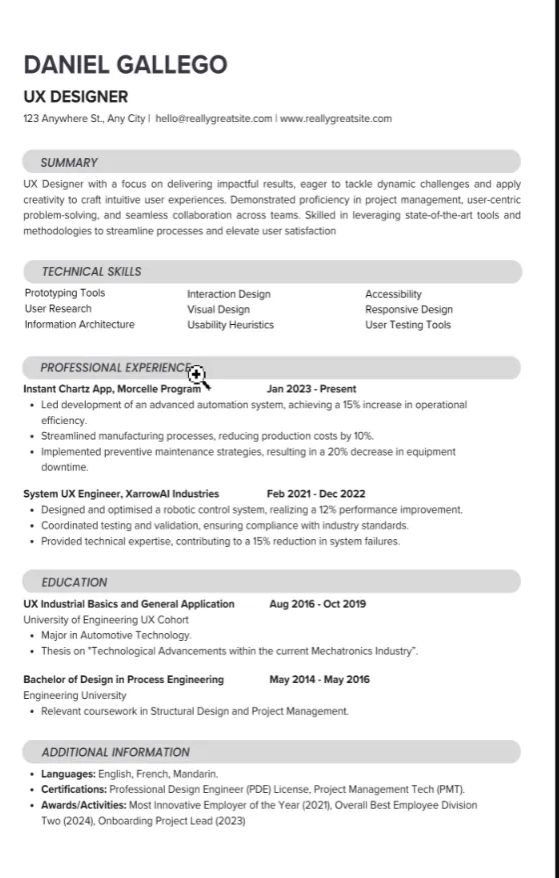
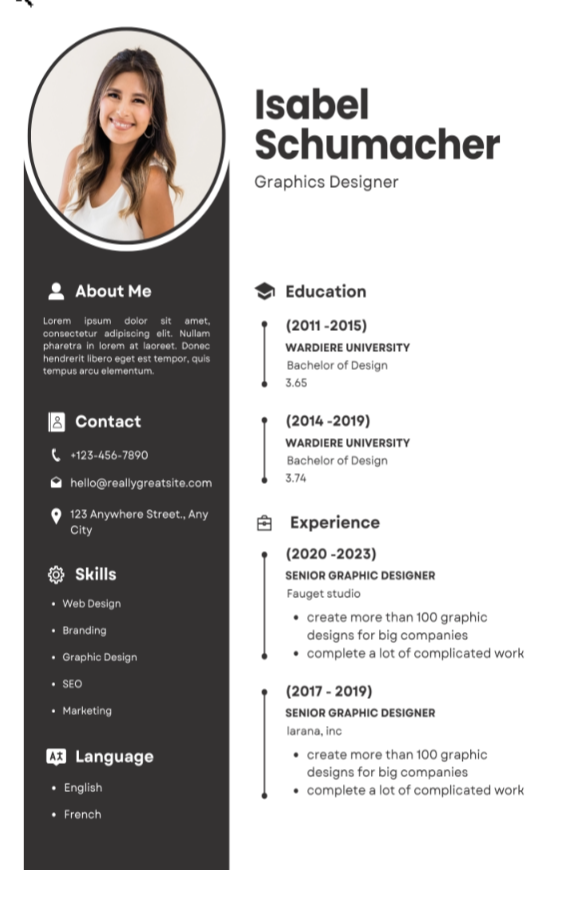
What is a Resume?
A resume is a brief document, typically one page long, that summarizes your work experience, education, skills, and achievements.
It is tailored to specific job applications, highlighting the most relevant information that aligns with the job description.
The primary purpose of a resume is to secure an interview by providing a clear, concise snapshot of your professional background.
Key Features of a Resume:
- Length: Usually one page, can extend to two pages for extensive experience.
- Focus: Tailored to a specific job; emphasizes relevant experience and skills.
- Format: Organized sections like summary, experience, education, and skills.
- Tone: Professional but can vary based on the industry (creative resumes may use different designs).
What is a CV?
A Curriculum Vitae (CV) is a more comprehensive document that provides an in-depth overview of your entire career. It includes detailed sections on your educational background, work history, publications, research, presentations, awards, and professional affiliations. CVs are commonly used in academia, research, and international job applications.
Key Features of a CV:
- Length: Typically two or more pages; there is no strict limit.
- Focus: Comprehensive; covers all aspects of your career.
- Format: Includes detailed sections such as academic achievements, teaching experience, research experience, publications, and professional memberships.
- Tone: Formal and detailed, reflecting a complete academic or professional journey.
Key Differences Between CV and Resume
| Feature | Resume | CV |
|---|---|---|
| Length | 1-2 pages | 2+ pages |
| Purpose | Job application | Comprehensive overview of career |
| Focus | Specific job-related information | Complete career history |
| Sections | Summary, work experience, education | Education, research, publications, etc. |
| Usage | Common in the U.S. for most jobs | Common in academia and international jobs |
When to Use a CV vs. a Resume
- Use a Resume When:
- Applying for positions in the private sector, such as business, technology, and non-profits.
- You have relevant experience that can be highlighted in a concise format.
- You want to tailor your application to specific job postings.
- Use a CV When:
- Applying for academic positions, research roles, or postgraduate programs.
- You have extensive educational and professional accomplishments to showcase.
- You are applying for jobs in countries where CVs are the norm (e.g., Europe, Asia).
Tips for Crafting an Effective Resume
- Tailor Your Content: Customize your resume for each job application, emphasizing relevant experiences and skills.
- Use Action Verbs: Start bullet points with action verbs to convey accomplishments effectively (e.g., "Developed," "Managed," "Led").
- Quantify Achievements: Whenever possible, use numbers to demonstrate your impact (e.g., "Increased sales by 30%").
- Keep It Concise: Stick to one page if possible; two pages are acceptable for those with extensive experience.
- Proofread: Ensure there are no spelling or grammatical errors. A clean, error-free resume creates a good impression.
Tips for Crafting an Effective CV
- Be Detailed: Include all relevant information, even if it extends beyond two pages.
- Organize Clearly: Use headings and subheadings to make it easy to navigate through different sections.
- Highlight Academic Achievements: Emphasize your education, publications, research, and professional memberships.
- Keep it Updated: Regularly update your CV with new experiences, publications, and achievements to ensure it reflects your current status.
- Use a Formal Tone: Maintain a professional and formal tone throughout your CV.
Common Misconceptions
- "CVs are always longer than resumes." While CVs typically cover more content, the length can vary based on the individual's career.
- "You only need one type of document." Depending on the job or field, you may need both a CV and a resume, tailored for different opportunities.
- "Resumes are only for the U.S." While resumes are more common in the U.S., they are used in various countries, especially in private sectors.
Statistics and Trends
- According to a survey by CareerBuilder, 58% of employers prefer resumes that are one page long.
- The U.S. Bureau of Labor Statistics indicates that over 50% of job seekers are using resumes, while 20% use CVs.
- A LinkedIn survey showed that 93% of recruiters use LinkedIn to evaluate candidates, making it essential to maintain an updated profile that aligns with your CV or resume.
Conclusion
Understanding the differences between a CV and a resume is essential for any job seeker. A resume offers a concise summary tailored for specific job applications, while a CV provides a comprehensive overview of your academic and professional history.
By knowing when to use each document and following the tips provided, you can enhance your chances of landing that coveted job interview. Whether you're crafting a resume or a CV, always aim for clarity, relevance, and professionalism.


