How to List Skills on a Resume: A Comprehensive Guide


Learn how to effectively list skills on your resume, including tips on tailoring, formatting, and beating Applicant Tracking Systems (ATS).
Your resume is often the first impression you make on a potential employer, and one of the most important sections is the skills section. Employers scan this part to quickly assess whether you have the abilities required for the job.
Knowing how to list your skills effectively can increase your chances of landing an interview and getting noticed by Applicant Tracking Systems (ATS).
In this post, we'll explore the best practices for listing your skills on a resume, providing you with actionable tips and insights to maximize your chances of success.
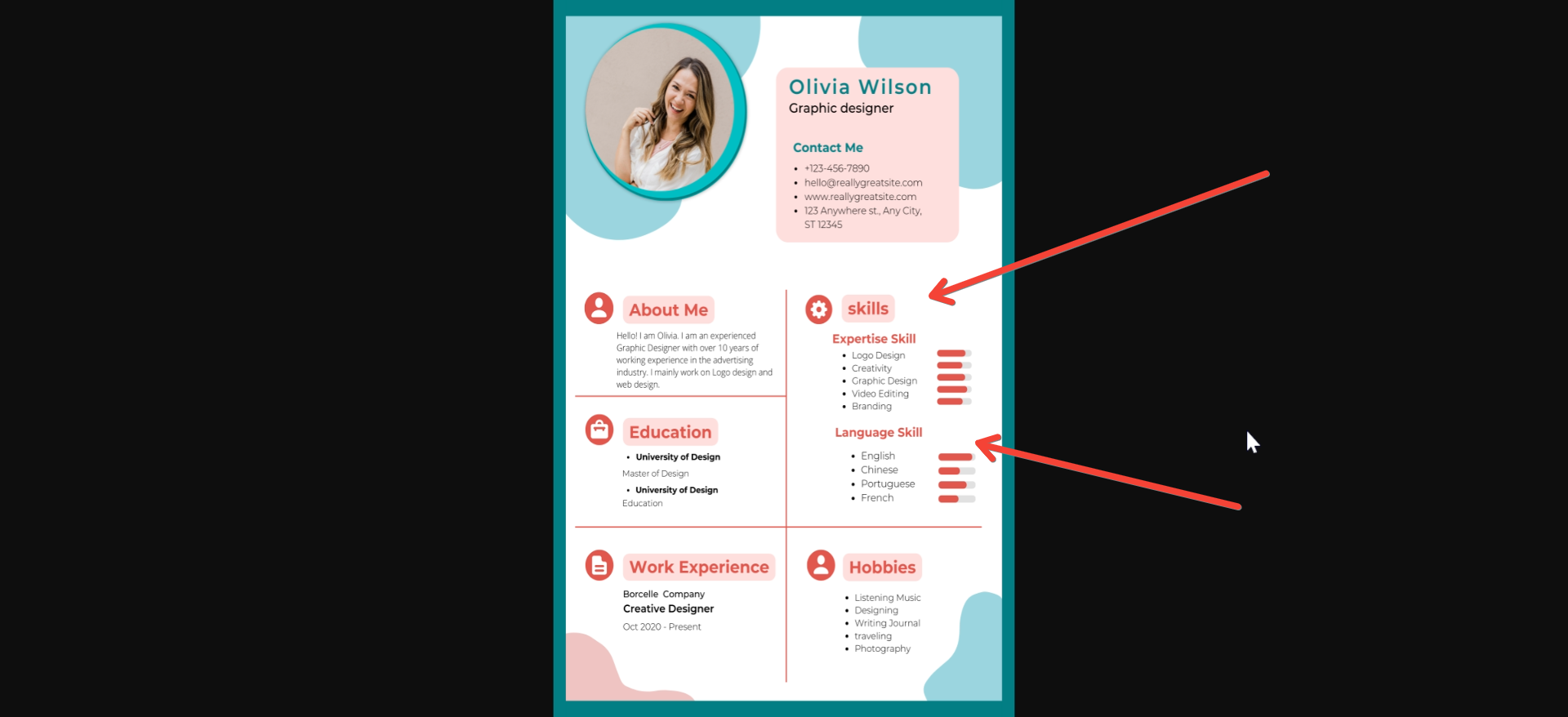
Understand the Types of Skills: Hard vs. Soft Skills
Before diving into how to list skills, it's essential to understand the two broad categories:
- Hard skills: These are specific, teachable abilities that can be measured and are often job-specific. For example, coding languages, data analysis, and operating machinery are all hard skills. They are typically acquired through training, education, or on-the-job experience.
- Soft skills: These are more personality-driven attributes that affect how you interact with others and handle work tasks. They include communication, problem-solving, time management, and teamwork. Soft skills are often transferable across jobs and industries.
Tip: While hard skills are more likely to attract the attention of ATS systems, employers also value soft skills, as they reflect your ability to adapt to a company's culture and work with others.
Tailor Your Skills to the Job Description
One of the most effective ways to list your skills is by customizing them to the job you're applying for. Study the job posting carefully, paying attention to the specific skills mentioned, and prioritize those on your resume.
- Example:
- If the job posting emphasizes proficiency in “Microsoft Excel” and “financial modeling,” make sure these are prominently listed in your skills section if you possess them.
Tip: Always be honest about your skills. Avoid listing skills you do not actually have, as they can backfire during an interview or once you're on the job.
Prioritize Your Top Skills
Your skills section should not be an exhaustive list of every skill you’ve ever acquired. Instead, focus on the most relevant skills for the job. Generally, listing 6–10 key skills works best. Keep in mind that recruiters only spend an average of 6-7 seconds reviewing resumes, so you want to make a quick impact by listing high-value skills right at the top.
Tip: Consider breaking your skills into categories such as “Technical Skills,” “Leadership Skills,” or “Language Proficiencies” to make them easy to scan. This adds structure to your resume and allows the employer to quickly identify your most relevant abilities.
Use Keywords to Beat ATS Systems
Many companies use Applicant Tracking Systems (ATS) to scan resumes for keywords before they even reach a human recruiter. If your resume lacks the right keywords, it may be filtered out, even if you’re highly qualified.
- Example:
- If a job description includes terms like “Python programming,” “data visualization,” and “machine learning,” be sure to include these exact phrases in your skills section if relevant. Avoid synonyms unless the job posting uses them.
Tip: Use tools like jobscan.co to identify the keywords in a job description and match them with your skills. Just be sure that your use of these keywords is genuine—don’t “keyword stuff” your resume with irrelevant skills.
Show, Don’t Just Tell: Skills in Action
While listing your skills in a dedicated section is essential, showcasing them in your work experience adds credibility. For example, instead of just listing “Project Management” in your skills section, mention how you “Led a team of 10 on a $1M project, completing it ahead of schedule” in your experience section.
Tip: Use numbers and metrics wherever possible to quantify your achievements. This not only validates your skills but also helps your resume stand out.
- Example:
- If you have “SEO” listed as a skill, reinforce it with experience like “Increased organic search traffic by 35% over six months through a targeted SEO strategy.”
Leverage the Skills Section Format
There are different ways to organize your skills section, and choosing the right format can make a big difference in how your resume is perceived.
- Bullet point lists: This is the most common format. Keep it concise and easy to scan.
- Example:
- Data Analysis
- SQL
- Digital Marketing
- Example:
- Categories or sections: If you have a mix of technical, creative, and soft skills, grouping them into sections can help organize the information more effectively.
- Example:
- Technical Skills: Python, JavaScript, SQL
- Creative Skills: Adobe Photoshop, InDesign
- Soft Skills: Leadership, Teamwork, Conflict Resolution
- Example:
- Skills Summary: Some professionals prefer to use a short paragraph to describe their skillset.
- Example: “Proficient in project management, client relations, and financial forecasting. Experienced with Agile methodologies, budgeting, and team leadership.”
Tip: Use a format that suits your background and makes your most impressive skills stand out immediately.
Balance Hard and Soft Skills
While hard skills are often prioritized by employers, soft skills are crucial for showing that you can thrive in a team environment. Ideally, your skills section should include a mix of both hard and soft skills.
- Example:
- Hard Skills: HTML/CSS, Google Analytics, Microsoft Excel
- Soft Skills: Problem-solving, Communication, Time Management
Fact: According to LinkedIn, 92% of talent professionals believe that soft skills are just as important, if not more so, than hard skills.
Tip: Use specific terms for your soft skills to avoid sounding generic. For example, instead of “Communication,” you could use “Public Speaking” or “Interpersonal Communication” if they are more relevant to the role.
Keep It Updated
As you progress in your career, your skill set will evolve. Make sure you regularly update your resume to reflect new certifications, technologies, or soft skills you’ve gained.
- Example:
Tip: When updating, consider the skills that are in-demand in your industry. Regularly checking job postings can give you insights into emerging skills you may want to learn and list.
Include Industry-Specific Skills
If you’re in a specialized field such as healthcare, engineering, or IT, listing industry-specific skills is crucial. Employers in these industries often look for particular certifications, tools, or techniques that are unique to the role.
- Example (for an IT role):
- Example (for a healthcare role):
Tip: Check job descriptions or speak to industry professionals to ensure you’re listing the most relevant and up-to-date skills.
Conclusion
The skills section on your resume is not just a list—it's a strategically crafted summary of your professional abilities that can make or break your chances of landing an interview. By understanding the types of skills, tailoring them to the job, using keywords, and integrating both hard and soft skills, you can present yourself as a strong candidate.
Whether you’re crafting your first resume or fine-tuning an existing one, remember that a well-thought-out skills section can set you apart in a competitive job market. Regularly updating your skills and aligning them with industry trends will ensure your resume stays relevant and impactful.


