How to Make a Good Resume for Freshers: A Step-by-Step Guide


Learn how to create a standout resume for freshers with step-by-step instructions, tips, and strategies to highlight your skills effectively.
Creating a resume as a fresher can be daunting. Without much work experience, you might wonder what to include, how to structure it, and how to stand out from the competition.
This blog post will guide you through the steps to create a resume for freshers that is clear, professional, and impactful, even without much professional experience.
We'll also include several practical tips to help you build a strong resume that grabs employers' attention.
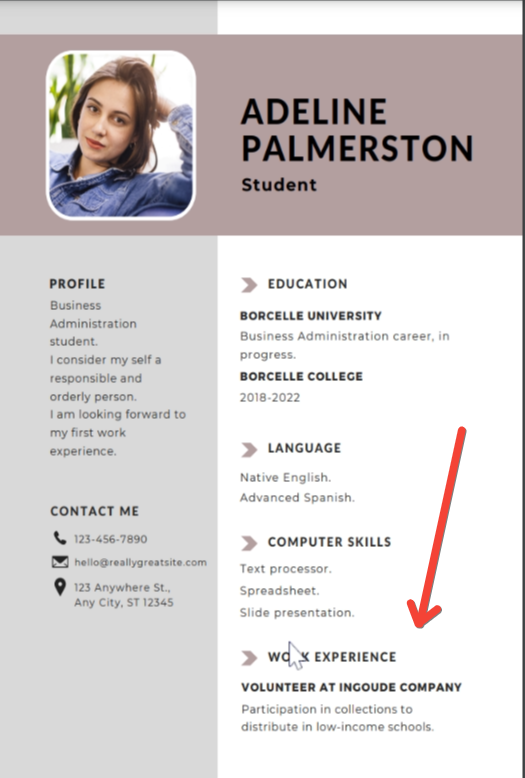
Step 1: Choose the Right Resume Format
The first step in creating a strong resume is selecting the right format. Since freshers typically lack extensive work experience, you should prioritize a format that highlights your skills, education, and potential.
Common resume formats:
- Chronological Resume: Focuses on work experience, listing jobs in reverse chronological order. This may not be ideal for freshers.
- Functional Resume: Emphasizes skills and education over work experience. This is the most suitable format for freshers.
- Combination Resume: A hybrid that includes both skills and work experience. This can be a good option if you have internships or part-time work experience.
Tip: For freshers, it's recommended to use the functional resume format because it allows you to focus on your skills, qualifications, and education. If you include your photo, ensure the background is neither creepy nor unprofessional. You can use an online tool for removing background.
Step 2: Use a Clean, Professional Layout
The design of your resume plays an essential role in making a good first impression. Choose a clean, professional layout that is easy to read and free from unnecessary graphics or excessive colors.
Best practices for layout:
- Font size and style: Use a standard font like Arial, Calibri, or Times New Roman in 10-12 pt for text and 14-16 pt for headings.
- Spacing: Ensure there's enough white space between sections for clarity.
- Length: Keep your resume concise—one page is ideal for freshers.
Tip: Avoid using fancy fonts or elaborate designs that can make your resume look unprofessional. Simple, clean designs are more likely to be well-received.
Step 3: Write a Strong Resume Objective or Summary
Since you're a fresher, including a strong objective or summary at the beginning of your resume is crucial. This brief statement should highlight your educational background, key skills, and career goals.
Example of a resume objective for freshers:"Motivated and results-driven Computer Science graduate with strong programming skills and a passion for developing innovative solutions. Seeking an entry-level position in software development to apply my skills in coding, problem-solving, and collaboration."
Tip: Make your resume objective specific to the job you're applying for, and include keywords from the job description to increase your chances of passing through applicant tracking systems (ATS).
Step 4: Highlight Your Education
For freshers, education is one of the most critical sections of the resume. List your highest qualifications, the institutions you attended, and the years of attendance.
Key information to include:
- Degree and major (e.g., B.A. in English Literature)
- University/college name
- Graduation date (or expected graduation date)
- GPA (if it's 3.5 or above)
Tip: If you have completed relevant courses or certifications, mention them in this section to show that you have specialized knowledge in your field.
Step 5: Emphasize Relevant Skills
Even without much work experience, you likely have skills that can be valuable to employers. Highlight both hard skills (technical skills) and soft skills (interpersonal skills).
Examples of hard skills:
- Programming languages (Python, Java)
- Microsoft Office proficiency
- Data analysis
- Social media management
Examples of soft skills:
- Communication
- Teamwork
- Problem-solving
- Leadership
Tip: Tailor your skills section to match the job description. If the employer is looking for someone proficient in Microsoft Excel, mention your proficiency in that tool explicitly.
Step 6: Include Internships, Projects, or Part-Time Work
Although freshers may not have full-time work experience, internships, part-time jobs, or even college projects can help demonstrate your skills and initiative.
What to include:
- Job title (e.g., Marketing Intern)
- Name of the company or organization
- Dates of employment or project duration
- Key responsibilities and accomplishments
Tip: Use action verbs such as "developed," "managed," or "assisted" to describe your roles in internships and projects. This makes your experience sound more dynamic.
Step 7: Add Extracurricular Activities and Volunteer Work
Employers appreciate well-rounded candidates who are active in their communities or participate in extracurricular activities. This section can help showcase your leadership and teamwork skills.
Examples of activities:
- Leadership roles in clubs or student organizations
- Volunteering at community events
- Participation in sports teams
Tip: Emphasize any leadership roles or responsibilities that demonstrate your ability to take initiative and manage tasks effectively.
Step 8: Tailor Your Resume to the Job Description
One of the most critical aspects of creating a resume for freshers is tailoring it to each job you apply for. Employers can easily tell if you've sent a generic resume. By customizing your resume for each position, you increase your chances of getting noticed.
How to tailor your resume:
- Use keywords from the job description.
- Highlight the skills and experiences that are most relevant to the position.
- Adjust your objective or summary to align with the company's goals.
Tip: Review the job description carefully, and ensure that your resume reflects the employer's specific needs and requirements. Many companies use applicant tracking systems (ATS), so using the right keywords can help your resume get through the initial screening.
Step 9: Proofread and Edit
Nothing can ruin a first impression faster than a resume filled with typos and grammatical errors. Always proofread your resume thoroughly before submitting it.
How to proofread:
- Use grammar-check tools like Grammarly or Hemingway.
- Read your resume out loud to catch awkward phrasing.
- Have a friend or mentor review it for you.
Tip: Even minor mistakes can make you appear careless, so take the time to review your resume carefully. Double-check details like your contact information and the formatting consistency.
Step 10: Save Your Resume as a PDF
Once your resume is complete and thoroughly proofread, save it as a PDF before sending it to employers. This ensures that the formatting remains consistent when viewed on different devices.
Tip: Name your file professionally, such as "FirstName_LastName_Resume.pdf." Avoid using informal names like "MyResume" or "FinalDraft."
Additional Tips for Writing a Good Resume for Freshers
- Use Action Verbs: Start bullet points with strong action verbs like "developed," "designed," "coordinated," and "led" to demonstrate impact.
- Quantify Your Achievements: Wherever possible, include numbers to demonstrate your accomplishments. For example, “Managed a team of 10 volunteers” is more impactful than “Led a team.”
- Use a Professional Email Address: Ensure your email address looks professional. Avoid using nicknames or numbers that might be considered unprofessional.
- Be Honest: Do not exaggerate or lie about your qualifications or experience. Employers can easily verify your information, and dishonesty can ruin your reputation.
- Keep it Updated: As you gain more experience or acquire new skills, update your resume regularly to reflect these changes.
- Include LinkedIn Profile: Adding a link to your LinkedIn profile can give employers a more detailed view of your professional background. Ensure your LinkedIn profile is complete and up to date.
Conclusion
Creating a strong resume for freshers is about emphasizing your education, skills, and potential rather than focusing solely on work experience.
By following these steps and incorporating the tips provided, you can craft a professional, well-structured resume that effectively highlights your strengths and catches the attention of potential employers.
Remember, your resume is often the first impression an employer will have of you, so make sure it's polished, concise, and tailored to the job you're applying for. Good luck!


