How to Make PowerPoint for Research Defense (2026 Guide)


How to make PowerPoint for research defense with a clear approach. Discover how to start a thesis defense presentation and present confidently.
How to Make PowerPoint for Research Defense: Complete Thesis Defense Presentation Guide
Creating a strong thesis defense presentation is one of the most important steps in effectively presenting your research. Knowing how to make PowerPoint for research defense is about communicating your research professionally.
In this guide, I’ll walk you through how to make PPT for research defense and structure your slides so you can deliver an impactful defense without wasting time on how to make PPT attractive.
Why Thesis Defense Presentation Matters?
The thesis defense presentation helps to deliver every researched point on your PPT topic while clearly demonstrating your subject expertise. Even strong research can lose impact if it’s not presented well. Overall, it helps:
- Present complex ideas in an understandable way
- Allows you to highlight the value of your research
- Demonstrates your confidence and preparation
- Helps the evaluators quickly grasp all your contributions
- Allows addressing questions and clarifying doubts effectively
- Reflects your professionalism and communication skills
A clear structure and confident explanation make it easier for evaluators to follow your work. I hope that this part is now clear; the next step is to understand how to begin your presentation.
How to Start a Thesis Defense Presentation?
Starting your thesis defense presentation the right way is important because it sets the tone for everything that follows. Here’s the overall flow of the presentation:
1. Strong Opening Slide:
- Research title
- Your name
- Institution
- Supervisor name
- Date
2. Confident Verbal Opening:
“Good morning/afternoon. Today, I will present my research on [topic], which focuses on [problem statement].”
3. Set the Context
Explain:
- Why your research matters
- What gap are you addressing
Ideal structure of a thesis defense presentation:
- Introduction
- Literature Review
- Methodology
- Results (Key Findings)
- Discussion
- Conclusion
- Future Scope
- Add Thank You Slide in PPT and Q&A Slide
How to Make PowerPoint for Research Defense?
To create an effective thesis defense presentation, the main goal is to keep your slides clear and easy to explain. Following a step-by-step approach helps ensure that all important parts of your research are covered:
#Step 1. Plan for your topic before creating a presentation
- Total slides (10–20 max)
- Key points per section (avoid long paras)
- Time limit
#Step 2. Choose a clean template
- Minimal design
- Professional fonts
#Step 3. Keep slides simple
- One idea per slide
- 5-6 bullet points max
#Step 4. Use visuals
- Charts for data
- Diagrams
- Icons
#Step 5. Highlight Key Points
- Use bold text
- Use contrast colors
- Avoid clutter
#Step 6. Add Speaker Notes
Always add notes so you don’t forget any crucial points.
A research defense PPT outline example:
- Title Slide
- Agenda
- Background
- Problem Statement
- Research Objectives
- Research Questions
- Literature Review
- Research Gap
- Methodology Overview
- Data Collection
- Tools/Techniques
- Results (Part 1)
- Results (Part 2)
- Analysis
- Discussion
- Key Findings
- Conclusion
- Limitations
- Future Work
- Thank You / Q&A
How to Make PPT for Research Defense Automatically (Using AI)
If you’re short on time or want to simplify the process, I’ve found that using AI tools can speed up how to create a thesis defense presentation. Instead of building slides manually, I can generate a complete draft in minutes.
For the same, I’ve personally explored MagicSlides AI Presentation Creator that helps automate slide creation directly from your content or visuals.
I tried this for free, and it helps me:
- Convert text to PPT
- No installation required
- Reduces the time spent thinking about the slide structure
- Save time on manual formatting and adding visuals
- Generates a complete deck with just a topic or prompt
- Supports multiple export options, i.e., PPTX, Google Slides, PDF, PNG, JPG, and more
How to Make PowerPoint for Research Defense Step-by-Step Process
Here’s the complete set of instructions to make a thesis defense presentation:
#Step 1. Start by signing up with your credentials (email and password) on the MagicSlides website. You can open this in any browser.

#Step 2. Now, click on the “Get Started-Free” button.

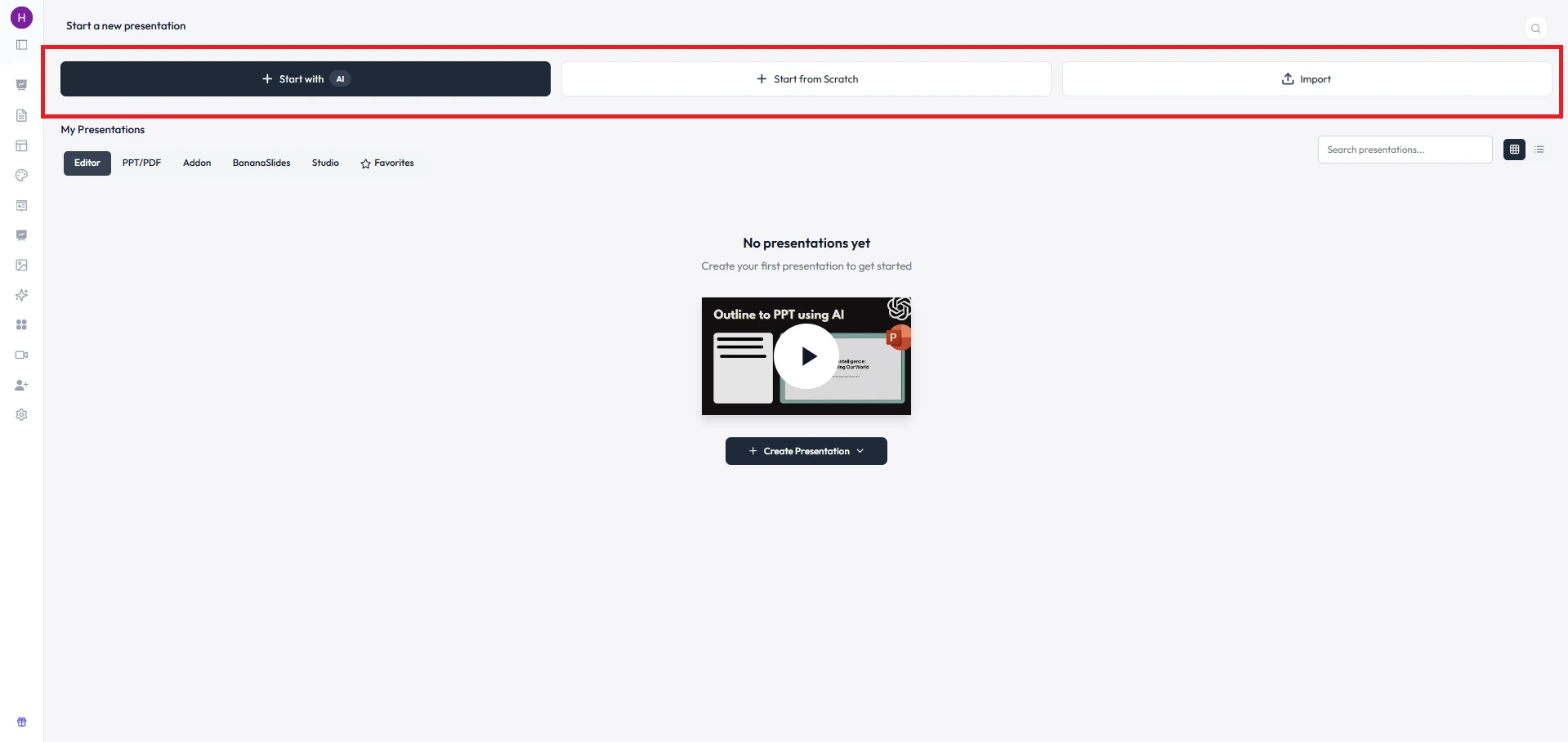
#Step 3. Afterwards, a new window will open, in which three options are available to generate a slide deck, i.e., Start with AI, Start from Scratch, and Import.
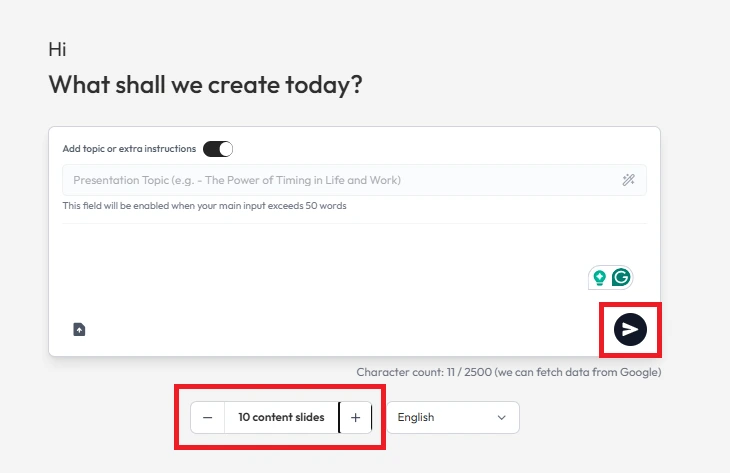
#Step 4. Once you select how you want to create a presentation, just hit the “>” button to initiate the procedure. Also, select the number of slides you want.
Once the slides are generated, take a few minutes to review and refine the content by just writing the text and what changes you find.
Design Tips to Follow
As we learned how to make PowerPoint for research defense with proper structure and the best AI-powered solution. Still, there is a presentation preparation checklist to keep in mind:
- Use font size ≥ 24
- Use only 2-3 colors max
- Avoid animations overload
- Maintain alignment and spacing
- Use high-quality visuals
- Write text in points (avoid paragraphs where possible)
- Practice at least 3-5 times before presenting
- Think about the questions that can be asked by your audience according to your topic
Always remember simple and clean slides, always grab the attention of the audience, instead of fancy and colourful ones.
Common Mistakes to Avoid
Most of the users make mistakes while creating a thesis defense presentation, and I don’t want you to make the same:
- Overloading slides with text
- Reading directly from slides
- Ignoring time limits
- Using inconsistent formatting
Bypassing these issues will help you to present either 5 minute presentation topics or persuasive presentation topics more confidently.
How to Answer Questions Confidently?
Many users panic when an audience member asks questions. So, the very first thing, don’t fear that, instead:
- Listen carefully
- Pause before answering
- If unsure, say:
“That’s a great question. Based on my understanding…”
Author’s Verdict
Learning how to make PowerPoint for research defense is not just about creating a slide deck and presenting normally; it is about making the slides:
- Clear
- Simple
- Not overloaded with animations or visuals
- Confident delivery
I hope that at this stage of our discussion, you have a proper understanding on how to start a thesis defense presentation. If you like this information, bookmark this guide so you never forget these guidelines on creating a perfect PPT.
People Also Ask
1. How long should a thesis defense presentation be?
15-20 minutes. However, it also depends on your institution.
2. How many slides are ideal?
Around 15-20 slides are ideal. Lengthy slides may bore the audience, so always keep them brief and knowledgeable.
3. What is the best way to explain results?
Use graphs and visuals instead of text. As per my experience, complex diagrams engaged the audience more and showed how knowledgeable you are.
4. How to make PowerPoint for research defense more engaging?
Use visuals, and share your story or real-life examples, not just text.


