Does Google Slides have a Designer Feature to Create Presentations?


Wondering does Google Slides have a designer feature? Discover Google Slides design tools, templates, themes, and the best AI alternative for presentations.
Yes, Google Slides does have design features, but it does not include a built-in Designer feature like Microsoft PowerPoint. Instead, Google Slides offers themes, templates, layouts, and AI-powered tools like Gemini to help you create professional-looking presentations.
If you’re wondering does Google Slides have a designer feature, the answer depends on what you mean by “Designer.” Unlike PowerPoint, Google Slides doesn’t have a one-click Design Ideas tool. Instead, it gives you access to customizable themes, templates, and other design tools to build visually appealing slides.
In this guide, you’ll learn whether does Google Slides have designer functionality, explore Google Slides smart design features, discover Google Slides design ideas, and see how it compares to PowerPoint Designer.
How to use Design Ideas in Google Slides using Templates?
Google Slides does not have a Design Ideas button, like some programs.. You can get a similar result with Google Slides. You can use templates that were made by professionals. These templates have layouts and colors and fonts already picked out. This makes it easy to make a presentation interactive that looks good. You do not have to start from nothing and make everything yourself. You can use Google Slides templates to make a presentation.
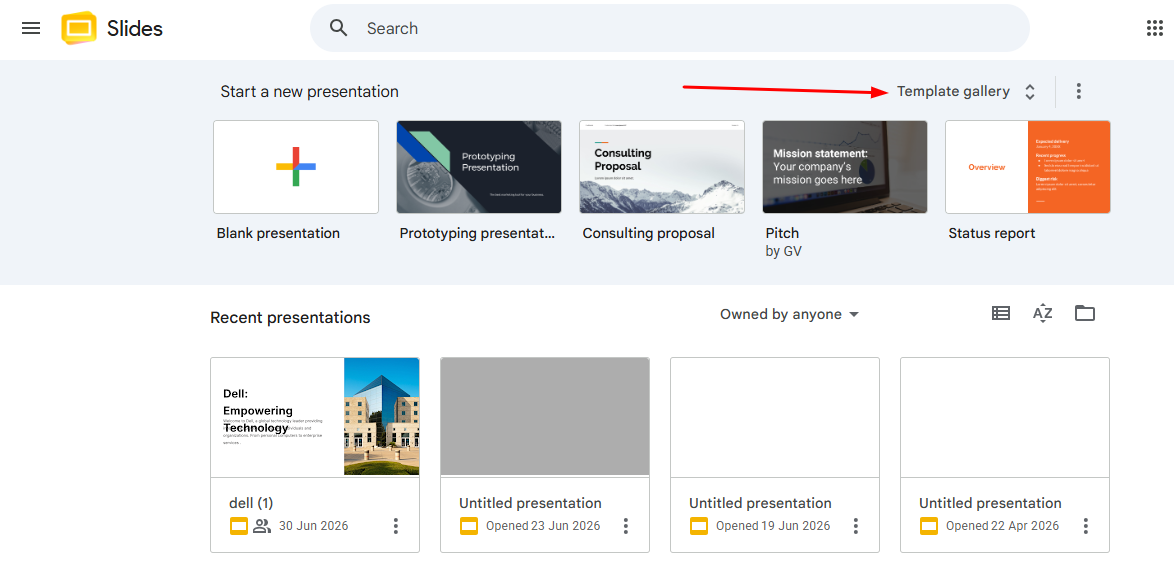
Step 1. Go to Google Slides and click Template Gallery at the top of the homepage. You’ll find templates for business, education, portfolios, project proposals, and more.
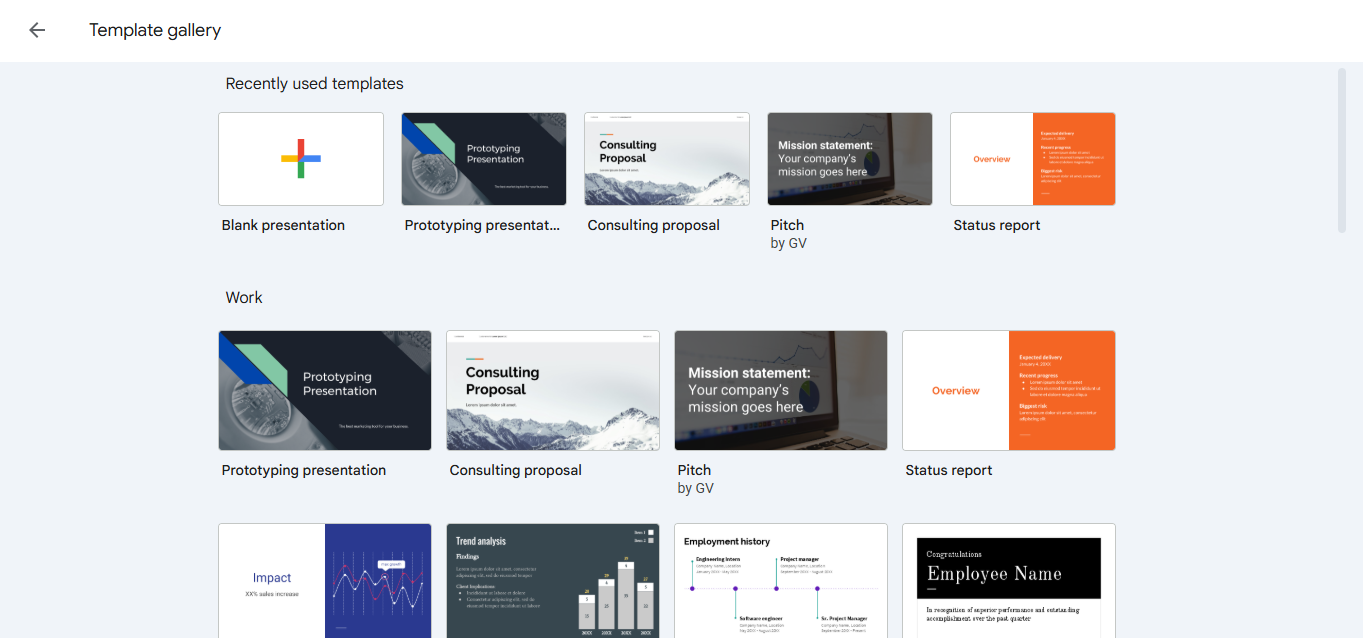
Step 2. Browse the available options and select one that matches your presentation topic. Each template includes coordinated slide layouts, helping you maintain a consistent and professional design.
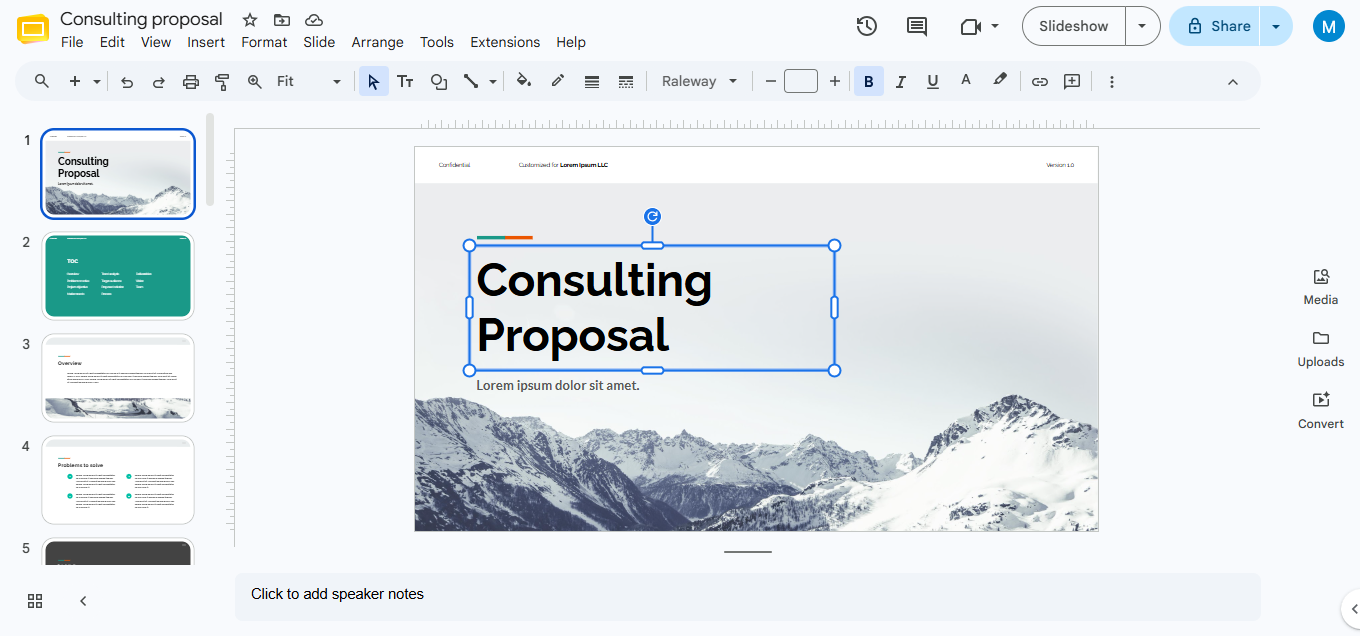
Step 3. Replace the sample text and images with your own content. You can also adjust fonts, colors, and backgrounds to match your brand or personal style while keeping the overall design intact.
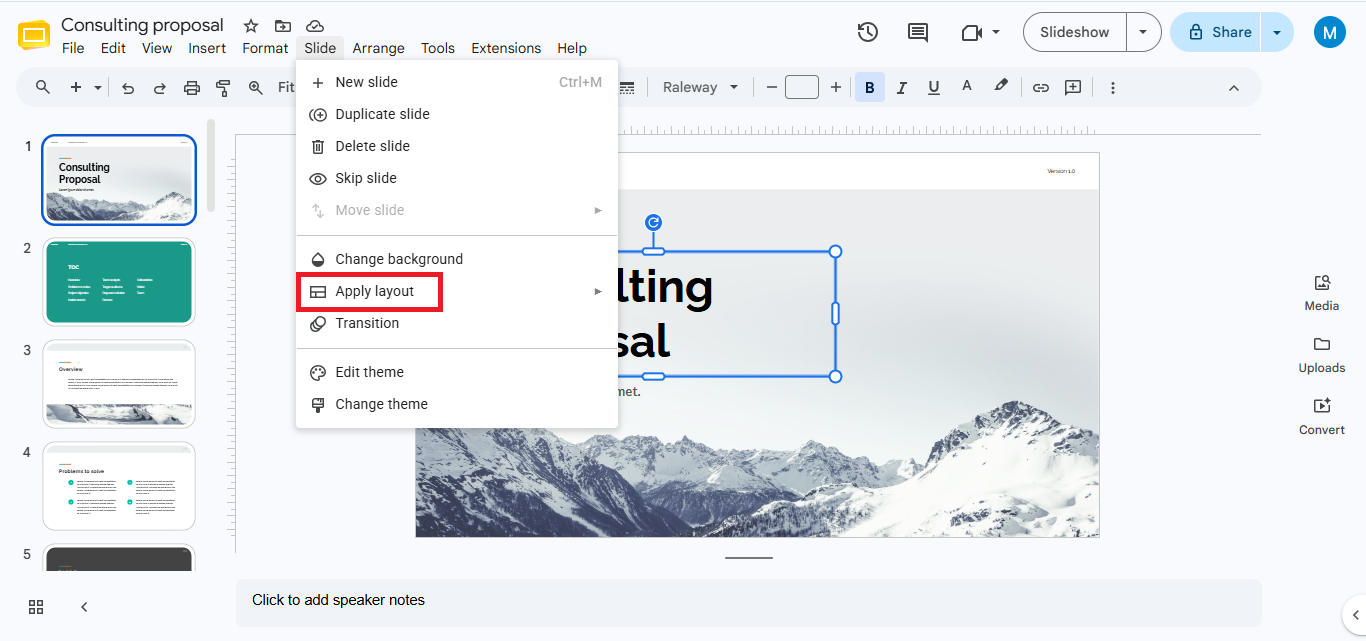
Step 4. Click Slide → Apply Layout to insert additional pre-designed slide layouts that match your chosen template. This helps keep every slide visually consistent.
If you want a true Google Slides designer experience, you can install MagicSlides Google Slides add-on from the Google Workspace Marketplace. Unlike Google Slides’ built-in templates, MagicSlides generates complete presentations from a topic, PDF, document, YouTube video, URL, or text prompt directly inside Google Slides. It automatically creates slide content, selects layouts, and adds visuals, helping you build professional presentations in minutes.
For users searching does Google Slides have design ideas, an AI add-on is one of the closest alternatives. While Google Slides itself doesn’t include a Design Ideas button like PowerPoint, add-ons such as MagicSlides can provide AI-assisted slide creation without leaving Google Slides.
How to use Design Ideas in Google Slides using Themes?
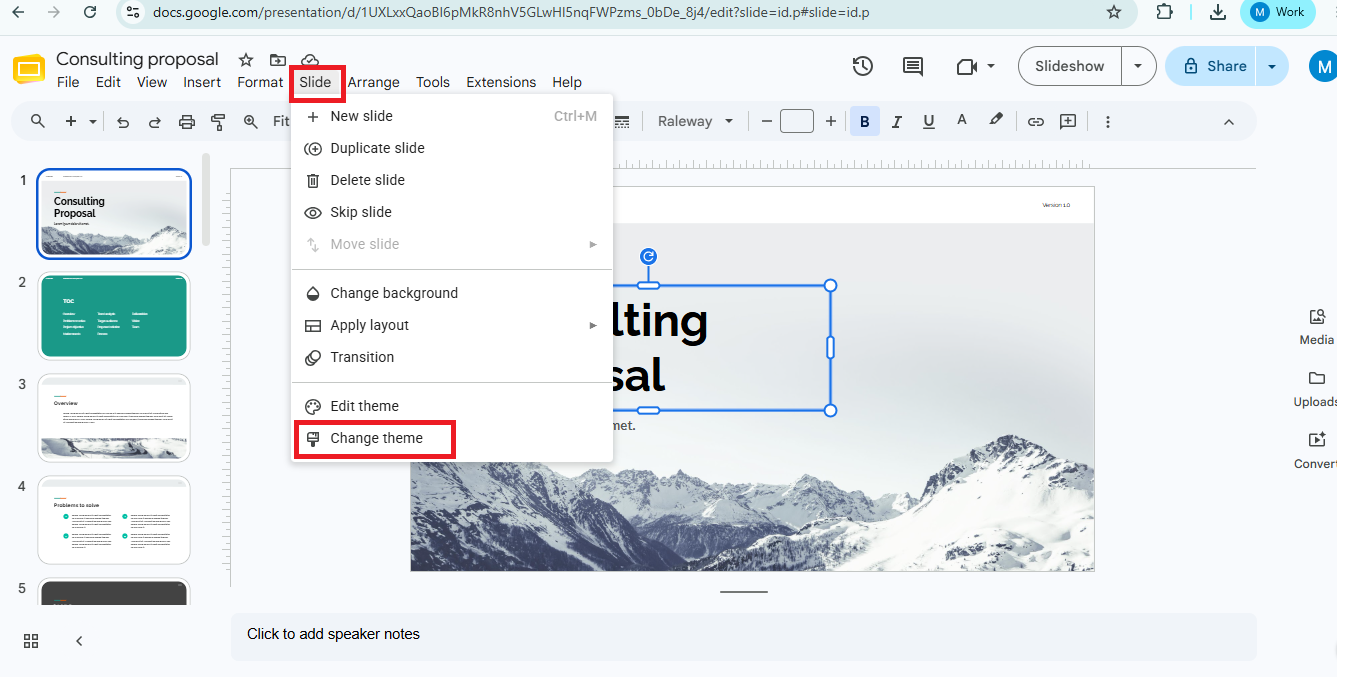
Step 1. When you are trying to figure out how to start a presentation you can also use a theme. This is an idea because a simple design can be more interesting than a presentation that has a lot of colors and pictures. To get some ideas, for themes you can go to Slide and then click on Change Theme.
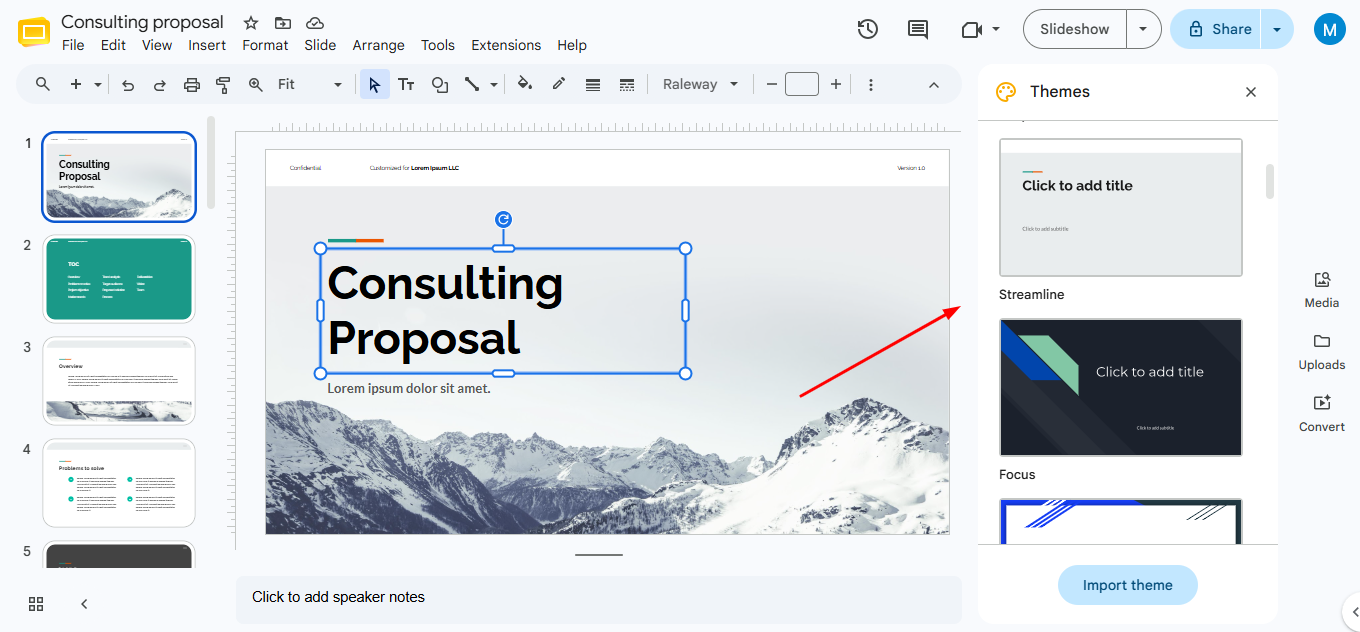
Step 2. To get started look at the sidebar and pick a theme that you like. Then you can see what it looks like. The theme designs that Google Slides shows you are the ones that are already set up.
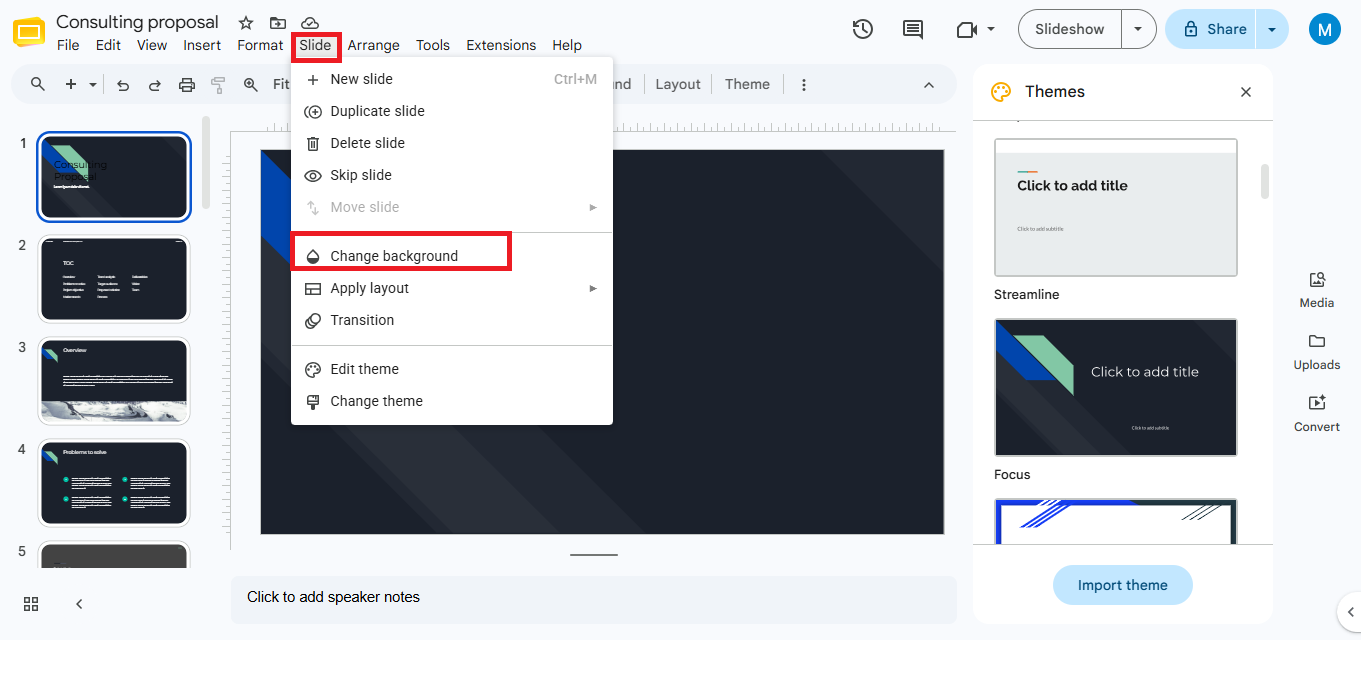
Step 3. When you pick a theme you can change the theme by going to Slide and then selecting Change Background.
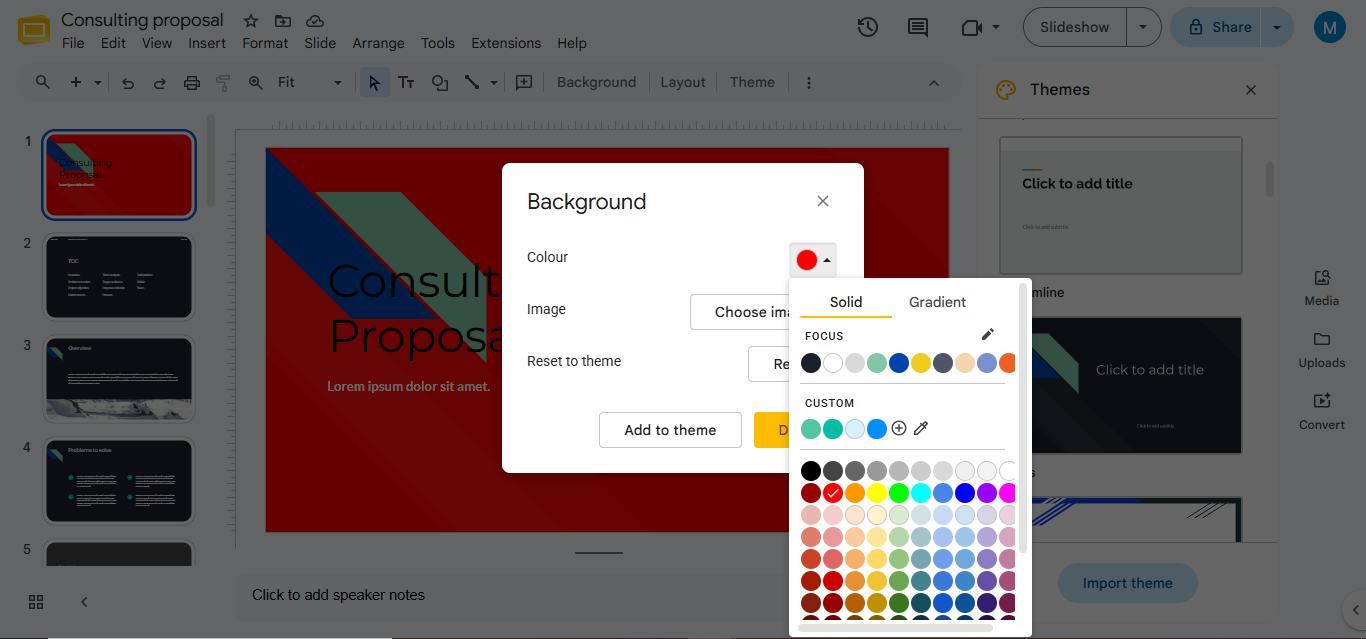
 Step 4. This will enable you to change the presentation background with a color or image.
What Design Features Does Google Slides Offer Instead?
Although Google Slides does not have a design feature it has many built-in tools. These tools make it easy to create presentations. They do not change your slides automatically like some tools but they help you create good presentations with little work.
Google Slides gives you the freedom to make your presentation look polished. You can use these features to make your presentation look nice without effort. Google Slides has tools that help you create a presentation.
Themes- Google Slides offers a variety of built-in themes that instantly apply matching fonts, colors, and layouts to your presentation. Using a theme keeps every slide consistent and professional.
Slide Layouts- You can choose from multiple slide layouts for titles, images, comparisons, and content sections. These layouts help organize information without designing each slide manually.
Theme Builder- The Theme Builder lets you customize your presentation’s master slides. You can set default fonts, colors, placeholders, and branding elements to maintain a consistent design across every slide.
Images, Icons, and Shapes- Google Slides includes built-in shapes, diagrams, tables, WordArt, and basic image editing tools. These features make it easy to create engaging presentations without using separate design software.
Conclusion
So does Google Slides have a designer feature? The answer is no. Google Slides does not have a built in designer feature like Microsoft PowerPoint.. Google Slides has some really good design tools that can help you make your presentations look good. These tools include things like themes and templates and slide layouts and the Theme Builder.
If you want something that can design your presentation for you you can use something called MagicSlides. This is an add on for Google Slides that uses intelligence to make complete presentations. You can give it a topic or a document or a video or a website. It will make a presentation for you right inside Google Slides. This is pretty close to what Microsoft PowerPoint can do with its designer feature.
Either way you can make presentations that look good and are interesting to look at. You do not need to be a designer to use Google Slides or an add on like MagicSlides. Google Slides and these add ons can help you make presentations even if you do not know a lot, about design.
FAQs
1. Does Google Slides have a designer feature?
No, Google Slides does not have a design tool.. It does offer many themes, templates and tools to help you make your presentations look good.
2. Does Google Slides have Design Ideas?
No, Google Slides does not have a button that gives you design ideas.. You can use pre-made templates or add-ons like MagicSlides to get ideas.
3. What is the Google Slides equivalent of PowerPoint Designer?
Google Slides does not have a tool like PowerPoint Designer.. You can use Google Slides templates and add-ons, like MagicSlides to make professional-looking slides.
4. How do I make Google Slides look professional?
- Use one theme throughout your slides.
- Put a few words on each slide.
- Choose fonts that’re easy to read.
- Add quality pictures.
- Keep things lined up properly.
- Leave some space.
You can also use tools that help you design faster.


