How to Turn Customer Interview Notes into Slides with AI


Turn customer interview notes into clear, professional slides with AI. Learn how to summarize insights fast using MagicSlides in simple steps.
Customer interviews are packed with valuable insights — pain points, motivations, preferences, and honest feedback that can shape your product, marketing, or business decisions. But turning pages of raw notes into a clear, visual story can feel overwhelming.
That’s where AI tools come in.
In this blog, we’ll walk you through how to convert customer interview notes into polished, presentation-ready slides using AI tools like MagicSlides. Whether you're preparing for a stakeholder meeting, team sync, or investor pitch, this guide will help you save hours of manual work while retaining key messages.
Why Turn Interview Notes into Slides?
Interview notes are often messy and unstructured. Turning them into slides helps:
- Highlight key insights in a visual and scannable format.
- Tell a clear story across stakeholders without overwhelming them.
- Identify patterns in customer behavior or feedback.
- Create a knowledge base for future team members or projects.
But doing this manually can be tedious — summarizing content, structuring slides, and designing them takes time. That’s where AI can do the heavy lifting.
How AI Can Help
AI-powered tools can analyze, summarize, and structure your raw text into slide-ready content. Instead of spending hours:
- Copy-pasting from docs
- Creating bullet points
- Designing layouts
You can simply input your notes and let AI generate a clean, concise presentation within seconds.
One such powerful tool is MagicSlides — an AI-powered presentation generator that turns text (like interview notes, research findings, or reports) into professional-looking slides instantly.
Step-by-Step: Turning Customer Interview Notes into Slides with MagicSlides
Here’s how you can use MagicSlides to generate slides from your interview notes:
Step 1: Organize Your Interview Notes
Before uploading, try to organize your notes in a basic format. You don’t need to polish them, but grouping responses into themes can help. For example:
Q: What problem were you trying to solve?
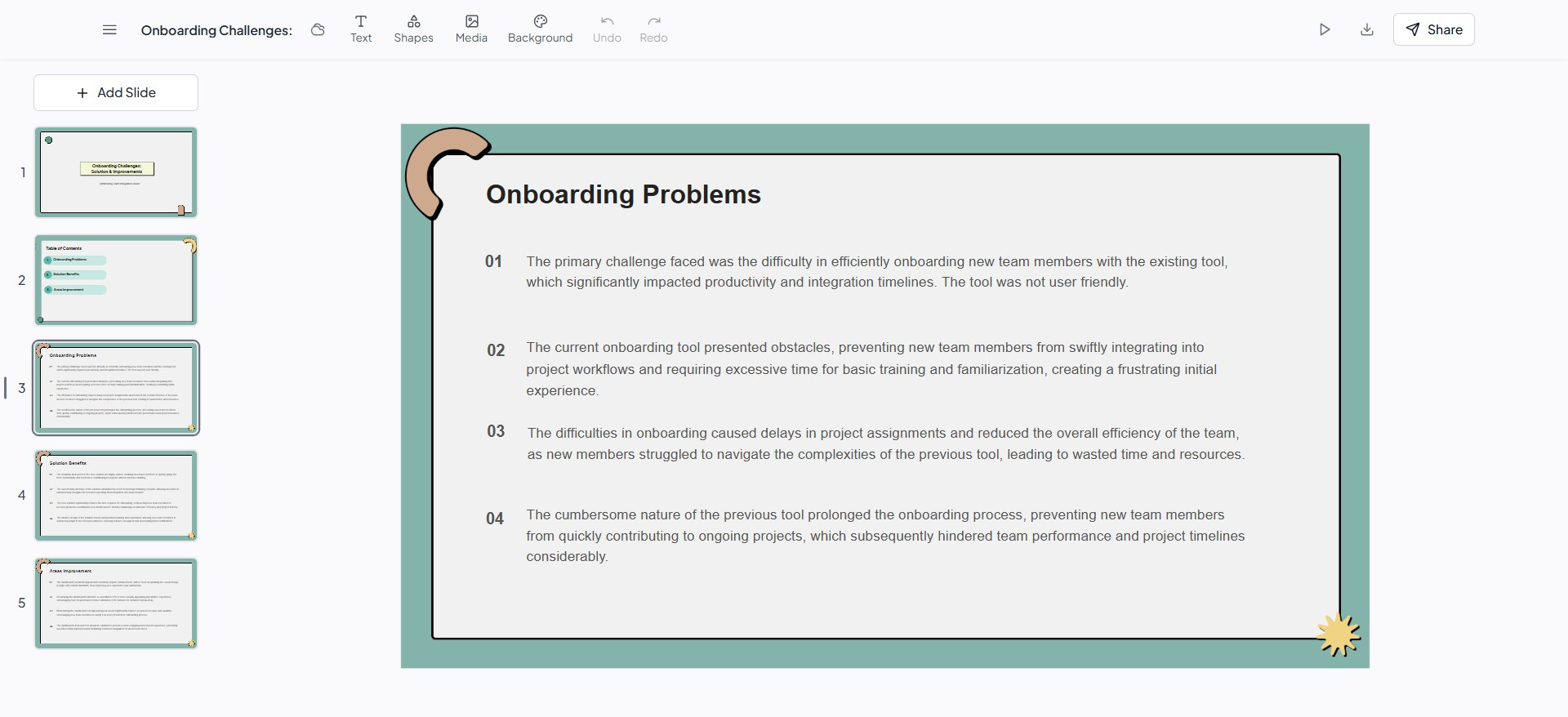
A: We couldn’t easily onboard new team members using our current tool.
Q: What do you like most about our solution?
A: It’s simple and fast. We don’t need training.
Q: What could be improved?
A: The dashboard feels outdated.
You can also group insights like:
- Pain Points
- Favorite Features
- Suggestions
- User Quotes
The clearer your structure, the better your slides will turn out.
Step 2: Go to MagicSlides
Visit www.magicslides.app — it works directly from your browser. No need to install anything.
You’ll be greeted with a clean interface where you can start creating your presentation.
Step 3: Paste Your Interview Notes
Paste your customer interview notes into the text box.
You can either paste raw text or structured bullet points — MagicSlides understands both.
Step 4: Choose Your Slide Style and Theme
You’ll be asked to:
- Choose a tone (Formal, Informal, Persuasive, etc.)
- Select a slide design/theme
- Choose how detailed you want each slide to be
For customer feedback presentations, a professional and clean theme works best.
Step 5: Click ‘Generate Slides’
With one click, MagicSlides will analyze your text, identify key themes and messages, and generate a full deck of slides for you — complete with:
- Titles and headings
- Key bullet points
- Quotes from customers
- Visually structured sections
You can now edit or download the presentation in Google Slides or PowerPoint format.
Bonus Tip: Use AI Summaries for Long Interviews
If your interview notes are long, consider using a free summarizing tool like ChatGPT or Notion AI to shorten the notes first. Then, paste the summaries into MagicSlides for sharper slide outputs.
Real-World Use Cases
Here’s how teams are already using MagicSlides to transform customer interviews:
✅ Product Managers turn interview notes into slides for roadmap prioritization
✅ Marketing Teams extract testimonials and pain points for campaign planning
✅ UX Researchers summarize user insights for sprint reviews
✅ Founders turn customer stories into investor decks
Why Choose MagicSlides?
There are many AI tools out there, but MagicSlides stands out for:
- 🧠 Context-aware slide generation
- 🎨 Beautiful and customizable themes
- 🕒 Huge time savings (generate slides in under 30 seconds)
- 🌐 Seamless export to Google Slides or PPT
It’s built for professionals who value both speed and quality.
Final Thoughts
Customer interviews are goldmines of insight — but only if you can communicate those insights effectively. With tools like MagicSlides, turning messy notes into compelling slides is no longer a chore.
So the next time you wrap up a round of interviews, don’t sit on those notes. Paste them into MagicSlides, hit generate, and present your insights like a pro.
Try it now 👉 MagicSlides.app


