AI로 슬라이드 복제 - 이미지를 편집 가능한 프레젠테이션으로 변환
인터넷에서 가져온 프레젠테이션 이미지를 2분 이내에 완전히 편집 가능한 .pptx 파일로 복제하세요. 영감을 주는 디자인을 나의 브랜드와 콘텐츠에 맞게 응용하는 데 최적입니다.
Upload a slide image to clone
Drag and drop or click to browse • PNG, JPEG, JPG • Max 50MB
Try with Example Slides
Click any example below to see how the clone feature works
슬라이드 복제 기능 실제 보기
슬라이드 이미지를 완전히 편집 가능한 프레젠테이션으로 변환하는 것이 얼마나 쉬운지 확인하세요
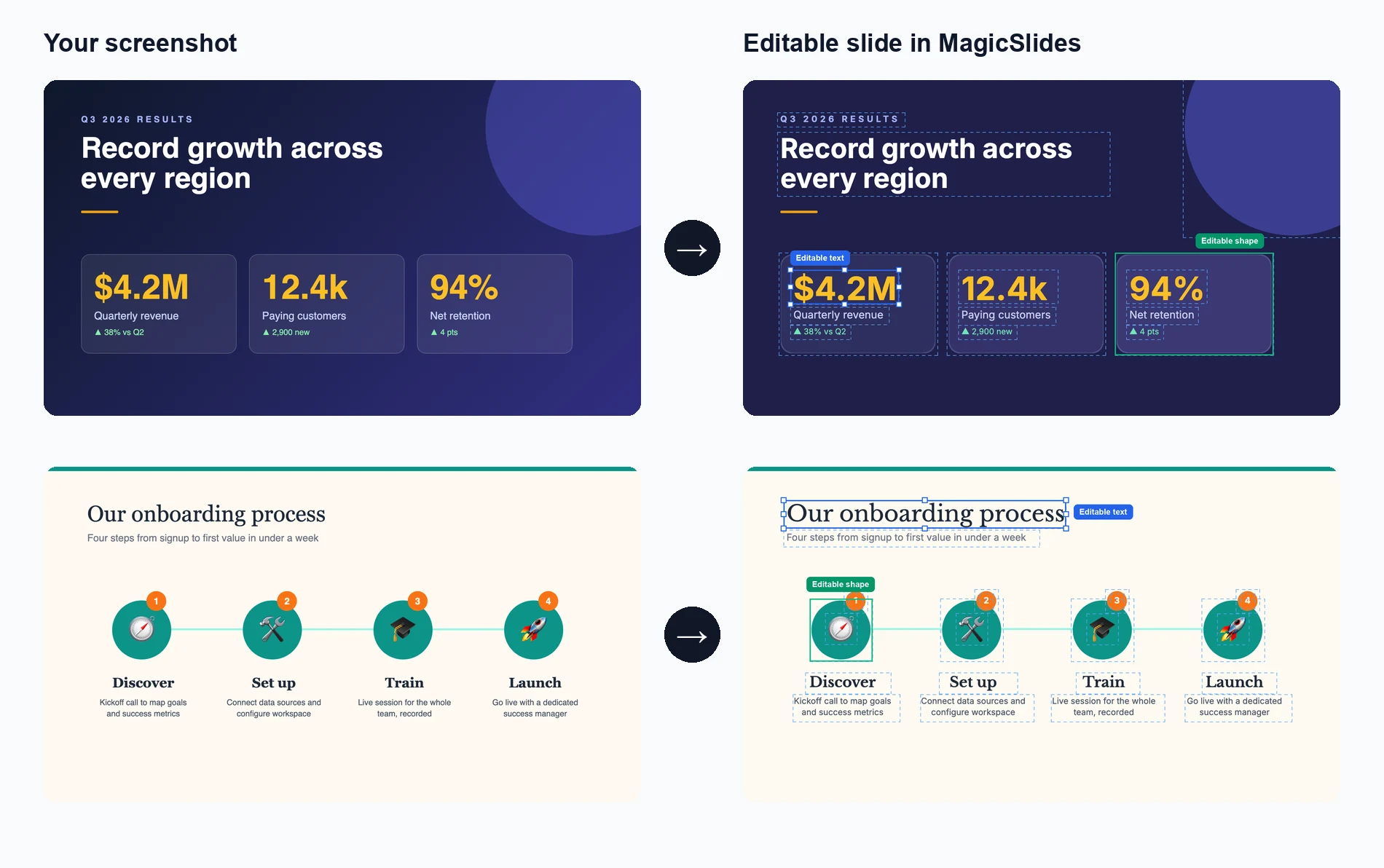
이미지 업로드
복제하려는 프레젠테이션 슬라이드 이미지를 드래그 앤 드롭하거나 선택하세요
AI 분석 및 재현
AI가 텍스트, 레이아웃, 디자인 요소를 추출하여 슬라이드를 재현합니다
편집 및 맞춤 설정
모든 요소를 수정할 수 있는 완전히 편집 가능한 프레젠테이션을 받으세요
See How Maya Clones Your Slides
Upload any slide image and Maya AI will analyze the design, extract every element, and rebuild it as a fully editable presentation

Magic Slides
Senior designer
Clone this conference slide into an editable deck
Analyzing your slide — I can see a dark gradient background with a bold title, 3-column layout with icons, and a bottom tagline. Let me recreate this as an editable deck.
Building your slides now...

How AI Slide Cloning Works
Our AI breaks down any slide image into its individual components and rebuilds each one as an editable PowerPoint element.
AI-Powered Image Analysis
Upload any slide screenshot and our AI detects every element — text blocks, shapes, icons, colors, and layout structure. It understands the visual hierarchy so the cloned version matches the original design intent.
- Works with PNG, JPG, and any image format
- Detects text, shapes, colors, and icons
- Understands layout hierarchy and spacing
Pixel-Perfect Reconstruction
Once analyzed, our AI rebuilds the slide as a fully editable PowerPoint file. Every text box, shape, and color is recreated as a native PPT element you can click, edit, and customize.
- Native PowerPoint elements, not flat images
- Edit text, change colors, resize anything
- Compatible with PowerPoint and Google Slides

Clone from Any Source
Found a great slide on a competitor's website, a conference recording, or a design inspiration board? Screenshot it and our AI turns it into your own editable starting point.
- Conference and webinar screenshots
- Design inspiration from Pinterest or Dribbble
- Competitor decks and industry reports
Who Uses Clone Slides?
Professionals across industries use AI slide cloning to save hours of manual recreation work
Sales Teams
Clone competitor pitch decks to study their messaging, then customize with your own value props and branding for client calls.
Students & Researchers
Recreate lecture slides or conference presentation formats into editable templates for your own academic work.
Designers & Agencies
Rapidly prototype from visual inspiration — clone a layout from Dribbble or Behance and adapt it for client projects.
Marketers
Adapt high-performing social media carousel designs and industry report layouts into your own branded presentations.
Consultants
Replicate framework slides from McKinsey, BCG, or Bain-style decks and fill in your own analysis and recommendations.
Teachers & Trainers
Convert textbook diagrams, infographics, and visual aids into editable slides for classroom presentations and training materials.
AI Clone vs Manual Recreation vs Hiring a Designer
See why AI slide cloning is the fastest and most cost-effective way to turn visual inspiration into editable presentations
| Feature | MagicSlides Clone | Manual Recreation | Hiring a Designer |
|---|---|---|---|
| Time to recreate a slide | ~2 minutes | 30-60 minutes | 1-3 days |
| Cost per slide | Free / cents | Your time | $20-100+ |
| Fully editable output | Yes, every element | Yes, if built right | Depends on contract |
| Design accuracy | AI-matched layout | Approximate | High quality |
| Design skills needed | None | Required | None |
| Batch cloning (10+ slides) | Yes, minutes | No, hours | No, days |
| Output format | .pptx / Google Slides | .pptx | Varies |
| Revisions | Instant — edit yourself | Edit yourself | Extra rounds, extra cost |
Everything Gets Cloned — Down to the Details
Our AI doesn't just capture the big picture. It reconstructs every design element so your cloned slide is truly editable, not a locked image.
Text & Typography
Headings, body text, captions, and font sizes are extracted and placed as editable text boxes with matched styling.
Colors & Gradients
Background colors, gradients, accent colors, and color schemes are detected and applied exactly as they appear in the original.
Shapes & Layout
Boxes, columns, grids, dividers, and spacing are reconstructed as native PowerPoint shapes you can move and resize freely.
Icons & Images
Visual elements like icons, logos, and decorative graphics are identified and placed in matching positions within the slide.
AI로 슬라이드를 복제하는 이유?
몇 분 만에 모든 프레젠테이션 영감을 나만의 맞춤형 걸작으로 변환하세요.
번개처럼 빠른 복제
인터넷에서 가져온 모든 이미지를 2분 이내에 완전히 편집 가능한 PowerPoint 프레젠테이션으로 변환하세요.
AI 기반 분석
첨단 AI가 디자인, 레이아웃, 콘텐츠 구조를 분석하여 정확하고 편집 가능한 복사본을 만듭니다.
완전히 편집 가능한 결과물
복제된 프레젠테이션의 모든 요소 - 텍스트, 이미지, 색상, 레이아웃 - 을 완전히 편집할 수 있습니다.
디자인 품질 유지
PowerPoint에서 전체 편집 기능을 활용하면서 원본의 시각적 매력을 유지하세요.
다양한 소스 형식
스크린샷, 웹 이미지, PDF 또는 모든 시각적 형식에서 편집 가능한 .pptx 파일로 복제하세요.
브랜드 맞춤 설정
복제된 프레젠테이션을 브랜드 색상, 글꼴, 스타일 가이드라인에 맞게 쉽게 조정하세요.
Loved by Teams Worldwide
Rated 4.1/5 on Trustpilot · 4.5/5 on G2
The slides actually look like something a skilled designer would have made — minimalist, balanced, and visually engaging. It doesn’t replace creativity, it amplifies it.

Chirag P.
Trustpilot
Very helpful in creating presentations, inserting images and data with proper alignment. Very easy to implement on your data. The customer support is really good.

Gagan M.
MIS Analyst · G2
They turned my ideas into a polished, professional presentation that exceeded my expectations. The design was sleek, engaging, and perfectly aligned with my brand.

Abdulrhman A.
Trustpilot
The presentations created are very nice, creative, and feel quite special — not like a standard or generic presentation. The customer support took time to explain everything.

Laki A.
Trustpilot
Easy to implement, not much confusion. Just paste the text and presentation will get ready within minutes. Contains different fonts, themes, and layouts which make presentations look really good.

Akash H.
System Engineer · G2
A game changer for me. I can just choose a prompt or give any URL or YouTube video and it makes a PPT on it with my favorite template or LLM model of my choice.
Priyansh S.
Trustpilot
자주 묻는 질문
AI 슬라이드 복제는 어떻게 작동하나요?
AI가 업로드된 이미지를 분석하여 텍스트, 레이아웃, 색상, 디자인 요소를 식별합니다. 그런 다음 원본 디자인을 유지하면서 모든 것을 완전히 맞춤화할 수 있도록 각 요소를 PowerPoint 파일의 편집 가능한 구성 요소로 재현합니다.
어떤 이미지 형식을 업로드할 수 있나요?
PNG, JPG, JPEG 및 기타 일반적인 이미지 형식을 업로드할 수 있습니다. 모든 기기나 플랫폼의 스크린샷은 복제에 매우 잘 작동합니다.
복제 프로세스는 얼마나 정확한가요?
AI는 레이아웃, 텍스트 내용, 디자인 요소를 복제하는 데 높은 정확도를 달성합니다. 정확한 글꼴 매칭은 다를 수 있지만, 전체적인 구조와 시각적 외관은 충실하게 재현됩니다.
여러 슬라이드를 한 번에 복제할 수 있나요?
네, 여러 이미지를 업로드하면 AI가 각 이미지를 별도의 편집 가능한 슬라이드로 만들어 다중 슬라이드 프레젠테이션을 생성합니다.
결과물은 PowerPoint에서 완전히 편집 가능한가요?
물론입니다! 복제된 프레젠테이션의 모든 요소 - 텍스트, 도형, 이미지, 레이아웃 - 는 Microsoft PowerPoint 또는 Google 슬라이드에서 완전히 편집 가능합니다.
저작권이 있는 디자인에 이것을 사용할 수 있나요?
이 도구는 개인 사용 및 영감을 위해 설계되었습니다. 복제하는 모든 디자인을 사용하거나 응용할 권리가 있는지 확인하고, 항상 지적 재산권을 존중하세요.
복제 프로세스는 얼마나 걸리나요?
대부분의 슬라이드는 1-2분 내에 복제됩니다. 많은 요소가 있는 복잡한 디자인은 약간 더 오래 걸릴 수 있지만 일반적으로 매우 빠릅니다.
스크린샷을 찍는 것과 어떻게 다른가요?
평면 이미지인 스크린샷과 달리, 이 도구는 텍스트를 수정하고, 색상을 변경하고, 요소 크기를 조정하고, 모든 것을 필요에 맞게 맞춤화할 수 있는 완전히 편집 가능한 프레젠테이션을 만듭니다.
복제할 수 있는 슬라이드 수에 제한이 있나요?
사용 제한에 대한 자세한 내용은 가격 페이지를 확인하세요.
다른 무료 PPT 도구
AI로 주제에서 PPT
키워드만으로 빠르고 매력적인 프레젠테이션을 생성합니다. 학생과 교육자가 빠르고 콘텐츠가 풍부한 슬라이드를 필요로 할 때 이상적입니다.
AI로 YouTube에서 PPT
유튜브 동영상을 정보가 풍부한 슬라이드 프레젠테이션으로 변환합니다. 마케터와 창작자가 동영상 콘텐츠의 범위를 확장하려고 할 때 적합합니다.
AI 피치덱 생성기
피치덱을 정보가 풍부한 슬라이드 프레젠테이션으로 변환합니다. 비즈니스와 스타트업이 자신의 사업을 발표하려고 할 때 유용합니다.
AI로 텍스트에서 PPT
키워드만으로 빠르고 매력적인 프레젠테이션을 생성합니다. 학생과 교육자가 빠르고 콘텐츠가 풍부한 슬라이드를 필요로 할 때 이상적입니다.
AI로 URL에서 PPT
웹 페이지를 포괄적인 프레젠테이션으로 손쉽게 변환합니다. 웹 기반 데이터를 발표하는 전문가와 연구자에게 적합합니다.
AI로 PDF에서 PPT
PDF 파일을 파워포인트 슬라이드로 손쉽게 변환합니다. 자세한 보고서를 다루는 분석가와 컨설턴트에게 필수적입니다.

Ready to create your presentation?
Join thousands of professionals who save hours every week with AI-powered presentations.
1,511 reviews · Trustpilot & Workspace


