Kid-Friendly Topics for Presentations: 100+ Fun and Engaging Ideas


Discover over 100 engaging and kid-friendly presentation topics, from animals and science to history and hobbies, perfect for young learners.
Creating presentations can be a daunting task, especially for kids. The key to keeping their interest is selecting a topic that’s not only educational but also engaging. Whether it’s for a school project, a community event, or just for fun, having the right topic can make all the difference.
Below, you’ll find over 100 kid-friendly topics, categorized into various subjects. We’ll also explore how to choose the right topic based on the child’s age, interests, and the purpose of the presentation.
Tips for Choosing Kid-Friendly Presentation Topics
1. Consider the Child’s Age
- Young Children (Ages 5-7): Keep topics simple and relatable, such as animals, colors, or family.
- Elementary School Children (Ages 8-10): Topics can be more detailed but still fun, like space exploration or favorite books.
- Pre-teens (Ages 11-13): These kids can handle more complex topics such as historical events, environmental issues, or science experiments.
2. Match the Topic to the Child’s Interests
- Choose a topic that the child is already curious about. This makes research more enjoyable and the presentation more authentic.
3. Educational Value
- Ensure the topic has some educational benefit. It should teach something new, whether it’s about history, science, culture, or even personal values.
4. Visual Appeal
- Opt for topics that allow for the use of visuals like pictures, diagrams, or videos. Kids respond well to colorful and dynamic presentations.
5. Interactivity
- If possible, choose topics that include interactive elements. For example, a science experiment demonstration or a question-and-answer session can be very engaging.
100+ Presentation Topics for Kids (Fun & Easy PowerPoint Ideas)
Animals and Nature
| Topic | Create Presentation | Best For |
| The Life Cycle of a Butterfly | Create → | Nature Enthusiasts |
| Endangered Animals and How to Protect Them | Create → | Environmentalists |
| Amazing Facts About Dinosaurs | Create → | Paleontologists |
| The Deep Sea: Exploring Ocean Creatures | Create → | Marine Biologists |
| The Role of Bees in the Environment | Create → | Environmental Advocates |
| Different Dog Breeds and Their Characteristics | Create → | Dog Lovers |
| Why Do Cats Purr? | Create → | Pet Owners |
| The Amazon Rainforest: A World of Wonders | Create → | Environmentalists |
| Interesting Bird Species Around the World | Create → | Birdwatchers |
| How Trees Help Our Planet | Create → | Environmental Educators |
Science and Technology
| Topic | Create Presentation | Best For |
| How Volcanoes Erupt | Create → | Science Enthusiasts |
| The Solar System: Our Place in Space | Create → | Astronomy Students |
| Simple Science Experiments You Can Do at Home | Create → | Young Scientists |
| What Are Black Holes? | Create → | Space Explorers |
| How Robots Work: The Basics of Robotics | Create → | Tech Enthusiasts |
| Fun Facts About the Human Body | Create → | Science Students |
| Renewable Energy Sources: The Future of Power | Create → | Sustainability Advocates |
| The Magic of Magnets | Create → | Science Explorers |
| The Science Behind Weather: Understanding Clouds and Rain | Create → | Meteorologists |
| How Does the Internet Work? | Create → | Tech Beginners |
History and Culture
| Topic | Create Presentation | Best For |
| Ancient Egypt: Life of the Pharaohs | Create → | History Buffs |
| The Story of the First Thanksgiving | Create → | History Students |
| Famous Inventors and Their Inventions | Create → | Innovators & Historians |
| The History of the Olympics | Create → | Sports History Enthusiasts |
| Life in the Middle Ages: Knights, Castles, and More | Create → | Medieval History Lovers |
| How Did People Live in the Stone Age? | Create → | Archaeologists |
| Famous Women in History | Create → | Equality Advocates |
| How the Pyramids Were Built | Create → | Ancient History Enthusiasts |
| The History of Toys: From Ancient Times to Modern Day | Create → | History Enthusiasts |
| The Importance of Martin Luther King Jr. | Create → | Social Justice Advocates |
Art and Literature
| Topic | Create Presentation | Best For |
| The Life of Pablo Picasso | Create → | Art Lovers |
| How to Draw Your Favorite Cartoon Characters | Create → | Artists & Kids |
| The History of Comic Books | Create → | Comic Fans |
| A Brief Introduction to Shakespeare for Kids | Create → | Literature Teachers |
| Famous Fairy Tales and Their Origins | Create → | Storytellers |
| How to Write a Short Story | Create → | Aspiring Writers |
| Understanding and Appreciating Poetry | Create → | Poetry Lovers |
| The World of Harry Potter: Why Kids Love It | Create → | Harry Potter Fans |
| Different Styles of Dance Around the World | Create → | Dance Lovers |
| Creating Your Own Comic Strip | Create → | Cartoonists |
Personal Growth and Values
| Topic | Create Presentation | Best For |
|---|---|---|
| The Importance of Kindness | Create → | Personal Development |
| How to Make New Friends | Create → | Kids & Young Adults |
| Setting Goals and Achieving Them | Create → | Goal-Setters |
| The Value of Teamwork | Create → | Team Leaders |
| Why It’s Okay to Make Mistakes | Create → | Motivational Speakers |
| The Importance of Reading Every Day | Create → | Book Lovers |
| Why Recycling Is Important | Create → | Environmental Advocates |
| How to Deal with Bullying | Create → | Counselors & Educators |
| The Benefits of Having a Hobby | Create → | Hobbies Enthusiasts |
| Understanding and Managing Emotions | Create → | Mental Health Advocates |
Health and Wellness
| Topic | Create Presentation | Best For |
|---|---|---|
| The Importance of a Balanced Diet | Create → | Nutritionists |
| Fun Ways to Exercise and Stay Active | Create → | Fitness Enthusiasts |
| How to Brush Your Teeth Properly | Create → | Health Educators |
| The Basics of First Aid for Kids | Create → | Parents & Teachers |
| Why Sleep Is Important for Growing Children | Create → | Parents & Teachers |
| How to Wash Your Hands Correctly | Create → | Health Advocates |
| Healthy Snacks You Can Make at Home | Create → | Kids & Parents |
| How to Stay Safe Online | Create → | Tech Safety Enthusiasts |
| The Importance of Drinking Water | Create → | Health Educators |
| Yoga and Meditation for Kids | Create → | Wellness Professionals |
Environmental Awareness
| Topic | Create Presentation | Best For |
|---|---|---|
| How to Make a Bird Feeder from Recycled Materials | Create → | Eco-friendly Advocates |
| The Effects of Plastic Pollution on Marine Life | Create → | Environmentalists |
| What Is Climate Change and How Can We Help? | Create → | Activists & Educators |
| The Life of a Tree: From Seed to Forest | Create → | Nature Enthusiasts |
| How to Start a Garden in Your Backyard | Create → | Gardeners |
| The Importance of Saving Water | Create → | Environmental Advocates |
| What Happens to Our Trash? | Create → | Waste Management Experts |
| How Can We Reduce Our Carbon Footprint? | Create → | Environmentalists |
| Exploring National Parks and Why They’re Important | Create → | Nature Lovers |
| Fun Ways to Reuse and Recycle Everyday Items | Create → | Sustainability Enthusiasts |
Fun and Hobbies
| Topic | Create Presentation | Best For |
|---|---|---|
| How to Make Your Own Slime | Create → | Kids & DIY Enthusiasts |
| The Basics of Origami: Fun Paper Folding Techniques | Create → | Craft Lovers |
| How to Create a Simple Science Experiment | Create → | Young Scientists |
| Learning to Play a Musical Instrument | Create → | Music Lovers |
| The Art of Baking: Simple Recipes for Kids | Create → | Aspiring Bakers |
| Building a LEGO City: Ideas and Tips | Create → | LEGO Enthusiasts |
| How to Start a Stamp Collection | Create → | Collectors |
| The Best Outdoor Games to Play with Friends | Create → | Gamers |
| How to Care for a Pet | Create → | Pet Owners |
| Fun Facts About Video Games | Create → | Gamers |
Technology and the Digital World
| Topic | Create Presentation | Best For |
|---|---|---|
| How to Create Your Own YouTube Channel | Create → | Content Creators |
| Introduction to Coding for Kids | Create → | Young Learners |
| The History of Video Games: From Pong to Fortnite | Create → | Gamers & Historians |
| How to Make a Simple Website | Create → | Aspiring Web Developers |
| Understanding Augmented Reality (AR) and Virtual Reality (VR) | Create → | Tech Enthusiasts |
| How Drones Work and What They’re Used For | Create → | Drone Enthusiasts |
| Digital Art: Creating Art with a Tablet | Create → | Artists |
| What Is Artificial Intelligence? | Create → | AI Enthusiasts |
| The Evolution of Mobile Phones | Create → | Tech Lovers |
| How to Use Google Earth to Explore the World | Create → | Travelers |
Social Studies and Global Awareness
| Topic | Create Presentation | Best For |
|---|---|---|
| What Is the United Nations? | Create → | Global Citizens |
| Countries Around the World: Fun Facts and Cultures | Create → | Geography Lovers |
| How Does Government Work? | Create → | Political Science Students |
| The Importance of Voting | Create → | Young Voters |
| The Role of a President/Prime Minister | Create → | Politics Enthusiasts |
| What Is a Community and How Can You Help Yours? | Create → | Activists |
| The World’s Most Famous Landmarks | Create → | Travelers |
| Celebrating Different Holidays Around the World | Create → | Cultural Enthusiasts |
| How the Economy Works: A Kid’s Guide | Create → | Young Learners |
| Famous Explorers and Their Discoveries | Create → | History Buffs |
Sports and Recreation
| Topic | Create Presentation | Best For |
|---|---|---|
| The History of Basketball | Create → | Basketball Fans |
| Famous Soccer Players Around the World | Create → | Football Fans |
| How to Play Chess: Rules and Strategies | Create → | Chess Enthusiasts |
| The Importance of Sportsmanship | Create → | Coaches & Athletes |
| What It Takes to Be an Olympian | Create → | Aspiring Athletes |
| The Basics of Skateboarding | Create → | Skateboarders |
| How to Build a Treehouse | Create → | DIY Enthusiasts |
| Fun Water Sports You Can Try | Create → | Water Sports Lovers |
| The Benefits of Playing Team Sports | Create → | Team Players |
| The Story of the World Cup | Create → | Soccer Fans |
How to Create an Engaging Presentation?
1. Start with a Strong Opening
Begin with an interesting fact, a question, or a story related to the topic to grab the audience’s attention.
2. Use Visuals and Props
Include images, videos, and props to make the presentation visually appealing. Kids love to see and touch!
3. Keep the Language Simple
Use age-appropriate language. Avoid jargon and complex words that might confuse younger children.
4. Make it Interactive
Encourage the audience to ask questions or participate in a small activity related to the topic.
5. Practice Makes Perfect
Rehearse the presentation multiple times to build confidence and smooth out any rough patches.
6. Use Storytelling Techniques
Frame the information in the form of a story. This makes the presentation more engaging and easier to remember.
7. Include a Fun Fact Section
Add a segment with fun or surprising facts to keep the audience engaged and curious.
8. Conclude with a Summary and a Thank You
End the presentation by summarizing the key points and thanking the audience for their attention.
Create Kids’ Presentations Faster with MagicSlides
Once you choose a topic, the next step is turning your ideas into a well-structured presentation. Instead of designing slides manually, tools like MagicSlides AI Presentation Maker can help you generate complete presentations in seconds.

MagicSlides uses AI to automatically create slides, making it easier for students, parents, and teachers to build presentations quickly.
Tools Offered By MagicSlides
- Topic to Presentation – Enter a topic like “The Solar System” or “Amazing Facts About Dinosaurs” and instantly generate a full presentation.
- Text to Presentation – Paste notes, research, or written content and convert it into structured presentation slides.
- YouTube Video to PPT – Turn educational YouTube videos into presentation slides by extracting the key points.
- PDF to PPT Converter – Upload study material or documents and convert them into presentation slides.
- URL to Presentation – Paste a webpage link and automatically generate slides from the content.
How to Create a Presentation Using MagicSlides?
Creating a presentation with MagicSlides takes only a few simple steps:
Step 1. Enter your topic or text
Type your topic (for example, “Amazing Facts About Dinosaurs”) or paste your content into the input box.
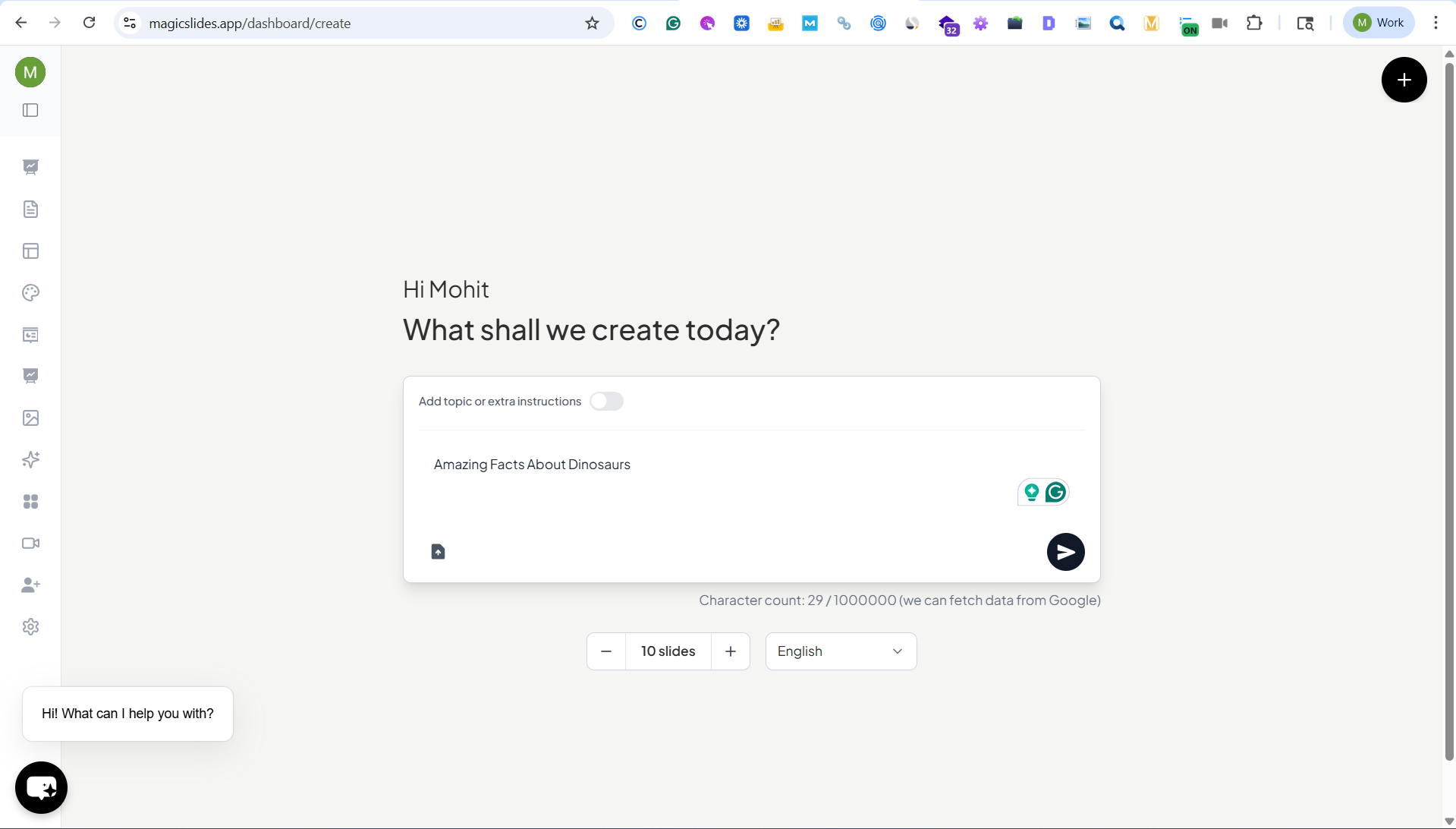
Step 2. Select the slide number and language
Choose how many slides you want in the presentation and select your preferred language. Select a Template for your Presentation.
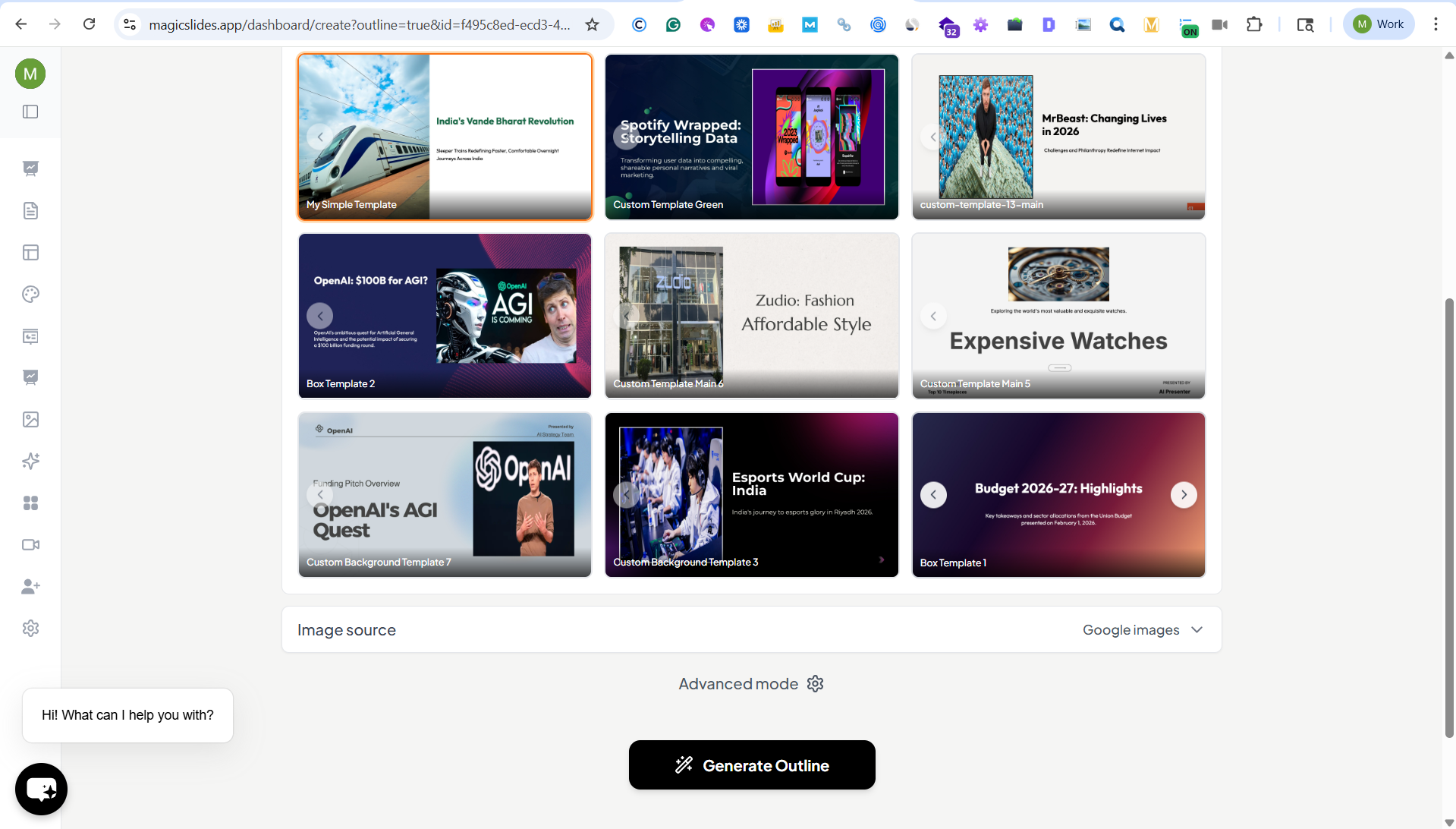
Step 3. Generate the outline
MagicSlides automatically creates a structured outline based on your topic or content.
Step 4. Click “Generate Presentation”
The AI converts the outline into a complete presentation with ready-to-use slides.
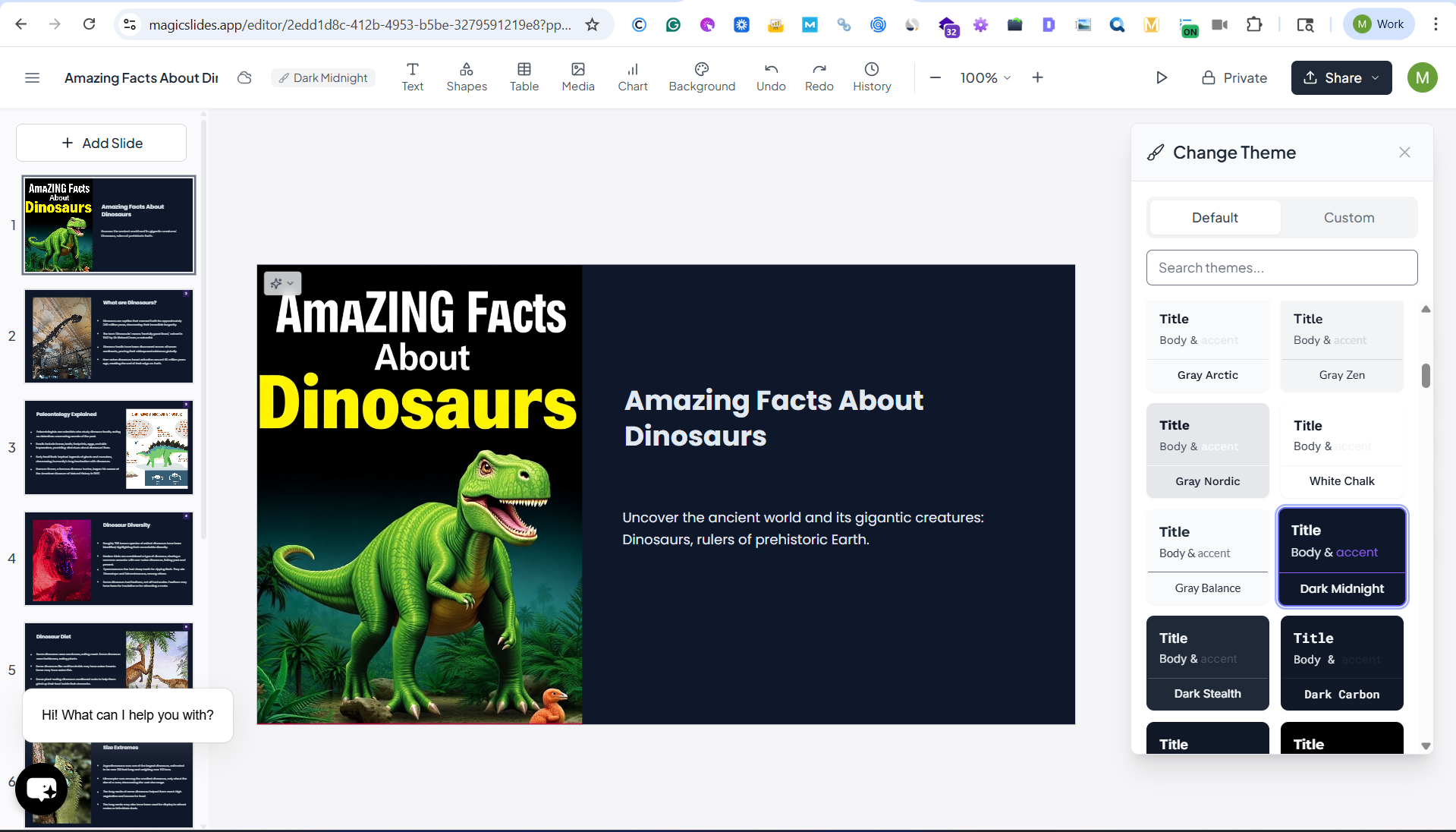
Using MagicSlides, kids and students can quickly turn their ideas into engaging presentations without spending hours designing slides.
Final Thoughts
Choosing the right topic for a kid’s presentation can make the experience enjoyable and educational.
Whether it’s exploring the wonders of nature, diving into the depths of space, or understanding how their favorite gadgets work, the right topic can ignite a child’s passion for learning.
Remember to keep it fun, interactive, and age-appropriate. With the right preparation and topic, kids can not only learn but also have a great time presenting!
Let us know in the comments which topic you or your child found most interesting, or if you have any more ideas to add to the list! Happy presenting!


