How To Overcome Nerves When Speaking In Public


Learn practical strategies to conquer public speaking anxiety and boost confidence with effective tips for overcoming nerves in public speaking situations.
Public speaking is an art that intimidates many, yet it is a crucial skill in various fields and personal growth. Whether you're presenting in front of a small group at work, delivering a speech at a wedding, or facing an audience at a large conference, the butterflies in your stomach seem inevitable. However, fear not! With the right preparation and mindset, you can transform this anxiety into excitement and deliver your speech with confidence.
Here’s a comprehensive guide on how to overcome nerves when speaking in public, crafted to be engaging and accessible.
Why Are You Nervous?
The first step to conquering public speaking anxiety is to understand it. Nervousness is a natural human response to a perceived threat; in this case, the threat of making a mistake or being judged. Recognize that almost everyone feels nervous about public speaking at one point or another, even seasoned speakers. Acknowledging your fear rather than fighting it can be the first step towards managing it.
How to Overcome Nerves When Speaking in Public
Public speaking can be a daunting task for many. The mere thought of standing in front of a crowd can send shivers down the spine of even the most seasoned professionals. However, with the right techniques and preparation, anyone can deliver a powerful presentation and keep their nerves in check. Here are some practical tips to help you master the art of public speaking and feel more confident, especially when presenting with a PowerPoint (PPT).
1. Know Your Material
The foundation of a confident presentation is knowing your material inside out. Spend ample time preparing your content and understanding every aspect of what you're going to say. This doesn’t just mean memorizing your PowerPoint slides, but also being able to engage with your topic deeply. If you know your subject well, you'll feel more confident answering questions and handling unexpected situations.
Practice, and Then Practice Some More
Rehearsing your presentation multiple times can significantly reduce your anxiety. Practice in front of a mirror, record yourself, or gather a small audience of friends or family. Pay attention to your voice modulation, body language, and timing. Each rehearsal will help you smooth out any rough edges and make you more familiar with your presentation flow.
Master the Use of PowerPoint
PowerPoint can be a powerful tool to aid your presentation, but it can also be a crutch if not used properly. Keep your slides clear, simple, and visually appealing. Use bullet points to highlight key information and include images or graphs to break up the text and add interest.
To ensure your slides are professional and effective, consider using tools like Magicslides.app, which can help you generate clear and simple presentations efficiently. Most importantly, ensure you are familiar with the technology; practice advancing slides, using the pointer, and managing any multimedia elements you have included.
Start Strong
The beginning of your presentation is crucial for setting the tone. Start with a strong, attention-grabbing opening. This could be an interesting statistic, a relevant quote, or a compelling story. A solid start not only captivates your audience but also boosts your confidence right off the bat.
Establish a Connection with Your Audience
Engaging your audience can significantly ease your nerves. Make eye contact, smile, and address your audience directly. This creates a rapport and makes the experience feel more like a conversation than a monologue. Understanding that your audience is genuinely interested in hearing what you have to say can also boost your confidence.
Use Breathing Techniques
Simple breathing techniques can help calm your nerves before and during your presentation. Practice deep, slow breathing to help control your heart rate and keep your mind clear. Focusing on your breath can provide a quick and effective way to manage anxiety in the moment.
Prepare for the Unexpected
Technology can fail, or unexpected interruptions can occur. Prepare for these situations beforehand by having backups of your materials and being ready to adapt. Knowing you have a plan B can alleviate stress and help you maintain your composure.
Accept that Perfection is Unattainable
No presentation goes perfectly, and that's okay. Accepting this can significantly reduce your pressure. Focus on delivering your best rather than aiming for perfection. Remember, minor mistakes are often unnoticed by the audience or easily forgiven.
Reflect on Your Experiences
After each presentation, take time to reflect on what went well and what could be improved. This reflection will provide valuable insights for your future presentations and help you continuously improve.
Seek Opportunities to Speak
The more you practice public speaking, the more comfortable you will become. Seek out opportunities to speak, whether in meetings, at social events, or in more formal settings. Each experience will build your confidence and reduce your anxiety.
How Can AI Enhance Your PowerPoint Presentations?
Artificial Intelligence (AI) is revolutionizing the way we approach PowerPoint presentations by introducing tools and features that enhance both the design and delivery of our slides. Magicslides, for instance, incorporates AI to streamline the process of creating compelling presentations. Here's a deeper dive into how AI, particularly through platforms like Magicslides, can elevate the quality and effectiveness of your presentations:
Automating Routine Tasks
AI can take over tedious and time-consuming tasks associated with presentation design. This includes formatting, aligning text and images, and ensuring that the design is consistent throughout the presentation. Tools like PowerPoint Designer use AI to suggest layout ideas when you add images or text, making it quicker to create professional-looking slides.
Enhancing Data Analysis and Visualization
For presentations that include data, AI can be incredibly useful. AI tools can analyze large datasets and suggest the best types of charts or graphs to represent your data effectively. Moreover, some AI applications can even highlight trends and patterns in your data, helping you draw meaningful conclusions that you can share with your audience.
Real-Time Content Enhancement
AI can suggest improvements to your content in real-time. This could range from correcting grammatical errors to suggesting more powerful words or phrases. Moreover, AI can help optimize the readability of your text, ensuring that it's accessible and engaging for your audience.
Dynamic and Visually Appealing Slides
AI doesn't just help with text; it can also assist in creating more dynamic and visually engaging slides. AI-driven tools can suggest modern and aesthetically pleasing templates that match your presentation's tone and content. Furthermore, AI can automatically adjust the color schemes and fonts for better visual impact and audience engagement.
Personalized Content Suggestions
Based on the content outline you provide, some AI tools can generate entire slides. These tools analyze your content and suggest relevant images, icons, and text arrangements, thus providing a comprehensive draft of your presentation. This feature is particularly useful when you're short on time or need a starting point to refine further.
Interaction and Engagement Tools
AI can also enhance how you interact with your audience during a presentation. Features like real-time polling, Q&A sessions, and audience sentiment analysis can be integrated into your PowerPoint slides, allowing for a more interactive and engaging presentation experience.
Speech Coaching
AI-powered speech coaching tools can help you rehearse your presentation and provide feedback on your pacing, pronunciation, and use of filler words. This technology helps you refine your delivery, ensuring that your speaking style is as compelling as your slides.
How Can AI Improve Presentation Delivery?
Artificial Intelligence (AI) has revolutionized various aspects of our professional lives, including how we create and deliver presentations. Tools powered by AI can streamline the process, enhance creativity, and ensure that presentations are not only visually appealing but also effectively tailored to meet specific audience needs. Here's how you can leverage AI for your presentations using Magicslides:
Visit Magicslides.app
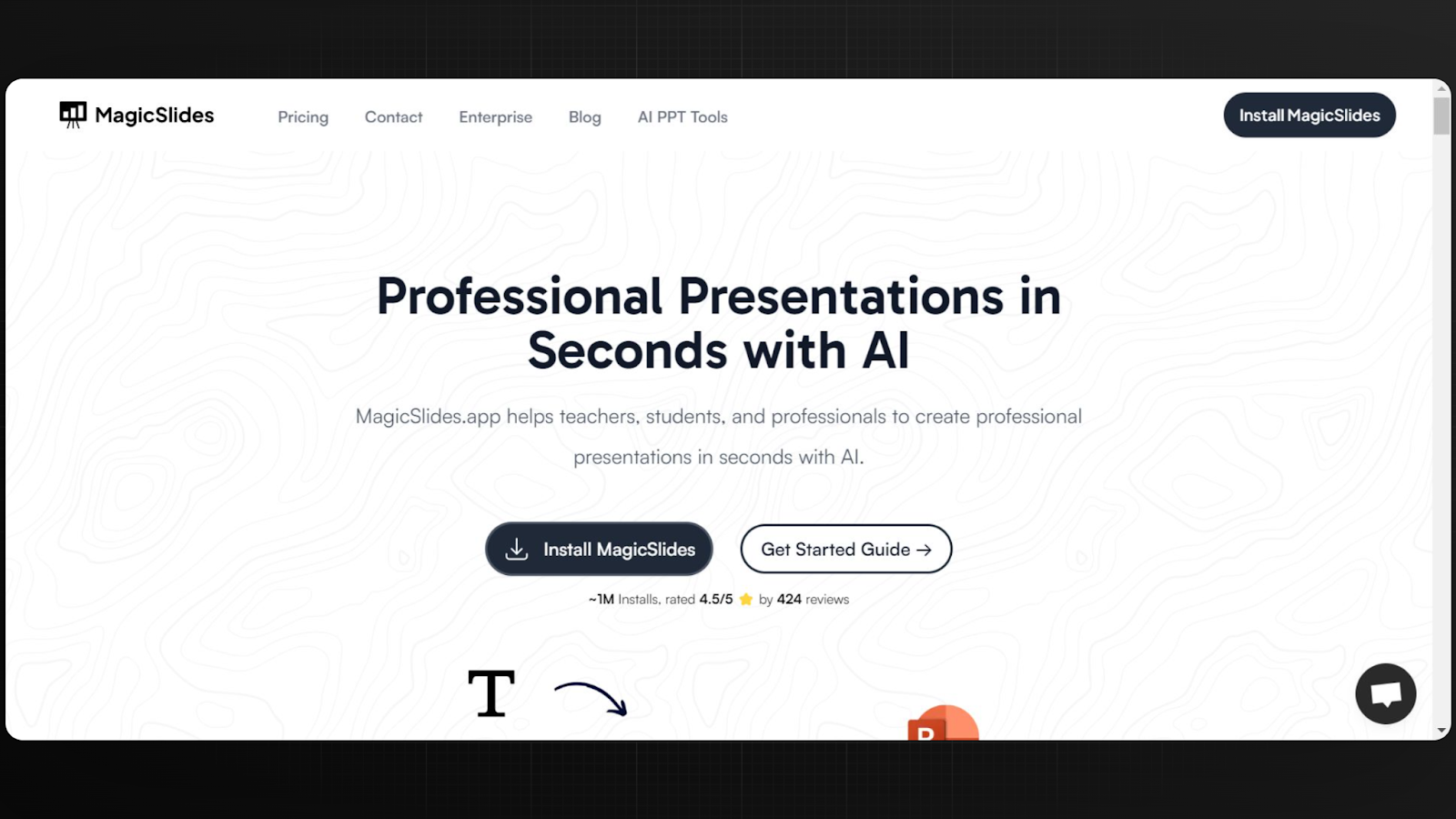
Start by navigating to the Magicslides website, where you'll find a range of tools designed to enhance your presentation creation process.
Click on the AI PPT Tools Page
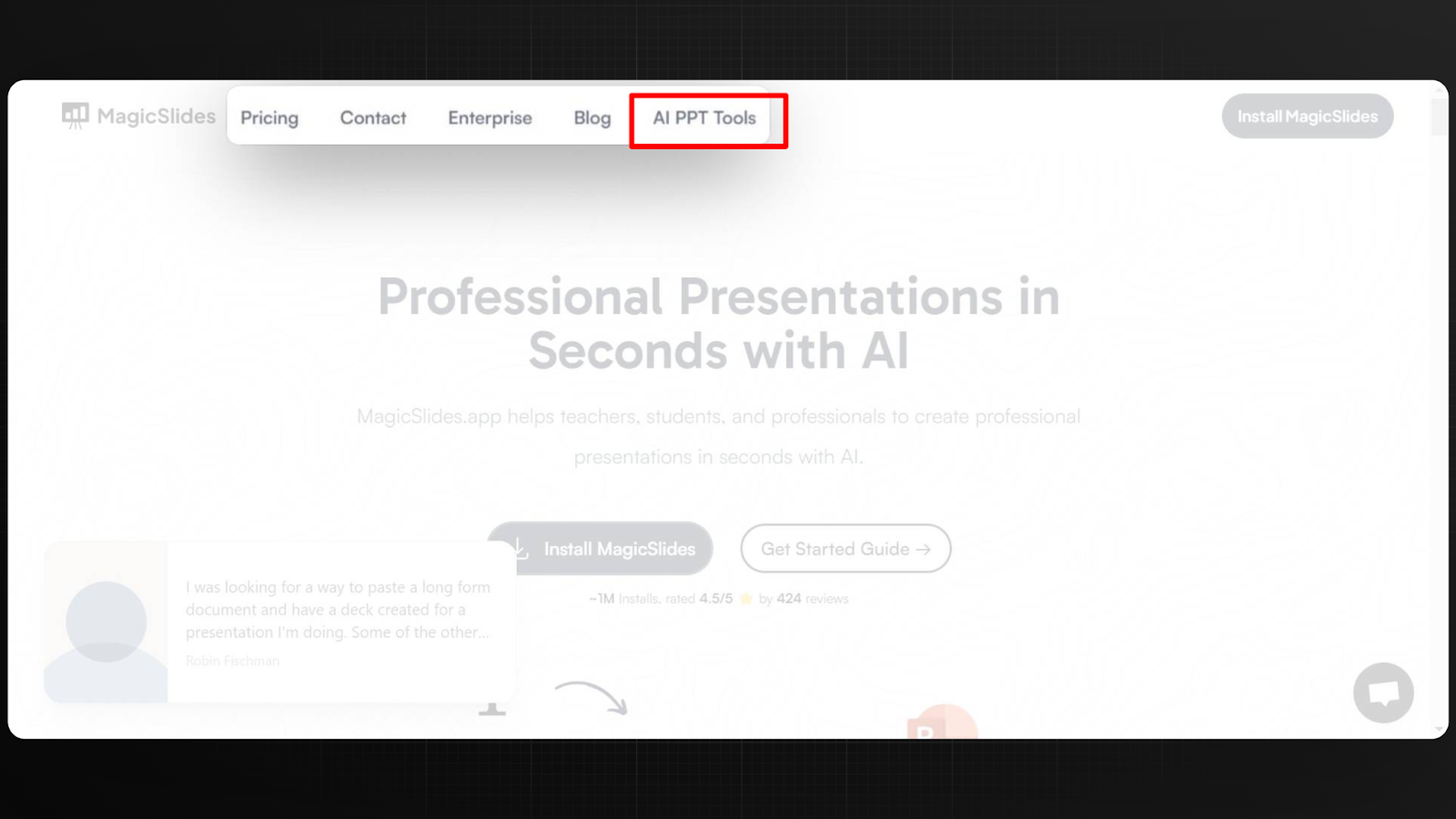
Once on the Magicslides website, locate and click on the AI PPT Tools page. This section is dedicated to AI-driven features that can assist in automating and refining your presentation.
Choose Your Preferred Way to Create a PPT
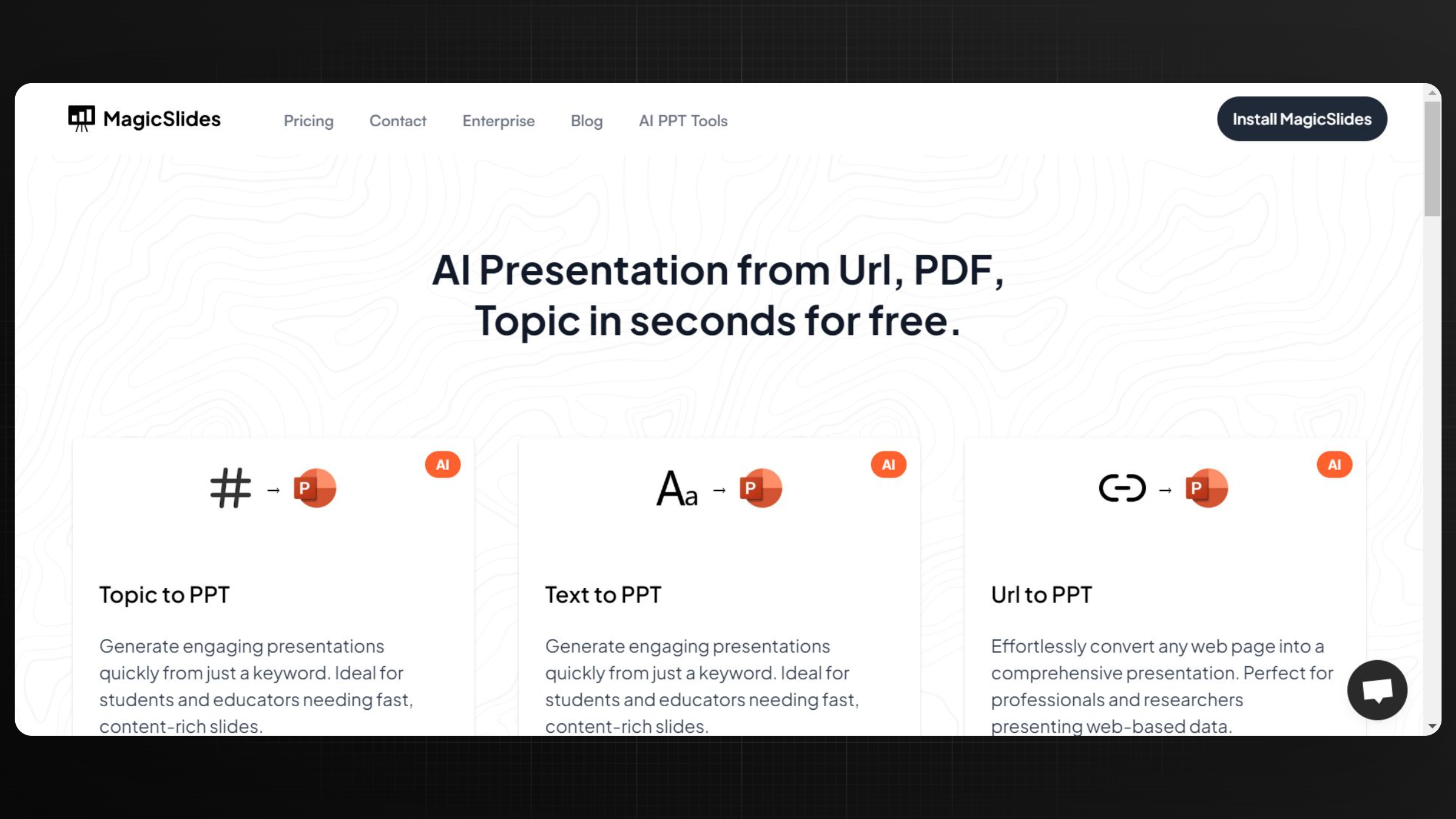
Magicslides offers various methods to create a presentation using AI. You can choose to start from a topic, or input specific content like a URL to PPT or YouTube video. Each option is designed to suit different needs and preferences.
Enter Topic/URL/YouTube
Input the topic you want to present, or provide a URL or a YouTube link that contains the content you wish to include in your presentation. Magicslides will analyze this input using AI to extract key information and generate a relevant, engaging PowerPoint presentation.
Tip: Take advantage of the AI’s ability to analyze text and visual content to ensure that your slides are not only informative but also contain appropriate images and designs that enhance your message. This can be particularly helpful in maintaining audience engagement and delivering your content in a more impactful manner.
By integrating AI tools like those offered by Magicslides, you can significantly improve the quality and delivery of your presentations. This not only saves you time and effort but also provides you with a sophisticated final product that is likely to captivate and impress your audience.
Conclusion
Integrating AI into PowerPoint presentations is not just about enhancing aesthetics or automating tasks—it's about making presentations more impactful and engaging. As these AI tools continue to evolve, they offer significant potential to transform how we prepare and deliver presentations, making them more effective and tailored to our audience's needs.


