Folien mit KI klonen – Bilder in bearbeitbare Präsentationen umwandeln
Klonen Sie beliebige Präsentationsbilder aus dem Internet in weniger als 2 Minuten in eine vollständig bearbeitbare .pptx-Datei. Ideal zum Anpassen inspirierender Designs an Ihre Marke und Inhalte.
Upload a slide image to clone
Drag and drop or click to browse • PNG, JPEG, JPG • Max 50MB
Try with Example Slides
Click any example below to see how the clone feature works
Folien klonen in Aktion erleben
Sehen Sie, wie einfach es ist, ein beliebiges Folienbild in eine vollständig bearbeitbare Präsentation umzuwandeln
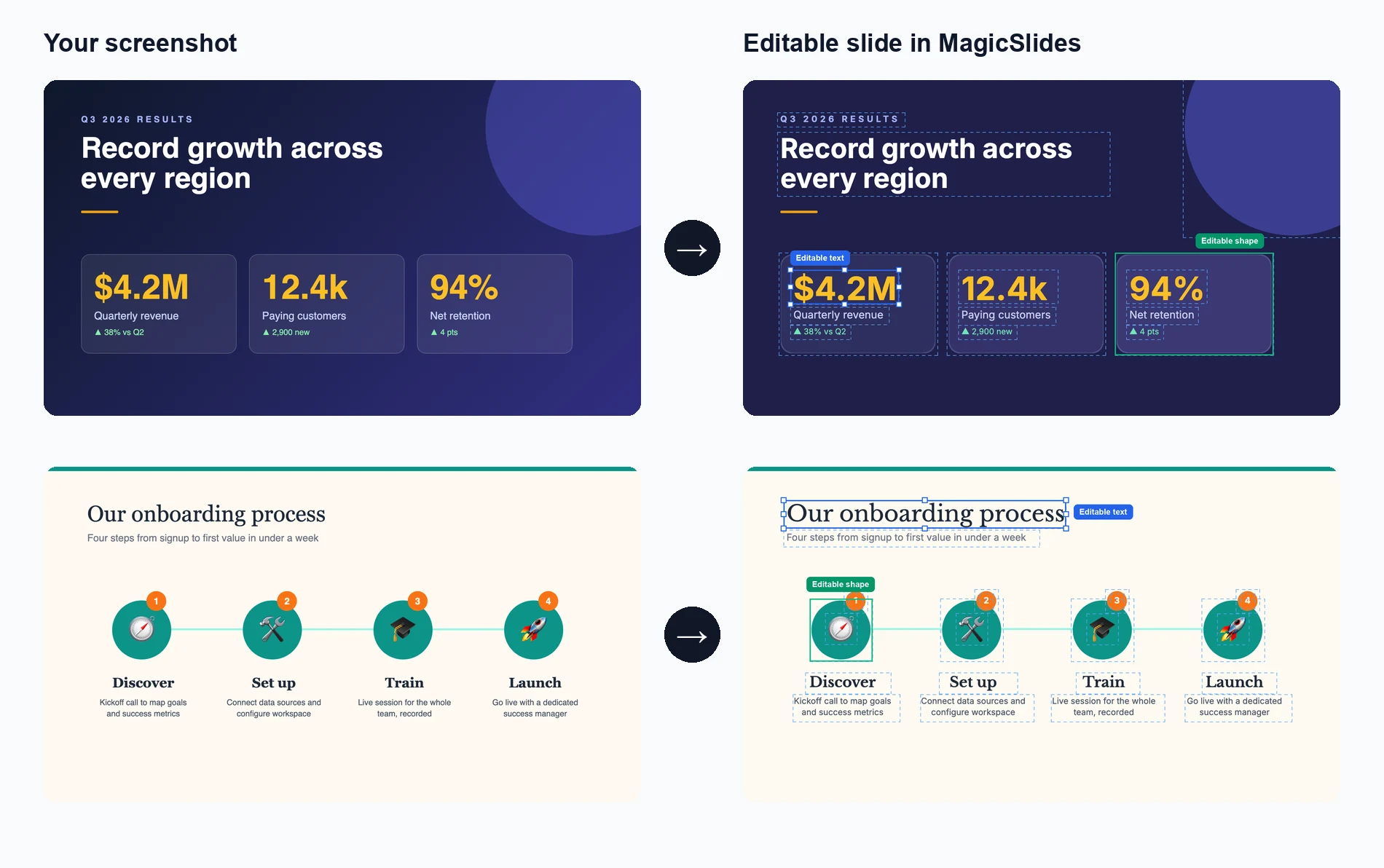
Bild hochladen
Ziehen Sie ein Präsentationsfolienbild, das Sie klonen möchten, per Drag-and-Drop oder wählen Sie es aus
KI analysiert und erstellt neu
Unsere KI extrahiert Text, Layout und Designelemente, um die Folie neu zu erstellen
Bearbeiten und anpassen
Erhalten Sie eine vollständig bearbeitbare Präsentation, in der Sie jedes Element ändern können
See How Maya Clones Your Slides
Upload any slide image and Maya AI will analyze the design, extract every element, and rebuild it as a fully editable presentation

Magic Slides
Senior designer
Clone this conference slide into an editable deck
Analyzing your slide — I can see a dark gradient background with a bold title, 3-column layout with icons, and a bottom tagline. Let me recreate this as an editable deck.
Building your slides now...

How AI Slide Cloning Works
Our AI breaks down any slide image into its individual components and rebuilds each one as an editable PowerPoint element.
AI-Powered Image Analysis
Upload any slide screenshot and our AI detects every element — text blocks, shapes, icons, colors, and layout structure. It understands the visual hierarchy so the cloned version matches the original design intent.
- Works with PNG, JPG, and any image format
- Detects text, shapes, colors, and icons
- Understands layout hierarchy and spacing
Pixel-Perfect Reconstruction
Once analyzed, our AI rebuilds the slide as a fully editable PowerPoint file. Every text box, shape, and color is recreated as a native PPT element you can click, edit, and customize.
- Native PowerPoint elements, not flat images
- Edit text, change colors, resize anything
- Compatible with PowerPoint and Google Slides

Clone from Any Source
Found a great slide on a competitor's website, a conference recording, or a design inspiration board? Screenshot it and our AI turns it into your own editable starting point.
- Conference and webinar screenshots
- Design inspiration from Pinterest or Dribbble
- Competitor decks and industry reports
Who Uses Clone Slides?
Professionals across industries use AI slide cloning to save hours of manual recreation work
Sales Teams
Clone competitor pitch decks to study their messaging, then customize with your own value props and branding for client calls.
Students & Researchers
Recreate lecture slides or conference presentation formats into editable templates for your own academic work.
Designers & Agencies
Rapidly prototype from visual inspiration — clone a layout from Dribbble or Behance and adapt it for client projects.
Marketers
Adapt high-performing social media carousel designs and industry report layouts into your own branded presentations.
Consultants
Replicate framework slides from McKinsey, BCG, or Bain-style decks and fill in your own analysis and recommendations.
Teachers & Trainers
Convert textbook diagrams, infographics, and visual aids into editable slides for classroom presentations and training materials.
AI Clone vs Manual Recreation vs Hiring a Designer
See why AI slide cloning is the fastest and most cost-effective way to turn visual inspiration into editable presentations
| Feature | MagicSlides Clone | Manual Recreation | Hiring a Designer |
|---|---|---|---|
| Time to recreate a slide | ~2 minutes | 30-60 minutes | 1-3 days |
| Cost per slide | Free / cents | Your time | $20-100+ |
| Fully editable output | Yes, every element | Yes, if built right | Depends on contract |
| Design accuracy | AI-matched layout | Approximate | High quality |
| Design skills needed | None | Required | None |
| Batch cloning (10+ slides) | Yes, minutes | No, hours | No, days |
| Output format | .pptx / Google Slides | .pptx | Varies |
| Revisions | Instant — edit yourself | Edit yourself | Extra rounds, extra cost |
Everything Gets Cloned — Down to the Details
Our AI doesn't just capture the big picture. It reconstructs every design element so your cloned slide is truly editable, not a locked image.
Text & Typography
Headings, body text, captions, and font sizes are extracted and placed as editable text boxes with matched styling.
Colors & Gradients
Background colors, gradients, accent colors, and color schemes are detected and applied exactly as they appear in the original.
Shapes & Layout
Boxes, columns, grids, dividers, and spacing are reconstructed as native PowerPoint shapes you can move and resize freely.
Icons & Images
Visual elements like icons, logos, and decorative graphics are identified and placed in matching positions within the slide.
Warum Folien mit KI klonen?
Verwandeln Sie jede Präsentationsinspiration in Minuten in ein eigenes anpassbares Meisterwerk.
Blitzschnelles Klonen
Verwandeln Sie jedes Bild aus dem Internet in weniger als 2 Minuten in eine vollständig bearbeitbare PowerPoint-Präsentation.
KI-gestützte Analyse
Unsere fortschrittliche KI analysiert Design, Layout und Inhaltsstruktur, um eine genaue, bearbeitbare Kopie zu erstellen.
Vollständig bearbeitbare Ausgabe
Jedes Element der geklonten Präsentation ist vollständig bearbeitbar – Text, Bilder, Farben und Layouts.
Designqualität erhalten
Bewahren Sie die visuelle Attraktivität des Originals und erhalten Sie gleichzeitig volle Bearbeitungsmöglichkeiten in PowerPoint.
Mehrere Quellformate
Klonen Sie aus Screenshots, Webbildern, PDFs oder einem beliebigen visuellen Format in bearbeitbare .pptx-Dateien.
Markenanpassung
Passen Sie geklonte Präsentationen einfach an Ihre Markenfarben, Schriftarten und Stilrichtlinien an.
Loved by Teams Worldwide
Rated 4.1/5 on Trustpilot · 4.5/5 on G2
The slides actually look like something a skilled designer would have made — minimalist, balanced, and visually engaging. It doesn’t replace creativity, it amplifies it.

Chirag P.
Trustpilot
Very helpful in creating presentations, inserting images and data with proper alignment. Very easy to implement on your data. The customer support is really good.

Gagan M.
MIS Analyst · G2
They turned my ideas into a polished, professional presentation that exceeded my expectations. The design was sleek, engaging, and perfectly aligned with my brand.

Abdulrhman A.
Trustpilot
The presentations created are very nice, creative, and feel quite special — not like a standard or generic presentation. The customer support took time to explain everything.

Laki A.
Trustpilot
Easy to implement, not much confusion. Just paste the text and presentation will get ready within minutes. Contains different fonts, themes, and layouts which make presentations look really good.

Akash H.
System Engineer · G2
A game changer for me. I can just choose a prompt or give any URL or YouTube video and it makes a PPT on it with my favorite template or LLM model of my choice.
Priyansh S.
Trustpilot
Häufig gestellte Fragen
Wie funktioniert das KI-Folienklonen?
Unsere KI analysiert das hochgeladene Bild, um Text, Layout, Farben und Designelemente zu identifizieren. Anschließend erstellt sie jedes Element als bearbeitbare Komponente in einer PowerPoint-Datei neu und bewahrt dabei das ursprüngliche Design, während alles vollständig anpassbar bleibt.
Welche Bildformate kann ich hochladen?
Sie können PNG, JPG, JPEG und andere gängige Bildformate hochladen. Screenshots von jedem Gerät oder jeder Plattform eignen sich hervorragend zum Klonen.
Wie genau ist der Klonprozess?
Unsere KI erreicht eine hohe Genauigkeit bei der Reproduktion von Layouts, Textinhalten und Designelementen. Obwohl die genaue Schriftartenübereinstimmung variieren kann, werden Gesamtstruktur und visuelles Erscheinungsbild originalgetreu wiedergegeben.
Kann ich mehrere Folien auf einmal klonen?
Ja, Sie können mehrere Bilder hochladen und unsere KI erstellt eine mehrseitige Präsentation, bei der jedes Bild zu einer separaten bearbeitbaren Folie wird.
Ist die Ausgabe in PowerPoint vollständig bearbeitbar?
Absolut! Jedes Element der geklonten Präsentation – Text, Formen, Bilder und Layouts – ist in Microsoft PowerPoint oder Google Slides vollständig bearbeitbar.
Kann ich dies für urheberrechtlich geschützte Designs verwenden?
Das Tool ist für den persönlichen Gebrauch und zur Inspiration konzipiert. Bitte stellen Sie sicher, dass Sie das Recht haben, die von Ihnen geklonten Designs zu verwenden oder anzupassen, und respektieren Sie stets die Rechte an geistigem Eigentum.
Wie lange dauert der Klonprozess?
Die meisten Folien werden innerhalb von 1–2 Minuten geklont. Komplexe Designs mit vielen Elementen können etwas länger dauern, aber der Prozess ist im Allgemeinen sehr schnell.
Was unterscheidet dies von einem Screenshot?
Im Gegensatz zu einem Screenshot, der ein flaches Bild ist, erstellt unser Tool eine vollständig bearbeitbare Präsentation, in der Sie Text ändern, Farben anpassen, Elemente skalieren und alles nach Ihren Bedürfnissen anpassen können.
Gibt es eine Begrenzung, wie viele Folien ich klonen kann?
Bitte beachten Sie die Preisseite für Details zu Nutzungslimits.
Weitere kostenlose PPT-Tools
Thema zu PPT mit KI
Erstellen Sie schnell ansprechende Präsentationen aus nur einem Schlüsselwort. Ideal für Schüler und Lehrer, die schnelle, inhaltsreiche Folien benötigen.
YouTube zu PPT mit KI
Verwandeln Sie YouTube-Videos in informative Präsentationen. Hervorragend für Vermarkter und Kreative, die die Reichweite ihrer Videoinhalte erweitern möchten.
KI Pitch Deck Generator
Verwandeln Sie Pitch Decks in informative Präsentationen. Hervorragend für Unternehmen und Startups, die ihr Geschäft präsentieren möchten.
Text zu PPT mit KI
Erstellen Sie schnell ansprechende Präsentationen aus nur einem Schlüsselwort. Ideal für Schüler und Lehrer, die schnelle, inhaltsreiche Folien benötigen.
URL zu PPT mit KI
Wandeln Sie jede Webseite mühelos in eine umfassende Präsentation um. Perfekt für Fachleute und Forscher, die webbasierte Daten präsentieren möchten.
PDF zu PPT mit KI
Wandeln Sie PDF-Dateien problemlos in PowerPoint-Folien um. Unverzichtbar für Analysten und Berater, die mit detaillierten Berichten arbeiten.

Ready to create your presentation?
Join thousands of professionals who save hours every week with AI-powered presentations.
1,511 reviews · Trustpilot & Workspace


