AI से स्लाइड क्लोन करें - छवियों को संपादन योग्य प्रस्तुतियों में बदलें
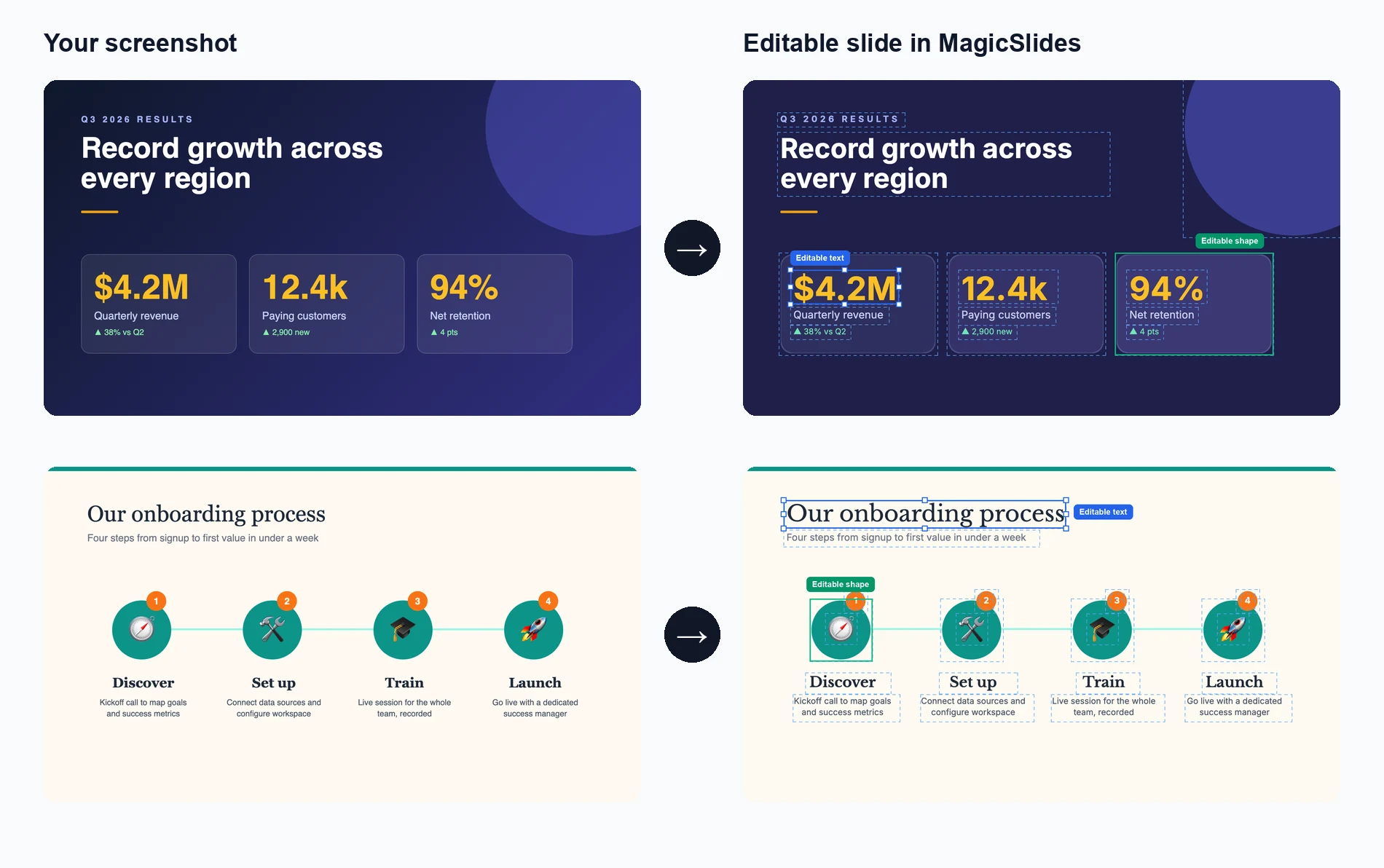
इंटरनेट से किसी भी प्रस्तुति छवि को 2 मिनट से कम समय में पूरी तरह संपादन योग्य .pptx फ़ाइल में क्लोन करें। अपने ब्रांड और सामग्री के लिए प्रेरणादायक डिज़ाइनों को अनुकूलित करने के लिए बिल्कुल सही।
Upload a slide image to clone
Drag and drop or click to browse • PNG, JPEG, JPG • Max 50MB
Try with Example Slides
Click any example below to see how the clone feature works
क्लोन स्लाइड्स को क्रिया में देखें
देखें कि किसी भी स्लाइड छवि को पूरी तरह संपादन योग्य प्रस्तुति में बदलना कितना आसान है
अपनी छवि अपलोड करें
जिस प्रस्तुति स्लाइड छवि को आप क्लोन करना चाहते हैं उसे खींचें और छोड़ें या चुनें
AI विश्लेषण और पुनः निर्माण करता है
हमारी AI स्लाइड को पुनः बनाने के लिए टेक्स्ट, लेआउट और डिज़ाइन तत्वों को निकालती है
संपादित और अनुकूलित करें
एक पूरी तरह संपादन योग्य प्रस्तुति प्राप्त करें जहां आप हर तत्व को बदल सकते हैं
See How Maya Clones Your Slides
Upload any slide image and Maya AI will analyze the design, extract every element, and rebuild it as a fully editable presentation

Magic Slides
Senior designer
Clone this conference slide into an editable deck
Analyzing your slide — I can see a dark gradient background with a bold title, 3-column layout with icons, and a bottom tagline. Let me recreate this as an editable deck.
Building your slides now...

How AI Slide Cloning Works
Our AI breaks down any slide image into its individual components and rebuilds each one as an editable PowerPoint element.
AI-Powered Image Analysis
Upload any slide screenshot and our AI detects every element — text blocks, shapes, icons, colors, and layout structure. It understands the visual hierarchy so the cloned version matches the original design intent.
- Works with PNG, JPG, and any image format
- Detects text, shapes, colors, and icons
- Understands layout hierarchy and spacing
Pixel-Perfect Reconstruction
Once analyzed, our AI rebuilds the slide as a fully editable PowerPoint file. Every text box, shape, and color is recreated as a native PPT element you can click, edit, and customize.
- Native PowerPoint elements, not flat images
- Edit text, change colors, resize anything
- Compatible with PowerPoint and Google Slides

Clone from Any Source
Found a great slide on a competitor's website, a conference recording, or a design inspiration board? Screenshot it and our AI turns it into your own editable starting point.
- Conference and webinar screenshots
- Design inspiration from Pinterest or Dribbble
- Competitor decks and industry reports
Who Uses Clone Slides?
Professionals across industries use AI slide cloning to save hours of manual recreation work
Sales Teams
Clone competitor pitch decks to study their messaging, then customize with your own value props and branding for client calls.
Students & Researchers
Recreate lecture slides or conference presentation formats into editable templates for your own academic work.
Designers & Agencies
Rapidly prototype from visual inspiration — clone a layout from Dribbble or Behance and adapt it for client projects.
Marketers
Adapt high-performing social media carousel designs and industry report layouts into your own branded presentations.
Consultants
Replicate framework slides from McKinsey, BCG, or Bain-style decks and fill in your own analysis and recommendations.
Teachers & Trainers
Convert textbook diagrams, infographics, and visual aids into editable slides for classroom presentations and training materials.
AI Clone vs Manual Recreation vs Hiring a Designer
See why AI slide cloning is the fastest and most cost-effective way to turn visual inspiration into editable presentations
| Feature | MagicSlides Clone | Manual Recreation | Hiring a Designer |
|---|---|---|---|
| Time to recreate a slide | ~2 minutes | 30-60 minutes | 1-3 days |
| Cost per slide | Free / cents | Your time | $20-100+ |
| Fully editable output | Yes, every element | Yes, if built right | Depends on contract |
| Design accuracy | AI-matched layout | Approximate | High quality |
| Design skills needed | None | Required | None |
| Batch cloning (10+ slides) | Yes, minutes | No, hours | No, days |
| Output format | .pptx / Google Slides | .pptx | Varies |
| Revisions | Instant — edit yourself | Edit yourself | Extra rounds, extra cost |
Everything Gets Cloned — Down to the Details
Our AI doesn't just capture the big picture. It reconstructs every design element so your cloned slide is truly editable, not a locked image.
Text & Typography
Headings, body text, captions, and font sizes are extracted and placed as editable text boxes with matched styling.
Colors & Gradients
Background colors, gradients, accent colors, and color schemes are detected and applied exactly as they appear in the original.
Shapes & Layout
Boxes, columns, grids, dividers, and spacing are reconstructed as native PowerPoint shapes you can move and resize freely.
Icons & Images
Visual elements like icons, logos, and decorative graphics are identified and placed in matching positions within the slide.
AI से स्लाइड क्लोन क्यों करें?
किसी भी प्रस्तुति प्रेरणा को कुछ ही मिनटों में अपनी खुद की अनुकूलन योग्य उत्कृष्ट कृति में बदलें।
बिजली की तेज़ क्लोनिंग
इंटरनेट से किसी भी छवि को 2 मिनट से कम में पूरी तरह संपादन योग्य PowerPoint प्रस्तुति में बदलें।
AI-संचालित विश्लेषण
हमारी उन्नत AI डिज़ाइन, लेआउट और सामग्री संरचना का विश्लेषण करके एक सटीक, संपादन योग्य प्रतिलिपि बनाती है।
पूरी तरह संपादन योग्य आउटपुट
क्लोन की गई प्रस्तुति में हर तत्व पूरी तरह से संपादन योग्य है - टेक्स्ट, छवियां, रंग और लेआउट।
डिज़ाइन गुणवत्ता बनाए रखें
PowerPoint में पूर्ण संपादन क्षमताएं प्राप्त करते हुए मूल की दृश्य अपील बनाए रखें।
अनेक स्रोत प्रारूप
स्क्रीनशॉट, वेब छवियों, PDFs या किसी भी दृश्य प्रारूप से संपादन योग्य .pptx फ़ाइलों में क्लोन करें।
ब्रांड अनुकूलन
क्लोन की गई प्रस्तुतियों को अपने ब्रांड के रंगों, फ़ॉन्ट और शैली दिशानिर्देशों के अनुसार आसानी से अनुकूलित करें।
Loved by Teams Worldwide
Rated 4.1/5 on Trustpilot · 4.5/5 on G2
The slides actually look like something a skilled designer would have made — minimalist, balanced, and visually engaging. It doesn’t replace creativity, it amplifies it.

Chirag P.
Trustpilot
Very helpful in creating presentations, inserting images and data with proper alignment. Very easy to implement on your data. The customer support is really good.

Gagan M.
MIS Analyst · G2
They turned my ideas into a polished, professional presentation that exceeded my expectations. The design was sleek, engaging, and perfectly aligned with my brand.

Abdulrhman A.
Trustpilot
The presentations created are very nice, creative, and feel quite special — not like a standard or generic presentation. The customer support took time to explain everything.

Laki A.
Trustpilot
Easy to implement, not much confusion. Just paste the text and presentation will get ready within minutes. Contains different fonts, themes, and layouts which make presentations look really good.

Akash H.
System Engineer · G2
A game changer for me. I can just choose a prompt or give any URL or YouTube video and it makes a PPT on it with my favorite template or LLM model of my choice.
Priyansh S.
Trustpilot
अक्सर पूछे जाने वाले प्रश्न
AI स्लाइड क्लोनिंग कैसे काम करती है?
हमारी AI अपलोड की गई छवि का विश्लेषण करके टेक्स्ट, लेआउट, रंग और डिज़ाइन तत्वों की पहचान करती है। फिर यह हर तत्व को PowerPoint फ़ाइल में एक संपादन योग्य घटक के रूप में पुनः बनाती है, मूल डिज़ाइन को बनाए रखते हुए सब कुछ पूरी तरह अनुकूलन योग्य बनाती है।
मैं कौन से छवि प्रारूप अपलोड कर सकता हूं?
आप PNG, JPG, JPEG और अन्य सामान्य छवि प्रारूप अपलोड कर सकते हैं। किसी भी डिवाइस या प्लेटफ़ॉर्म के स्क्रीनशॉट क्लोनिंग के लिए बहुत अच्छे काम करते हैं।
क्लोनिंग प्रक्रिया कितनी सटीक है?
हमारी AI लेआउट, टेक्स्ट सामग्री और डिज़ाइन तत्वों को दोहराने में उच्च सटीकता प्राप्त करती है। जबकि सटीक फ़ॉन्ट मिलान भिन्न हो सकता है, समग्र संरचना और दृश्य उपस्थिति विश्वसनीय रूप से पुनः उत्पन्न होती है।
क्या मैं एक साथ कई स्लाइड क्लोन कर सकता हूं?
हां, आप कई छवियां अपलोड कर सकते हैं और हमारी AI एक बहु-स्लाइड प्रस्तुति बनाएगी, जिसमें प्रत्येक छवि एक अलग संपादन योग्य स्लाइड बन जाएगी।
क्या आउटपुट PowerPoint में पूरी तरह संपादन योग्य है?
बिल्कुल! क्लोन की गई प्रस्तुति में हर तत्व - टेक्स्ट, आकृतियां, छवियां और लेआउट - Microsoft PowerPoint या Google Slides में पूरी तरह संपादन योग्य है।
क्या मैं इसे कॉपीराइट डिज़ाइनों के लिए उपयोग कर सकता हूं?
यह टूल व्यक्तिगत उपयोग और प्रेरणा के लिए डिज़ाइन किया गया है। कृपया सुनिश्चित करें कि आपके पास किसी भी डिज़ाइन को क्लोन करने का अधिकार है जिसे आप क्लोन करते हैं, और हमेशा बौद्धिक संपदा अधिकारों का सम्मान करें।
क्लोनिंग प्रक्रिया में कितना समय लगता है?
अधिकांश स्लाइड 1-2 मिनट के भीतर क्लोन हो जाती हैं। कई तत्वों वाले जटिल डिज़ाइनों में थोड़ा अधिक समय लग सकता है, लेकिन प्रक्रिया आम तौर पर बहुत तेज़ होती है।
यह स्क्रीनशॉट लेने से अलग कैसे है?
एक स्क्रीनशॉट के विपरीत जो एक सपाट छवि है, हमारा टूल एक पूरी तरह संपादन योग्य प्रस्तुति बनाता है जहां आप टेक्स्ट बदल सकते हैं, रंग बदल सकते हैं, तत्वों का आकार बदल सकते हैं और अपनी ज़रूरतों के अनुसार सब कुछ अनुकूलित कर सकते हैं।
क्या मैं कितनी स्लाइड क्लोन कर सकता हूं इसकी कोई सीमा है?
उपयोग सीमाओं के विवरण के लिए कृपया मूल्य निर्धारण पृष्ठ देखें।
अन्य मुफ़्त PPT टूल
AI से विषय से PPT
केवल एक कीवर्ड से तुरंत आकर्षक पीपीटी बनाएं। छात्रों और शिक्षकों के लिए आदर्श जिन्हें तेज़, सामग्री-समृद्ध स्लाइड चाहिए।
AI से YouTube से PPT
YouTube वीडियो को जानकारीपूर्ण स्लाइड प्रस्तुतियों में बदलें। मार्केटर्स और क्रिएटर्स के लिए बेहतरीन जो अपने वीडियो सामग्री की पहुंच बढ़ाना चाहते हैं।
AI पिच डेक जनरेटर
पिच डेक को जानकारीपूर्ण स्लाइड प्रस्तुतियों में बदलें। व्यापार और स्टार्टअप के लिए बेहतरीन जो अपना व्यापार प्रस्तुत करना चाहते हैं।
AI से टेक्स्ट से PPT
केवल एक कीवर्ड से तुरंत आकर्षक पीपीटी बनाएं। छात्रों और शिक्षकों के लिए आदर्श जिन्हें तेज़, सामग्री-समृद्ध स्लाइड चाहिए।
AI से URL से PPT
किसी भी वेब पेज को आसानी से एक व्यापक पीपीटी में कन्वर्ट करें। पेशेवरों और शोधकर्ताओं के लिए बिल्कुल सही जो वेब-आधारित डेटा प्रस्तुत करते हैं।
AI से PDF से PPT
PDF फाइलों को आसानी से PowerPoint स्लाइड में कन्वर्ट करें। विस्तृत रिपोर्ट्स के साथ काम करने वाले विश्लेषकों और सलाहकारों के लिए आवश्यक।

Ready to create your presentation?
Join thousands of professionals who save hours every week with AI-powered presentations.
1,511 reviews · Trustpilot & Workspace


