
AI विषय से PPT - किसी भी विषय को एक क्लिक में प्रेजेंटेशन में बदलें
MagicSlides AI विषय से PowerPoint कनवर्टर के साथ अपने विचारों को तुरंत पॉलिश्ड प्रेजेंटेशन में बदलें। बस एक विषय दर्ज करें या लिंक पेस्ट करें, और टूल सेकंडों में एक पूर्ण, अच्छी तरह से संरचित प्रेजेंटेशन बनाएगा।
13.6k PPTs created in the last 30 days
See How Maya Builds Your Presentation
Type any topic and Maya AI researches it, outlines the content, and generates a complete slide deck in seconds

Magic Slides
Senior designer
Create a presentation on climate change impact on agriculture
Great topic! I'll research the key impacts, structure the data into sections, and design slides covering rising temperatures, crop yield changes, water scarcity, and adaptation strategies.
Generating your slides now...

How Topic to PPT Works
Enter any topic and Maya AI creates a complete presentation with structured content and professional design.
AI-Powered Slide Generation
Just type a topic — our AI researches it, structures the content, and generates a complete slide deck with titles, bullet points, and visuals. No outline needed, no content writing required.
- Works with any topic or subject
- Auto-structures content into slides
- Generates 8-15 slides per topic
Professional Templates
Your topic is placed into beautiful, professionally designed templates — ready to present or customize. Choose from 50+ themes that match your subject and audience.
- Multiple design themes
- Consistent branding across slides
- Editable in PowerPoint or Google Slides
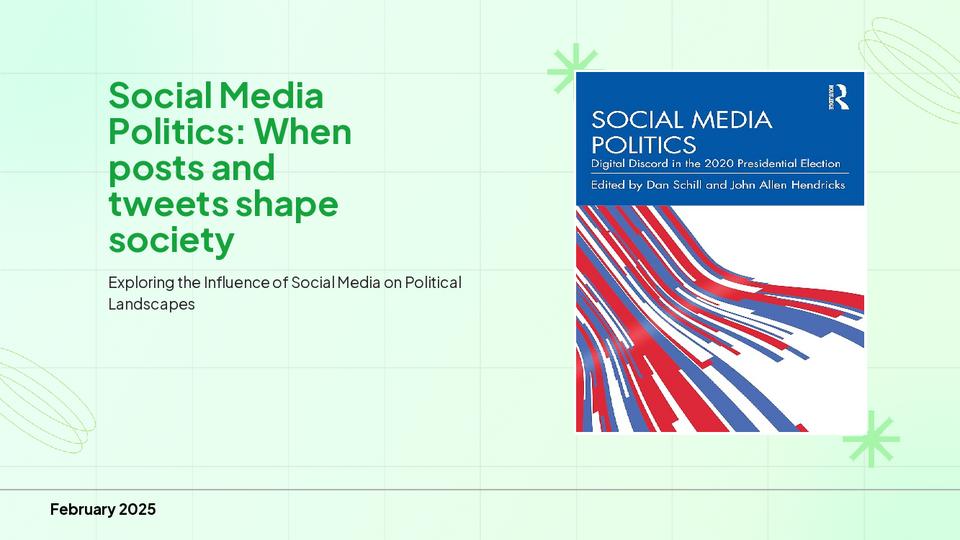
Perfect for Any Audience
From school projects to boardroom pitches — enter any topic and get presentation-ready slides tailored to your audience level and context.
- Students and educators
- Business teams and managers
- Creators and marketers
विचारों को तुरंत प्रेजेंटेशन में बदलने के लिए विषय से PPT AI
MagicSlides AI विषय से प्रेजेंटेशन जनरेटर आपको केवल एक विषय या विचार से पूर्ण स्लाइड डेक बनाने में मदद करता है। बस दर्ज करें कि आप क्या प्रस्तुत करना चाहते हैं और स्कूल, काम या पेशेवर बोलने के लिए उपयोग के लिए तैयार प्रेजेंटेशन प्राप्त करें।
Quick Idea Outlines
Enter a short topic and let AI expand it into a logical presentation with key points and sections. Perfect for last-minute preparation when you have a topic in mind but no content or images ready.
Research & Informational Topics
Turn informative subjects into engaging presentations with diagrams, charts, and a natural flow — ideal for reports or knowledge sharing. Modify visuals by simply writing a prompt.
Project Topics
Convert business subjects or discussion points into organised slides that communicate your message clearly to teams or clients. Structure your project updates, proposals, and reviews in minutes.
Educational Subjects
Generate structured presentations for lectures, assignments, or classroom teaching. The AI breaks down complex subjects into easy-to-explain slides with diagrams and visual aids for better understanding.
MagicSlides AI विषय से PPT कनवर्टर क्यों चुनें
सीधे किसी विषय से प्रेजेंटेशन बनाने का एक स्मार्ट तरीका खोजें, स्पष्टता और संरचना बनाए रखते हुए, बिना मैन्युअल रूप से स्लाइड्स की योजना बनाए या स्लाइड संरचना की चिंता किए।
Intelligent Topic Breakdown
The AI analyses your subject and divides it into meaningful sections, creating a natural progression of slides from introduction to conclusion without missing key points.
Automatic Layout Selection
The AI applies relevant themes, layouts, and formatting to produce a professional slide deck in seconds. No need to adjust fonts, colors, or slide arrangements manually.
Title Slide
Two Column
Chart Slide
Bullet Points
Structured Slides for Every Purpose
Depending on the topic, the AI prepares slide formats suited to the subject — key points, process explanations, comparison slides, data layouts, and conclusion slides that keep your audience engaged.
100+ Languages Supported
Create presentations in multiple languages to reach diverse audiences. Enter your topic, choose your preferred language, and the AI generates a complete slide deck in that language — no manual translation needed.
+ 90 more languages
MagicSlides vs PowerPoint vs Google Slides
See how AI-powered topic to PPT compares with creating presentations manually
| Feature | MagicSlides | PowerPoint | Google Slides |
|---|---|---|---|
| Topic to full presentation | Yes, instant | No, manual | No, manual |
| Time to create 10 slides | ~30 seconds | ~2 hours | ~2 hours |
| AI content generation | Yes, built-in | Copilot (paid) | Gemini (limited) |
| Professional templates | Yes, auto-applied | Manual selection | Limited options |
| Design skills needed | None | Required | Required |
| Research & structure content | Yes, AI handles it | No, you do it | No, you do it |
| Export to .pptx | Yes | Yes | Yes |
| Free to start | Yes | No, license required | Yes |
MagicSlides क्यों?
Everything you need to go from a topic idea to a polished presentation in under a minute.
30 सेकंड में पहला ड्राफ्ट
एक विचार से PPT तक जाने में कई चरण होते हैं, प्रवाह तय करना उनमें से एक है। MagicSlides के साथ आप बस सामग्री प्रदान करें और आपका ड्राफ्ट तैयार है।
संपादन योग्य .PPTX डाउनलोड
विषय इनपुट को संपादन योग्य .PPTX फ़ाइल में बदलें जिसे PowerPoint, Google Slides या किसी अन्य PPT ऐप में आयात किया जा सकता है।
50+ PPT टेम्पलेट
AI-जनित लेआउट के साथ पेशेवर सौंदर्य बनाए रखें जो आपके विषय की दृश्य अपील को बढ़ाते हैं।
यह तेज़ है
MagicSlides ऐप AI छवियां, Google खोज और अधिक जैसी सेटिंग्स के आधार पर 30 सेकंड - 2 मिनट के समय में प्रेजेंटेशन बनाता है।
सुरक्षित और गोपनीय
गोपनीय पीढ़ी प्रक्रिया के साथ अपने विषय डेटा को सुरक्षित रखें, गोपनीयता और सुरक्षा सुनिश्चित करें।
100+ भाषाएं
MagicSlides ऐप 100 से अधिक भाषाओं में आपके विषय से प्रेजेंटेशन बना सकता है।
Loved by Teams Worldwide
Rated 4.1/5 on Trustpilot · 4.5/5 on G2
The slides actually look like something a skilled designer would have made — minimalist, balanced, and visually engaging. It doesn’t replace creativity, it amplifies it.

Chirag P.
Trustpilot
Very helpful in creating presentations, inserting images and data with proper alignment. Very easy to implement on your data. The customer support is really good.

Gagan M.
MIS Analyst · G2
They turned my ideas into a polished, professional presentation that exceeded my expectations. The design was sleek, engaging, and perfectly aligned with my brand.

Abdulrhman A.
Trustpilot
The presentations created are very nice, creative, and feel quite special — not like a standard or generic presentation. The customer support took time to explain everything.

Laki A.
Trustpilot
Easy to implement, not much confusion. Just paste the text and presentation will get ready within minutes. Contains different fonts, themes, and layouts which make presentations look really good.

Akash H.
System Engineer · G2
A game changer for me. I can just choose a prompt or give any URL or YouTube video and it makes a PPT on it with my favorite template or LLM model of my choice.
Priyansh S.
Trustpilot
अन्य मुफ्त PPT टूल
AI से स्लाइड क्लोन करें
इंटरनेट पर किसी भी इमेज को 2 मिनट से कम में संपादन योग्य .pptx फ़ाइल में क्लोन करें। दृश्य प्रेरणा को पूरी तरह से अनुकूलन योग्य प्रस्तुतियों में तुरंत बदलें।
AI से YouTube से PPT
YouTube वीडियो को जानकारीपूर्ण स्लाइड प्रस्तुतियों में बदलें। मार्केटर्स और क्रिएटर्स के लिए बेहतरीन जो अपने वीडियो सामग्री की पहुंच बढ़ाना चाहते हैं।
AI पिच डेक जनरेटर
पिच डेक को जानकारीपूर्ण स्लाइड प्रस्तुतियों में बदलें। व्यापार और स्टार्टअप के लिए बेहतरीन जो अपना व्यापार प्रस्तुत करना चाहते हैं।
AI से टेक्स्ट से PPT
केवल एक कीवर्ड से तुरंत आकर्षक पीपीटी बनाएं। छात्रों और शिक्षकों के लिए आदर्श जिन्हें तेज़, सामग्री-समृद्ध स्लाइड चाहिए।
AI से URL से PPT
किसी भी वेब पेज को आसानी से एक व्यापक पीपीटी में कन्वर्ट करें। पेशेवरों और शोधकर्ताओं के लिए बिल्कुल सही जो वेब-आधारित डेटा प्रस्तुत करते हैं।
AI से PDF से PPT
PDF फाइलों को आसानी से PowerPoint स्लाइड में कन्वर्ट करें। विस्तृत रिपोर्ट्स के साथ काम करने वाले विश्लेषकों और सलाहकारों के लिए आवश्यक।
अक्सर पूछे जाने वाले प्रश्न
1. विषय से PPT AI क्या है?
MagicSlides AI विषय से प्रेजेंटेशन एक ऐसा टूल है जो एक ही विषय या विचार से स्वचालित रूप से एक पूर्ण PowerPoint प्रेजेंटेशन बनाता है। अपना विषय दर्ज करें, और AI उपयोग के लिए तैयार संरचित स्लाइड्स बनाता है। स्लाइड डेक बनने के बाद, आप बस इसमें एक प्रॉम्प्ट लिखकर इसे और संशोधित कर सकते हैं। जब आप परिणाम से संतुष्ट हों, तो इसे वांछित फ़ाइल फॉर्मेट में डाउनलोड करें, जैसे MS PowerPoint (PPTX), PDF, PNG, Google Slides आदि।
2. क्या प्रेजेंटेशन बनाने से पहले मुझे सामग्री लिखनी होगी?
नहीं, आपको नोट्स या ड्राफ्ट की आवश्यकता नहीं है। विषय से PPT AI टूल आपके विषय के आधार पर सामग्री बनाता है, हालाँकि आप अधिक विशिष्ट परिणामों के लिए निर्देश जोड़ सकते हैं। आप एक नमूना प्रेजेंटेशन या कंपनी का लोगो भी जोड़ सकते हैं ताकि यह PPT बनाते समय एकरूपता सुनिश्चित करे।
3. विषय से प्रेजेंटेशन AI कैसे काम करता है?
AI आपके विषय का विश्लेषण करता है, उन प्रमुख बिंदुओं या सामग्री का चयन करता है जिन्हें कवर किया जाना चाहिए, और उन्हें प्रस्तुति के लिए उपयुक्त शीर्षकों, सामग्री और विजुअल के साथ एक तार्किक स्लाइड अनुक्रम में व्यवस्थित करता है।
4. क्या मैं बनाने के बाद स्लाइड्स संपादित कर सकता हूं?
हाँ। आप अपनी आवश्यकताओं या प्रेजेंटेशन शैली के अनुसार डाउनलोड करने से पहले स्लाइड्स की समीक्षा और अनुकूलन कर सकते हैं। आपको परिवर्तन मैन्युअल रूप से करने की आवश्यकता नहीं है, बस वे परिवर्तन टेक्स्ट दर्ज करें जो आप चाहते हैं, और विषय से PPT AI को ऐसा करने दें। जब आप परिणाम से संतुष्ट हों, तो इसे साझा करने या प्रेजेंटेशन उद्देश्यों के लिए PPTX फॉर्मेट में डाउनलोड करें।
5. मुझे कौन सा फ़ाइल फॉर्मेट मिलेगा?
आपकी प्रेजेंटेशन PowerPoint (PPT) फ़ाइल, PDF, Google Slides, PNG या JPEG के रूप में डाउनलोड की जा सकती है। ये फॉर्मेट किसी भी ऑपरेटिंग सिस्टम (OS) में आसानी से सुलभ हैं और मानक प्रेजेंटेशन सॉफ्टवेयर का उपयोग करके संपादित और प्रस्तुत करना आसान है।
6. क्या विषय से PPT AI छात्रों और पेशेवरों के लिए उपयुक्त है?
बिल्कुल। यह इनके लिए काम करता है: - शैक्षणिक प्रेजेंटेशन - व्यापारिक बैठकें - प्रोजेक्ट रिपोर्ट - सेमिनार - और कई अन्य उपयोग के मामले।
7. प्रेजेंटेशन बनाने में कितना समय लगता है?
अधिकांश प्रेजेंटेशन सेकंडों में बनाई जाती हैं, जो विषय की जटिलता और अनुरोधित स्लाइड्स की संख्या पर निर्भर करती है। हमारा विषय से प्रेजेंटेशन टूल लंबे और जटिल विषयों के लिए अधिकतम 2 मिनट लेता है जिनके लिए विस्तृत सामग्री और स्पष्ट विजुअल की आवश्यकता होती है। आसान विषयों के लिए, आपको 15-30 सेकंड में परिणाम मिलेगा।
8. क्या मैं विभिन्न भाषाओं में प्रेजेंटेशन बना सकता हूं?
हाँ। विषय से PPT AI टूल 100+ वैश्विक भाषाओं का समर्थन करता है, जो आपको दुनिया भर के विविध दर्शकों के लिए प्रेजेंटेशन बनाने की अनुमति देता है।

Ready to create your presentation?
Join thousands of professionals who save hours every week with AI-powered presentations.
1,511 reviews · Trustpilot & Workspace


