Klona bilder med AI – Omvandla bilder till redigerbara presentationer
Klona valfri presentationsbild från internet till en fullt redigerbar .pptx-fil på under 2 minuter. Perfekt för att anpassa inspirerande designer till ditt varumärke och innehåll.
Upload a slide image to clone
Drag and drop or click to browse • PNG, JPEG, JPG • Max 50MB
Try with Example Slides
Click any example below to see how the clone feature works
Se Klona Bilder i aktion
Se hur enkelt det är att omvandla valfri bildbild till en fullt redigerbar presentation
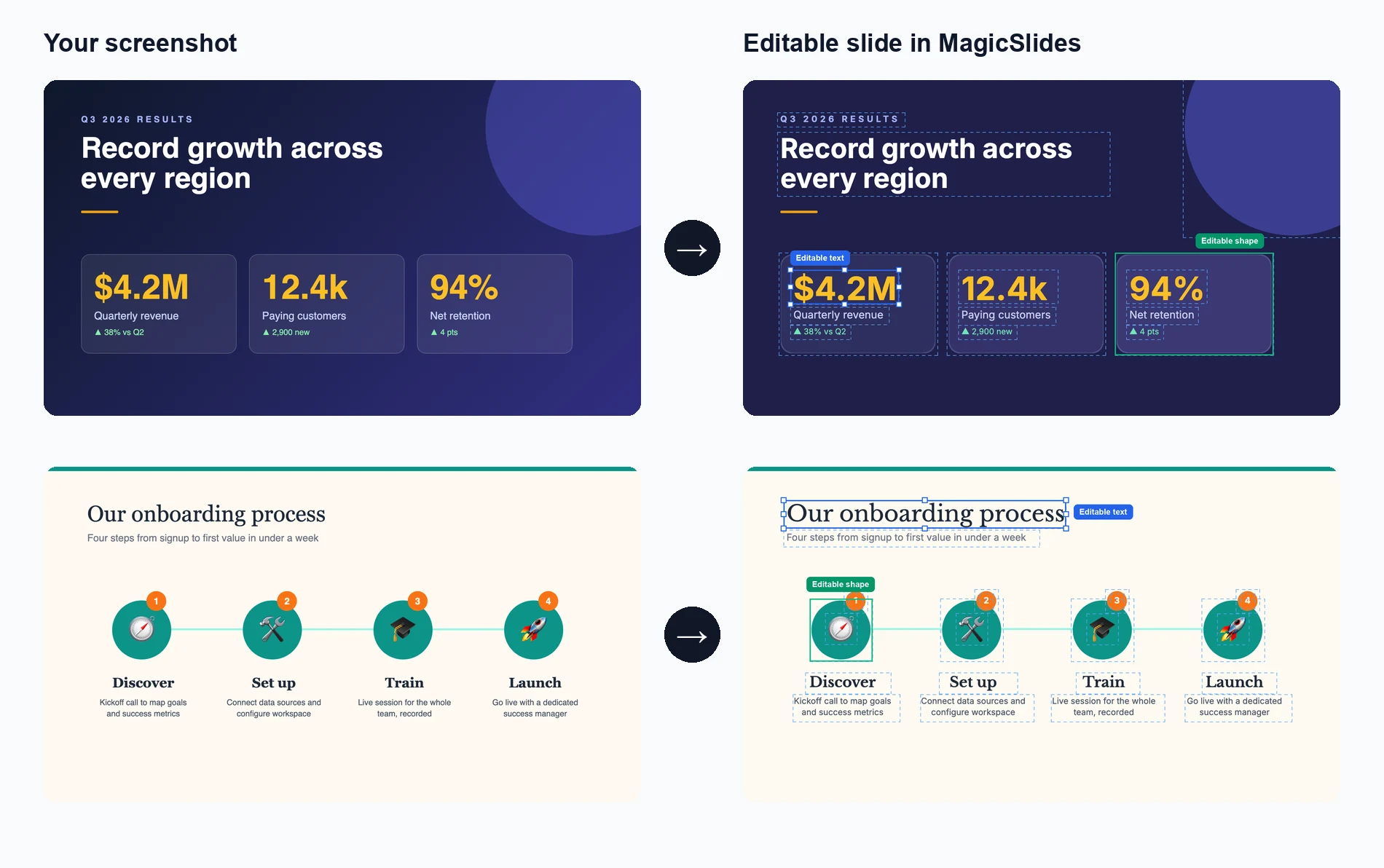
Ladda upp din bild
Dra och släpp eller välj valfri presentationsbildbild du vill klona
AI analyserar och återskapar
Vår AI extraherar text, layout och designelement för att återskapa bilden
Redigera och anpassa
Få en fullt redigerbar presentation där du kan ändra varje element
See How Maya Clones Your Slides
Upload any slide image and Maya AI will analyze the design, extract every element, and rebuild it as a fully editable presentation

Magic Slides
Senior designer
Clone this conference slide into an editable deck
Analyzing your slide — I can see a dark gradient background with a bold title, 3-column layout with icons, and a bottom tagline. Let me recreate this as an editable deck.
Building your slides now...

How AI Slide Cloning Works
Our AI breaks down any slide image into its individual components and rebuilds each one as an editable PowerPoint element.
AI-Powered Image Analysis
Upload any slide screenshot and our AI detects every element — text blocks, shapes, icons, colors, and layout structure. It understands the visual hierarchy so the cloned version matches the original design intent.
- Works with PNG, JPG, and any image format
- Detects text, shapes, colors, and icons
- Understands layout hierarchy and spacing
Pixel-Perfect Reconstruction
Once analyzed, our AI rebuilds the slide as a fully editable PowerPoint file. Every text box, shape, and color is recreated as a native PPT element you can click, edit, and customize.
- Native PowerPoint elements, not flat images
- Edit text, change colors, resize anything
- Compatible with PowerPoint and Google Slides

Clone from Any Source
Found a great slide on a competitor's website, a conference recording, or a design inspiration board? Screenshot it and our AI turns it into your own editable starting point.
- Conference and webinar screenshots
- Design inspiration from Pinterest or Dribbble
- Competitor decks and industry reports
Who Uses Clone Slides?
Professionals across industries use AI slide cloning to save hours of manual recreation work
Sales Teams
Clone competitor pitch decks to study their messaging, then customize with your own value props and branding for client calls.
Students & Researchers
Recreate lecture slides or conference presentation formats into editable templates for your own academic work.
Designers & Agencies
Rapidly prototype from visual inspiration — clone a layout from Dribbble or Behance and adapt it for client projects.
Marketers
Adapt high-performing social media carousel designs and industry report layouts into your own branded presentations.
Consultants
Replicate framework slides from McKinsey, BCG, or Bain-style decks and fill in your own analysis and recommendations.
Teachers & Trainers
Convert textbook diagrams, infographics, and visual aids into editable slides for classroom presentations and training materials.
AI Clone vs Manual Recreation vs Hiring a Designer
See why AI slide cloning is the fastest and most cost-effective way to turn visual inspiration into editable presentations
| Feature | MagicSlides Clone | Manual Recreation | Hiring a Designer |
|---|---|---|---|
| Time to recreate a slide | ~2 minutes | 30-60 minutes | 1-3 days |
| Cost per slide | Free / cents | Your time | $20-100+ |
| Fully editable output | Yes, every element | Yes, if built right | Depends on contract |
| Design accuracy | AI-matched layout | Approximate | High quality |
| Design skills needed | None | Required | None |
| Batch cloning (10+ slides) | Yes, minutes | No, hours | No, days |
| Output format | .pptx / Google Slides | .pptx | Varies |
| Revisions | Instant — edit yourself | Edit yourself | Extra rounds, extra cost |
Everything Gets Cloned — Down to the Details
Our AI doesn't just capture the big picture. It reconstructs every design element so your cloned slide is truly editable, not a locked image.
Text & Typography
Headings, body text, captions, and font sizes are extracted and placed as editable text boxes with matched styling.
Colors & Gradients
Background colors, gradients, accent colors, and color schemes are detected and applied exactly as they appear in the original.
Shapes & Layout
Boxes, columns, grids, dividers, and spacing are reconstructed as native PowerPoint shapes you can move and resize freely.
Icons & Images
Visual elements like icons, logos, and decorative graphics are identified and placed in matching positions within the slide.
Varför klona bilder med AI?
Omvandla valfri presentationsinspiration till ditt eget anpassningsbara mästerverk på minuter.
Blixtsnabb kloning
Omvandla valfri bild från internet till en fullt redigerbar PowerPoint-presentation på under 2 minuter.
AI-driven analys
Vår avancerade AI analyserar design, layout och innehållsstruktur för att skapa en exakt, redigerbar kopia.
Fullt redigerbart resultat
Varje element i den klonade presentationen är helt redigerbart – text, bilder, färger och layouter.
Bevara designkvalitet
Bibehåll det visuella intrycket av originalet samtidigt som du får fullständiga redigeringsmöjligheter i PowerPoint.
Flera källformat
Klona från skärmdumpar, webbbilder, PDF-filer eller valfritt visuellt format till redigerbara .pptx-filer.
Varumärkesanpassning
Anpassa enkelt klonade presentationer för att matcha ditt varumärkes färger, typsnitt och stilriktlinjer.
Loved by Teams Worldwide
Rated 4.1/5 on Trustpilot · 4.5/5 on G2
The slides actually look like something a skilled designer would have made — minimalist, balanced, and visually engaging. It doesn’t replace creativity, it amplifies it.

Chirag P.
Trustpilot
Very helpful in creating presentations, inserting images and data with proper alignment. Very easy to implement on your data. The customer support is really good.

Gagan M.
MIS Analyst · G2
They turned my ideas into a polished, professional presentation that exceeded my expectations. The design was sleek, engaging, and perfectly aligned with my brand.

Abdulrhman A.
Trustpilot
The presentations created are very nice, creative, and feel quite special — not like a standard or generic presentation. The customer support took time to explain everything.

Laki A.
Trustpilot
Easy to implement, not much confusion. Just paste the text and presentation will get ready within minutes. Contains different fonts, themes, and layouts which make presentations look really good.

Akash H.
System Engineer · G2
A game changer for me. I can just choose a prompt or give any URL or YouTube video and it makes a PPT on it with my favorite template or LLM model of my choice.
Priyansh S.
Trustpilot
Vanliga frågor
Hur fungerar AI-bildkloningen?
Vår AI analyserar den uppladdade bilden för att identifiera text, layout, färger och designelement. Den återskapar sedan varje element som en redigerbar komponent i en PowerPoint-fil och bevarar originaldesignen samtidigt som allt görs fullt anpassningsbart.
Vilka bildformat kan jag ladda upp?
Du kan ladda upp PNG, JPG, JPEG och andra vanliga bildformat. Skärmdumpar från valfri enhet eller plattform fungerar utmärkt för kloning.
Hur exakt är kloningsprocessen?
Vår AI uppnår hög noggrannhet vid replikering av layouter, textinnehåll och designelement. Även om exakt typsnittssmatchning kan variera återges den övergripande strukturen och det visuella utseendet troget.
Kan jag klona flera bilder på en gång?
Ja, du kan ladda upp flera bilder och vår AI skapar en presentation med flera bilder, där varje bild blir en separat redigerbar bild.
Är resultatet fullt redigerbart i PowerPoint?
Absolut! Varje element i den klonade presentationen – text, former, bilder och layouter – är fullt redigerbart i Microsoft PowerPoint eller Google Slides.
Kan jag använda detta för upphovsrättsskyddade designer?
Verktyget är utformat för personligt bruk och inspiration. Se till att du har rätt att använda eller anpassa de designer du klonar och respektera alltid immateriella rättigheter.
Hur lång tid tar kloningsprocessen?
De flesta bilder klonas inom 1–2 minuter. Komplexa designer med många element kan ta något längre tid, men processen är i allmänhet mycket snabb.
Vad skiljer detta från att ta en skärmdump?
Till skillnad från en skärmdump som är en platt bild skapar vårt verktyg en fullt redigerbar presentation där du kan ändra text, byta färger, ändra storlek på element och anpassa allt efter dina behov.
Finns det en gräns för hur många bilder jag kan klona?
Se prissidan för information om användningsbegränsningar.
Andra gratis PPT-verktyg
Ämne till PPT med AI
Skapa engagerande presentationer snabbt från bara ett nyckelord. Perfekt för studenter och lärare som behöver snabba, innehållsrika bilder.
YouTube till PPT med AI
Förvandla YouTube-videor till informativa bildpresentationer. Utmärkt för marknadsförare och kreatörer som vill utöka räckvidden för sitt videoinnehåll.
AI Pitch Deck-generator
Förvandla Pitch Deck till informativa bildpresentationer. Utmärkt för företag och startups som vill presentera sin verksamhet.
Text till PPT med AI
Skapa engagerande presentationer snabbt från bara ett nyckelord. Perfekt för studenter och lärare som behöver snabba, innehållsrika bilder.
URL till PPT med AI
Konvertera enkelt valfri webbsida till en omfattande presentation. Perfekt för yrkesverksamma och forskare som presenterar webbaserad data.
PDF till PPT med AI
Konvertera PDF-filer till PowerPoint-bilder enkelt. Oumbärligt för analytiker och konsulter som hanterar detaljerade rapporter.

Ready to create your presentation?
Join thousands of professionals who save hours every week with AI-powered presentations.
1,511 reviews · Trustpilot & Workspace


