How to Generate Onboarding Presentations from Internal Wiki Using AI


Learn how to turn internal wiki content into onboarding presentations with AI. Save time and boost clarity using MagicSlides in simple steps.
Bringing new employees up to speed quickly is essential for any growing team. Yet, creating onboarding presentations from your internal documentation, like wikis, Notion pages, or company handbooks, can be time-consuming.
But what if you could instantly turn your internal wiki into clean, structured onboarding slides using AI?
In this blog, we’ll show you exactly how to do that using tools like MagicSlides, an AI-powered slide generator that saves time and delivers polished results.
Why Use Internal Wiki for Onboarding?
Most companies store valuable onboarding content in internal wikis (e.g., Notion, Confluence, or Google Docs). This includes:
- Company mission, vision, values
- Team structure
- Tools and processes
- HR and IT policies
- Communication norms
- First-week checklists
However, long documents can overwhelm new hires. Slides, on the other hand, offer a quick, visual overview that's easier to digest and present.
Challenges with Manual Slide Creation
Manually converting wiki content into slides involves:
- Summarizing and rewriting long sections
- Designing layouts
- Ensuring consistency in formatting
- Reviewing for accuracy
This can take several hours per onboarding deck, especially for large teams or frequently updated documentation.
That’s where AI can make your life easier.
AI to the Rescue: Meet MagicSlides
MagicSlides is an AI-powered presentation tool that converts text, like wiki content or notes, into slide decks in seconds.
Whether you're onboarding developers, marketers, or remote hires, you can turn wiki pages into tailored onboarding decks with minimal effort.
Step-by-Step: Creating Onboarding Presentations from Wiki
Step 1: Copy the Relevant Wiki Content
Go to your internal wiki (like Notion or Confluence) and copy the sections relevant for onboarding. This could include:
- Welcome message
- Company background
- Department structure
- Tools and software
- Code of conduct
- Key contacts
You don’t need to format anything, just copy the raw text.
Step 2: Visit MagicSlides
Go to www.magicslides.app.
You’ll be taken to a simple interface where you can paste your content.
Step 3: Paste the Wiki Content
Paste the copied content into the textbox provided.
Tip: You can break your content into short paragraphs or bullet points for more structured output.
Step 4: Customize Your Preferences
Choose:
- Presentation Tone: Formal (recommended for onboarding)
- Visual Style: Clean, professional themes
- Level of Detail: Moderate (best for summarizing wiki content)
Step 5: Generate Slides
Click “Generate Slides”, and let MagicSlides do the rest.
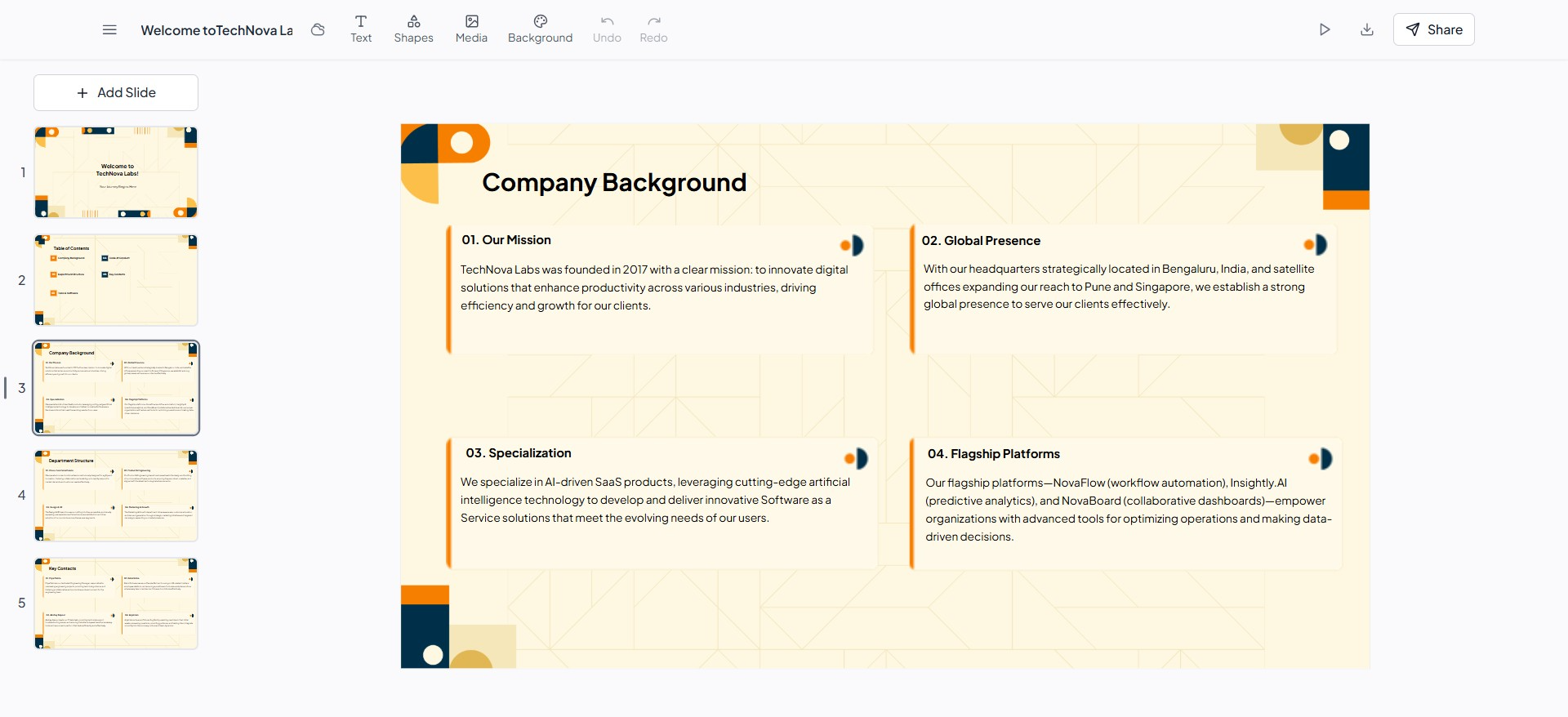
Within seconds, you’ll have a complete onboarding presentation, including:
- Clear slide titles
- Bullet points for each topic
- Consistent formatting
- Optional sections like "Meet the Team" or "Getting Started"
You can export it to Google Slides or PowerPoint for sharing or editing.
Optional: Break It Down for Roles or Teams
You can create different onboarding decks for each department by pasting only the team-specific sections from your wiki. For example:
- Engineering onboarding
- HR onboarding
- Sales onboarding
MagicSlides makes it easy to tailor content for each role.
Benefits of Using MagicSlides for Onboarding
✅ Saves hours of formatting
✅ Ensures clean, professional-looking slides
✅ Keeps documentation updated with minimal effort
✅ Easy to scale across departments
✅ Improves new hire experience
Final Thoughts
Your internal wiki holds all the knowledge your new hires need, but it’s not always in the most digestible format. By using an AI tool like MagicSlides, you can convert that content into effective onboarding presentations in minutes.
No design headaches. No manual summarizing. Just paste your content, click, and present.
Start creating your onboarding deck today at MagicSlides.app


