Which Type of Template is Best for Making Presentations?


Discover the best template for presentations, explore white clean PPT templates, and learn how MagicSlides.app simplifies creating stunning, professional slides instantly!
When it comes to creating presentations, the right template can make or break your message. A well-chosen template not only enhances the visual appeal of your slides but also ensures that your content is easy to read and understand. Whether you’re preparing for a business pitch, an academic presentation, or a team meeting, choosing the right type of template is crucial.
One of the most versatile and effective choices is the white clean PPT template. Let’s explore why this style stands out and how you can create stunning presentations effortlessly with tools like MagicSlides.app.
Why Choose a White Clean PPT Template?
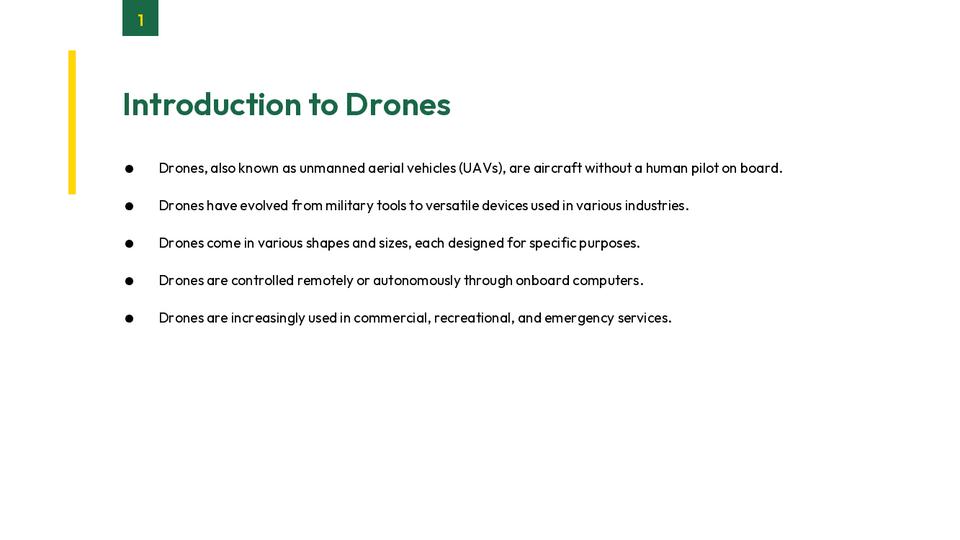
White clean templates are popular for good reason. Here’s why they are considered the best for most types of presentations:
1. Clarity and Readability
White backgrounds provide excellent contrast for text and images, making your content easy to read. Clean designs eliminate unnecessary distractions, allowing your audience to focus on your key points.
2. Professional Appearance
Minimalist templates exude professionalism. Whether you’re pitching to investors or teaching a class, white clean templates convey a sense of sophistication and seriousness.
3. Versatility
These templates work well for any topic, be it a corporate presentation, educational content, or creative showcase. Their simplicity complements a wide range of themes without overpowering your message.
4. Easy Customization
White clean templates are like blank canvases. You can easily add your brand colors, logos, or personal touches without clashing with the design.
What to Look for in a Presentation Template
When choosing a template, keep these factors in mind:
- Simplicity: Avoid overly complex designs. The focus should be on your content.
- Consistent Layout: Ensure all slides have a uniform style to maintain a cohesive look.
- Flexibility: Choose templates that allow easy editing to match your specific needs.
- Visual Hierarchy: Look for designs that emphasize key points with clear headings, subheadings, and bullet points.
How to Effortlessly Create Presentations with MagicSlides.app
Gone are the days of spending hours perfecting your slides. With MagicSlides.app, you can generate stunning presentations in just a few clicks. Here’s how:
Step 1: Visit MagicSlides.app
Head to MagicSlides.app on your browser. The user-friendly interface ensures a seamless experience from the get-go.
Step 2: Enter Your Topic
Type in your presentation topic. Whether it’s “Marketing Strategies for 2025” or “Introduction to Artificial Intelligence,” MagicSlides understands your requirements.
Step 3: Click ‘Generate Instant PPT’
Let MagicSlides work its magic! This AI-powered tool will gather relevant content and structure it into a polished presentation.
Step 4: Select Slide Theme and Number of Slides
Choose a white clean PPT template or another theme that suits your style. Specify the number of slides you want, and the app will tailor the content accordingly.
Step 5: Click ‘Generate’
Watch as your presentation takes shape in seconds. The AI ensures the layout is visually appealing and well-structured.
Step 6: Download and Customize
Once your presentation is ready, download it and make any final adjustments. You can add your logo, tweak the text, or insert additional visuals.
Benefits of Using MagicSlides.app
- Saves Time: No more hours spent designing slides from scratch.
- Professional Output: High-quality templates and AI-optimized content.
- Customizable: Adapt your slides to perfectly match your vision.
- Accessible: Generate presentations on any topic, anytime, anywhere.
Conclusion
Choosing the right template is the first step toward a successful presentation, and a white clean PPT template is often the best choice. Its clarity, professionalism, and versatility make it ideal for almost any scenario. With tools like MagicSlides.app, creating polished, engaging presentations has never been easier.
Why not give it a try? Visit MagicSlides.app today and take your presentations to the next level. Let the magic of AI help you create slides that captivate your audience effortlessly!


