Clone Slides with AI - Transform Images into Editable Presentations
Clone any presentation image from the internet into a fully editable .pptx file in under 2 minutes. Perfect for adapting inspiring designs to your brand and content.
Upload a slide image to clone
Drag and drop or click to browse • PNG, JPEG, JPG • Max 50MB
Try with Example Slides
Click any example below to see how the clone feature works
See Clone Slides in Action
Watch how easy it is to transform any slide image into a fully editable presentation
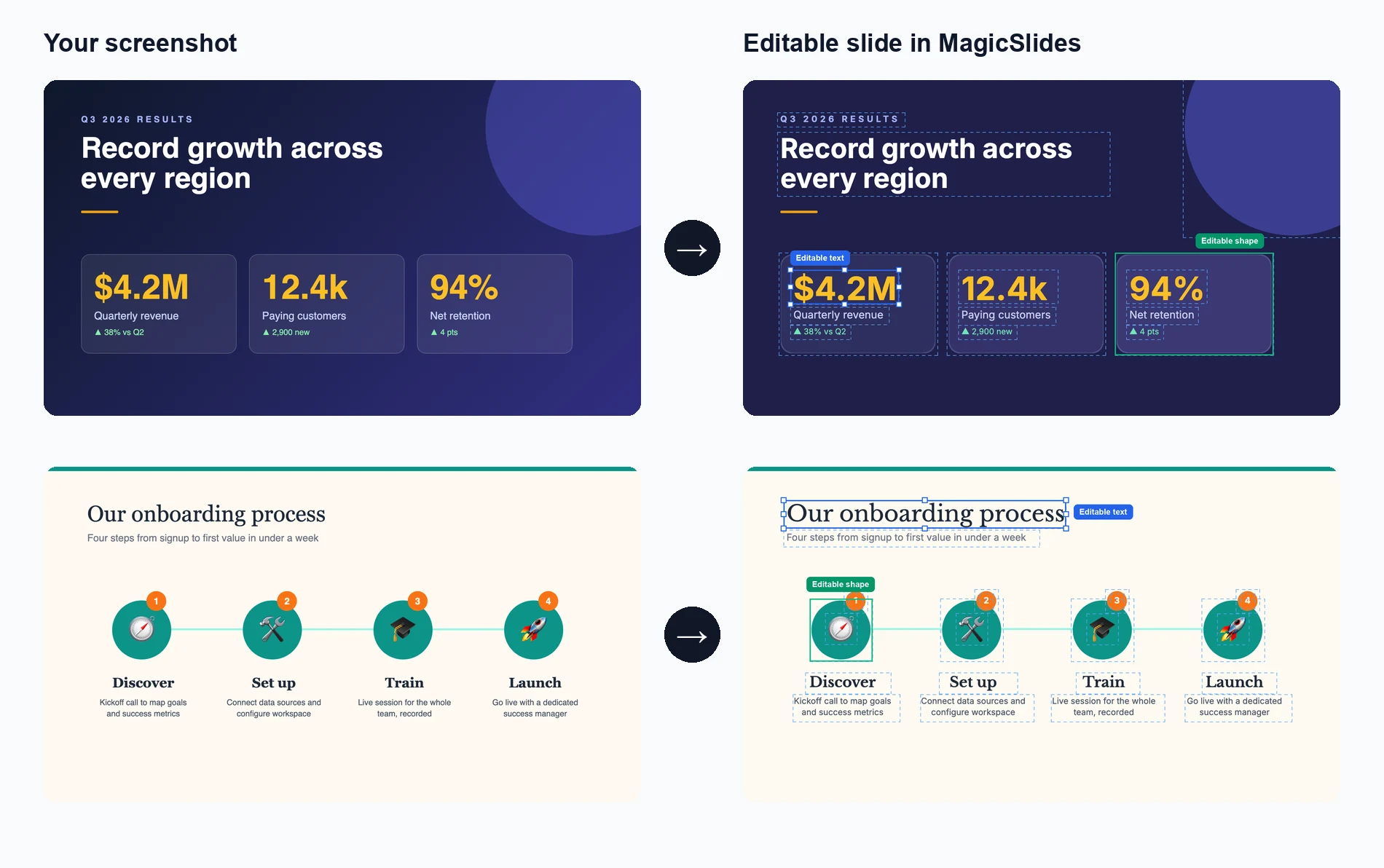
Upload Your Image
Drag and drop or select any presentation slide image you want to clone
AI Analyzes & Recreates
Our AI extracts text, layout, and design elements to recreate the slide
Edit & Customize
Get a fully editable presentation where you can modify every element
See How Maya Clones Your Slides
Upload any slide image and Maya AI will analyze the design, extract every element, and rebuild it as a fully editable presentation

Magic Slides
Senior designer
Clone this conference slide into an editable deck
Analyzing your slide — I can see a dark gradient background with a bold title, 3-column layout with icons, and a bottom tagline. Let me recreate this as an editable deck.
Building your slides now...

How AI Slide Cloning Works
Our AI breaks down any slide image into its individual components and rebuilds each one as an editable PowerPoint element.
AI-Powered Image Analysis
Upload any slide screenshot and our AI detects every element — text blocks, shapes, icons, colors, and layout structure. It understands the visual hierarchy so the cloned version matches the original design intent.
- Works with PNG, JPG, and any image format
- Detects text, shapes, colors, and icons
- Understands layout hierarchy and spacing
Pixel-Perfect Reconstruction
Once analyzed, our AI rebuilds the slide as a fully editable PowerPoint file. Every text box, shape, and color is recreated as a native PPT element you can click, edit, and customize.
- Native PowerPoint elements, not flat images
- Edit text, change colors, resize anything
- Compatible with PowerPoint and Google Slides

Clone from Any Source
Found a great slide on a competitor's website, a conference recording, or a design inspiration board? Screenshot it and our AI turns it into your own editable starting point.
- Conference and webinar screenshots
- Design inspiration from Pinterest or Dribbble
- Competitor decks and industry reports
Who Uses Clone Slides?
Professionals across industries use AI slide cloning to save hours of manual recreation work
Sales Teams
Clone competitor pitch decks to study their messaging, then customize with your own value props and branding for client calls.
Students & Researchers
Recreate lecture slides or conference presentation formats into editable templates for your own academic work.
Designers & Agencies
Rapidly prototype from visual inspiration — clone a layout from Dribbble or Behance and adapt it for client projects.
Marketers
Adapt high-performing social media carousel designs and industry report layouts into your own branded presentations.
Consultants
Replicate framework slides from McKinsey, BCG, or Bain-style decks and fill in your own analysis and recommendations.
Teachers & Trainers
Convert textbook diagrams, infographics, and visual aids into editable slides for classroom presentations and training materials.
AI Clone vs Manual Recreation vs Hiring a Designer
See why AI slide cloning is the fastest and most cost-effective way to turn visual inspiration into editable presentations
| Feature | MagicSlides Clone | Manual Recreation | Hiring a Designer |
|---|---|---|---|
| Time to recreate a slide | ~2 minutes | 30-60 minutes | 1-3 days |
| Cost per slide | Free / cents | Your time | $20-100+ |
| Fully editable output | Yes, every element | Yes, if built right | Depends on contract |
| Design accuracy | AI-matched layout | Approximate | High quality |
| Design skills needed | None | Required | None |
| Batch cloning (10+ slides) | Yes, minutes | No, hours | No, days |
| Output format | .pptx / Google Slides | .pptx | Varies |
| Revisions | Instant — edit yourself | Edit yourself | Extra rounds, extra cost |
Everything Gets Cloned — Down to the Details
Our AI doesn't just capture the big picture. It reconstructs every design element so your cloned slide is truly editable, not a locked image.
Text & Typography
Headings, body text, captions, and font sizes are extracted and placed as editable text boxes with matched styling.
Colors & Gradients
Background colors, gradients, accent colors, and color schemes are detected and applied exactly as they appear in the original.
Shapes & Layout
Boxes, columns, grids, dividers, and spacing are reconstructed as native PowerPoint shapes you can move and resize freely.
Icons & Images
Visual elements like icons, logos, and decorative graphics are identified and placed in matching positions within the slide.
Why Clone Slides with AI?
Transform any presentation inspiration into your own customizable masterpiece in minutes.
Lightning Fast Cloning
Transform any image from the internet into a fully editable PowerPoint presentation in under 2 minutes.
AI-Powered Analysis
Our advanced AI analyzes the design, layout, and content structure to create an accurate, editable replica.
Fully Editable Output
Every element in the cloned presentation is completely editable - text, images, colors, and layouts.
Preserve Design Quality
Maintain the visual appeal of the original while gaining full editing capabilities in PowerPoint.
Multiple Source Formats
Clone from screenshots, web images, PDFs, or any visual format into editable .pptx files.
Brand Customization
Easily adapt cloned presentations to match your brand colors, fonts, and style guidelines.
Loved by Teams Worldwide
Rated 4.1/5 on Trustpilot · 4.5/5 on G2
The slides actually look like something a skilled designer would have made — minimalist, balanced, and visually engaging. It doesn’t replace creativity, it amplifies it.

Chirag P.
Trustpilot
Very helpful in creating presentations, inserting images and data with proper alignment. Very easy to implement on your data. The customer support is really good.

Gagan M.
MIS Analyst · G2
They turned my ideas into a polished, professional presentation that exceeded my expectations. The design was sleek, engaging, and perfectly aligned with my brand.

Abdulrhman A.
Trustpilot
The presentations created are very nice, creative, and feel quite special — not like a standard or generic presentation. The customer support took time to explain everything.

Laki A.
Trustpilot
Easy to implement, not much confusion. Just paste the text and presentation will get ready within minutes. Contains different fonts, themes, and layouts which make presentations look really good.

Akash H.
System Engineer · G2
A game changer for me. I can just choose a prompt or give any URL or YouTube video and it makes a PPT on it with my favorite template or LLM model of my choice.
Priyansh S.
Trustpilot
How to Clone Any Slide into an Editable Slide with MagicSlides
Upload a screenshot of any slide and MagicSlides rebuilds it as a fully editable slide — real text, shapes and colours. Three ways to do it, including the Chrome extension, step by step with screenshots.
Seen a slide you love — in a pitch deck, on LinkedIn, in a competitor's webinar? Take a screenshot. MagicSlides' Clone reads the image and rebuilds it as a real, editable slide: every headline, label, card and colour becomes its own layer you can click and change. It is not a flat picture pasted onto a slide.
There are three ways to clone a slide:
- From the Clone Slides page — best when you're starting fresh. You upload a screenshot and land in the editor with the clone ready.
- From inside the editor — best when you're already building a deck and want to add a slide in the middle of it.
- From any website with the Chrome extension — best when the slide is already on your screen: in a blog post, a shared deck or a paused webinar. No screenshot or upload needed.
All three take about a minute. Your first clone is free on a free account; on a paid plan, each clone uses 1 presentation credit.
What you need
- A MagicSlides account. Free accounts get 1 free clone; paid plans use 1 presentation credit per clone (the Clone panel shows how many you have left).
- A screenshot or image of the slide: PNG, JPG or JPEG, up to 50 MB. A clean, straight-on screenshot of just the slide gives the best result.
For this guide we cloned the slide below — a dark stats slide with a headline and three cards.
 The screenshot we uploaded.
Method 1: Clone from the Clone Slides page
Step 1: Open the Clone Slides page
Go to magicslides.app/tools/clone-slides and make sure you're signed in. You'll see an upload box that says Upload a slide image to clone.
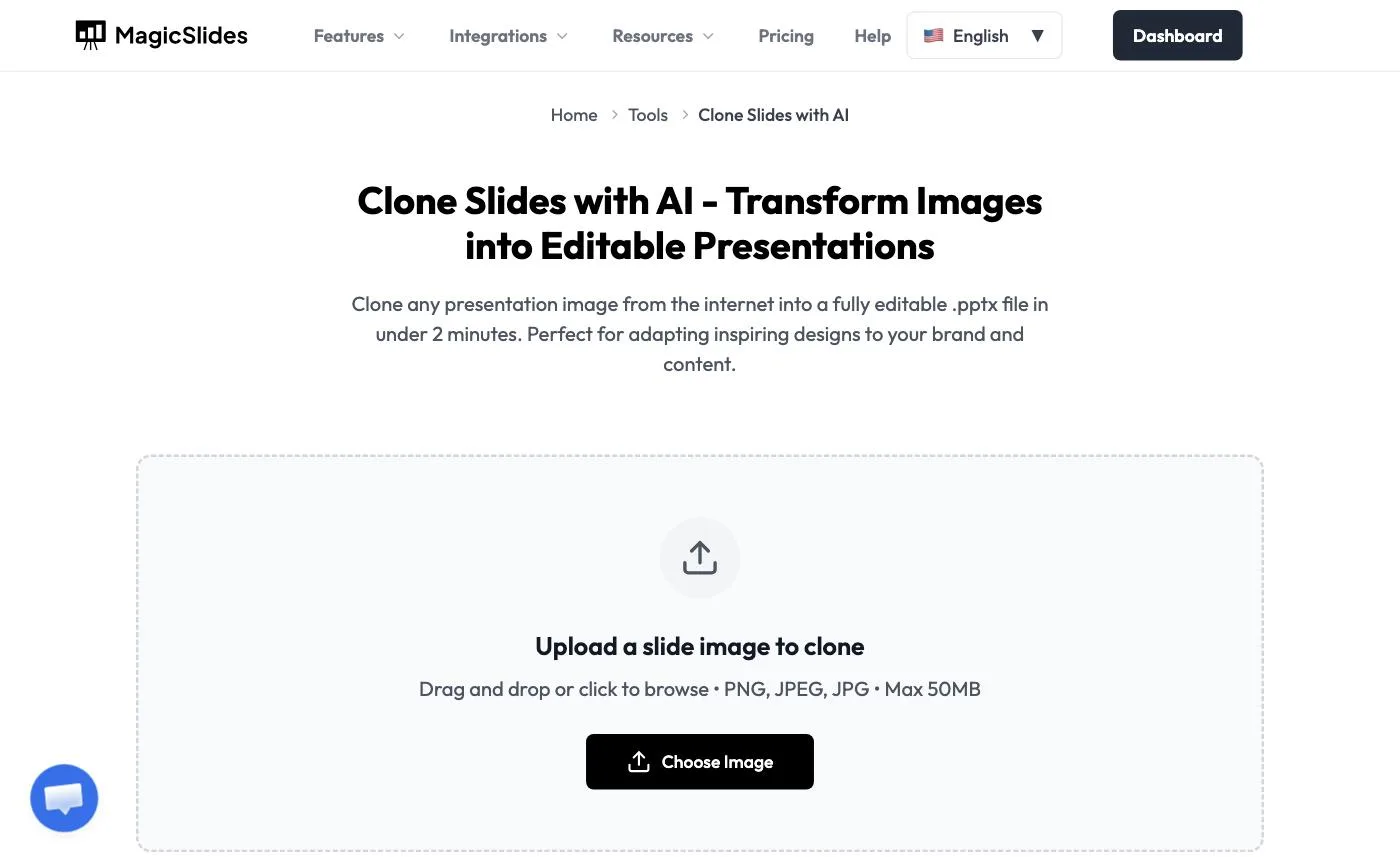
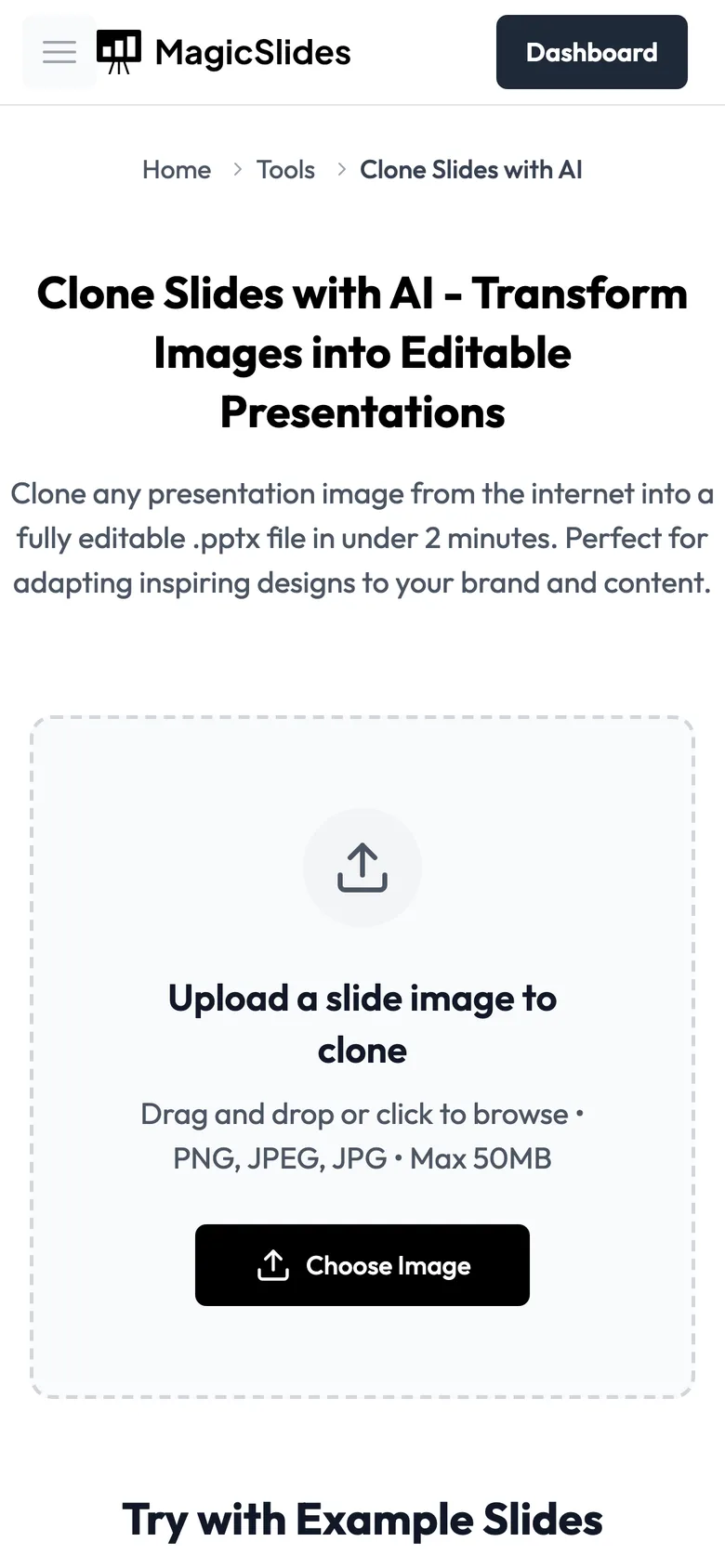
The Clone Slides page.
Step 2: Upload your screenshot and click Clone This Slide
Click Choose Image (or drag the file onto the box). A preview of your slide appears. Check it's the right image, then click Clone This Slide. Picked the wrong file? Click Remove and choose again.

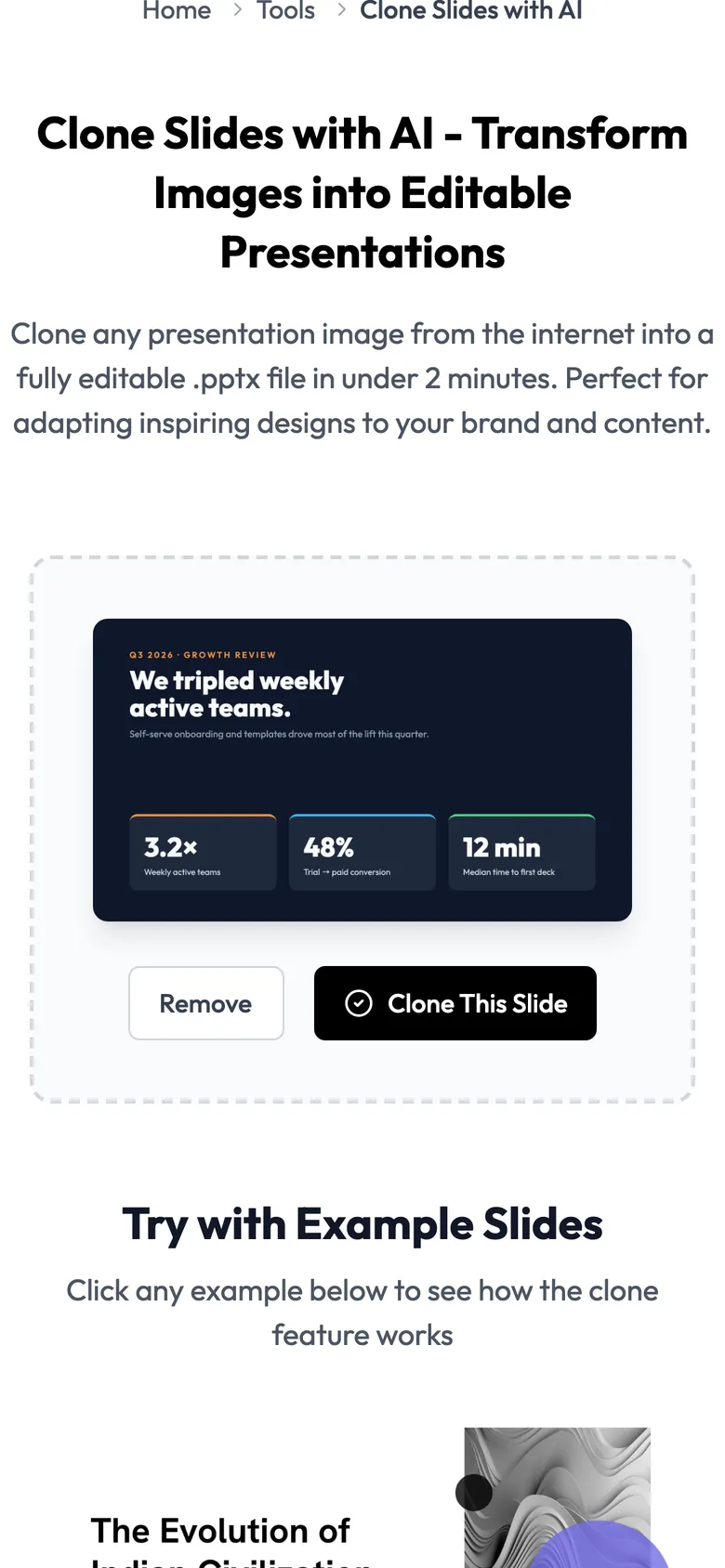
Your screenshot, ready to clone.
Step 3: MagicSlides opens the editor and starts cloning
You're taken straight into the MagicSlides editor. The Clone Slide panel on the right fetches your image and starts rebuilding it. The bottom of the panel shows your remaining credits.
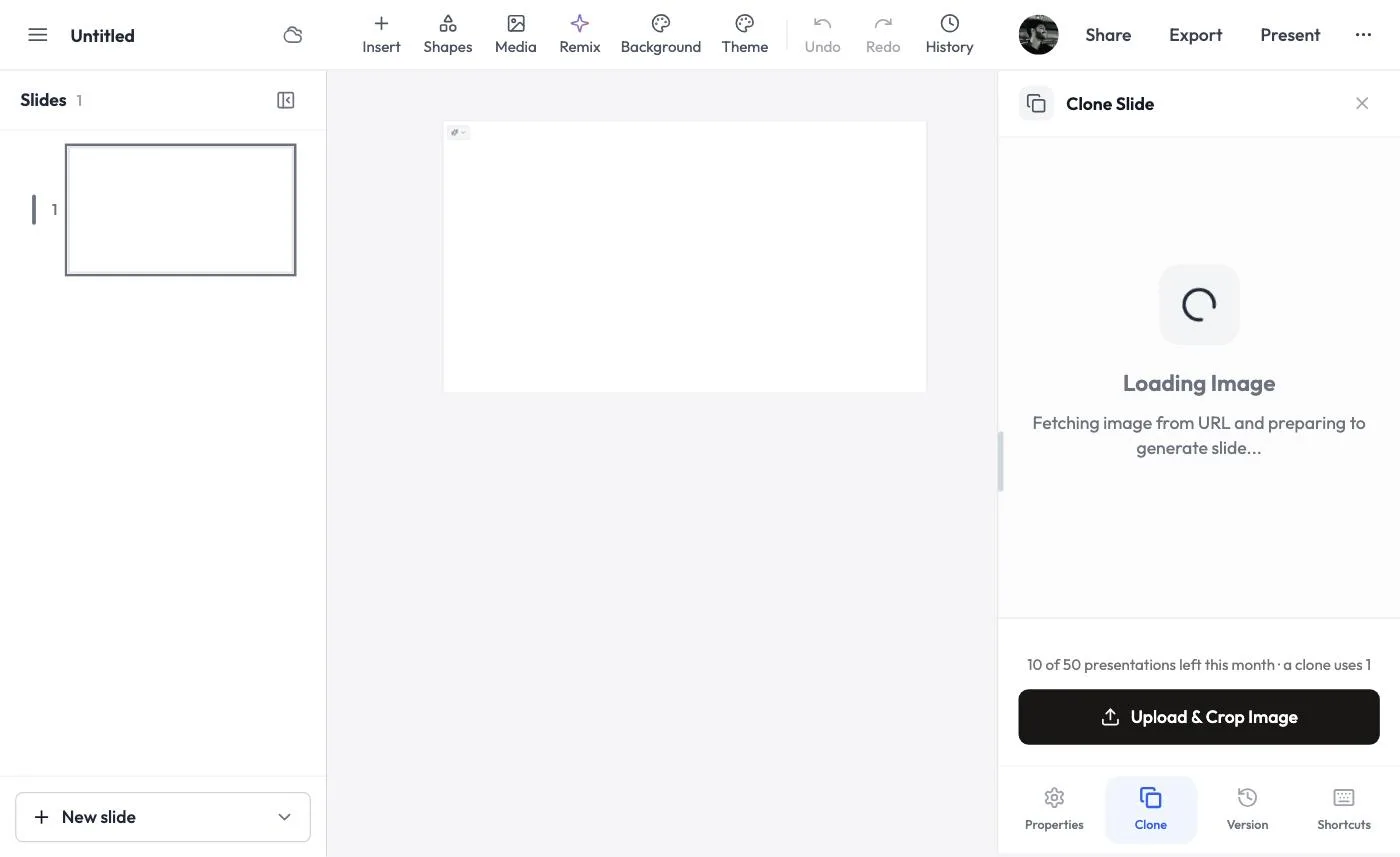 Cloning starts automatically — no extra clicks.
Step 4: Click Add Slide
In under a minute the clone appears in the panel with a green tick. Click Add Slide.
 The clone is ready — add it to your deck.
Step 5: Your cloned slide is in the deck
You'll see a Slide added confirmation, and the slide appears in the slide list on the left and on the canvas.
 The cloned slide, now slide 2 of the deck.
Step 6: Click anything to edit it
This is the part that matters: click the headline and it's real text. The text toolbar appears (font, size, bold, colour, alignment), plus Magic Write and Ask AI to rewrite it for you. The stat cards, labels and numbers are all separate, editable layers too.
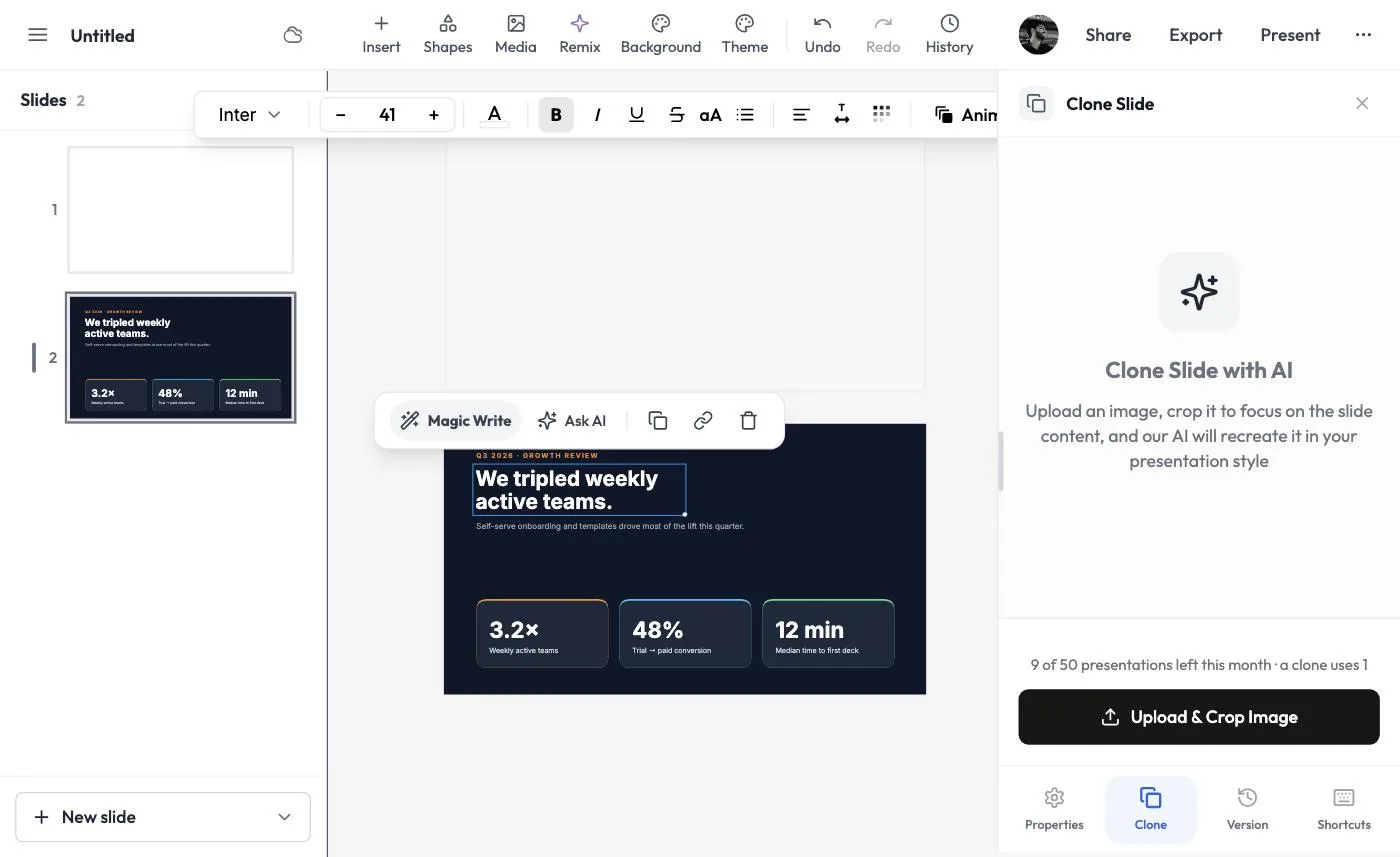 Every element of the clone is editable.
Method 2: Clone from inside the editor
Already working on a presentation? You can clone a slide without leaving it. This time we cloned a light "how it works" slide:
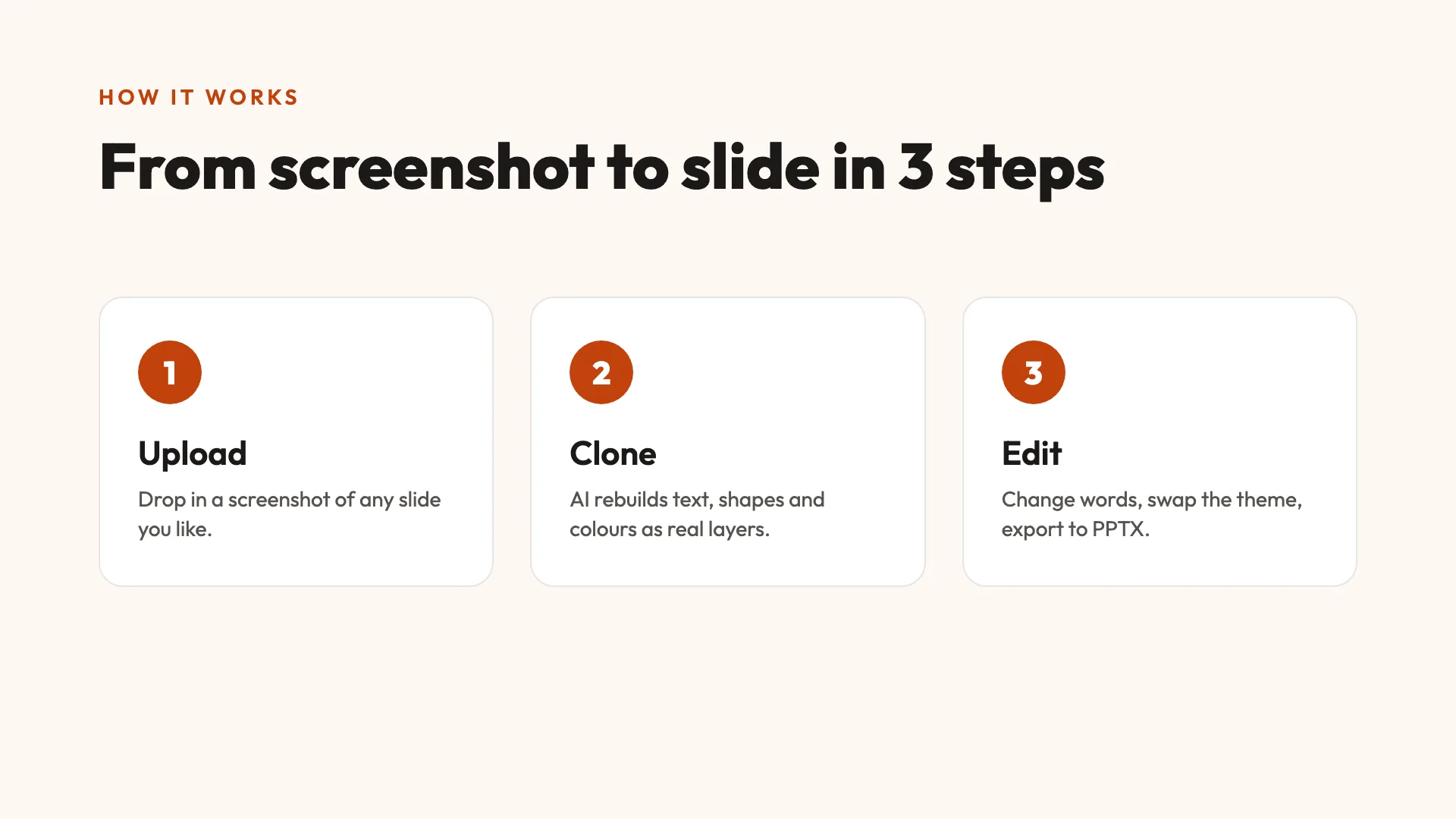 The screenshot we uploaded for method 2.
Step 1: Click New slide → Clone a slide
At the bottom of the slide list, open the New slide menu (the arrow on the right of the button). Choose Clone a slide — Upload a screenshot, get an editable slide.
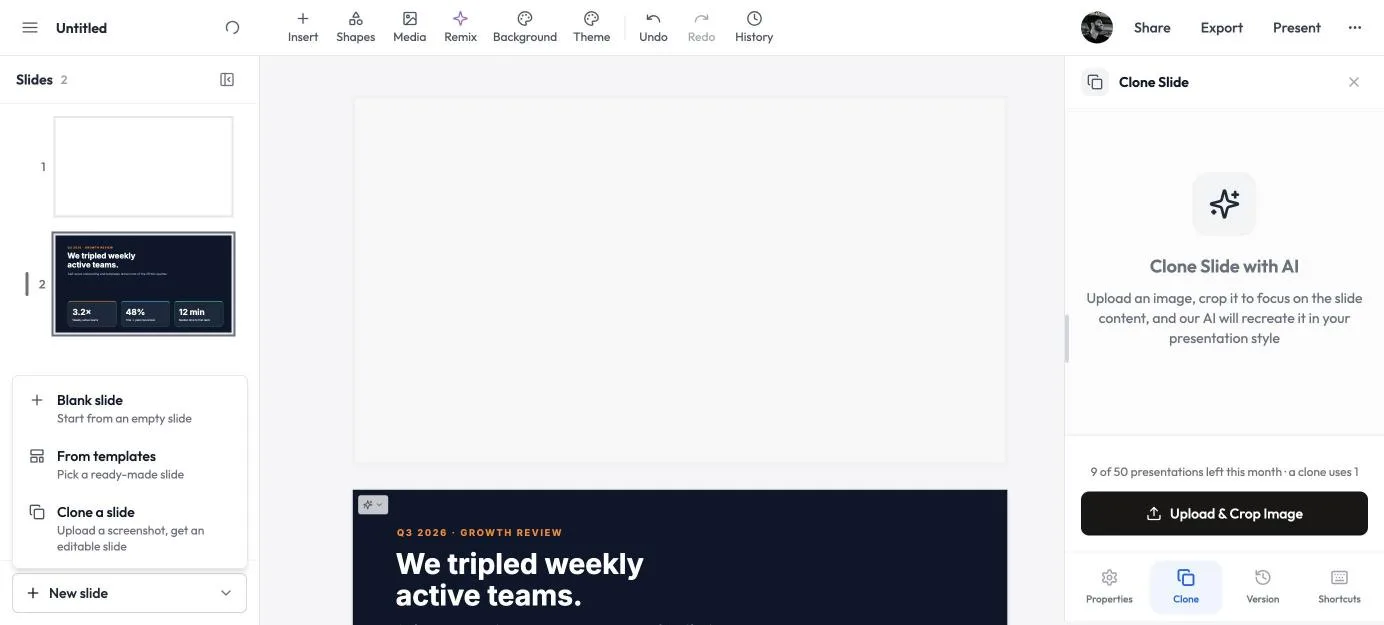

New slide → Clone a slide.
Step 2: Click Upload & Crop Image
The Clone Slide panel opens on the right. Click Upload & Crop Image and pick your screenshot.
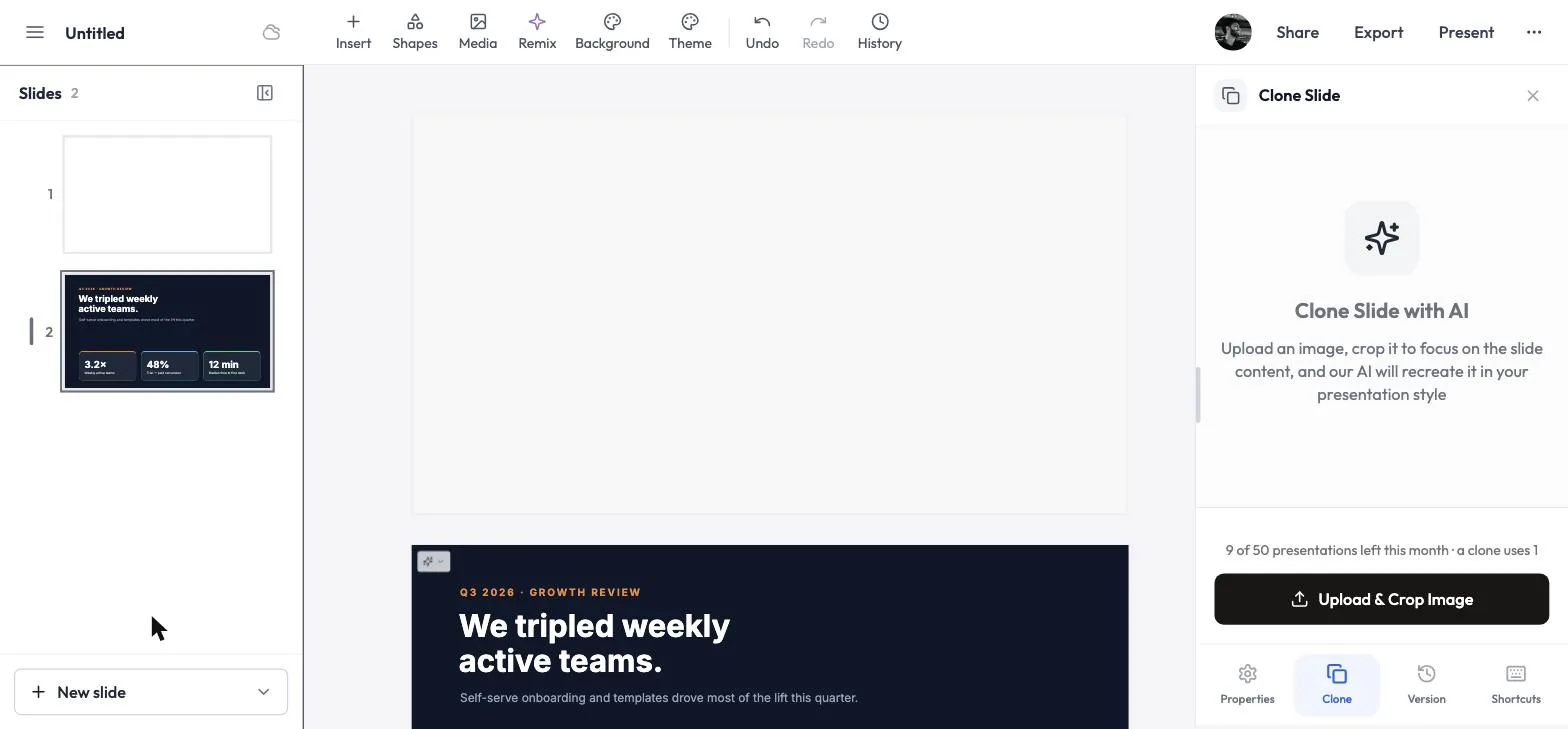

The Clone Slide panel inside the editor.
Step 3: Check the crop, then click Clone slide
A Check your slide window shows what will be cloned. If your screenshot has extra space around the slide — browser bars, a desktop, other windows — click Trim to detected slide or drag the corners so only the slide is inside the box. Sideways photo? Use Rotate 90°. Then click Clone slide.
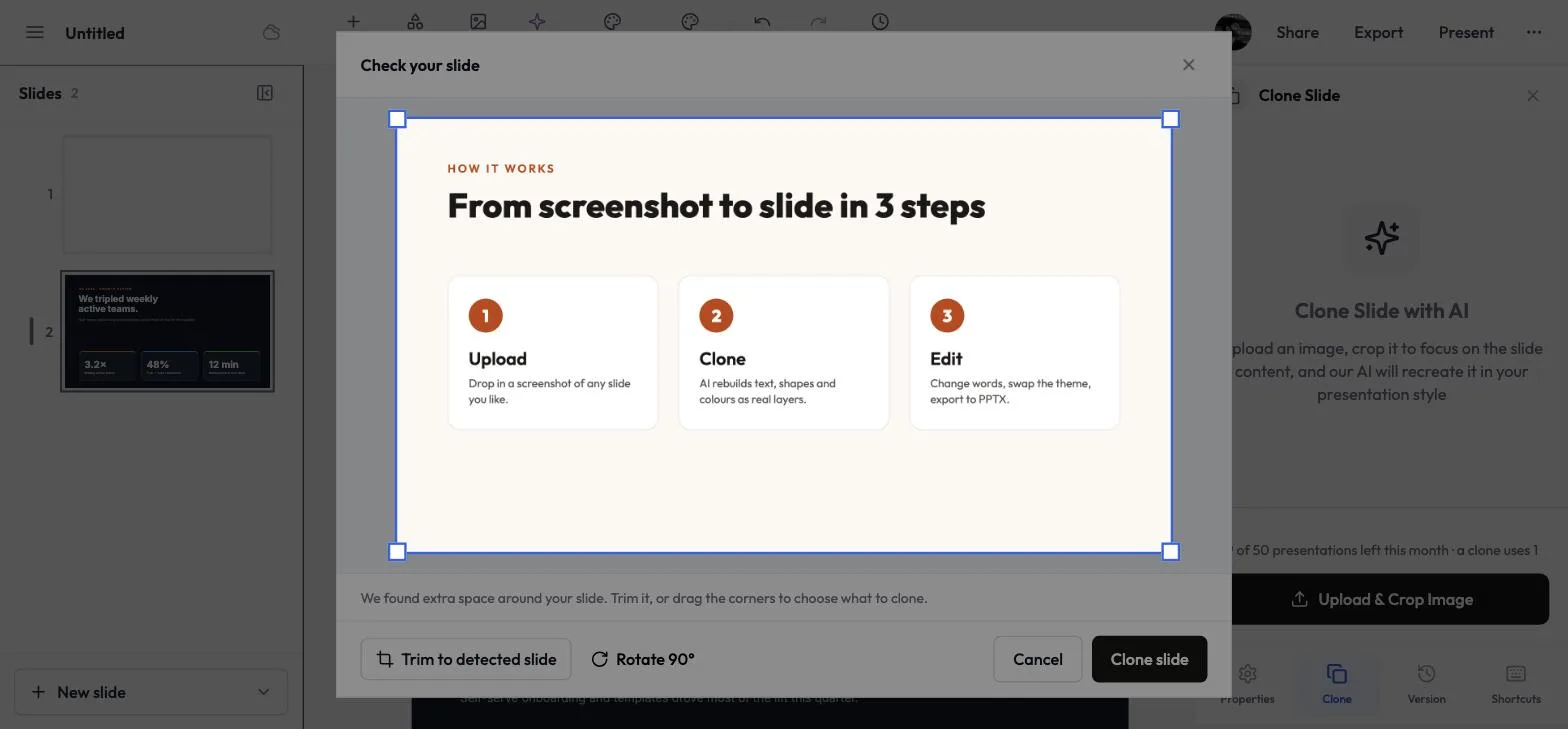

Crop to just the slide for the most accurate clone.
Step 4: Wait for the clone
The panel shows Generating slide… with a countdown. It usually takes under a minute.
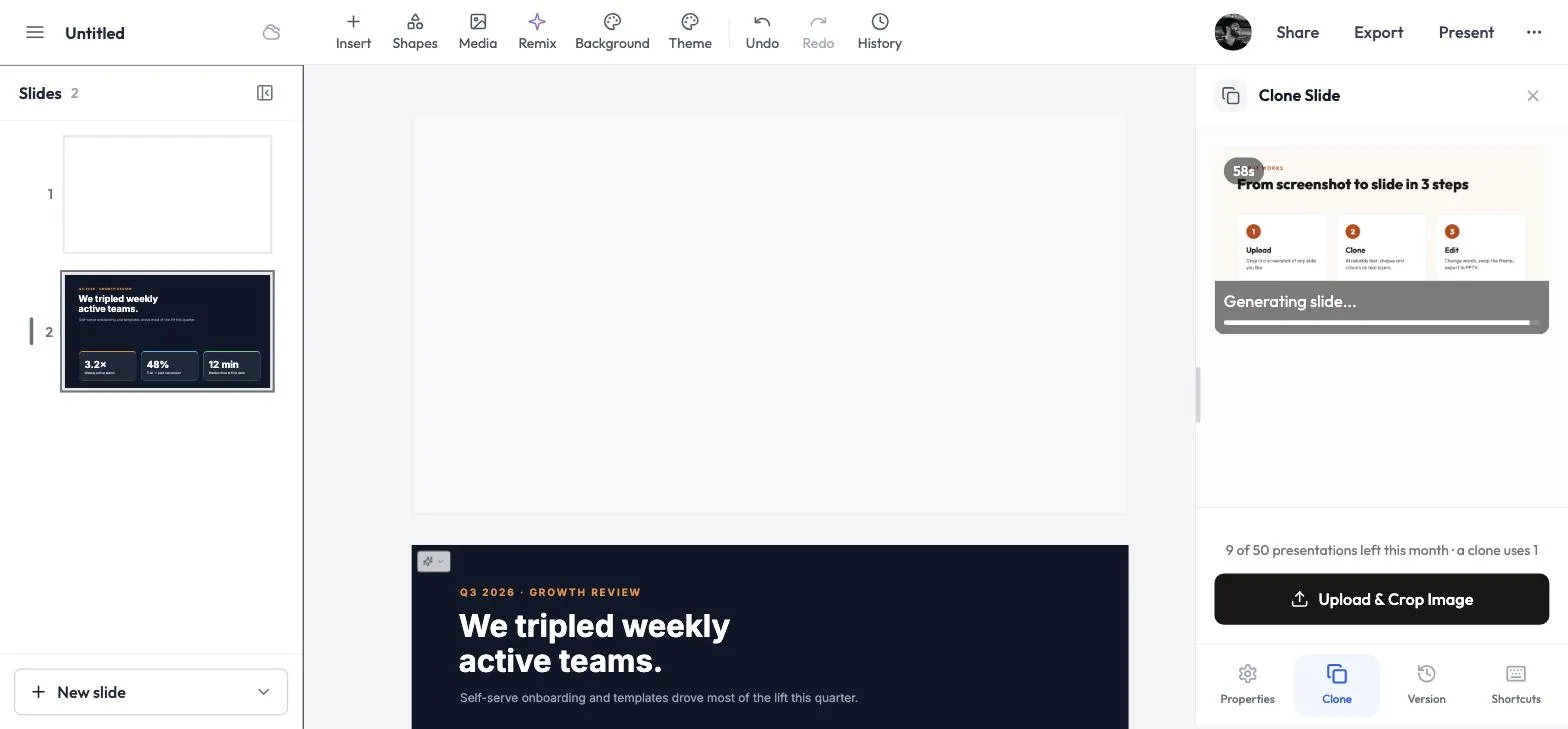 Cloning in progress.
Step 5: Click Add Slide
When the green tick appears, click Add Slide.
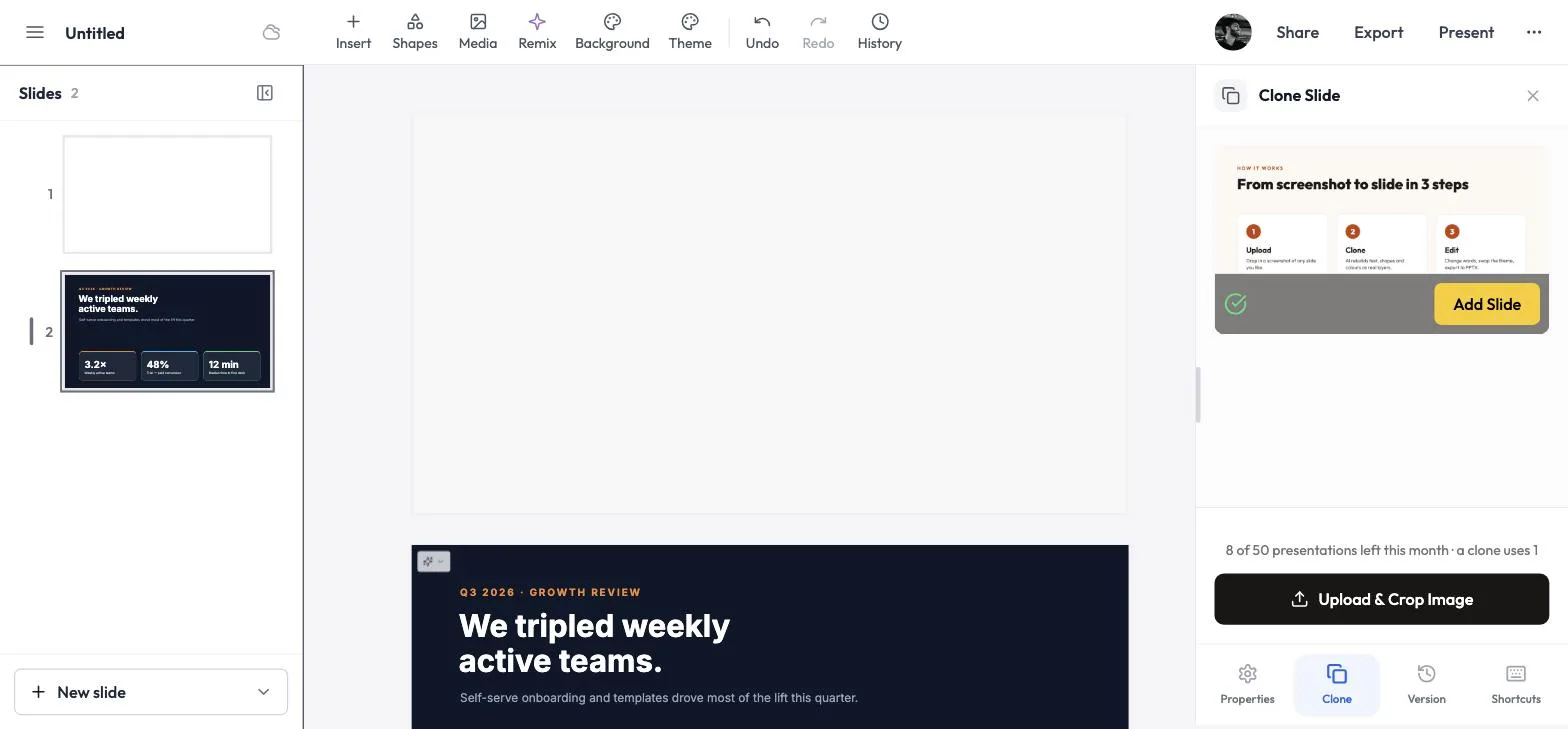 Ready to add.
Step 6: Done — edit it like any other slide
The slide is added to the end of your deck, matching the original's layout, colours and text.
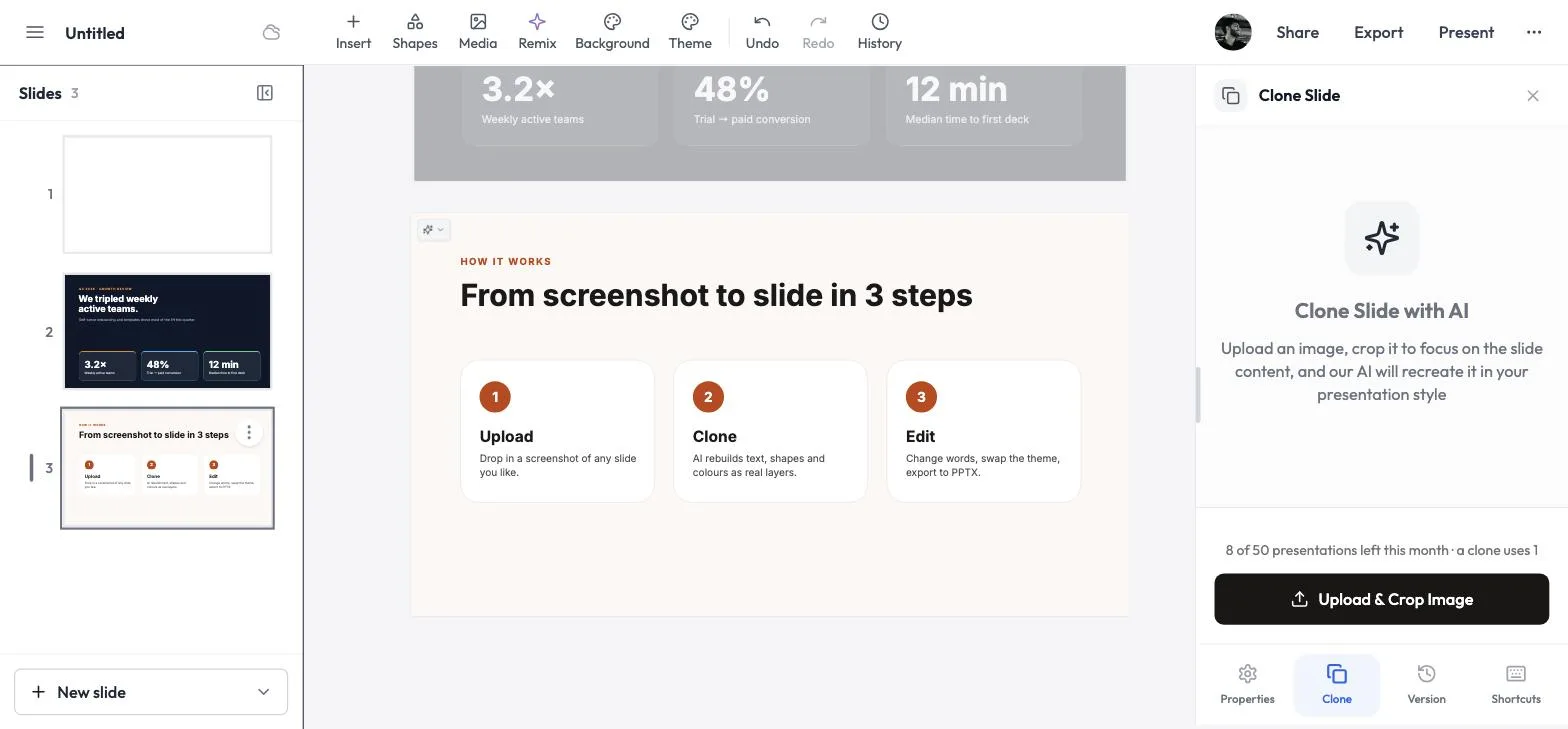 The clone, added as slide 3.
Method 3: Clone from any website with the Chrome extension
The free MagicSlides Chrome extension adds two options to Chrome's right-click menu:
- Clone with MagicSlides — right-click a slide image on any web page.
- Select area to clone in MagicSlides — drag a box around anything on screen, like a slide in a video, a chart in an article or a section of a document.
Both open the MagicSlides editor with the clone already running. Cloning works exactly as in Method 1 and uses the same credits.
Step 1: Add the extension to Chrome
Open the Magicslide.app extension on the Chrome Web Store and click Add to Chrome. Then make sure you're signed in to MagicSlides in the same Chrome profile so the clone lands in your account.
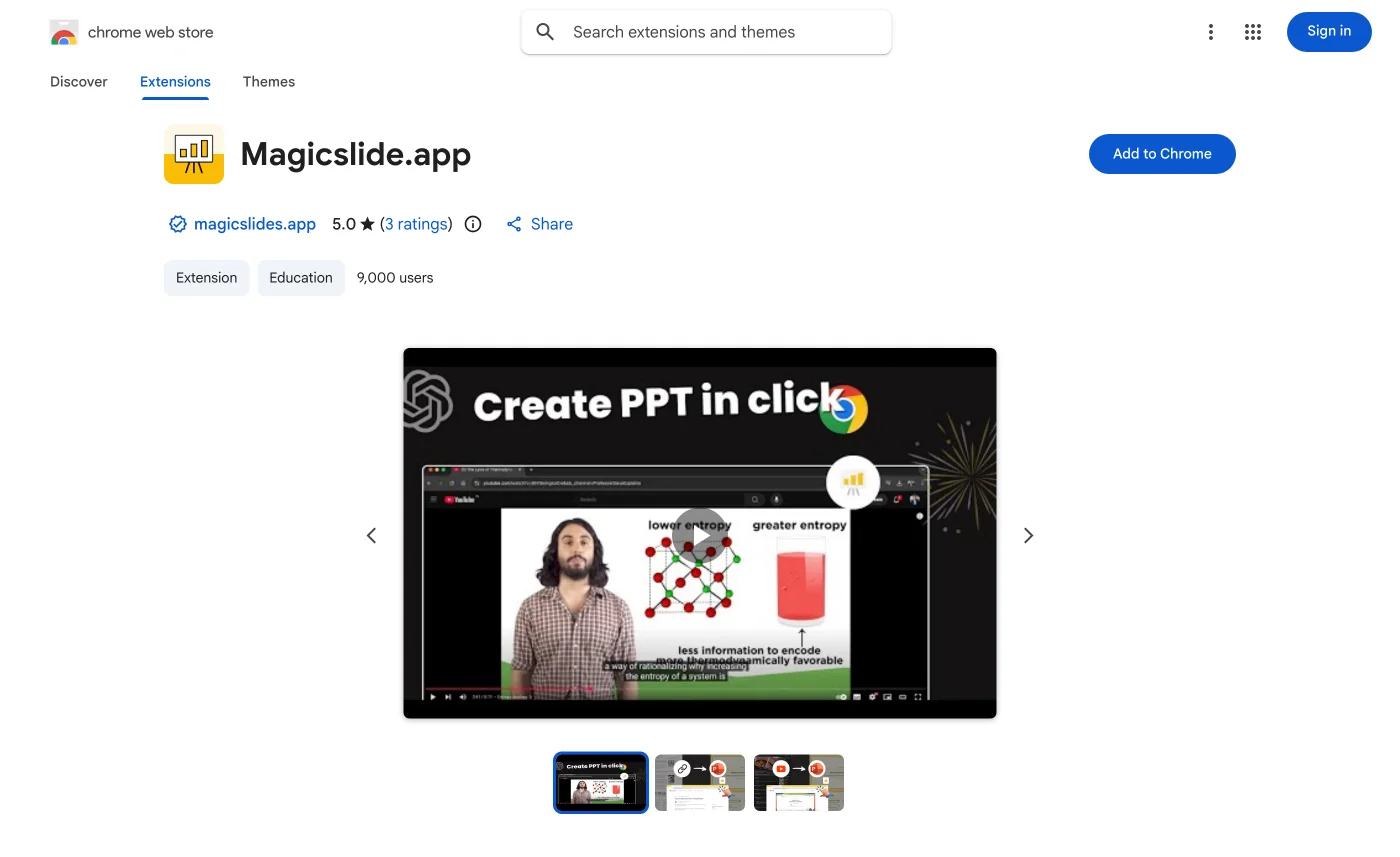 The extension on the Chrome Web Store.
Step 2: Right-click a slide image → Clone with MagicSlides
If the slide is an image on the page, right-click it and choose Clone with MagicSlides. On pages where the image is also a link, the MagicSlides options sit together under a Magicslide.app submenu, as shown here.
 Right-click the slide image, then Clone with MagicSlides.
Step 3: Or right-click the page → Select area to clone
Used Step 2? Skip to Step 5. If the slide isn't a separate image, like a slide shown in a video, a webinar or an embedded deck, use area select instead. Right-click a blank part of the page, outside the video player, and choose Select area to clone in MagicSlides.
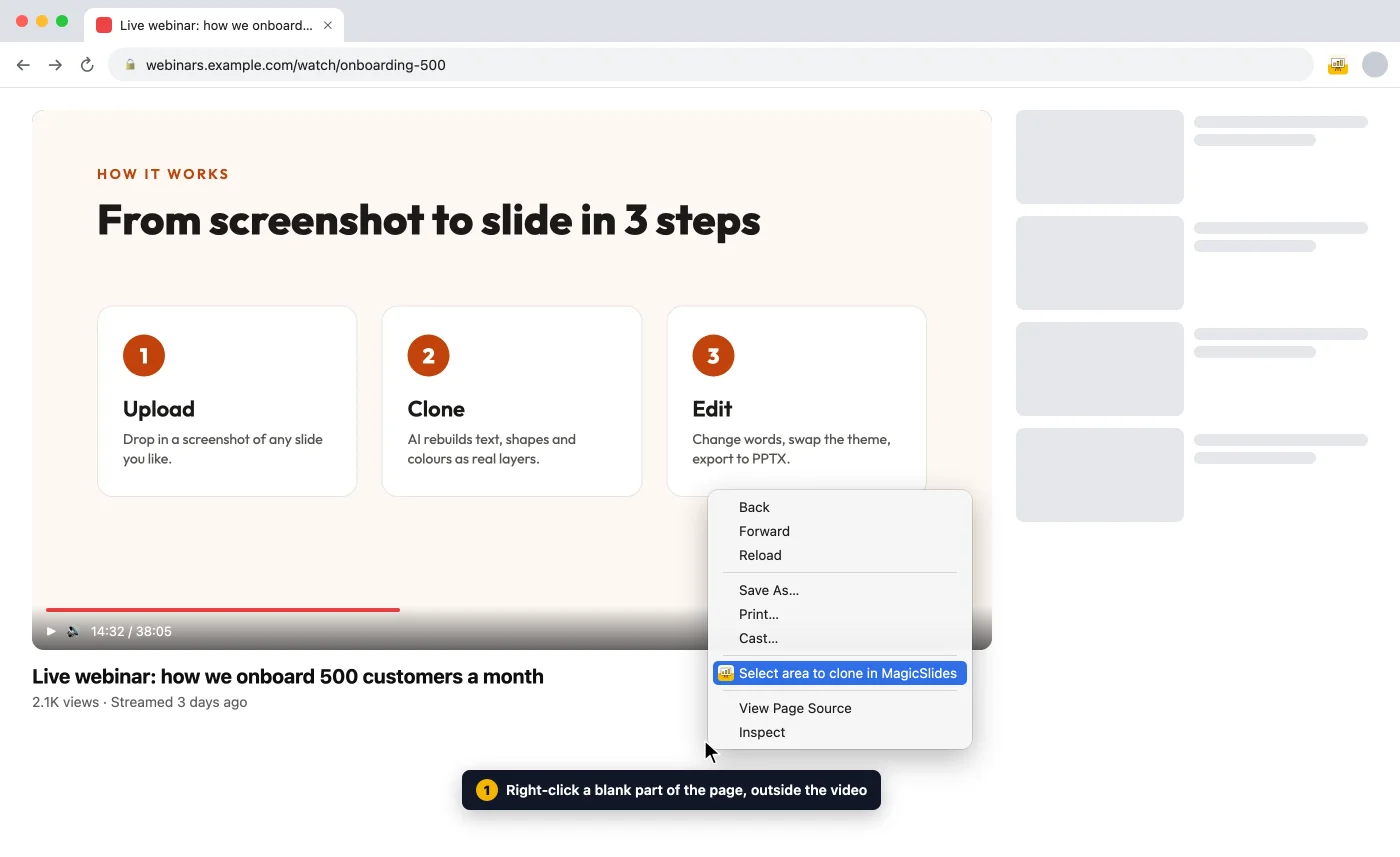 Right-click outside the player. Video players show their own menu instead of Chrome's.
Step 4: Drag a box around the slide
The page dims and a blue bar says Click and drag to select an area. Press ESC to cancel. Drag from one corner of the slide to the opposite corner. Keep the box tight to the slide and leave out player controls and page text.
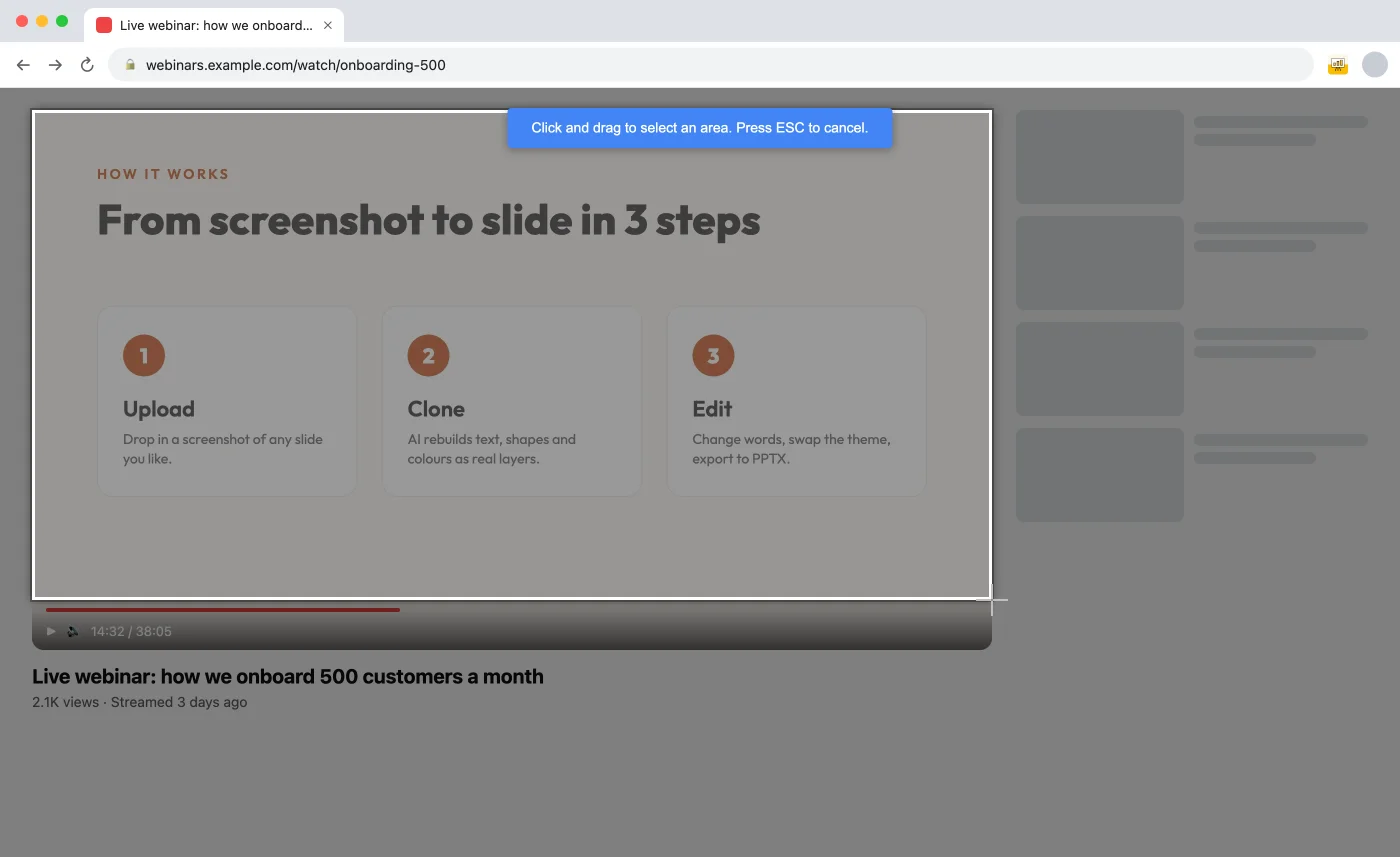 Select just the slide.
Step 5: MagicSlides opens and starts cloning
With area select, the bar turns green and says Opening MagicSlides... when you let go. The extension captures your selection and opens the editor in a new tab. With Clone with MagicSlides, the editor opens right after you click.
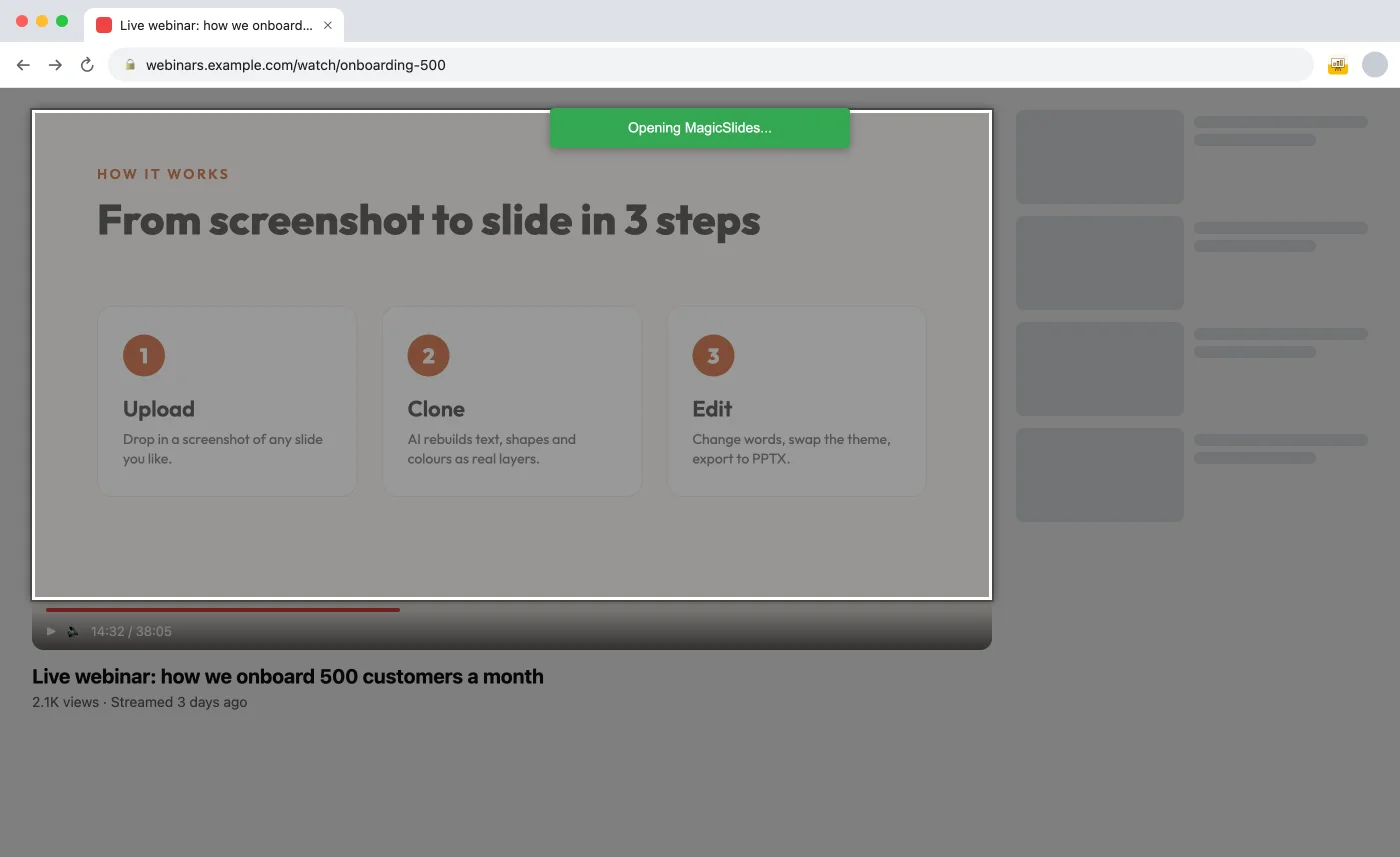 Your selection is on its way to the editor.
From here it's the same as Method 1: the Clone Slide panel loads your image and rebuilds it (Step 3 above). Click Add Slide when the green tick appears, then click anything on the slide to edit it.
The editor opens with the clone already running.
Tips for the best clone
- Crop tight. Only the slide should be in the image — no browser tabs, toolbars or desktop. In the editor, Trim to detected slide does this for you.
- Use a sharp screenshot. Blurry or tiny images make small text harder to read. A full-screen screenshot works better than a thumbnail.
- Right-click did nothing useful? Some sites load images in a way the extension can't fetch. Use Select area to clone in MagicSlides and drag over the image instead. It captures exactly what's on your screen.
- Zoom in before you select. With area select, the clone reads what's on screen. Make the slide big (full-screen the video or zoom the page) so small text stays sharp.
- One slide per image. If you screenshot a grid of slides, crop to the one you want.
- Then make it yours. After cloning, use Theme to switch to your brand colours, or Magic Write to rewrite the text for your topic.
Frequently asked questions
How does the AI slide cloning work?
Our AI uses computer vision to analyze the uploaded image and identify every visual element — text blocks, shapes, icons, background colors, gradients, and layout structure. It then maps each detected element to a native PowerPoint object (text box, rectangle, image placeholder, etc.) and positions them to match the original layout. The result is a fully editable .pptx file where you can click on any element and modify it, rather than a flat image pasted onto a slide.
What image formats can I upload?
You can upload PNG, JPG, JPEG, WebP, and other common image formats. Screenshots taken from any device or platform — Mac, Windows, iPhone, Android — work perfectly. We recommend uploading the highest resolution image available for the best cloning accuracy.
How accurate is the cloning process?
Our AI achieves high accuracy in replicating layouts, text content, color schemes, and overall design structure. Text is extracted with OCR and placed into editable text boxes. While exact font matching may vary (we substitute the closest available system font), the overall visual appearance, spacing, and hierarchy are faithfully reproduced.
Can I clone multiple slides at once?
Yes, you can upload multiple images and our AI will create a multi-slide presentation, with each image becoming a separate editable slide. This is perfect for cloning an entire deck from a series of screenshots — for example, screenshots from a conference talk or a competitor's SlideShare presentation.
Is the output fully editable in PowerPoint?
Absolutely. Every element in the cloned presentation — text boxes, shapes, background colors, images, and layouts — is a native PowerPoint object. You can edit text, change fonts, swap colors, resize shapes, delete elements, or rearrange the layout. The file also opens in Google Slides and Keynote.
Can I use this for copyrighted designs?
The tool is designed for personal use, inspiration, and as a starting point for your own original work. You can use it to study design patterns and recreate layouts with your own content. Always ensure you have the right to use or adapt any designs you clone, and respect intellectual property rights.
How long does the cloning process take?
Most slides are cloned within 1-2 minutes. Complex designs with many layered elements, gradients, or embedded charts may take slightly longer — typically under 3 minutes. The process runs entirely in the cloud so your device speed doesn't matter.
What makes this different from taking a screenshot?
A screenshot is a flat image — you can't click on the text to edit it, change a color, or move an element. Our AI slide cloner deconstructs the image into individual editable components. You get a real PowerPoint file where every text box, shape, and graphic is a separate, editable object. Think of it as reverse-engineering a slide design into its building blocks.
Can I clone slides from Canva, Google Slides, or Keynote?
Yes. Simply take a screenshot of any slide from Canva, Google Slides, Keynote, or any other presentation tool, and upload the image. Our AI doesn't care about the source — it works purely from the visual image, so any slide from any platform can be cloned into an editable PowerPoint file.
What happens to my uploaded images after cloning?
Your uploaded images are processed securely on our servers and are not stored permanently. After the cloning is complete and you download your presentation, the original images are automatically deleted. We take data privacy seriously and do not use your uploads for training or any other purpose.
Can I customize the cloned slides after downloading?
That's the whole point! The cloned slides are designed to be a starting point. After downloading the .pptx file, you can open it in PowerPoint or Google Slides and change absolutely everything — swap in your brand colors, replace placeholder text with your own content, add or remove slides, change fonts, insert your logo, and make it completely your own.
Is there a limit to how many slides I can clone?
Free users can clone a limited number of slides per month. For higher volume needs — like cloning entire decks or using the tool regularly for client work — check our pricing page for premium plan details with increased limits and priority processing.
Other Free PPT Tools
Topic to PPT using AI
Generate engaging presentations quickly from just a keyword. Ideal for students and educators needing fast, content-rich slides.
YouTube to PPT using AI
Turn YouTube videos into informative slide presentations. Excellent for marketers and creators looking to expand their video content's reach.
AI PitchDeck Generator
Turn Pitch Deck into informative slide presentations. Excellent for business and startup looking to present his business.
Text to PPT using AI
Generate engaging presentations quickly from just a keyword. Ideal for students and educators needing fast, content-rich slides.
URL to PPT using AI
Effortlessly convert any web page into a comprehensive presentation. Perfect for professionals and researchers presenting web-based data.
PDF to PPT using AI
Convert PDF files to PowerPoint slides easily. Essential for analysts and consultants dealing with detailed reports.

Clone any slide design you love
Recreate the look of any deck and make it your own — same polished style, your content.
1,511 reviews · Trustpilot & Workspace


