How to Write a Letter of Presentation: A Step-by-Step Guide


Learn how to write a professional letter of presentation with examples, structure, formatting tips, and best practices. Create a compelling cover letter that stands out.
A letter of presentation, also known as a cover letter, is one of the most important documents in a job application or academic submission. A well-written presentation letter helps you introduce yourself professionally, highlight your qualifications, and explain why you are the ideal candidate for the opportunity.
Whether you are applying for a job, internship, scholarship, or business proposal, learning how to write a strong letter of presentation can significantly improve your chances of success. In this guide, you’ll learn the proper structure, formatting tips, examples, and best practices for creating a professional presentation letter.
Understanding the Purpose of a Letter of Presentation
A letter of presentation is your chance to:
- Introduce Yourself: Provide a brief overview of who you are and your current role or status.
- Highlight Relevant Skills and Achievements: Showcase how your background aligns with the opportunity.
- Express Your Enthusiasm: Demonstrate genuine interest in the position, organization, or program.
- Encourage Further Engagement: Motivate the recipient to review your application in detail.
Whether you’re applying for a job, internship, scholarship, or another professional opportunity, your letter should aim to leave a lasting positive impression.
Structure of a Letter of Presentation
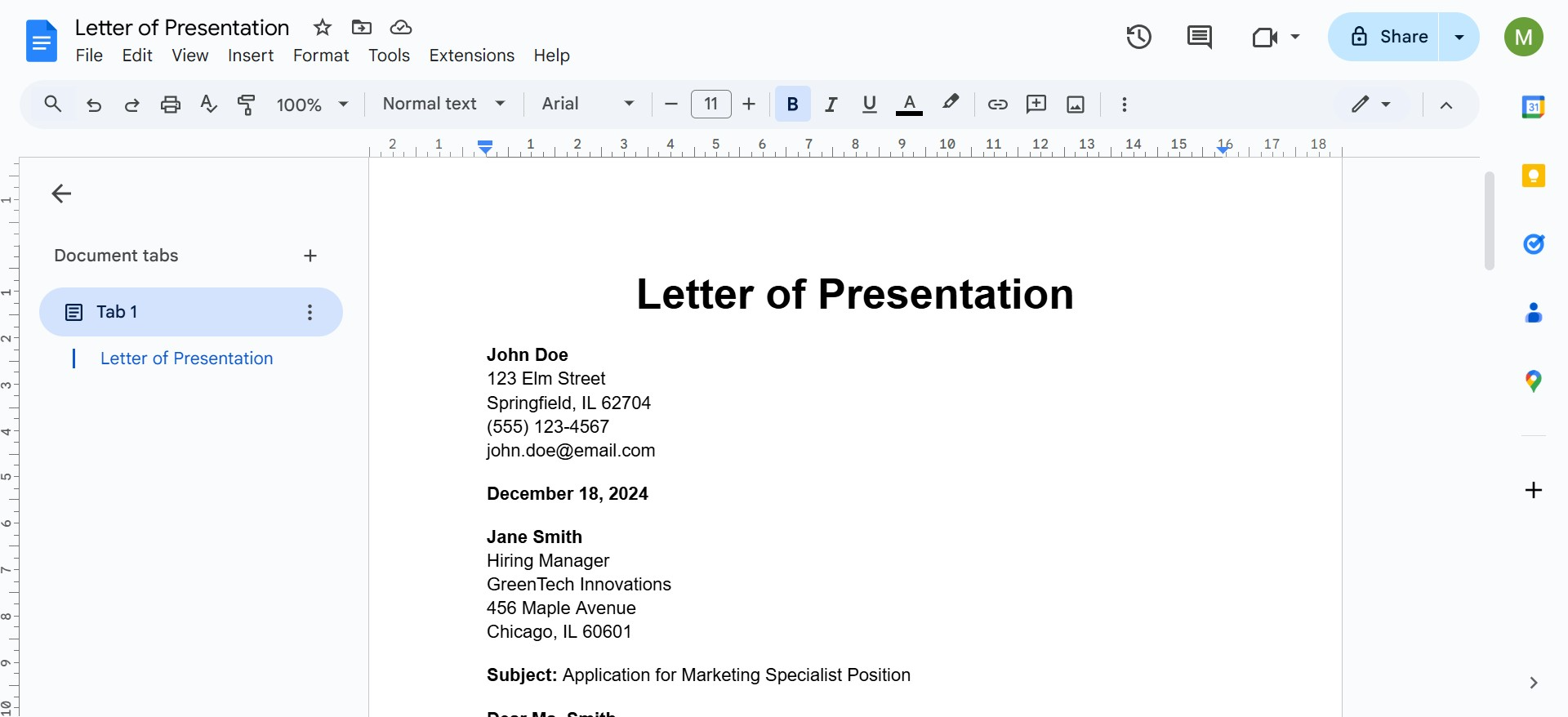
1. Header and Salutation
- Your Contact Information: At the top of the letter, include your name, address, phone number, and email.
- Recipient’s Information: Follow with the recipient’s name, title, organization, and address.
- Date: Place the date below the recipient’s information.
- Salutation: Use a professional greeting, such as “Dear [Recipient’s Name],” or “To Whom It May Concern,” if the name is unavailable.
2. Opening Paragraph
The opening paragraph should grab the reader’s attention and set the tone for the letter. Include:
- A clear statement of the purpose of your letter.
- A brief mention of the opportunity you’re applying for.
- A compelling hook, such as a notable achievement or your enthusiasm for the role.
Example: “I am writing to express my keen interest in the Marketing Specialist position at XYZ Corporation, as advertised on your website. With a proven track record in digital marketing and a passion for innovative brand strategies, I am eager to bring my expertise to your dynamic team.”
3. Body Paragraphs
The body is where you elaborate on your qualifications and make a case for your suitability.
Paragraph 1: Showcase Your Experience
Highlight your relevant experience, skills, or achievements that directly align with the opportunity. Use specific examples to demonstrate your value.
Example: “In my previous role as a Digital Marketing Coordinator at ABC Agency, I spearheaded a social media campaign that increased client engagement by 35% within three months. By analyzing audience data and implementing targeted strategies, I successfully enhanced brand visibility and ROI.”
Paragraph 2: Align with the Organization’s Needs
Show that you’ve done your research by connecting your background to the organization’s goals, values, or recent initiatives.
Example: “I am particularly impressed by XYZ Corporation’s commitment to sustainability and innovative marketing solutions. My experience in crafting eco-conscious campaigns aligns seamlessly with your mission to promote environmentally responsible practices.”
Paragraph 3: Highlight Your Enthusiasm
Reiterate your passion for the role and explain why you’re excited about the opportunity.
Example: “Joining XYZ Corporation would allow me to contribute to impactful campaigns while growing alongside a team that shares my dedication to creativity and excellence.”
4. Closing Paragraph
The closing paragraph should summarize your key points and include a strong call to action.
- Reaffirm your interest in the role.
- Mention that you’ve attached your resume or other required documents.
- Politely request a follow-up or an opportunity to discuss your application further.
Example: “I am enthusiastic about the possibility of contributing to your team and am confident that my skills and experience make me a strong candidate for this role. I have attached my resume for your review and would welcome the opportunity to discuss how I can add value to your organization. Thank you for considering my application, and I look forward to the possibility of speaking with you soon.”
5. Closing Signature
Use a professional closing followed by your name and signature if submitting a printed copy.
Example:
- Sincerely,
- Best regards,
- Respectfully,
Your Name
Tips for Writing an Effective Letter of Presentation
1. Personalize the Letter: Avoid using a generic template. Tailor the content to the specific role, organization, or program by referencing its unique aspects.
2. Keep it Concise: Stick to one page. Use clear, direct sentences and avoid unnecessary jargon.
3. Proofread: Typos or grammatical errors can create a poor impression. Review your letter carefully, and consider asking a friend or mentor to check it as well.
4. Match Your Tone: Align your tone with the opportunity. For corporate roles, maintain a formal tone; for creative positions, you can adopt a slightly more conversational style.
5. Use Action Words: Incorporate action verbs like “led,” “developed,” “implemented,” and “achieved” to make your accomplishments stand out.
6. Format Professionally: Choose a clean, professional font like Arial or Times New Roman, with a font size of 11-12. Use standard margins and single spacing between lines.
Create Professional Presentation Letters Faster with MagicSlides
Writing a compelling letter of presentation can take time, especially when tailoring it for different roles or opportunities. Tools like MagicSlides, an AI PPT Maker, can help streamline the process by generating professional content, organizing ideas, and creating polished presentations or documents in minutes.
Whether you’re preparing for a job application, academic submission, or business proposal, AI-powered tools can save time while helping you maintain a professional tone and structure.
If you frequently create presentations, cover letters, or professional documents, using an AI productivity tool can improve both efficiency and quality.
Conclusion
A well-crafted letter of presentation is your first opportunity to make a strong impression. By following the structure and tips outlined above, you can create a compelling letter that showcases your strengths and enthusiasm, paving the way for further discussions. Remember, the key is to present yourself confidently and authentically while staying aligned with the opportunity’s requirements.
Frequently Asked Questions
Q1. What is a letter of presentation?
A letter of presentation is a professional document used to introduce yourself to an employer, institution, or organization. It highlights your qualifications, skills, and interest in a specific opportunity.
Q2. Is a letter of presentation the same as a cover letter?
Yes, a letter of presentation is often referred to as a cover letter in job applications. Both serve the purpose of introducing candidates and explaining their suitability for a role.
Q3. How long should a letter of presentation be?
A professional letter of presentation should usually be one page long and concise while covering your qualifications and enthusiasm effectively.
Q4. What should be included in a presentation letter?
A presentation letter should include contact information, a professional greeting, an introduction, relevant experience, enthusiasm for the opportunity, and a strong closing statement.


