How Do AI Tools Enhance Decision-Making and Drive Innovation?


Explore the transformative impact of AI tools on decision-making and innovation. Unlock new possibilities with cutting-edge technology. Dive in now!
In the fast-paced and dynamic landscape of today's business world, the ability to make informed decisions quickly and foster innovation is paramount. As technology continues to evolve, Artificial Intelligence (AI) has emerged as a powerful ally in enhancing decision-making processes and driving innovation across various industries. In this blog post, we will explore the ways in which AI tools contribute to these crucial aspects of organizational success.
How Do AI Tools Enhance Decision-Making and Drive Innovation?
The Role of AI in Decision-Making

1. Data Analysis and Insights
One of the primary strengths of AI lies in its ability to analyze vast amounts of data rapidly. Decision-makers can leverage AI algorithms to sift through complex datasets, identify patterns, and extract valuable insights. This data-driven approach allows for more informed and strategic decision-making, minimizing the reliance on intuition alone.
2. Predictive Analytics
AI tools excel in predictive analytics, forecasting future trends based on historical data. This capability is particularly valuable in industries such as finance, where predicting market trends and stock prices is essential. By incorporating AI-driven predictions, decision-makers can mitigate risks and capitalize on emerging opportunities.
3. Automation of Routine Tasks
AI tools can automate routine and repetitive tasks, freeing up valuable time for decision-makers to focus on more complex and strategic issues. This not only increases efficiency but also reduces the likelihood of human errors associated with monotonous tasks.
4. Personalized Recommendations
In customer-centric industries, AI algorithms can analyze customer behavior and preferences to provide personalized recommendations. This level of customization enhances the decision-making process, whether it's tailoring marketing strategies or improving product offerings.
AI's Impact on Innovation
1. Accelerating Research and Development
AI expedites the research and development process by quickly analyzing vast amounts of data, identifying potential areas for innovation, and even suggesting novel solutions. This acceleration is particularly beneficial in industries like healthcare and technology, where rapid advancements are critical.
2. Creative Assistance
AI isn't limited to analytical tasks; it can also play a role in fostering creativity. Through the analysis of historical data and patterns, AI tools can provide creative insights and suggestions, acting as a collaborative partner in the ideation phase of innovation.
3. Improved Product Design
In product-centric industries, AI contributes to innovation by aiding in the design process. By analyzing user feedback, market trends, and competitor data, AI can recommend design modifications, ensuring that products align with consumer needs and preferences.
4. Enhanced Decision-Making in Innovation Projects
AI's ability to process and analyze vast datasets is invaluable in innovation projects. From selecting the most viable ideas to optimizing project timelines, AI assists decision-makers in navigating the complexities of innovation.
Introducing MagicSlides: Revolutionizing Presentation Creation with AI

As we delve into the transformative power of AI in decision-making and innovation, it's essential to highlight tools that seamlessly integrate AI into everyday workflows. Enter MagicSlides, a revolutionary application designed to elevate your presentation creation process using the magic of AI.
MagicSlides: Making Presentations Effortless

1. Text to Presentation
Have an outline of a presentation ready? With MagicSlides, simply paste the text, and your presentation is ready in seconds. AI algorithms work behind the scenes to transform your content into a visually appealing and coherent presentation.
2. Topic to Presentation
Thinking about a specific topic? Enter the topic and the number of slides you desire, and let MagicSlides do the rest. It's as simple as that. This feature is perfect for those times when you need a presentation quickly and efficiently.
3. Youtube to Presentation
Got an informative YouTube video you want to convert into a presentation? Just enter the URL into MagicSlides, and watch as your presentation takes shape effortlessly. This innovative feature streamlines the process, saving you time and effort.
4. Make it Look Good
MagicSlides understands the importance of aesthetics. With different themes, font choices, color palettes, and layouts, you have the power to make your presentation look polished and professional. Let AI assist you in creating visually stunning presentations.
How MagicSlides Works: A Simple Four-Step Process
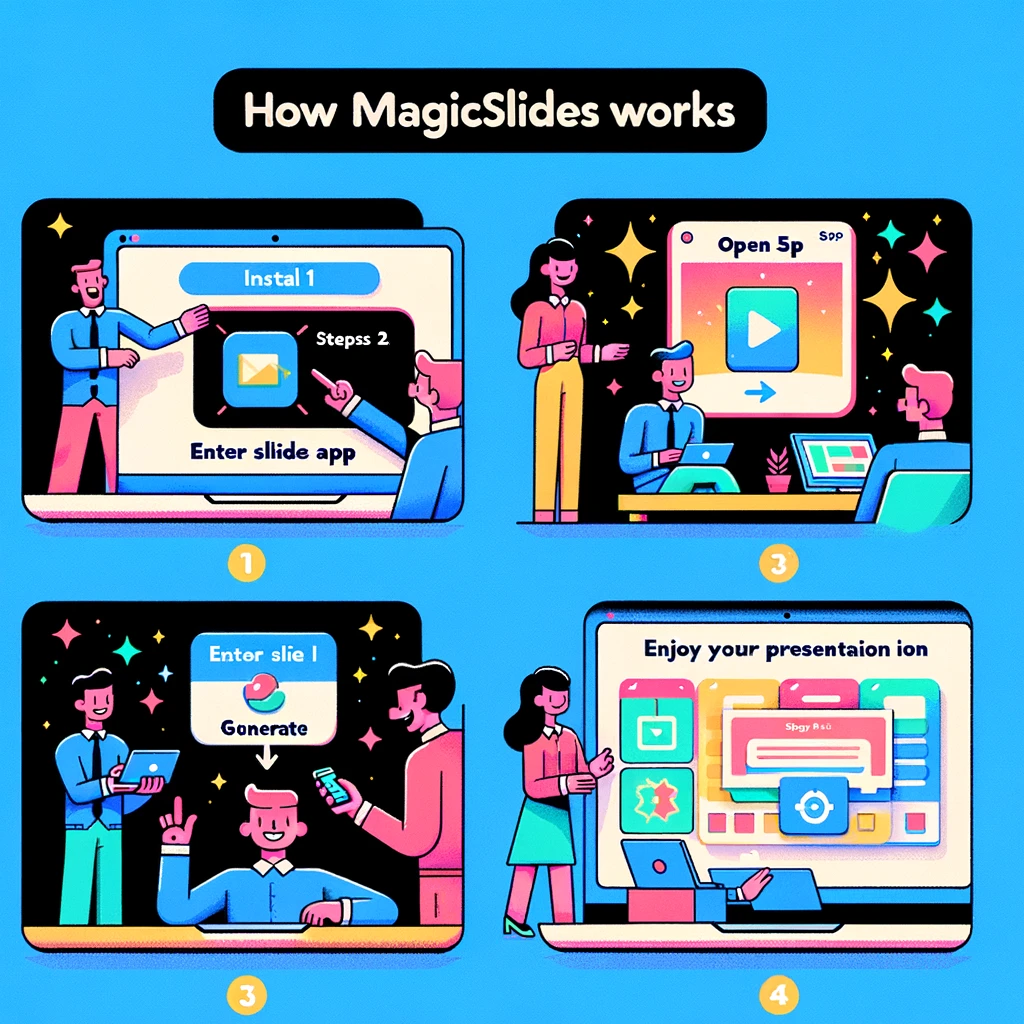
Step 1: Install MagicSlides
Begin by installing MagicSlides from the Google Workspace Marketplace. This seamless integration ensures that you can access the power of AI directly within Google Slides.
Install Now →
Step 2: Open MagicSlides App
Visit slide.new, create a new slide, and launch MagicSlides from the add-ons menu (Extensions > MagicSlides App > open). The intuitive interface puts the magic at your fingertips.
Step 3: Enter Slide Info & Generate
Input the presentation topic and desired slide count. MagicSlides will automatically generate the slides for you. You can even enter specific text you want to incorporate, giving you control over the content.
Step 4: Enjoy Your Presentation
Once the slides are generated, you can sit back, relax, and enjoy your presentation. If needed, you have the flexibility to edit the presentation to match your preferences perfectly.
Professional Presentations in Seconds with AI
Bid farewell to tedious and uninspiring presentation creation. Let the computer handle the heavy lifting, allowing you to focus on delivering impactful content. MagicSlides ensures that you can create presentations from text, YouTube videos, or even PDFs, making it a versatile and indispensable tool for professionals.
No Credit Card Required | No Need to Learn a New Tool
MagicSlides is designed with user convenience in mind. There's no need for a credit card, and you won't have to invest time in learning a new, complex tool. The intuitive nature of MagicSlides empowers you to harness the benefits of AI without any unnecessary hassle.
Conclusion: Transforming Workflows with AI-Powered Innovation
In conclusion, the integration of AI tools into decision-making processes and innovation initiatives has proven to be a game-changer for businesses. The ability to analyze data, predict trends, and automate tasks not only streamlines operations but also empowers organizations to stay ahead in a competitive landscape.
MagicSlides takes this integration to the next level by bringing the power of AI directly into the realm of presentation creation. With its seamless features and user-friendly interface, MagicSlides is set to revolutionize the way professionals approach presentations, making it a must-have tool in the era of AI-driven innovation. Embrace the magic, enhance your presentations, and elevate your impact with MagicSlides.


