Addon google slides iconPPT with AISlide TemplatesPPT TemplatesPricingBlog
    PPT with AISlide TemplatesPPT TemplatesPricingBlog
    Google forms
    1. Home
    2. Blog
    3. How to connect Google forms to Google sheets


    How to connect Google forms to Google sheets

    magicslides app

    Published By

    magicslides app
    Mohit Kumar Jha

    Approved By

    Mohit Kumar Jha

    Published On

    September 21th, 2024

    Reading Time

    2 min read

    Elevate your data game: Learn how to effortlessly link Google Forms to Sheets for seamless collaboration.

    The synergy between Google Forms and Google Sheets offers a powerful solution for collecting and managing data.
    In this guide, we'll take you through the step-by-step process of connecting Google Forms to Google Sheets.
    This integration simplifies data organization, making it a valuable tool for surveys, feedback, and data collection. Dive into the following steps to seamlessly link these two Google Workspace applications.

    Steps to Connect Google Forms to Google Sheets:

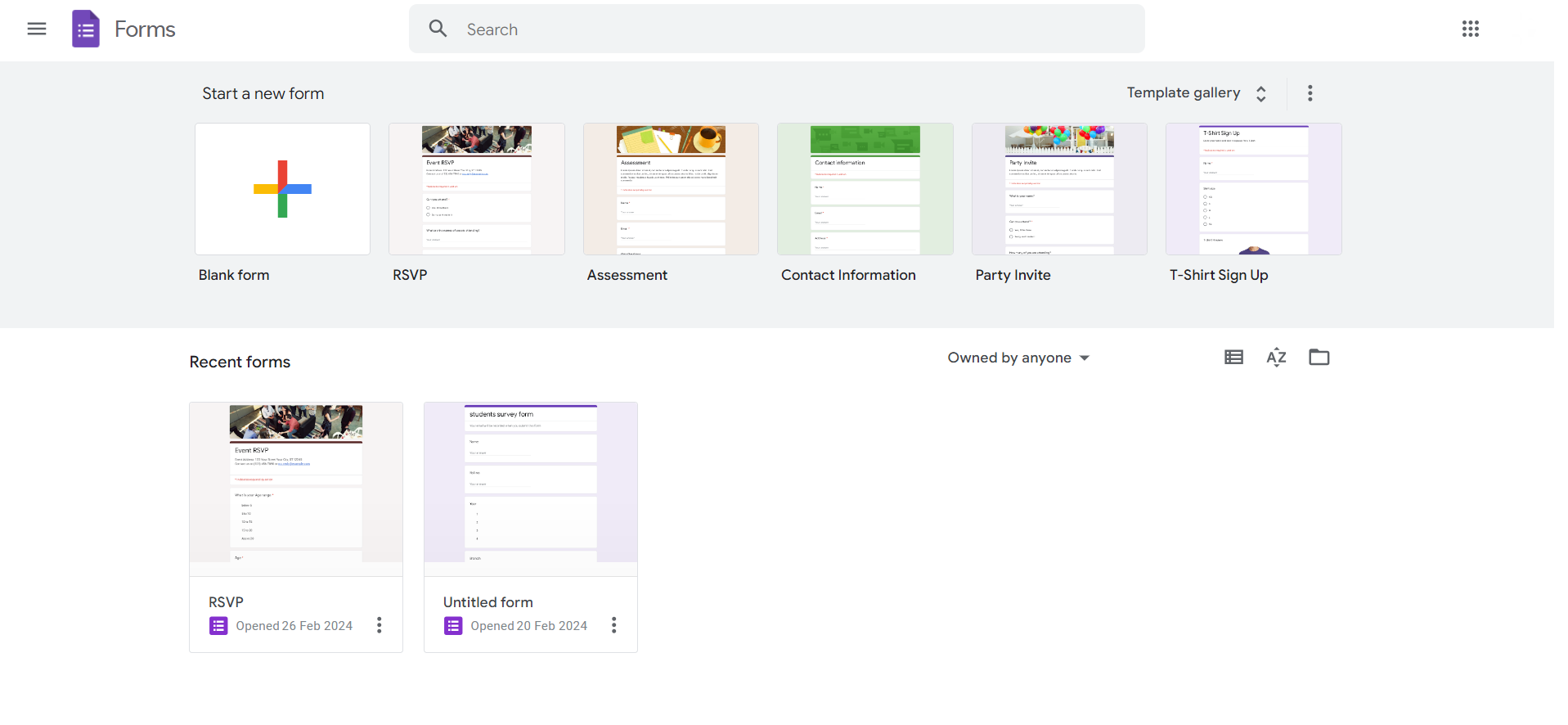
    Step 1: Create a Google Form

    Start by creating a Google Form through Google Drive or directly at forms.google.com.
    Design your form, adding questions and response options as needed.
    notion image

    Step 2: Access the Responses Tab

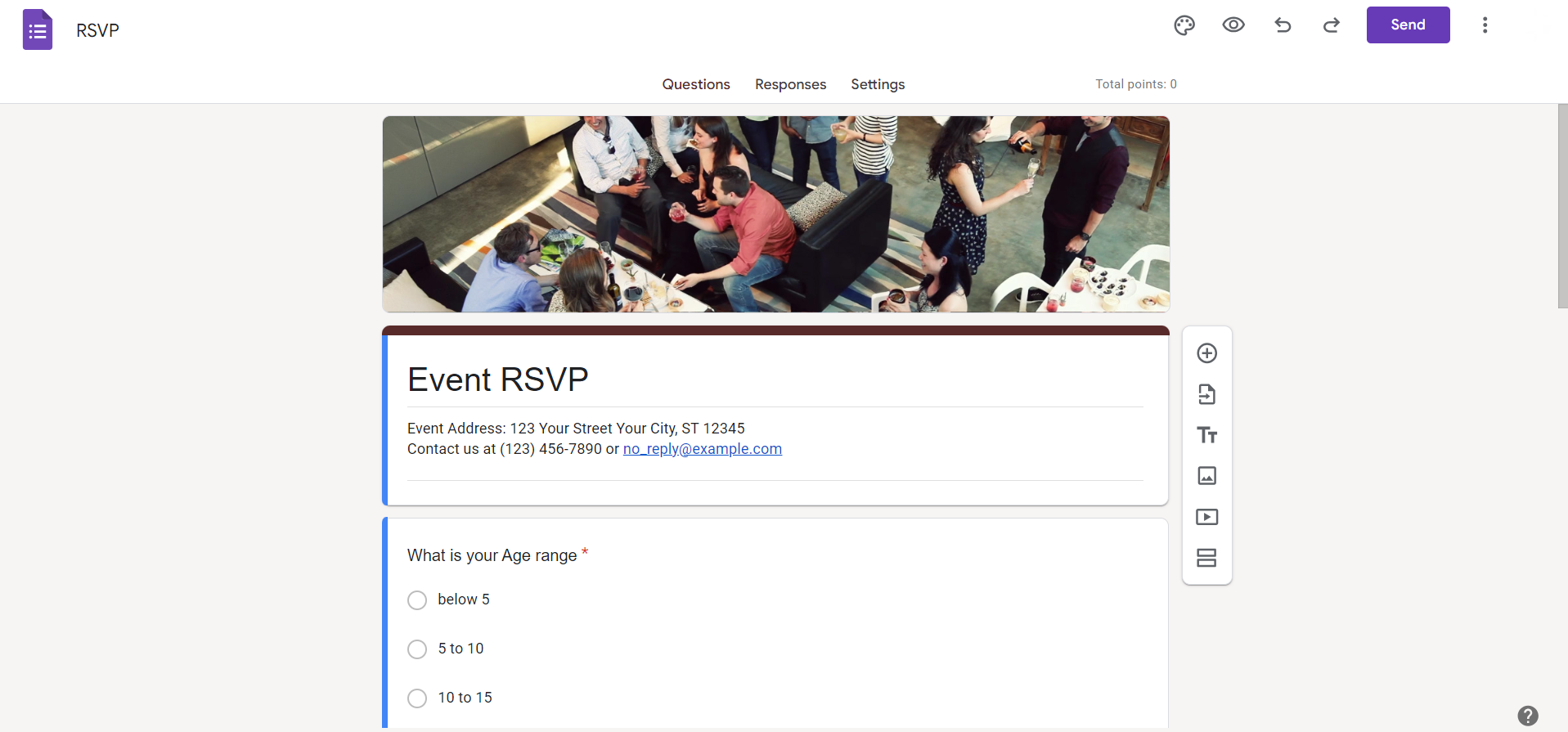
    In your Google Form, navigate to the 'Responses' tab.
    Click on the green Sheets icon to create a new spreadsheet linked to your form.
    notion image

    Step 3: Confirm the Connection

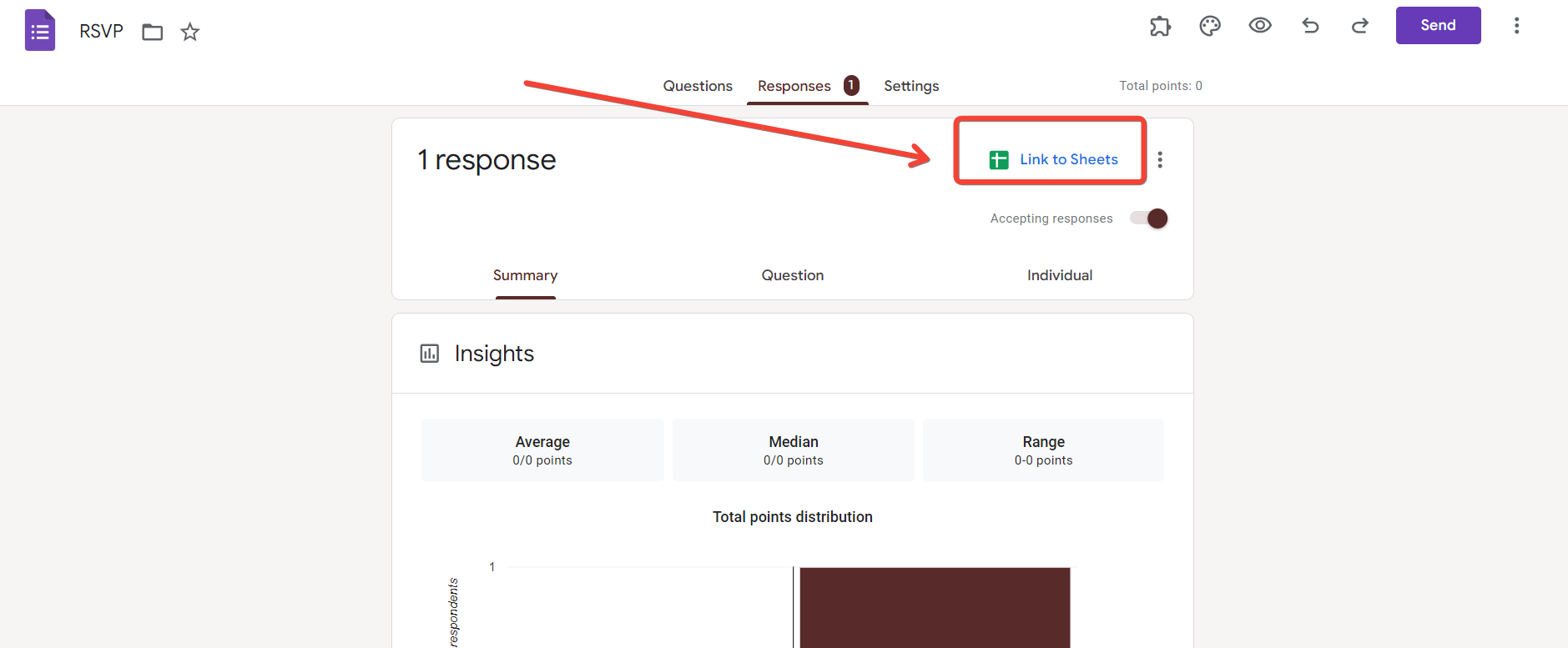
    A prompt will appear, asking for confirmation to create a new Google Sheets spreadsheet.
    Click 'Create' to establish the connection.
    notion image

    Step 4: Open Google Sheets

    Go to Google Drive and locate the newly created Google Sheets spreadsheet.
    This sheet will automatically collect and update responses from your Google Form.
    notion image

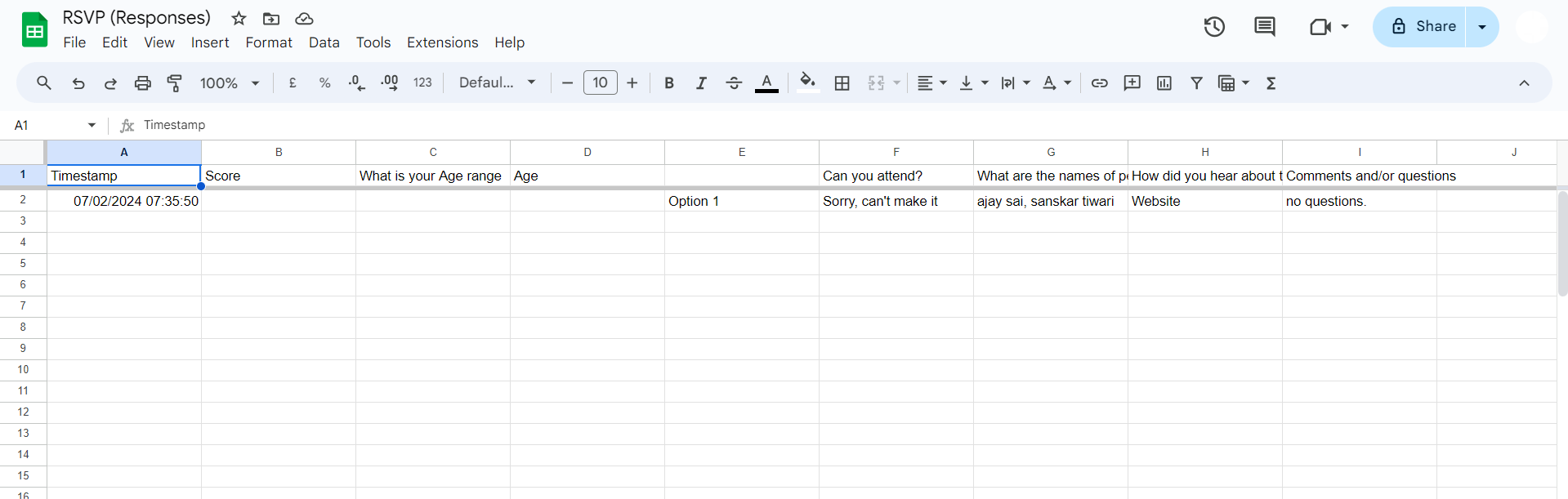
    Step 5: Explore Data in Google Sheets

    Open the Google Sheets document to view and manage form responses.
    Each form submission will populate a new row, creating an organized and dynamic dataset.
    notion image

    Step 6: Set Up Notifications (Optional)

    If desired, enable email notifications for new form responses within Google Sheets.
    This is useful for staying informed in real-time.

    Conclusion:

    Connecting Google Forms to Google Sheets streamlines data management, offering a seamless flow from form creation to data analysis.
    This integration enhances collaboration, allowing teams to work concurrently on both platforms.
    As you explore the steps outlined above, you'll unlock the full potential of these Google Workspace applications, turning data collection into an efficient and organized process.
    Maximize your productivity by leveraging the interconnected capabilities of Google Forms and Google Sheets.

    Frequently Asked Questions:

    Can I edit Google Form responses directly in Google Sheets?

    No, edits must be made in the original Google Form; changes will then reflect in Sheets.

    What happens if I delete the connected Google Sheets file?

    Deleting the linked sheet may disrupt the connection; it's recommended to keep the file intact.

    Can I use conditional formatting in Google Sheets for form responses?

    Yes, leverage Google Sheets' conditional formatting to visually enhance and analyze form response data.

    How many Google Forms can be linked to a single Google Sheets document?

    You can connect multiple Google Forms to a single Google Sheets document for consolidated data.

    Share on socials

    About the author

    Sanskar Tiwari profile photo
    Sanskar Tiwari— Founder at MagicSlides

    Sanskar is Founder at IAG Tech, For the past 3 years sanskar have build more than 24+ products, taught 100k students how to code.

    More from Sanskar

    More from the blog

      250+ Good Morning Messages for Her (Romantic, Deep, Cute & Sweet)

      30 January 2026

      200+ Heart Touching Birthday Wishes for Sister (Short, Funny and More)

      29 January 2026

      50+ History Presentation Topics For 2026

      28 January 2026

      How to Add Music to Your Canva Presentation: A Step-by-Step Guide

      27 January 2026

      15 Quick Tips To Use ChatGpt At Work

      22 January 2026

      11 Best AI Tools for Business in 2025

      22 January 2026

      How to Create an Infographic That Clearly Communicates Your Message

      20 January 2026

      How to Create a Sales Presentation Template in Google Sheets

      20 January 2026

      How to Make a Pie Chart on Google Slides in Simple Steps

      19 January 2026

    Table of Contents

    Create Presentations in Seconds

    Transform your ideas into professional presentations with AI. No design skills needed.

    Try MagicSlides Free

    Create Stunning Presentations with AI in Seconds ✨

    Transform any topic, text, YouTube video, PDF or URL into beautiful presentations instantly with MagicSlides AI.

    Try MagicSlides AI Presentation Maker
    MagicSlides AI Presentation

    Footer

    Solutions

    • MagicSlides App
    • Google Slides Add-on
    • MagicSlides in Chrome
    • MagicSlides in Figma
    • MagicSlides in ChatGPT
    • MagicSlides in Telegram
    • MagicSlides in Zapier
    • MagicSlides in Figma Slides

    Tools

    • AI PPT Tools
    • QR Code Generator
    • Design Tools
    • PPT Templates
    • Slide Templates
    • PDF Tools

    Examples

    • AI Presentations
    • PPT by MagicSlides
    • Quizzes
    • Charts
    • Coloring Pages

    Resources

    • Changelog
    • Documentation
    • API Docs

    Top Blogs

    • How to Create Presentation Using ChatGPT
    • 100+ Best Seminar Topics for Students in 2025

    Company

    • Help
    • MCP
    • Blog
    • Pricing
    • Affiliate Program
    • Manage Subscription
    • Privacy Policy
    • Contact Us
    • Terms & Conditions
    • Refund & Cancellation Policy

    We also built

    • SheetAI - GPT For Sheets
    • MagicForm - GPT For Google Forms
    • SecondBrain.fyi
    • BlogBee - Free Blogging Platform

    © 2026 IndianAppGuy Tech Pvt Ltd. All rights reserved.