What is a Presentation Aid? An In-Depth Exploration


Explore how professional PowerPoint slides enhance corporate presentations with detailed financial charts and sleek designs.
Creating a compelling presentation requires more than just great content—it demands a well-designed, professional look that captivates your audience. Whether you're a business professional, educator, student, or entrepreneur, using professional PowerPoint presentation templates can save time and ensure your slides look polished and engaging.
In this blog, we will explore the benefits of using professionally designed templates, where to find high-quality options, and how to quickly generate stunning presentations using MagicSlides.app.
Why Use Professional PowerPoint Presentation Templates?
1. Saves Time and Effort
Manually designing slides from scratch can be time-consuming. Pre-made professional PowerPoint presentation templates provide a ready-to-use framework with high-quality designs, allowing you to focus on content rather than formatting.
2. Enhances Visual Appeal
A visually appealing presentation helps maintain audience engagement. Professional templates come with well-structured layouts, appropriate color schemes, and high-quality graphics, ensuring your slides look aesthetically pleasing.
3. Ensures Consistency
Consistency is key in a presentation. With pre-designed templates, every slide follows a cohesive theme, making your presentation look professional and well-organized.
4. Designed for Different Purposes
Whether it's a corporate pitch, educational lecture, marketing proposal, or project report, there are specialized templates tailored to different needs.
5. Easy to Customize
Templates allow flexibility—simply replace placeholder text, adjust colors, and insert your own images to match your branding or presentation style.
Where to Find the Best Professional PowerPoint Presentation Templates?
There are numerous platforms offering high-quality templates, but finding the right one can be challenging. MagicSlides.app is an excellent choice for effortlessly generating professional presentations. It provides a wide range of templates suitable for various industries and use cases, making it a one-stop solution for all your presentation needs.
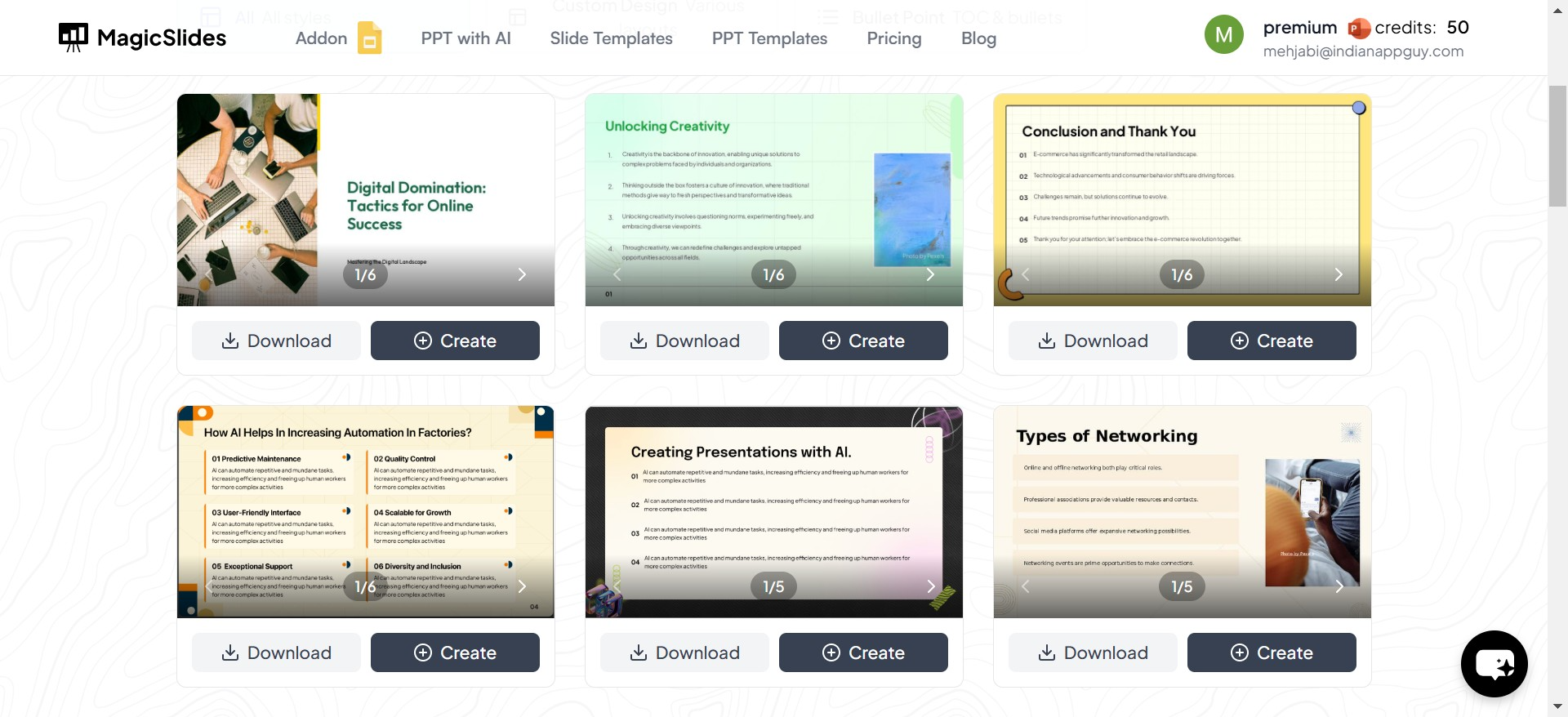
Other sources for professional PowerPoint templates include:
- Microsoft Office Template Library – Offers a collection of basic templates.
- Canva – Provides stylish presentation templates with drag-and-drop editing.
- Envato Elements – A premium source for unique and high-quality designs.
- Slidesgo – Free and premium Google Slides and PowerPoint templates.
While these platforms provide downloadable templates, MagicSlides.app takes it a step further by generating complete PowerPoint presentations in seconds!
How to Instantly Generate a Professional PowerPoint Presentation Using MagicSlides
If you need a fully designed PowerPoint presentation without spending hours formatting slides, follow these simple steps to generate one using MagicSlides.app:
Step 1: Visit MagicSlides.app
Go to MagicSlides.app to access the AI-powered presentation tool.
Step 2: Enter Your Topic
In the designated space, type in your presentation topic or subject.
Step 3: Click ‘Generate Instant PPT’
The AI will analyze your topic and begin creating a structured presentation.
Step 4: Choose a Template, Number of Slides, and More
Select from various professional PowerPoint presentation templates, decide the number of slides, and customize additional settings to match your requirements.
Step 5: Click ‘Generate PPT’
Once you've selected your preferred options, click the generate button.
Step 6: Your PowerPoint is Ready!
In seconds, your professionally designed presentation will be available for download, ready to be used and edited as needed.
Key Features of MagicSlides.app
Using MagicSlides.app to create presentations offers several advantages:
✅ Time-Saving – Generates presentations instantly.
✅ AI-Generated Content – Well-structured slides based on your topic.
✅ Wide Range of Templates – Choose from diverse designs.
✅ Customizable – Edit slides to align with your branding or personal style.
✅ Works for PowerPoint & Google Slides – Easily download and use in both platforms.
For anyone looking to quickly generate a professional presentation, MagicSlides.app is a game-changer.
Final Thoughts: The Smart Way to Create Presentations
With the right tools, creating a professional PowerPoint presentation doesn’t have to be stressful. Professional PowerPoint presentation templates help maintain quality and consistency, while AI-powered solutions like MagicSlides.app take convenience to the next level by automatically generating well-structured slides.
Instead of spending hours designing a presentation, try MagicSlides.app and create high-quality slides in just a few clicks! Whether for business, education, or personal projects, having the right template can make all the difference.
Try it now at MagicSlides.app and take your presentations to the next level!


