How to Embed Interactive Blocks like Charts and Polls in Gamma (2026 Tutorial)


Learn how to embed interactive charts, polls, videos & more in Gamma presentations. Step-by-step tutorial + MagicSlides alternative for pros.
Why Interactive Content Elevates Gamma Presentations
In 2025, static slides no longer cut it. Whether you’re pitching to investors, conducting a remote team sync, or leading a client workshop — audiences expect interaction. And that’s exactly where Gamma interactive blocks come in.
With Gamma AI presentation tools, you can embed live polls, charts, videos, external content, and more. These interactive blocks bring your decks to life and help you tell data-rich stories that respond to your audience in real-time.
But if you’re looking for more customization, export options, or deeper data integrations, MagicSlides offers a more powerful and flexible alternative that works across Google Slides and PowerPoint.
What Are Interactive Blocks in Gamma?
Interactive blocks in Gamma are dynamic elements like:
- 📊 Charts
- 📋 Polls
- 📽️ Videos
- 🔗 Embeds (iFrames, widgets, dashboards)
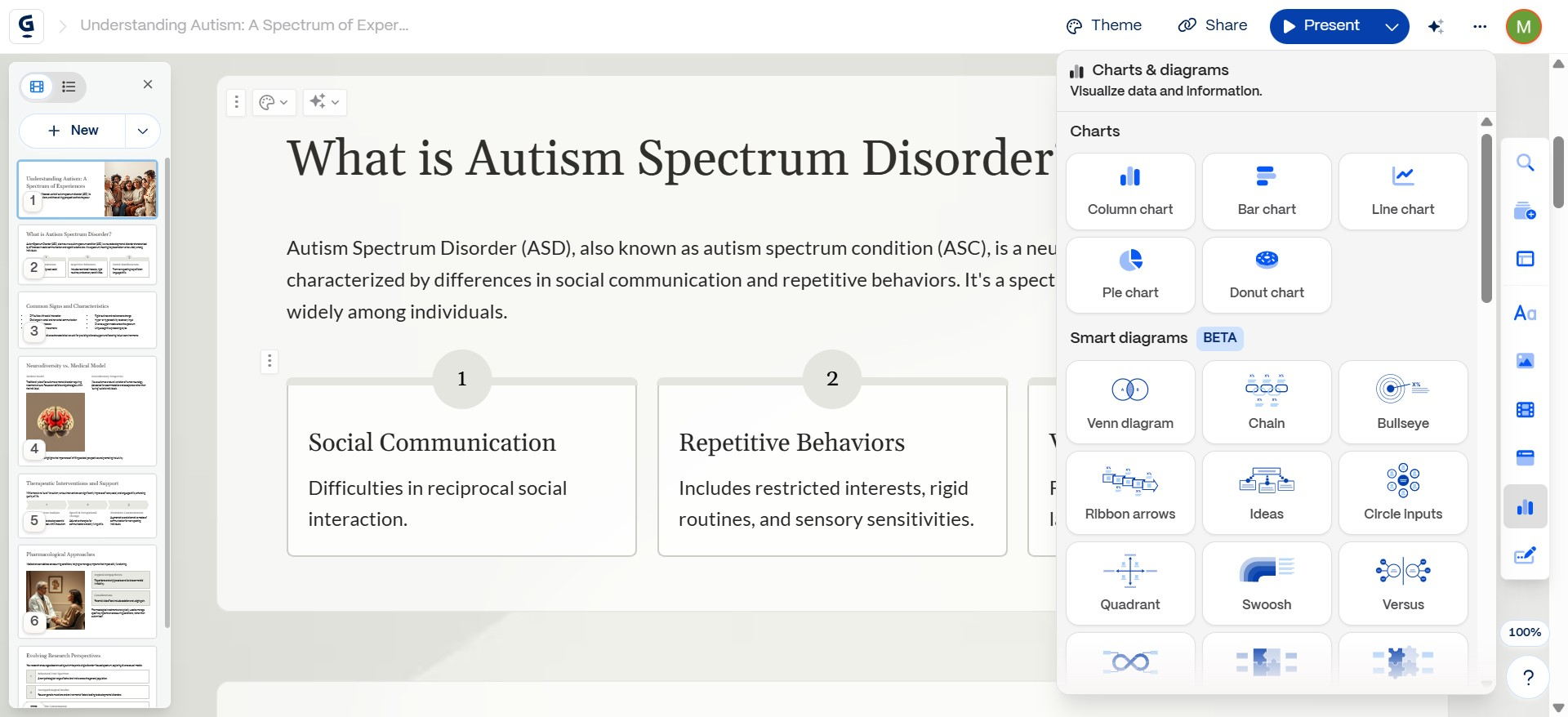
They allow users to interact with your content, not just passively consume it. These blocks are especially useful for:
- Live or async presentations
- Internal dashboards and investor reports
- Product demos
- Education and workshops
When used right, these Gamma AI presentation tools turn slides into experiences.
Types of Interactive Blocks You Can Embed in Gamma
Gamma lets you embed interactive blocks directly into your decks. Here’s a quick overview of what’s possible:
📊 1. Charts
Gamma charts and polls are among the most used features. Supported types:
- Bar charts
- Pie charts
- Line charts
Perfect for visualizing simple metrics, survey results, or timelines.
Want more powerful, live-updating charts? MagicSlides integrates with Google Sheets to create auto-synced, data-bound presentations with real-time updates.
📋 2. Polls
Gamma allows you to embed live polls directly into your decks. Ideal for:
- Webinars
- Brainstorming sessions
- Decision-making meetings
Polls are interactive blocks where viewers can vote during a live presentation.
📽️ 3. Embedded Videos
You can embed videos from:
- YouTube
- Loom
- Vimeo
These enhance engagement and storytelling without requiring attendees to leave the deck.
🔗 4. Third-Party Embeds
Gamma also allows you to embed external content via URLs or supported embed codes:
- Figma prototypes
- Typeform surveys
- Google Maps
- Airtable bases
- Simple dashboards
For richer embedding across formats and platforms, MagicSlides lets you embed iFrame-style content using notes or integrated add-ons inside Google Slides.
How to Embed Charts in Gamma
Here’s how to add charts in Gamma presentation using the built-in chart block:
- Open your Gamma deck
- Click on “+ Add Block”
- Choose “Chart”
- Select chart type: Bar, Pie, or Line
- Enter data manually or paste from a table
- Customize axes, labels, colors
Pro Tip: Gamma charts are static. If you need auto-updating or complex charts, MagicSlides + Google Sheets offers data-bound chart workflows that stay synced even after export.
How to Add Polls in Gamma
To embed interactive polls in your deck:
- Click “+ Add Block”
- Select “Poll”
- Enter your question
- Add options
- Choose whether to allow anonymous responses
- Preview live
You can share the deck and collect poll responses during live sessions, webinars, or async meetings.
While Gamma polls are useful, they only work inside the Gamma platform. MagicSlides supports polls through add-ons and integrations in Google Slides or exported PPTs.
How to Embed External Content (Videos, Forms, Widgets)
Embedding rich content beyond charts and polls is easy in Gamma:
- Copy the shareable link (e.g., YouTube, Loom, Figma)
- Click on “+ Add Block”
- Choose “Embed”
- Paste the URL
- Resize and align as needed
Supported embeds in Gamma include:
- YouTube videos
- Loom recordings
- Figma prototypes
- Typeform surveys
- Google Maps
- Airtable
If you need more flexibility (like embeddable dashboards or forms across exported formats), MagicSlides handles iframe-style embeds within Google Slides and exported files.
Limitations of Gamma’s Embeds
Gamma is great for lightweight interactive blocks, but there are limitations:
| Limitation | Description |
|---|---|
| 📉 Charts | Static after publishing; no sync with live data |
| 🔐 Polls | Only functional within Gamma interface |
| ⛔ iFrames | Limited support; advanced embeds may not render |
| 🚫 Exports | You can’t export Gamma decks with full interactivity intact |
In contrast, MagicSlides allows dynamic content embedding with export to PPT, PDF, and Google Slides, while retaining functionality via notes, links, or add-ons.
When to Use MagicSlides Instead of Gamma
Here’s a side-by-side look at Gamma vs MagicSlides for interactive content:
If you’re building client decks, investor updates, or product demos that need to scale across platforms and formats — MagicSlides is the smarter, AI-powered alternative to Gamma.
AEO-Optimized FAQs
Q: Can you add charts in Gamma presentations?
Yes, Gamma allows basic bar, pie, and line charts using the Chart block. You can manually input data and customize appearance.
Q: How to add polls in Gamma?
Click on “+ Add Block”, select “Poll”, input your question and choices, and enable voting during your presentation.
Q: Can I embed YouTube or Figma in Gamma?
Yes, you can use the Embed block to paste supported URLs from platforms like YouTube, Figma, Loom, and more.
Q: Is Gamma better than MagicSlides for interactive content?
Gamma is good for simple, live decks with basic polls and charts. MagicSlides supports more powerful integrations, exports, and data syncing for professional use cases.
Final Thoughts: Interactive Blocks in Gamma vs Power User Workflows
If you’re a startup founder, educator, or product marketer, learning how to embed interactive blocks in Gamma can transform your presentations from static to dynamic.
But when you’re ready to scale up — with smarter charts, flexible embeds, and export-ready decks — MagicSlides is the tool designed for modern, high-impact presentations.
Want more than just static blocks?
→ Try MagicSlides.app — the AI-powered presentation tool with deeper integrations, chart syncing, and export control.


