Addon google slides iconPPT with AISlide TemplatesPPT TemplatesPricingBlog
    PPT with AISlide TemplatesPPT TemplatesPricingBlog
    1. Home
    2. Blog
    3. How to Find Your Slack Workspace URL


    How to Find Your Slack Workspace URL

    magicslides app

    Published By

    magicslides app
    Mohit Kumar Jha

    Approved By

    Mohit Kumar Jha

    Published On

    January 17th, 2025

    Reading Time

    2 min read

    Discover the key to seamless Slack collaboration; find your workspace URL with these simple steps.

    Navigating the digital landscape often involves managing multiple platforms for communication and collaboration.
    For Slack users, knowing the workspace URL is crucial for sharing and connecting with team members.
    This step-by-step guide will walk you through the process of finding your Slack workspace URL effortlessly.
     
    Before we begin, if you are looking to send Google form submissions directly to Slack, check SlackNotify.app. It will include all info submitted and sent directly to the Slack channel of your choice

    How to Find Your Slack Workspace URL

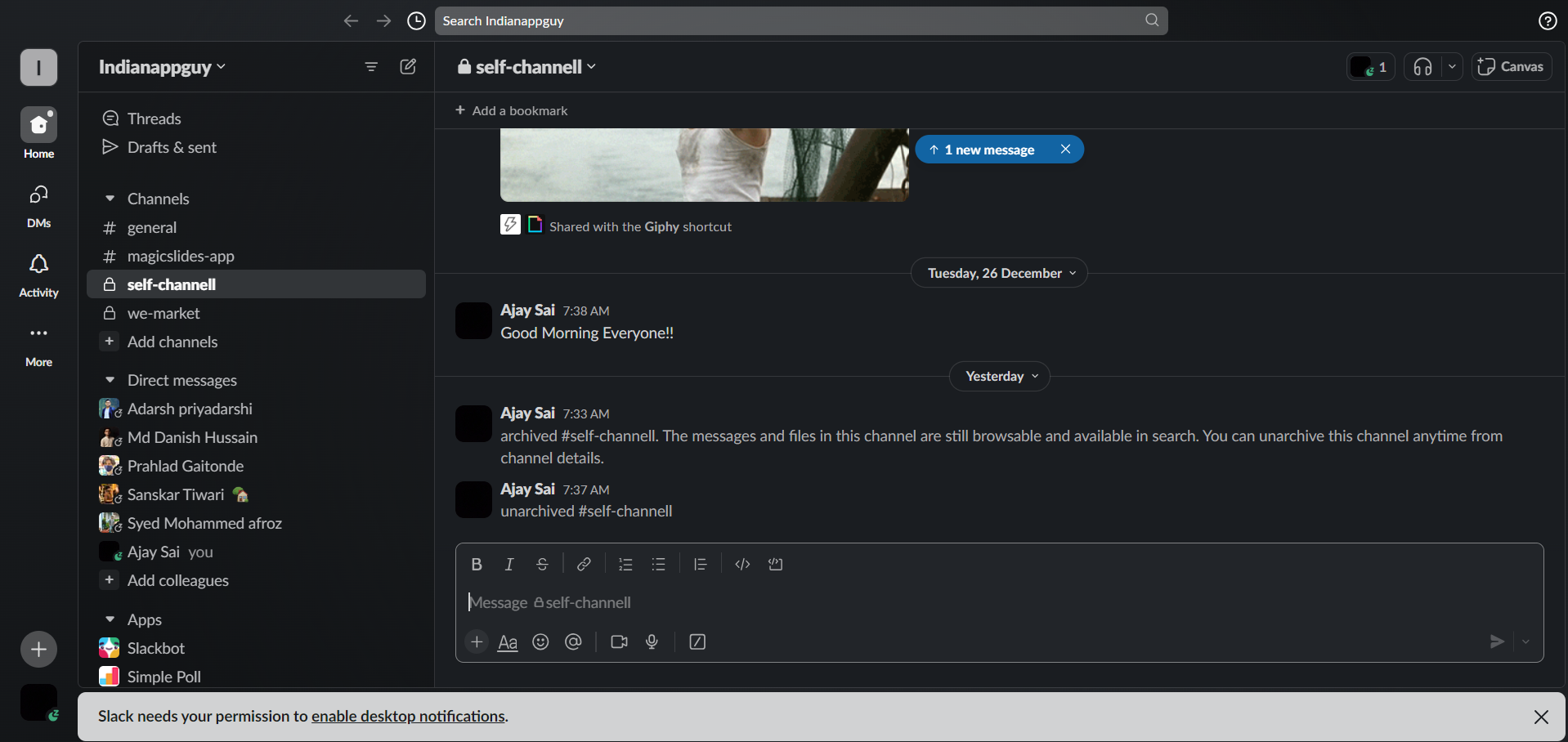
    Visit Slack:

    Begin your journey by opening your preferred web browser and navigating to Slack's website.
    notion image

    Sign In to Your Account:

    Log in to your Slack account using the email address and password associated with your workspace.

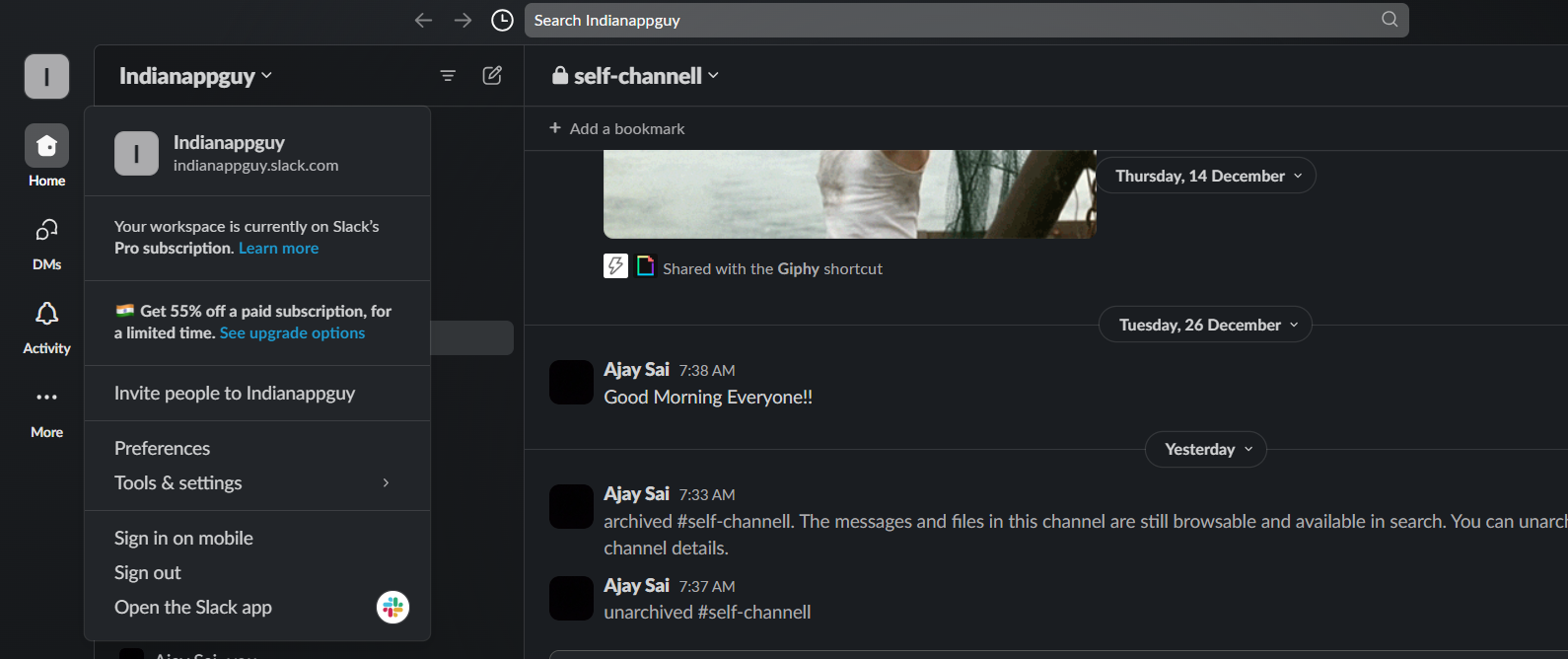
    Navigate to the Workspace Menu:

    Upon logging in, you'll find yourself on the Slack homepage. Locate the left sidebar and click on your workspace name.
    notion image

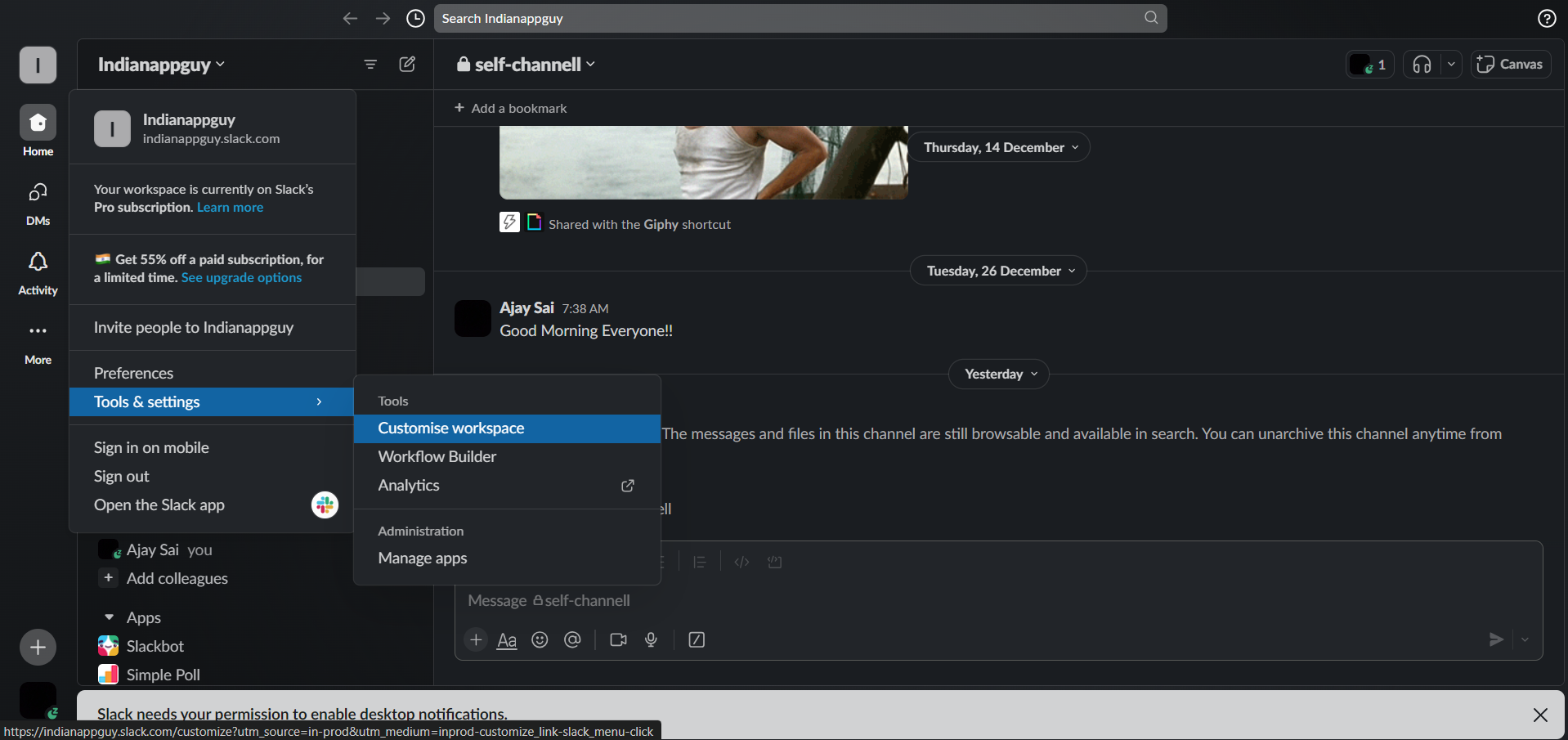
    View Workspace Details:

    A drop down menu will unfold. Explore further by clicking on "Settings & administration" and then selecting "Workspace settings."
    notion image

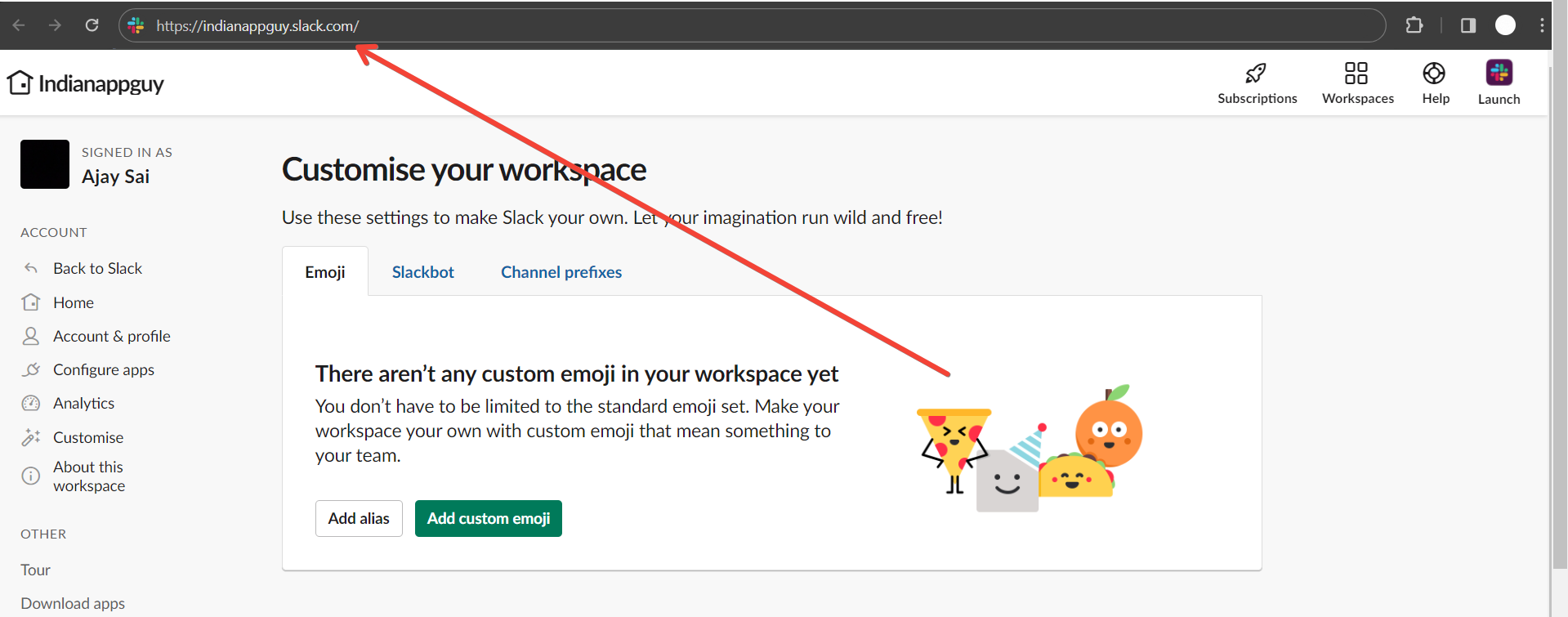
    Find the Workspace URL:

    In the Workspace settings section, keep an eye out for the "Workspace URL" or a similar option.
    The URL, typically in the format "yourworkspace.slack.com," will be prominently displayed.
    notion image
    After finding your Slack Workspace URL, enhance your workflow by setting up a Google Form Slack integration.
    This ensures that each Google Form submission triggers a Slack notification, keeping your team informed and on the same page.

    Pro Tip 💡:

    Ensure that you have the necessary administrative permissions to access the workspace settings and view the URL. This information is vital for administrators and team members alike, enhancing the overall efficiency of your Slack collaboration.

    Conclusion:

    Understanding how to locate your Slack workspace URL is fundamental for effective collaboration.
    This unique identifier ensures seamless communication and connection within your team.
    By following these straightforward steps, you can effortlessly find and share your Slack workspace URL, streamlining your digital workspace experience.

    Frequently Asked Questions:

    Can Anyone Access My Slack Workspace with the Workspace URL?

    No, the Slack workspace URL alone does not grant access. Users need an invitation and appropriate permissions to join.

    What If I Can't Find the Workspace URL in Settings?

    Reach out to a workspace administrator. They can provide the URL or guide you to access it.

    Can I Customize the Workspace URL to Something Memorable?

    No, Slack assigns a unique URL based on your workspace name, and customization is not currently available.

    Share on socials

    About the author

    Sanskar Tiwari profile photo
    Sanskar Tiwari— Founder at MagicSlides

    Sanskar is Founder at IAG Tech, For the past 3 years sanskar have build more than 24+ products, taught 100k students how to code.

    More from Sanskar

    More from the blog

      250+ Good Morning Messages for Her (Romantic, Deep, Cute & Sweet)

      30 January 2026

      200+ Heart Touching Birthday Wishes for Sister (Short, Funny and More)

      29 January 2026

      50+ History Presentation Topics For 2026

      28 January 2026

      How to Add Music to Your Canva Presentation: A Step-by-Step Guide

      27 January 2026

      15 Quick Tips To Use ChatGpt At Work

      22 January 2026

      11 Best AI Tools for Business in 2025

      22 January 2026

      How to Create an Infographic That Clearly Communicates Your Message

      20 January 2026

      How to Create a Sales Presentation Template in Google Sheets

      20 January 2026

      How to Make a Pie Chart on Google Slides in Simple Steps

      19 January 2026

    Table of Contents

    Create Presentations in Seconds

    Transform your ideas into professional presentations with AI. No design skills needed.

    Try MagicSlides Free

    Create Stunning Presentations with AI in Seconds ✨

    Transform any topic, text, YouTube video, PDF or URL into beautiful presentations instantly with MagicSlides AI.

    Try MagicSlides AI Presentation Maker
    MagicSlides AI Presentation

    Footer

    Solutions

    • MagicSlides App
    • Google Slides Add-on
    • MagicSlides in Chrome
    • MagicSlides in Figma
    • MagicSlides in ChatGPT
    • MagicSlides in Telegram
    • MagicSlides in Zapier
    • MagicSlides in Figma Slides

    Tools

    • AI PPT Tools
    • QR Code Generator
    • Design Tools
    • PPT Templates
    • Slide Templates
    • PDF Tools

    Examples

    • AI Presentations
    • PPT by MagicSlides
    • Quizzes
    • Charts
    • Coloring Pages

    Resources

    • Changelog
    • Documentation
    • API Docs

    Top Blogs

    • How to Create Presentation Using ChatGPT
    • 100+ Best Seminar Topics for Students in 2025

    Company

    • Help
    • MCP
    • Blog
    • Pricing
    • Affiliate Program
    • Manage Subscription
    • Privacy Policy
    • Contact Us
    • Terms & Conditions
    • Refund & Cancellation Policy

    We also built

    • SheetAI - GPT For Sheets
    • MagicForm - GPT For Google Forms
    • SecondBrain.fyi
    • BlogBee - Free Blogging Platform

    © 2026 IndianAppGuy Tech Pvt Ltd. All rights reserved.