Addon google slides iconPPT with AISlide TemplatesPPT TemplatesPricingBlog
    PPT with AISlide TemplatesPPT TemplatesPricingBlog
    1. Home
    2. Blog
    3. How to rename Slack channel on mobile app


    How to rename Slack channel on mobile app

    magicslides app

    Published By

    magicslides app
    Mohit Kumar Jha

    Approved By

    Mohit Kumar Jha

    Published On

    January 17th, 2025

    Reading Time

    3 min read

    Elevate collaboration on the go: Easily rename Slack channels with simple taps on your mobile device.

    In this blog post we will see how we can change the name of you slack channel on the mobile app in just few steps using the below steps, navigate the evolution of your Slack channels effortlessly on the go!
    This guide, discovers the simplicity of renaming channels using the Slack mobile app. With just a few taps, transform your virtual spaces to align with your team's dynamic energy.
    Before we begin, if you are looking to send Google form submissions directly to Slack, check SlackNotify.app

    How to rename Slack channel on mobile app

    Open the Slack App:

    In the palm of your hand, unlock the gateway to communication by launching the Slack app on your mobile device.

    notion image

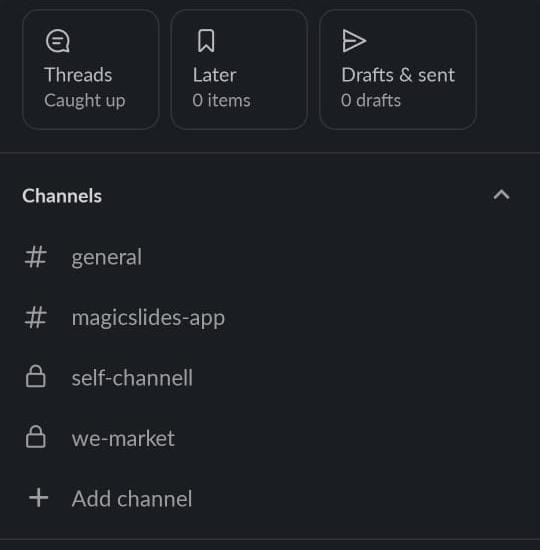
    Navigate to the Channel:

    Effortlessly navigate to the channel in question, a few taps bringing you to the center of mobile collaboration.
    notion image

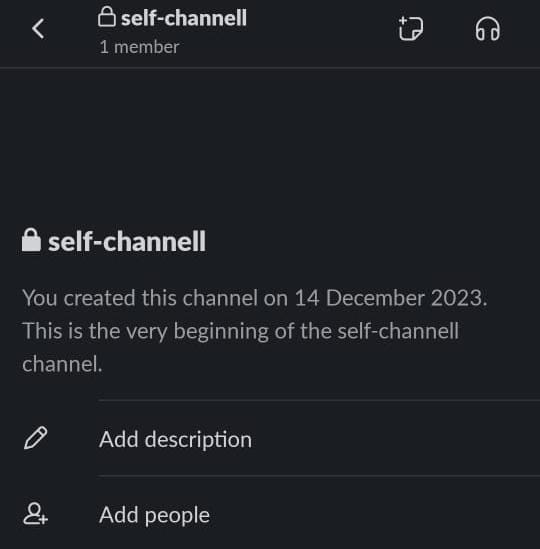
    Tap on the Channel Name:

    With a mere tap on the channel name, open the portal to additional features and actions, setting the stage for transformation.
    notion image

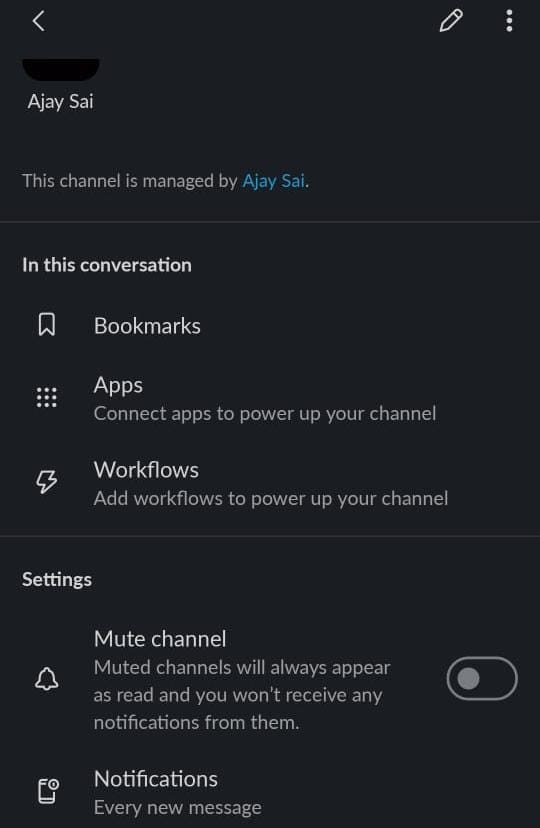
    Select "Channel Settings":

    In this mobile odyssey, seek out the "More" or "Channel Settings" option, a gateway to channel evolution.
    notion image

    Choose "Rename Channel":

    A pivotal choice emerges as you select "Rename Channel," a digital proclamation of a channel's renewed identity.

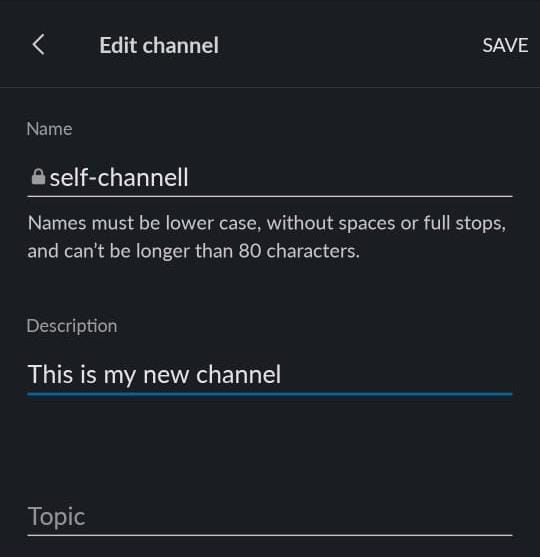
    Enter the New Name:

    A digital canvas awaits your input as you enter the new name, redefining the channel's essence within the palm of your hand.
    notion image

    Save Changes:

    Solidify the change with a tap on "Save" or "Update," sending ripples of transformation across the collaborative landscape. After removing you may want to add new team members to Slack application, check out this article for a smooth onboarding process: click here
    When renaming a Slack channel on your mobile app, ensure Google Form submissions are still routed to the correct channel by setting up Google Form Slack integration for seamless notifications.

    Conclusion:

    In the palm of your hand, Slack's mobile channel renaming becomes a catalyst for dynamic collaboration.
    With a few taps, redefine virtual spaces, aligning them with the ever-evolving narrative of your team.
    This mobile empowerment ensures fluid adaptation to new objectives, crafting a workspace that mirrors the collective heartbeat of innovation and growth.

    Frequently Asked Questions:

    Is renaming a channel on the Slack mobile app the same as on the desktop?

    Yes, the process is similar. Tap through channel settings to find the "Rename Channel" option.

    Can I rename a channel from my mobile device without using a computer?

    Absolutely. The Slack mobile app allows you to rename channels directly, ensuring flexibility on-the-go.

    Will changing a channel name on my mobile affect my desktop view?

    Yes, channel name changes are synchronized across devices for a consistent experience in Slack.

    Share on socials

    About the author

    Sanskar Tiwari profile photo
    Sanskar Tiwari— Founder at MagicSlides

    Sanskar is Founder at IAG Tech, For the past 3 years sanskar have build more than 24+ products, taught 100k students how to code.

    More from Sanskar

    More from the blog

      250+ Good Morning Messages for Her (Romantic, Deep, Cute & Sweet)

      30 January 2026

      200+ Heart Touching Birthday Wishes for Sister (Short, Funny and More)

      29 January 2026

      50+ History Presentation Topics For 2026

      28 January 2026

      How to Add Music to Your Canva Presentation: A Step-by-Step Guide

      27 January 2026

      15 Quick Tips To Use ChatGpt At Work

      22 January 2026

      11 Best AI Tools for Business in 2025

      22 January 2026

      How to Create an Infographic That Clearly Communicates Your Message

      20 January 2026

      How to Create a Sales Presentation Template in Google Sheets

      20 January 2026

      How to Make a Pie Chart on Google Slides in Simple Steps

      19 January 2026

    Table of Contents

    Create Presentations in Seconds

    Transform your ideas into professional presentations with AI. No design skills needed.

    Try MagicSlides Free

    Create Stunning Presentations with AI in Seconds ✨

    Transform any topic, text, YouTube video, PDF or URL into beautiful presentations instantly with MagicSlides AI.

    Try MagicSlides AI Presentation Maker
    MagicSlides AI Presentation

    Footer

    Solutions

    • MagicSlides App
    • Google Slides Add-on
    • MagicSlides in Chrome
    • MagicSlides in Figma
    • MagicSlides in ChatGPT
    • MagicSlides in Telegram
    • MagicSlides in Zapier
    • MagicSlides in Figma Slides

    Tools

    • AI PPT Tools
    • QR Code Generator
    • Design Tools
    • PPT Templates
    • Slide Templates
    • PDF Tools

    Examples

    • AI Presentations
    • PPT by MagicSlides
    • Quizzes
    • Charts
    • Coloring Pages

    Resources

    • Changelog
    • Documentation
    • API Docs

    Top Blogs

    • How to Create Presentation Using ChatGPT
    • 100+ Best Seminar Topics for Students in 2025

    Company

    • Help
    • MCP
    • Blog
    • Pricing
    • Affiliate Program
    • Manage Subscription
    • Privacy Policy
    • Contact Us
    • Terms & Conditions
    • Refund & Cancellation Policy

    We also built

    • SheetAI - GPT For Sheets
    • MagicForm - GPT For Google Forms
    • SecondBrain.fyi
    • BlogBee - Free Blogging Platform

    © 2026 IndianAppGuy Tech Pvt Ltd. All rights reserved.