 Codex CLI + MagicSlides MCP
Turn a spreadsheet into a PPT with Codex CLI
Codex CLI runs shell commands, so it can fetch a public dataset, compute the figures in a script and then build slides from them. Add the MagicSlides MCP once and the same session returns a finished deck.
Set up MagicSlides in Codex CLI (one time)
Two commands: add the server, then log in.
codex mcp add magicslides --url https://www.magicslides.app/api/mcp/mcp
codex mcp login magicslides[mcp_servers.magicslides]
url = "https://www.magicslides.app/api/mcp/mcp"- 1.Run codex mcp add, then codex mcp login and approve in the browser.
- 2.Start codex (or use codex exec "…" for one-off runs).
- 3.Ask for a deck. Codex calls MagicSlides and prints the present link.
Example: what you type in Codex CLI
codex exec "Download the World Bank population CSV from github.com/datasets/population, compare 2014 and 2025 for India, China, Nigeria and Japan plus the world total, and build a 6-slide deck with MagicSlides."
Source used: World Bank total population by country, via datasets/population (population.csv)
- Ran curl to download population.csv (557 KB, 1960 to 2025)
- Ran a pandas pivot for 2014 vs 2025 change, world totals by decade and peak years
- Called get_template_schema (responsive-grid, 6 slides)
- Wrote the slot copy and called create_presentation_from_slots with stock images
Created a 6-slide deck. World population is 8.22 billion in 2025, up 11.7% since 2014; Nigeria grew 27.8% while Japan fell 3.1%, and China peaked in 2021. Present link, PPTX and PDF are ready.

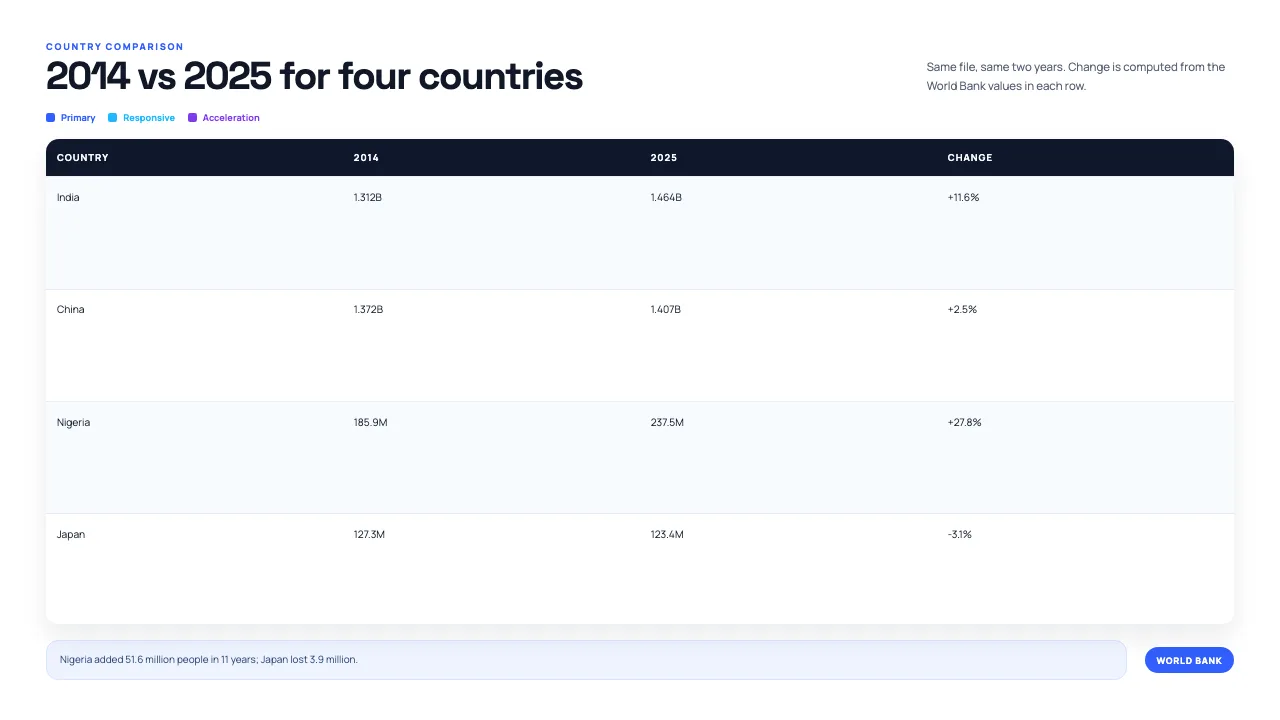
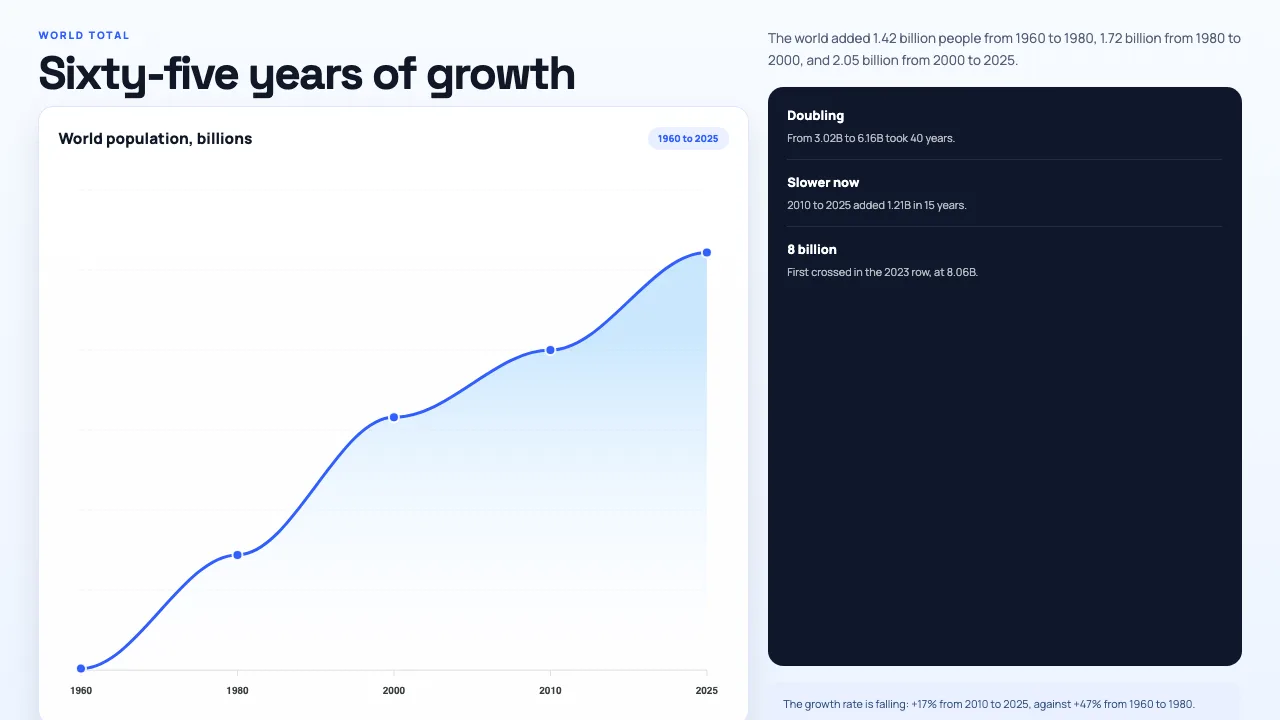

This is the real output from that prompt, made with the MagicSlides MCP. Open it to click through or download it.
How it works
- 1.Run codex mcp add magicslides --url https://www.magicslides.app/api/mcp/mcp.
- 2.Run codex mcp login magicslides and log in.
- 3.Ask Codex to download or open the CSV, compute what you need and build a deck, or run it with codex exec.
- 4.Open the present link or download the PPTX from the output.
Tool used: create_presentation_from_slots. Prefer a web app? Excel to PPT does the same without an agent.
FAQ
Can I run this without an interactive session?
Yes. codex exec runs a prompt non-interactively, so you can script a deck build from a dataset.
Does Codex need an API key for MagicSlides?
No. Run codex mcp login magicslides and log in with your MagicSlides account through OAuth.
Can it use a local XLSX file instead of a download?
Yes. Codex reads local files and runs shell commands, so it can parse a spreadsheet in your folder.
What does the result include?
A present link, one link per slide, and PPTX and PDF downloads. The bring-your-own-content path costs 0 AI credits.
More with Codex CLI
Excel to PPT in other agents


Connect MagicSlides to Codex CLI
One MCP server for decks, docs, sheets and reels. Log in with your MagicSlides account, no API key. Making a deck from your own copy uses no AI credits.


