 Claude + MagicSlides MCP
Turn a spreadsheet into a PPT with Claude
Upload a CSV or XLSX into a Claude chat and Claude reads the rows, does the math and writes the slides. With the MagicSlides connector added, it sends that copy to a template and you get back a deck with the real numbers on it.
Set up MagicSlides in Claude (one time)
Add MagicSlides once as a custom connector. It works on every Claude plan; the Free plan allows one custom connector.
https://www.magicslides.app/api/mcp/mcp- 1.In Claude, open Customize → Connectors and click Add custom connector.
- 2.Name it MagicSlides and paste the URL above.
- 3.Click Connect and log in with MagicSlides. There is no API key.
Example: what you type in Claude
Here is owid-co2-data.csv from Our World in Data. Make a 6-slide client briefing on who emits the most CO2 in 2024 and how that changed since 2014, with the real numbers.
Source used: Our World in Data CO2 and Greenhouse Gas Emissions dataset (owid-co2-data.csv)
- Read the uploaded owid-co2-data.csv (14.4 MB, data to 2024)
- Ran analysis: 2024 top emitters by share, 2014 vs 2024 change for World, China, US, India, EU-27, per capita and fuel split
- Called get_template_schema (editorial-pitch, 6 slides)
- Wrote the slot copy with the computed figures and called create_presentation_from_slots with stock images
Your 6-slide briefing is ready. It shows world CO2 at 38,599 Mt in 2024 (up 8.8% since 2014), China at 31.8% of the total, India up 48.7% and the EU down 20.2%, and you can present it or download the PPTX or PDF.

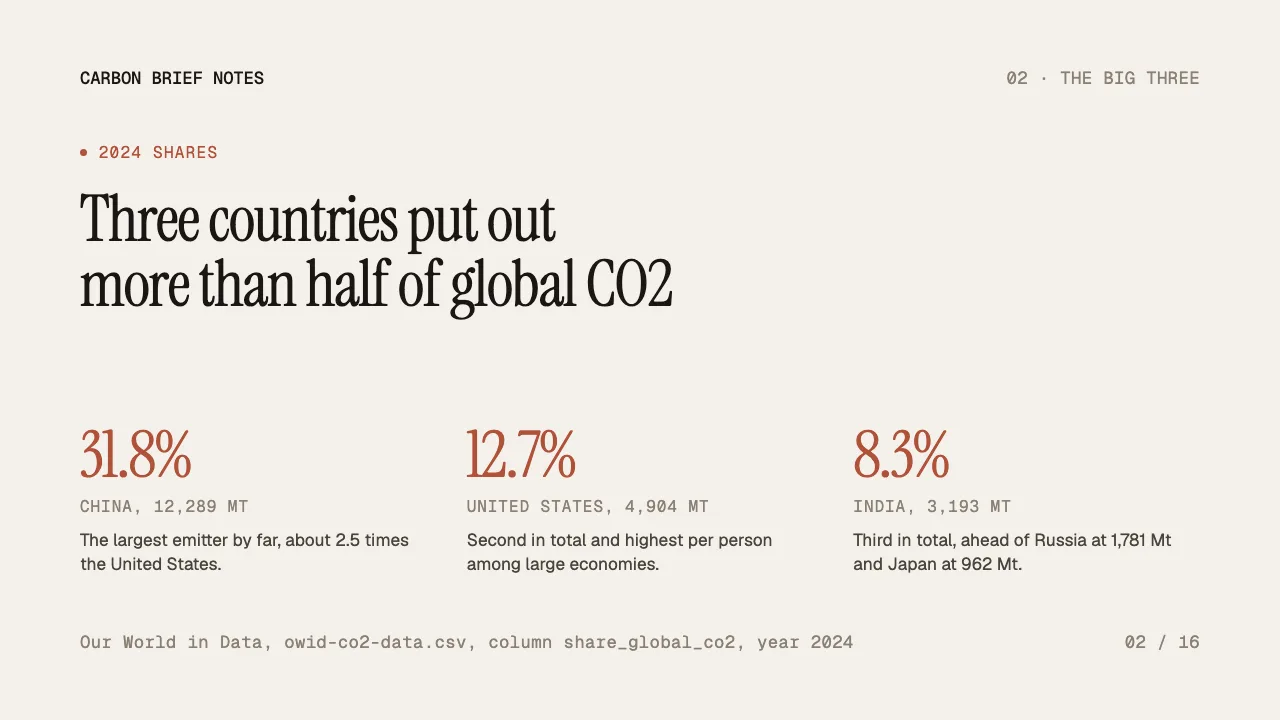
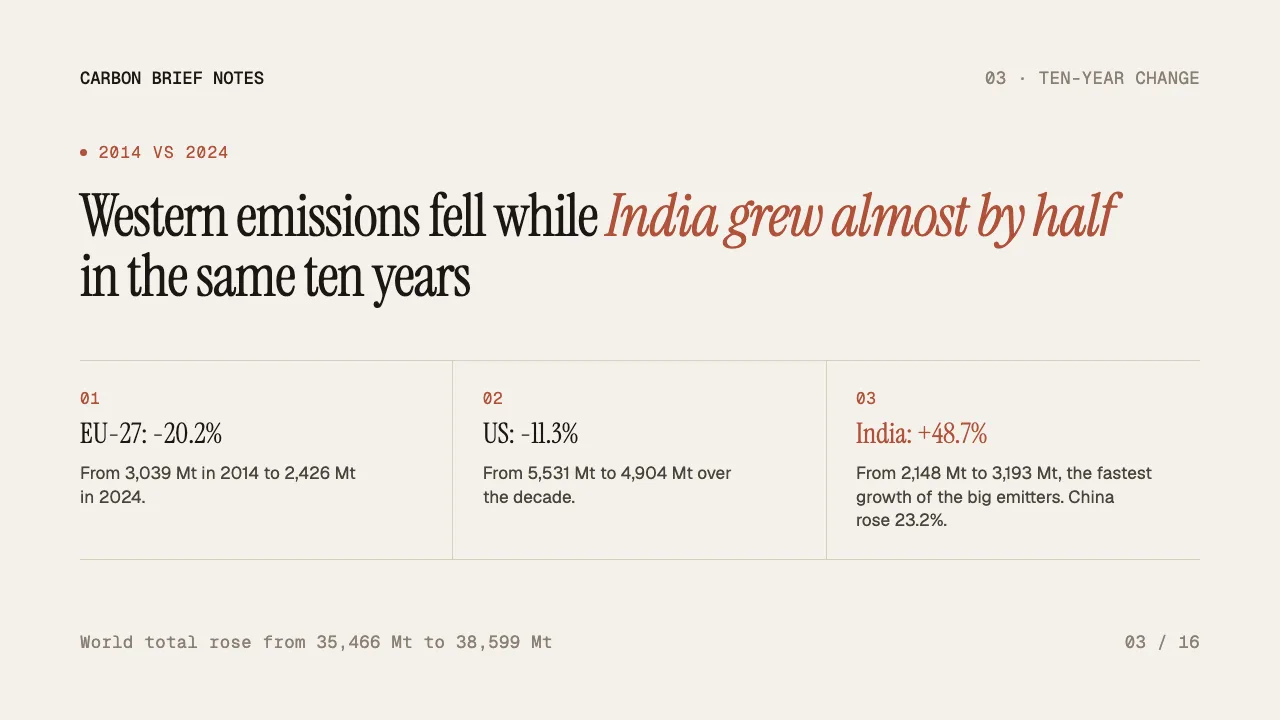
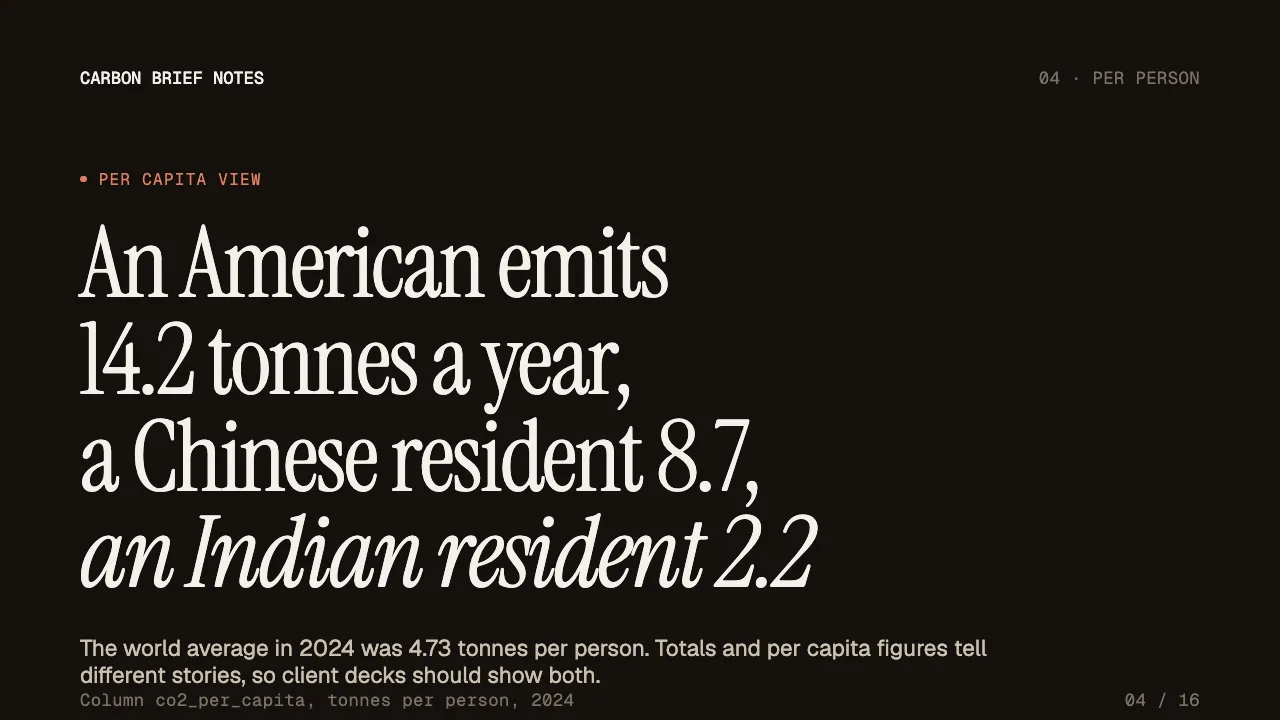
This is the real output from that prompt, made with the MagicSlides MCP. Open it to click through or download it.
How it works
- 1.In claude.ai go to Customize, then Connectors, then Add custom connector, paste https://www.magicslides.app/api/mcp/mcp and log in with MagicSlides.
- 2.Start a chat and upload your CSV or XLSX file.
- 3.Ask for a deck with a slide count and the questions you want the numbers to answer.
- 4.Open the present link, or download the PPTX or PDF from the result.
Tool used: create_presentation_from_slots. Prefer a web app? Excel to PPT does the same without an agent.
FAQ
Can Claude read an Excel or CSV file for the deck?
Yes. You can upload PDF, XLSX and CSV files into a Claude chat, and Claude computes the figures before it writes the slide copy.
Are the numbers on the slides real?
They come from your file. In this example every figure was computed from the Our World in Data CSV, and Claude lists the columns it used on the slides.
Does this work on the free Claude plan?
The free plan allows one custom connector, so you can add MagicSlides as that one.
Does building the deck use MagicSlides AI credits?
No. Claude writes the copy itself, and the bring-your-own-content path costs 0 AI credits.
What do I get back?
A present link, a link for each slide, and PPTX and PDF downloads. The deck also opens in the MagicSlides editor.
More with Claude
Excel to PPT in other agents


Connect MagicSlides to Claude
One MCP server for decks, docs, sheets and reels. Log in with your MagicSlides account, no API key. Making a deck from your own copy uses no AI credits.


