How Can Presentation Maker AI Change the Way You Create Slides?


Discover how Presentation Maker AI revolutionizes slide creation, boosting efficiency and creativity in your presentations. Embrace the future now!
In the digital age, presentations remain a staple in business, education, and personal projects, but the process of creating these presentations has evolved significantly. With the rise of AI-powered tools like Magicslides.app, the landscape of slide creation is transforming. In this post, we will explore how AI presentation makers are redefining the art of creating engaging and impactful slides.
Challenges In Traditional Presentation Creation
Before all this, we need to take a technical understanding of the ins and outs involved in a standard process of creating a presentation before the advanced AI-driven tools are under consideration. Over time, effectively and meaningfully putting together a presentation became a very time-, effort-, and technically consuming process. The process involved numerous intricate steps because human involvement was necessary at each stage of the process:
- Template Selection: Users faced limited template options, often not aligning with their vision, requiring compromises in design and brand consistency.
- Content Alignment: Once a template was chosen, aligning text, images, and multimedia demanded a keen sense of design and visual prioritization.
- Graphic Design: Sophisticated visuals required users to create or edit graphics, a challenging task without graphic design skills.
- Maintaining Consistency: Ensuring uniformity in fonts, colors, and design elements across slides was tedious, with any adjustments affecting the entire presentation.
- Multimedia Integration: Integrating multimedia required technical skills to handle files efficiently and ensure compatibility across different platforms, often leading to time-consuming adjustments and inconsistencies.
Old Way vs. New Way of Making Presentations
To better understand the impact of AI in presentation creation, here’s a comparative table that outlines the traditional approach versus the AI-powered approach:
| Aspect | Traditional Method | AI-Powered Method (e.g., Magicslides.app) |
| Template Selection | Manually browse through limited templates. | AI suggests templates based on the content’s context. |
| Content Layout | Manually format text, images, and graphs. | AI optimizes layout dynamically to enhance readability. |
| Design Consistency | Manually ensure fonts, colors, and styles are consistent. | Automatically maintains a cohesive design theme. |
| Time Efficiency | Hours or even days for complex presentations. | Minutes, even for detailed and dynamic presentations. |
| Content Generation | Content must be manually input or copied. | Generate presentations directly from URLs, YouTube links, etc. |
| Accessibility | Primarily desktop-based with limited access. | Accessible from any device, enhancing flexibility. |
Benefits of Using AI-Powered Presentation Tools
Streamlined Content Placement
AI PPT Maker like MagicSlides.app automate the alignment of text, images, and multimedia, optimizing layouts based on design best practices and visual hierarchy, saving time and enhancing presentation quality.
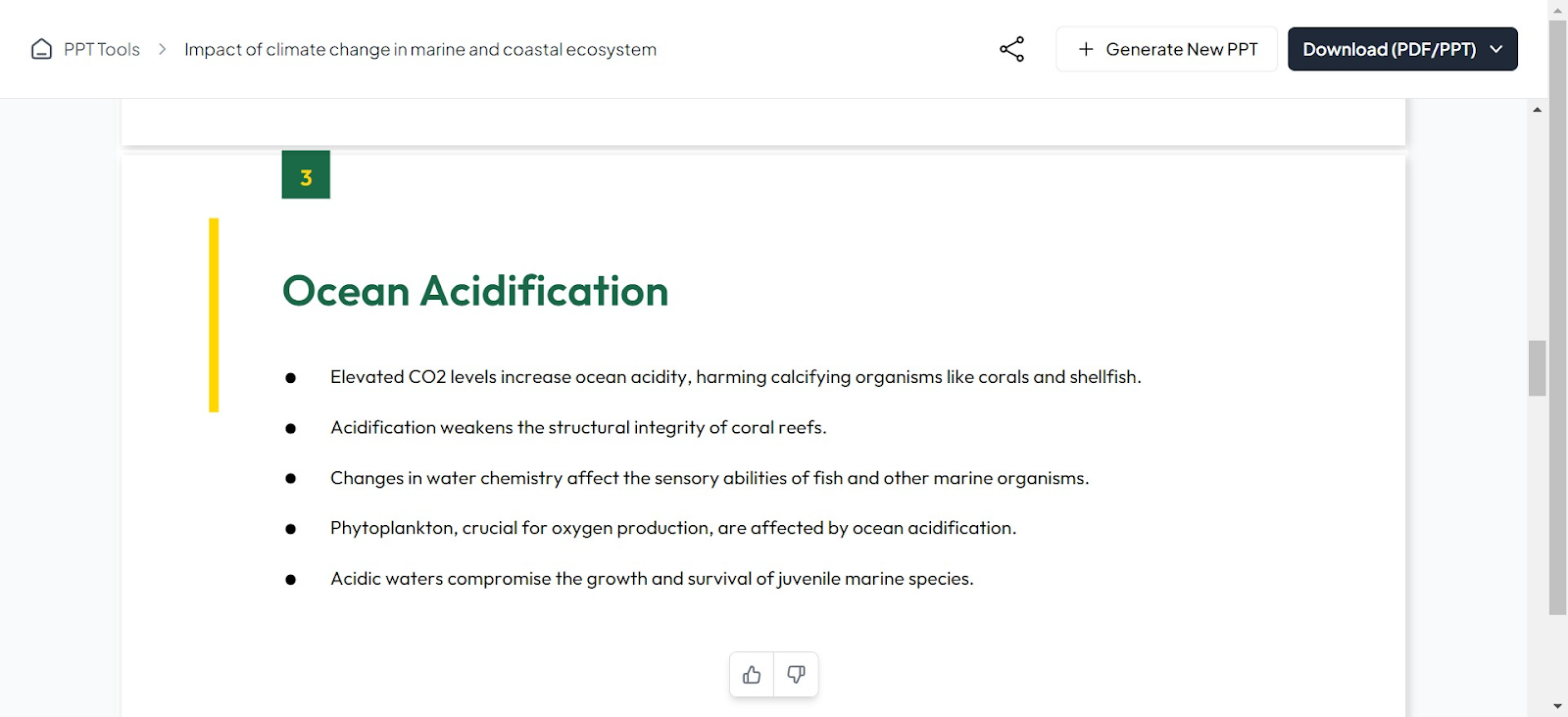
Here is an example of a PPT generated by MagicSlides.app where we only provided it with a topic and it gives us a complete presentation:
Enhanced Graphic Design
With AI, users can access sophisticated graphic design capabilities, including pre-designed elements and user-friendly editing tools, making professional visuals accessible even to those without graphic design expertise.
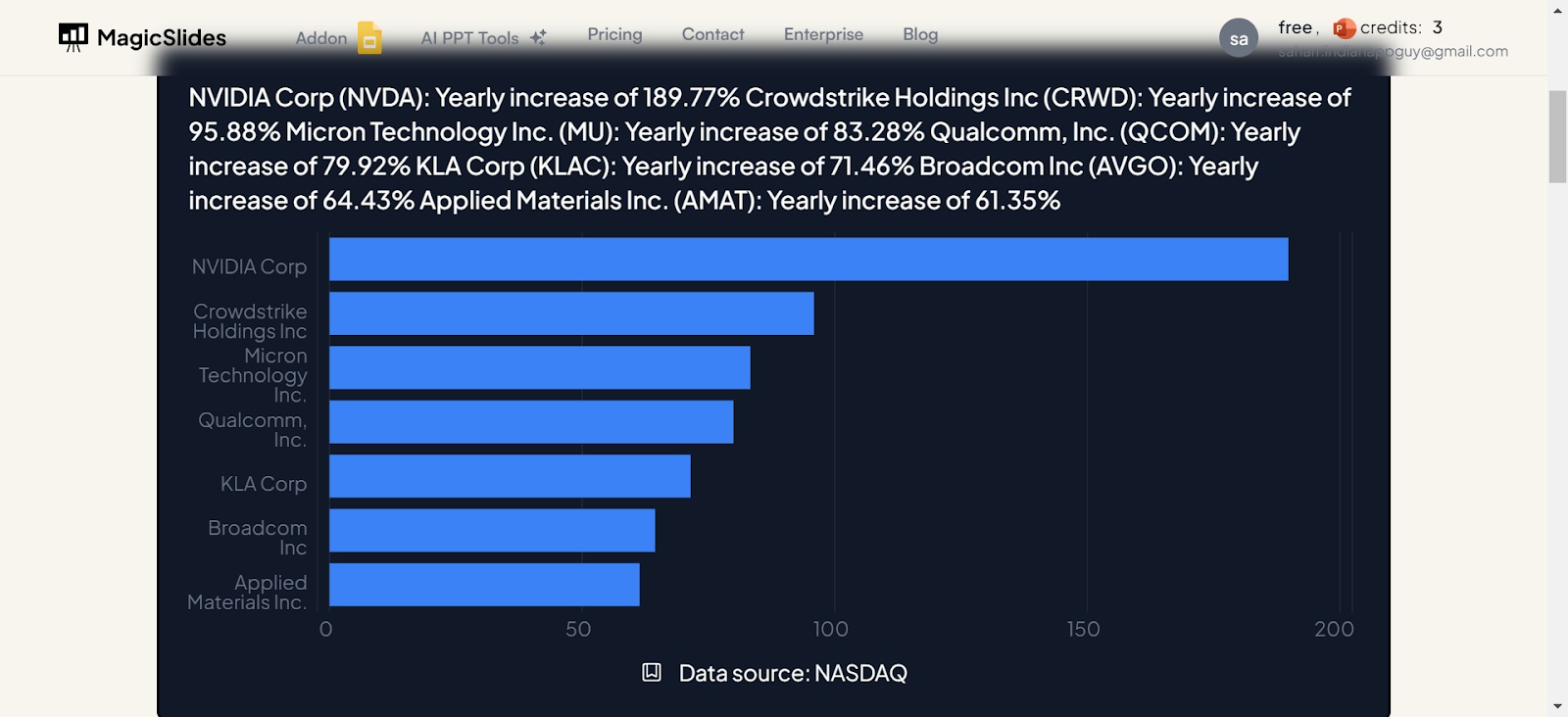
As you can see in the above image, the graphic was created using MagicSlides.app chart maker AI PPT Tool.
Consistent Visual Appeal
AI ensures uniformity across all slides in fonts, colors, and design elements, reducing the need for constant adjustments and maintaining a cohesive look throughout the presentation.
Efficient Multimedia Integration
AI-driven platforms manage multimedia files effectively, ensuring smooth performance and compatibility across different devices and presentation contexts.
Case Studies of Traditional Efforts
Scenario: Marketing Professional Preparing for a Product Launch
Imagine a marketing expert tasked with unveiling a new product. The preparation for this pivotal event often stretched over several days or even weeks.
The process involved extensive research to gather accurate and compelling content, meticulous layout adjustments to ensure visual harmony, and creative graphic design to make each slide stand out.
Each element of the presentation required individual attention to detail to ensure that the overall message was not only clear but also engaging and persuasive.
The professional had to juggle between optimizing the design elements and fine-tuning the content, making sure that each slide effectively contributed to a cohesive narrative.
This exhaustive process was typical in the era before advanced presentation tools became available, highlighting the significant time and effort invested in traditional presentation methods.
Transforming the Presentation Landscape
Artificial intelligence, incorporated into presentation software, has shifted how humanity creates and delivers presentations. It is a tremendous change in the process, far surpassing any streamlining or time-saving shortcuts; through the implementation of technology, it personalizes and changes the entire presentation experience, increasing the effectiveness of communication.
Personalization and Engagement
Using AI technologies permits a presentation beyond a static set of slides. Content adapts in real-time to the feedback from the audience, with the material developed to suit different preferences and levels of engagement. Such dynamic engagement makes the presentation more interactive and much more effective in connecting with the audience at a deeper level.
Content Optimization
AI fine-tunes the content so that the language, visuals, and data optimally suit the grain of the audiences' expectations and levels of understanding. For example, complicated ideas can be simplified into smaller, manageable ones or made more illustrative with the help of visuals.
Analysis of the Audience
Advanced algorithms analyze the audience's demographics and prior knowledge to enable presenters to adapt the message accordingly. This is a way to ensure that the content is always relevant and pitched at the right level to increase the overall effectiveness of communication.
Design Tasks Automation
From picking color palettes to aligning text boxes, AI will carry out most of the tedious and time-consuming design tasks that are presumably part of creating a presentation. This will surely speed up the process —empowering those presenting to focus on the substance of the content rather than getting lost in the aesthetics of detail.
Feedback and Improvements
AI tools can make real-time suggestions to improve presentations based on historical data and best practices. For instance, if the audience is consistently unimpressed with a particular slide, it may give ideas on how to do that particular slide differently or suggest means by which it can reduce text and increase visuals.
It would not just ease the process of creating a presentation but would also enhance how it can deliver and receive information through the integration of AI. This makes for more effective meetings, lectures, and presentations of any kind, such that each slide not only captures attention but also presents the idea being conveyed as clearly and with as much impact as possible. It shows a vital step toward the communication tools of the future: more interactive, more innovative, and more flexible.
The Future of Presentations
As AI technology continues to revolutionize various sectors, its impact on presentation software and tools is particularly notable. The advancements in AI are setting the stage for more sophisticated features that can transform the way presentations are created and delivered.
One of the anticipated features includes real-time audience engagement analytics. This technology will allow presenters to see how effectively they are engaging their audience, making adjustments on-the-fly to improve their connection and message delivery. Whether it’s changing the pace, adjusting the content, or shifting focus based on real-time feedback, this feature promises to make presentations more dynamic and responsive.
Moreover, adaptive content suggestions based on viewer feedback will be a game changer. Imagine a scenario where your presentation software suggests modifications or additions to your slides as you prepare your pitch, tailored specifically to the anticipated preferences and questions of your audience. This could significantly enhance the relevance and impact of your presentations, ensuring that your content resonates well with the audience.
Enhanced interactivity is another exciting frontier. Future presentation tools might allow for more sophisticated interactions with the audience, such as live polls, interactive Q&A sessions, and even virtual reality elements, making the presentation experience more immersive and engaging.
For those who rely heavily on presentations to communicate with stakeholders, keeping up with these advancements is crucial. While not explicitly linked to any single software, it's interesting to note how platforms are integrating these AI-driven capabilities to enhance user experience. For example, a platform that specializes in creating engaging presentations could greatly benefit from incorporating such AI features, potentially setting a new standard in the industry.
As we look forward, the integration of AI into presentation tools not only promises to enhance the efficacy of communications but also to make the process more intuitive and less time-consuming, allowing presenters to focus more on content and delivery rather on the technical aspects of presentation creation.
Conclusion
AI presentation makers like Magicslides.app are revolutionizing the way we create presentations. By reducing the manual labor involved and enhancing the aesthetic appeal of slides, these tools allow everyone from students to professionals to convey their ideas more effectively and persuasively. As we move forward, the role of AI in presentation creation promises to grow, continually changing the way we communicate our ideas to the world.
how-presentation-maker-ai-changes-slide-creation
how-presentation-maker-ai-changes-slide-creation


