How to Open PPTX File With or Without PowerPoint (6 Easy Methods)


Learn how to open a PPTX file without PowerPoint using Google Slides, PowerPoint Online, LibreOffice, WPS Office, and AI tools for free.
Have a .pptx presentation but don’t have Microsoft PowerPoint installed? Don’t worry, you don’t need PowerPoint to open or view PPTX files.
Whether you’re using Windows, Mac, Chromebook, or even your phone, there are several free ways to open PPTX presentations without purchasing Microsoft Office.
In this guide, I’ll show you the best methods to open PPTX files, edit them if needed, and even convert them into other formats.
What Is a PPTX File?
A PPTX file is the default presentation format created by Microsoft PowerPoint. It contains slides, images, text, animations, charts, videos, and other presentation elements.
Since PPTX is an open XML-based format, many applications besides Microsoft PowerPoint can open it.
Method 1: Open PPTX Files with Google Slides (Free)
Google Slides is one of the easiest ways to open a PPTX file online.
Step 1. Visit Google Drive.
Step 2. Sign in to your Google account.
Step 3. Click New → File Upload.
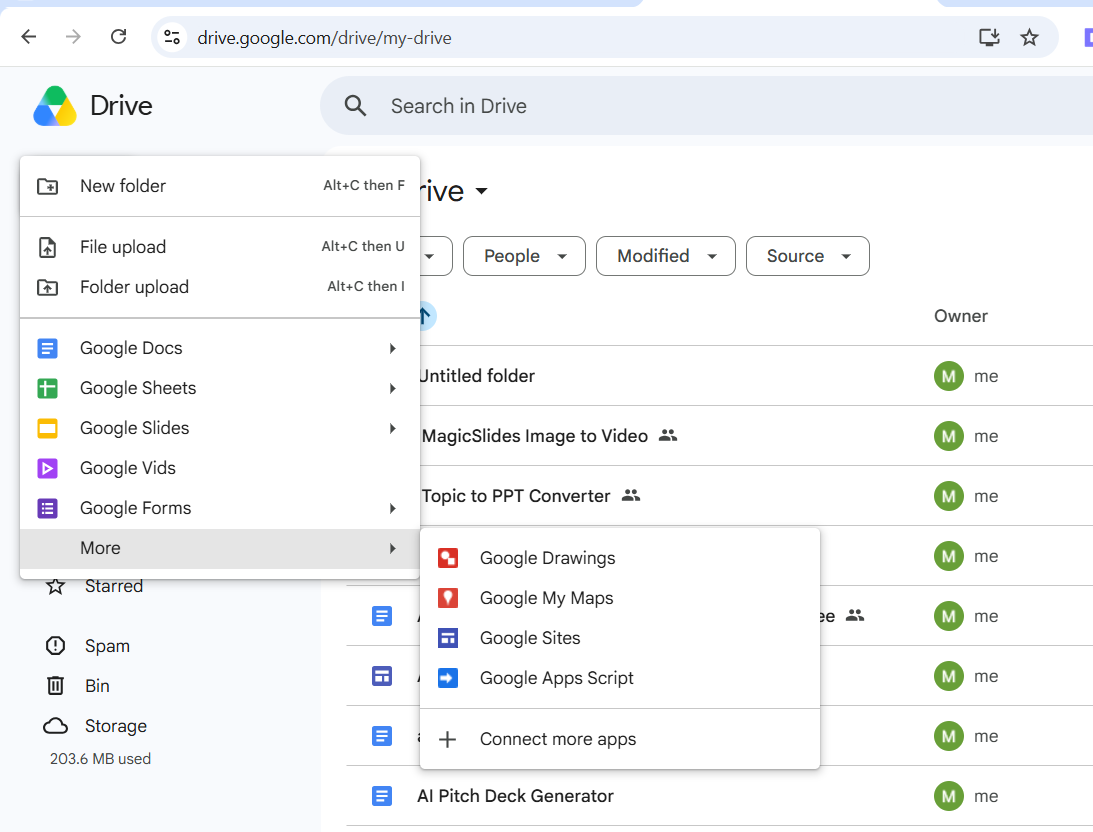
Step 4. Upload your PPTX file.
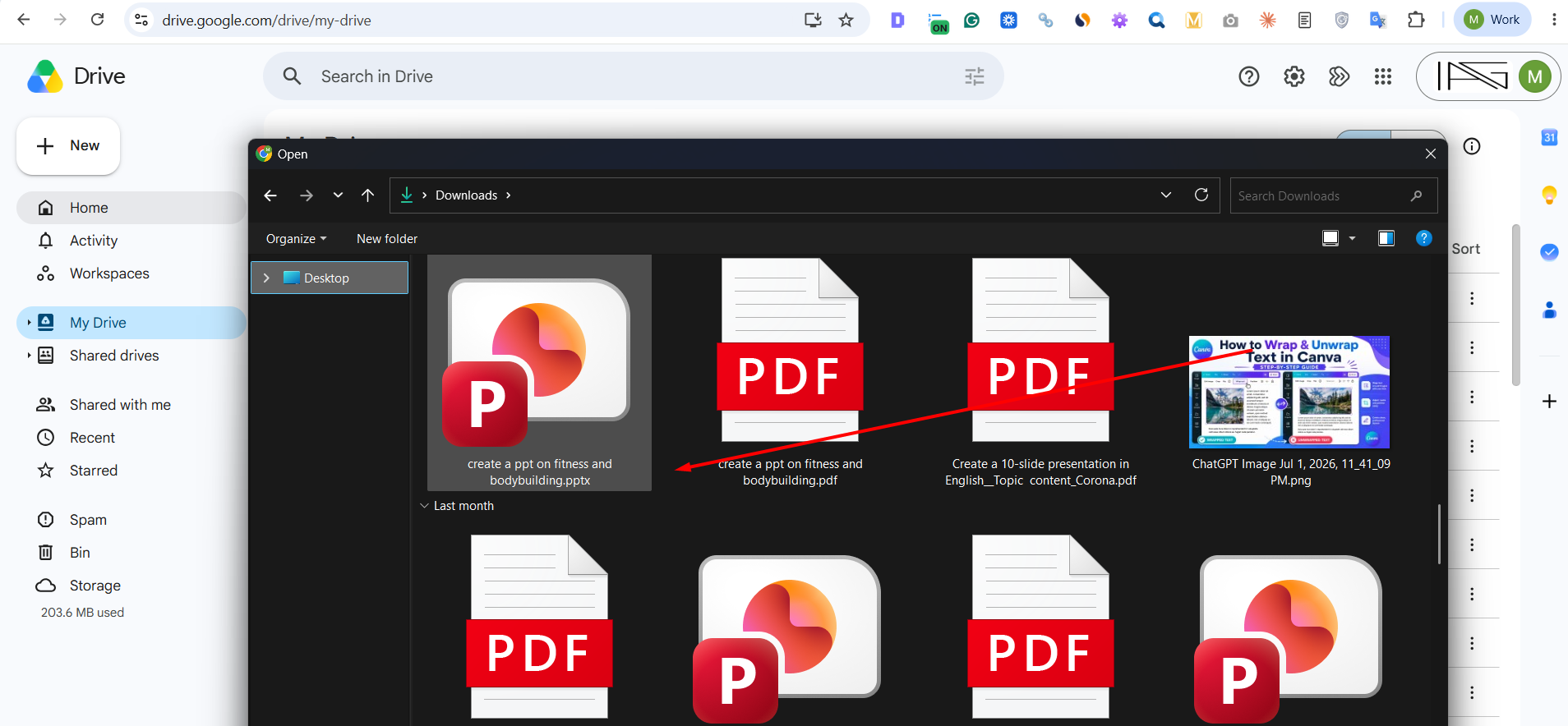
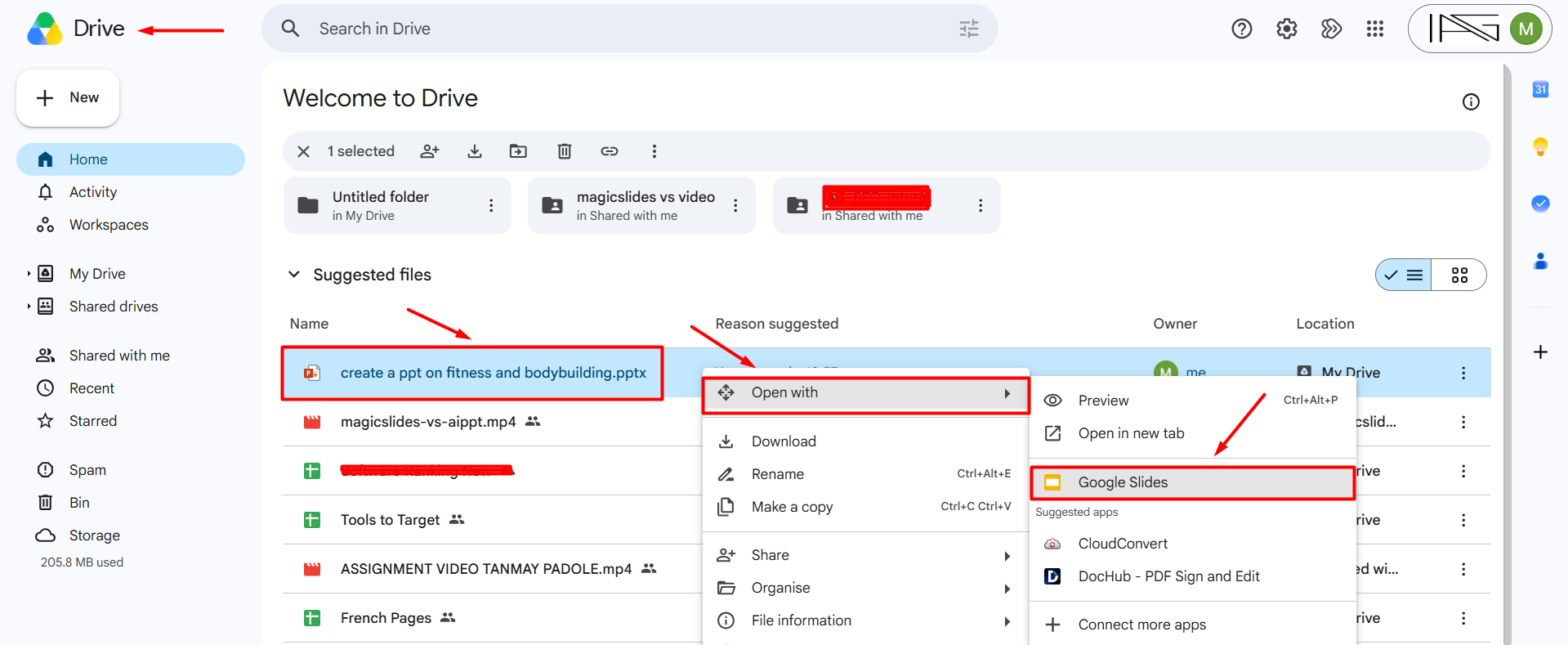
Step 5. Right-click the uploaded file.
Step 6. Choose Open With → Google Slides.
Your presentation will open in the browser without installing any software.
Pros
- Completely free
- Works on Windows, Mac, Linux, and Chromebook
- Edit presentations online
- Auto-saves changes
- Share with others easily
Method 2: Open PPTX Files with PowerPoint Online (Free)
If you prefer using Microsoft’s own software but don’t want to install PowerPoint, PowerPoint Online is a great option. It lets you view, edit, and present PPTX files directly from your web browser for free.
Steps
Step 1. Open your web browser and go to PowerPoint Online.
Step 2. Sign in with your Microsoft account. If you don’t have one, you can create a free account.
Step 3. Click Upload and Open or upload your PPTX file to OneDrive.
Step 4. Select the PPTX file you want to open.
Step 5. Your presentation will open instantly in your browser, where you can view, edit, and present it without installing Microsoft PowerPoint.
Pros
- Free to use with a Microsoft account
- No software installation required
- Maintains excellent compatibility with PowerPoint files
- Supports real-time collaboration and sharing
- Accessible from any device with an internet connection
Method 3: Open PPTX with LibreOffice Impress
LibreOffice Impress is one of the best free PowerPoint alternatives.
Steps
- Install LibreOffice.
- Open Impress.
- Click Open.
- Select your PPTX file.
LibreOffice supports most PowerPoint features, including:
- Images
- Charts
- Animations
- Shapes
- Speaker notes
Method 4: Use PowerPoint Desktop Application (If you have it)
Step 1. Ensure You Have PowerPoint Installed
Before you can open a PowerPoint file, you need to ensure that you have Microsoft PowerPoint installed on your computer. It’s a part of the Microsoft Office suite, and if you don’t already have it, you may need to purchase a license or subscribe to Microsoft 365, which includes access to PowerPoint.
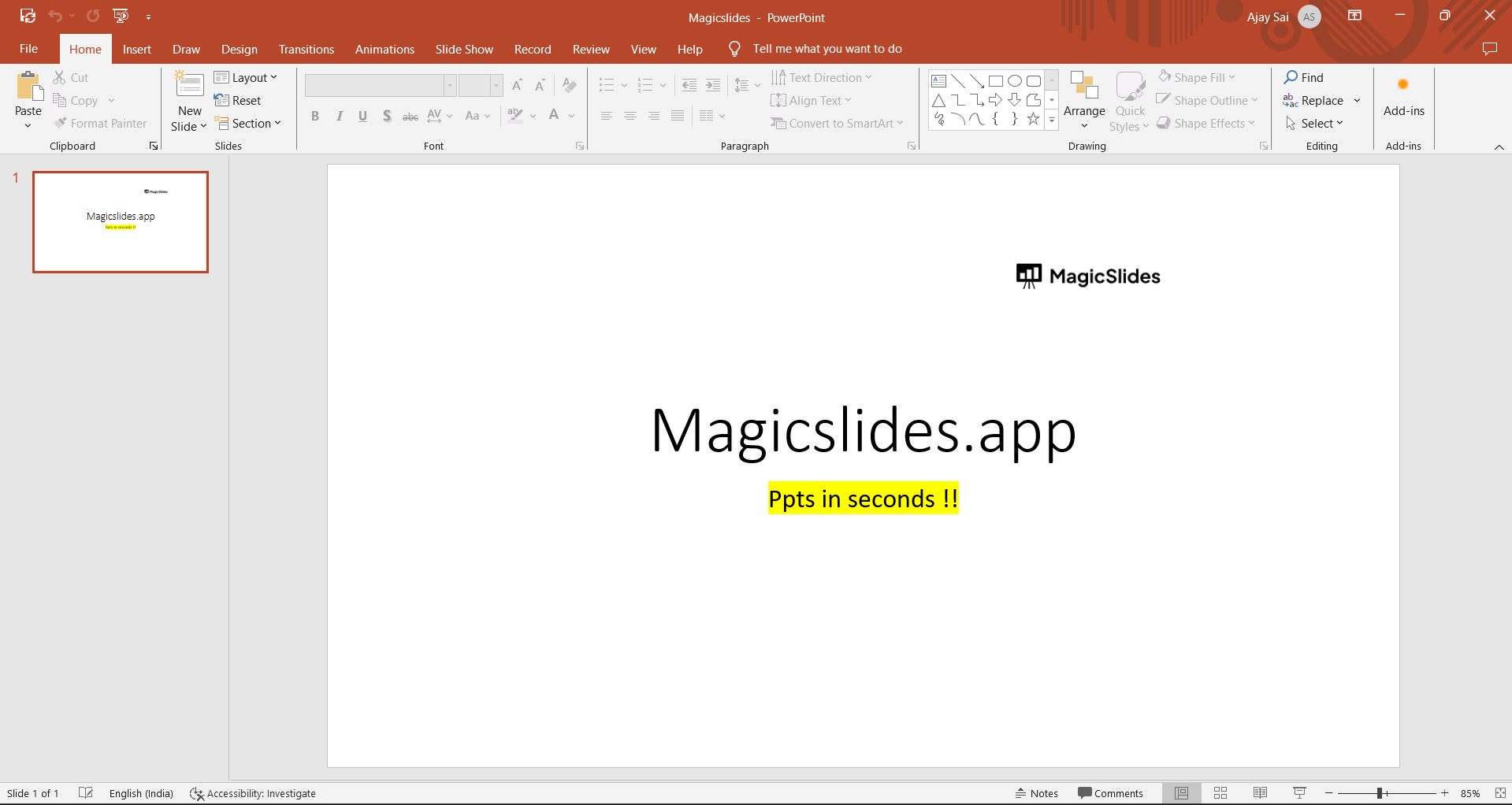
Step 2. Locate the PowerPoint File
Once you have PowerPoint installed, you’ll need to locate the PowerPoint file you want to open. It could be on your computer’s hard drive, in an email attachment, or downloaded from the internet.
Step 3. Double-Click on the PowerPoint File
To open the PowerPoint file, simply double-click on it. If PowerPoint is your default application for this file type, it will open automatically. If not, you might need to right-click on the file, select “Open with,” and choose PowerPoint from the list of available programs.
Step 4. Use File > Open from Within PowerPoint
If you have PowerPoint open but need to open a specific file, you can use the “File” menu within PowerPoint itself. Follow these steps:
→ Open Microsoft PowerPoint.
→ Click on the “File” tab at the top-left corner of the window.
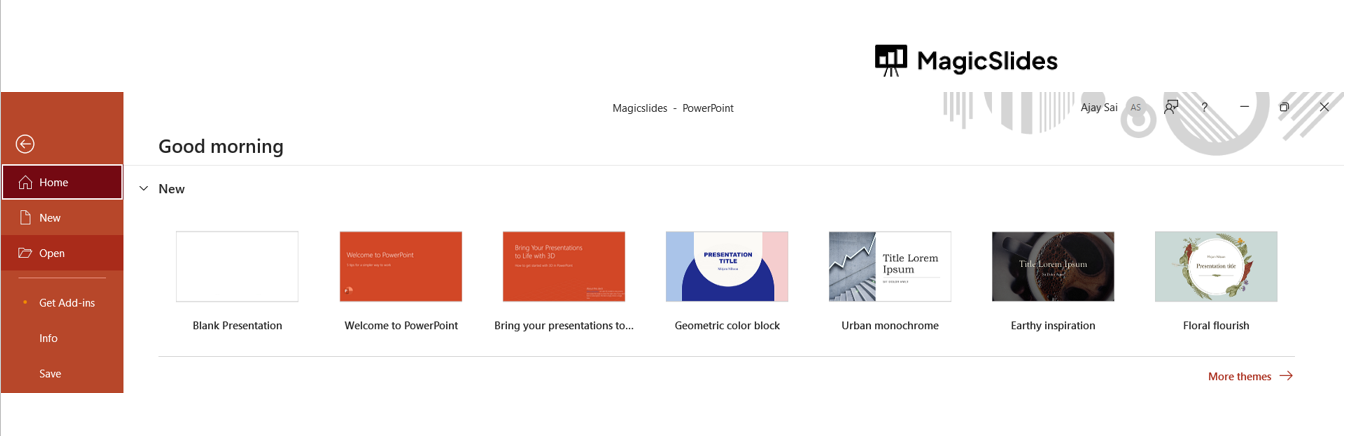
→ Select “Open” from the menu.
→ Navigate to the location of the PowerPoint file you want to open.
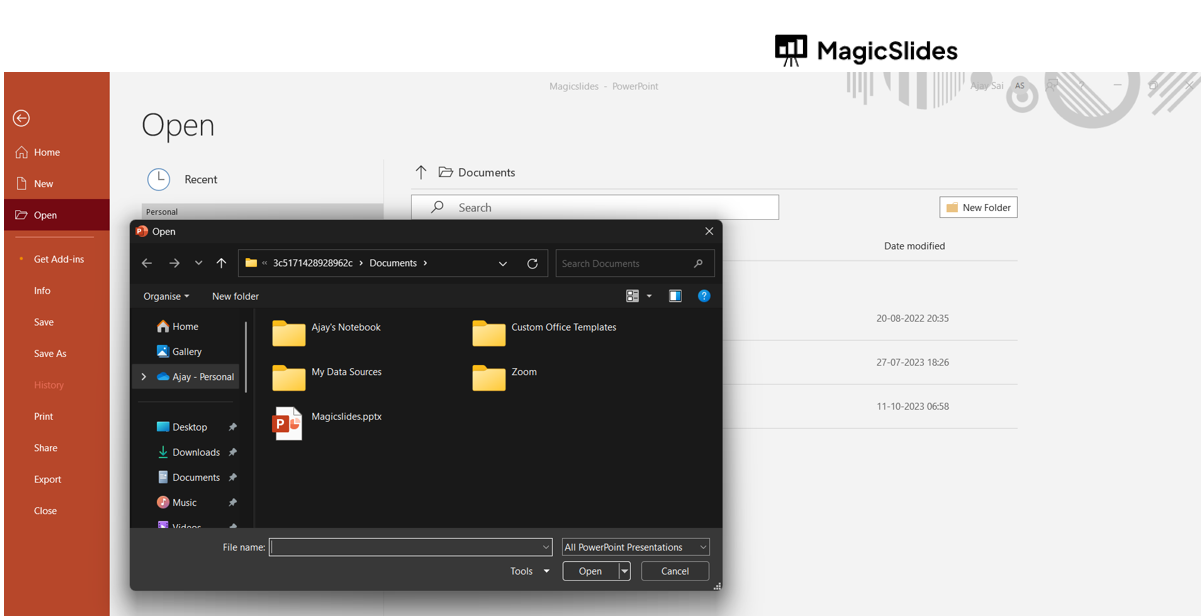
→ Click on the file to open it.
Step 5: Drag and Drop the File into PowerPoint
Another quick way to open a PowerPoint file is to simply drag and drop it into an open PowerPoint window. This method works well if you have both PowerPoint and the file you want to open visible on your desktop.
Method 5: Open and Edit PPTX Files with MagicSlides AI
If you want to do more than simply open a PPTX file, MagicSlides AI lets you upload your existing PowerPoint presentation and enhance it with AI in just a few clicks. Instead of manually editing every slide, you can quickly improve your presentation while preserving its original structure.
Steps
Step 1. Visit MagicSlides AI PPT Maker.

Step 2. Upload your PPTX presentation.
Step 3. Let AI analyze your slides and content.
Step 4. Edit, rewrite, or redesign your presentation using AI-powered tools.
Step 5. Download your updated presentation as a PPTX file or continue editing online.
Conclusion
You don’t need Microsoft PowerPoint to open a PPTX file. Free tools like Google Slides, PowerPoint Online, LibreOffice Impress, WPS Office, and Apple Keynote make it easy to view and edit presentations on almost any device.
If you also want to enhance your presentation, AI-powered tools like MagicSlides can help you improve content, redesign slides, and create professional presentations in minutes.
Frequently Asked Questions
Q1. Can I open a PPTX file without Microsoft PowerPoint?
Yes. You can use Google Slides, PowerPoint Online, LibreOffice Impress, WPS Office, Apple Keynote, or AI Presentation Tool to open PPTX files.
Q2. Is Google Slides free for PPTX files?
Yes. Google Slides lets you upload, view, and edit PPTX presentations at no cost.
Q3. Can I edit a PPTX without PowerPoint?
Absolutely. Most presentation software supports editing PPTX files while preserving formatting.
Q4. What’s the best free PPTX viewer?
Google Slides and PowerPoint Online are among the easiest and most reliable free options.
Q5. Can I convert PPTX to another format?
Yes. Most presentation tools allow you to export presentations as PDF, images, or different presentation formats.
Q6. Will animations work without PowerPoint?
Basic animations usually work, but complex animations and transitions may not display the same in third-party software.


