What is Apple Keynote?


Apple Keynote is Apple’s presentation software for creating stunning, professional slideshows on Mac and iOS
What is Apple Keynote?
Apple Keynote is Apple’s powerful and user-friendly presentation software designed for macOS and iOS devices.
It allows users to create professional and visually appealing slideshows with animations, transitions, charts, and multimedia elements.
Whether you're preparing a pitch deck, academic lecture, or business proposal, Keynote offers a seamless and elegant solution for building captivating presentations.
Step-by-Step Overview: Understanding Apple Keynote
Step 1: Keynote is Part of Apple’s iWork Suite
Apple Keynote comes bundled as part of the iWork suite, alongside Pages (for word processing) and Numbers (for spreadsheets). credit: apple support

It is available for free on Mac, iPhone, and iPad. You can also use it online via iCloud.
Step 2: User-Friendly Interface
Keynote’s interface is intuitive, with a clean layout. It features a slide navigator on the left, a canvas in the middle, and formatting tools on the right. credit: Hislide.io
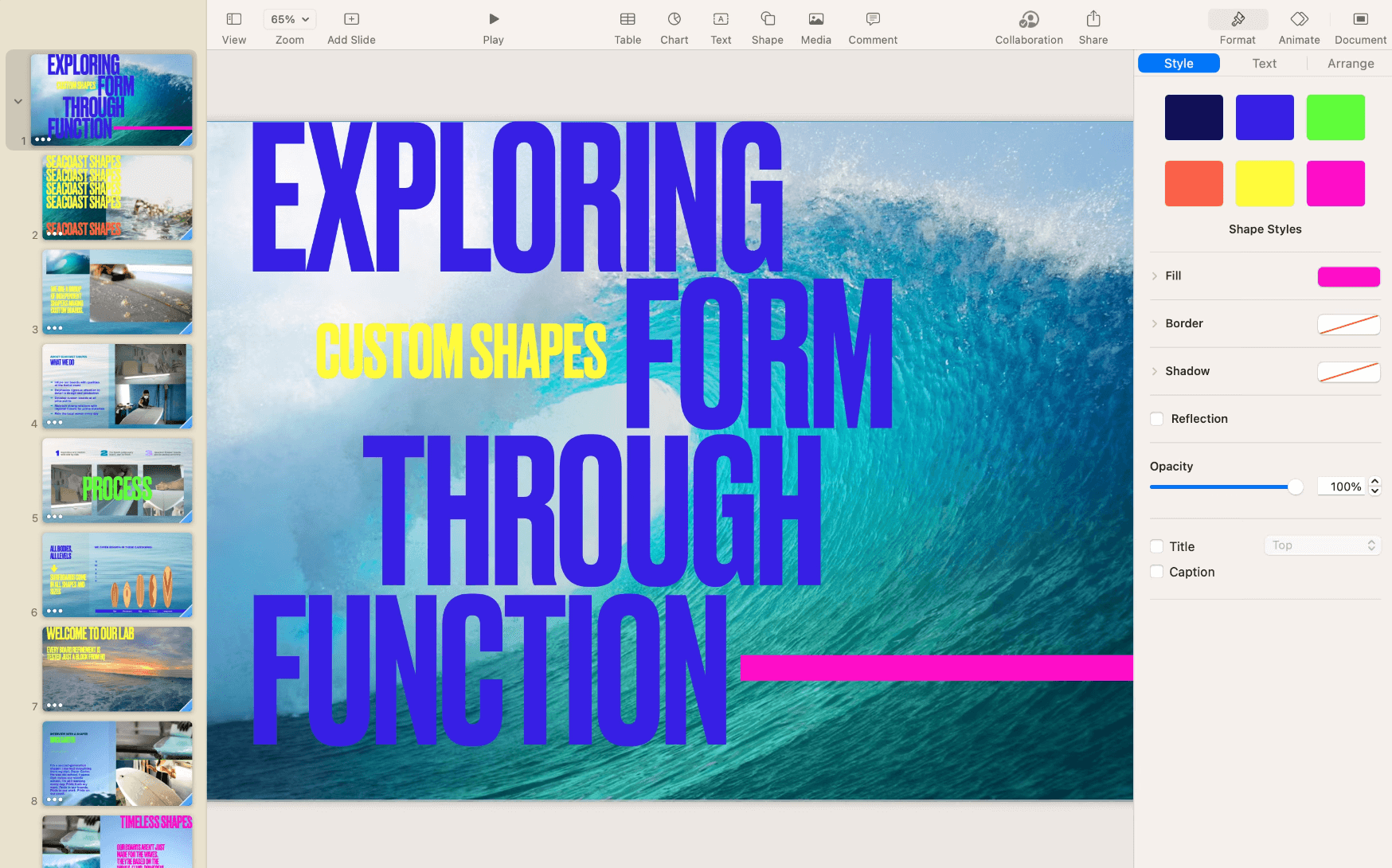
This makes it easy even for beginners to get started quickly.
Tired of spending hours crafting a presentation? Here’s a smarter solution MagicSlides.
Whether it’s for work, school, or a pitch deck, building a presentation from scratch can take hours from researching and organizing content to designing each slide. But what if you could skip all that and have your presentation ready in under a minute? That’s exactly what MagicSlides does for you.

MagicSlides is an AI-powered tool that creates professional, engaging presentations with just one prompt. Simply enter your topic, and the platform will generate a full deck complete with structured content, design elements, and suggested visuals.
Here’s what you’ll love about MagicSlides:
- Instant slide generation with just one prompt
- Smart content organization and bullet points
- Visually polished designs, no design skills needed
- Multiple formats: Download as PowerPoint, use in Google Slides
- Supports customization, edits, and re-generation
- Converts YouTube videos, URLs, or text into full presentations
- Perfect for business, education, content creation, and more
Want to try it yourself? Click here to start creating your first presentation for free!
Step 3: Professional Templates and Themes
Keynote offers a wide variety of professionally designed templates for business, education, and creative projects. credit: colourlib

These templates come with built-in slide designs that help maintain consistency and visual appeal.
Step 4: Rich Media Integration
You can easily add images, videos, audio clips, live video feeds, and animations to your Keynote slides. The integration with other Apple services (like Photos, Music, and iMovie) enhances the overall presentation experience.
Step 5: Powerful Animations and Transitions
Keynote’s animations and transitions stand out for their smoothness and style.
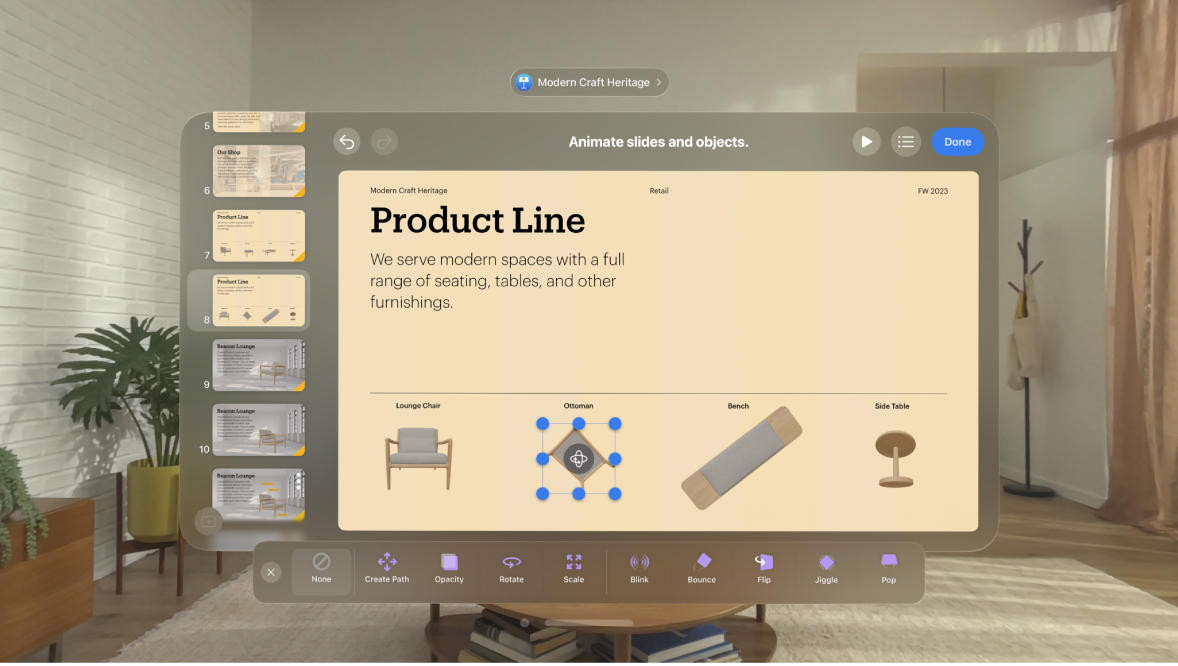
The "Magic Move" transition, for example, creates a cinematic flow between slides that adjust objects automatically. credit: apple support
Step 6: Collaboration Features
With iCloud, users can collaborate in real-time with others. You can share your presentation and allow others to view or edit it from anywhere, even if they’re using a PC via the web.
Step 7: Exporting and Compatibility
Keynote allows you to export presentations as PDF, PowerPoint (.pptx), movie files, or images. This makes it compatible with other tools like Microsoft PowerPoint, making sharing and collaboration easy across platforms.
Step 8: Cross-Device Sync
Because it’s part of the Apple ecosystem, Keynote presentations sync seamlessly across all Apple devices using iCloud. You can start a presentation on your iPhone and finish it on your Mac without missing a beat.
Conclusion
Apple Keynote is a powerful alternative to PowerPoint for Apple users who want sleek, professional, and easy-to-create presentations.
With its elegant design templates, fluid animations, and real-time collaboration tools, Keynote empowers users to deliver impactful presentations that truly stand out.
Whether you’re a student, business professional, or creative, Keynote offers the tools and flexibility to communicate your ideas effectively.
FAQs are here to help!
Is Keynote only available on Apple devices?
Keynote is primarily available on Apple devices, but you can also access and edit Keynote presentations via iCloud on any web browser.
Can I open PowerPoint files in Keynote?
Yes, Keynote allows you to import and edit PowerPoint (.pptx) files. However, some complex formatting might require adjustments.
Is Keynote free?
Yes, Apple offers Keynote for free on all compatible Mac, iPhone, and iPad devices.


