Which AI presentation tool wins?

MagicSlides vs Beautiful.ai: Complete AI Presentation Comparison for 2026

Beautiful.ai mainly helps users create slides automatically after adding their presentation content. MagicSlides focuses on designing complete presentations from topics, PDFs, URLs, YouTube videos, and DOCX files in just a few steps. This comparison goal is to help users understand which tool is better for creating PowerPoint presentations faster and with less manual work.

No credit card required · Free forever plan
Quick verdict

MagicSlides is better for users who want automatic presentation creation from scratch. Beautiful.ai is better for users who already have content and just want an organized layout. In simple words: • From scratch to ready-to-present slides = MagicSlides • Need only the slide layout for prewritten content = Beautiful.ai

MagicSlides wins at
  • Creating complete presentations automatically
  • Supporting PDFs, URLs, YouTube videos, and DOCX files
  • Faster presentation generation with fewer manual steps
  • Editable PowerPoint and Google Slides exports
  • Free plan and Google Slides add-on support
Beautiful.ai wins at
  • Automatic slide alignment and formatting
  • Keeping presentation layouts visually consistent
  • Simple slide editing with design suggestions built in
The contenders

MagicSlides vs Beautiful.ai: Platform Overview

Understand What MagicSlides and Beautiful.ai Do and How Both Tools Create Presentations Differently

What is MagicSlides?

MagicSlides automatically generates presentation slides, content, images, and layouts that can be exported to PowerPoint or Google Slides. It is mainly useful for users who don’t want to create a complete slide deck from scratch, but instead need to generate a ready-to-use presentation with just an idea or topic. It is best when you don’t have much time to create a presentation.

Founded2022
Best forusers who want complete presentations created automatically
Visit MagicSlides

What is Beautiful.ai?

Beautiful.ai only helps to create a layout or adjust the formatting automatically according to your content. It can’t help users make an attractive PPT from scratch; instead, you have to provide it with proper content, and then it will start designing. Moreover, it automatically adjusts layouts and spacing to keep slides looking clean.

Founded2017
Best forusers who want a cleaner slide design and automatic formatting during editing
Visit Beautiful.ai
Methodology

How We Compared MagicSlides and Beautiful.ai?

Both Tools Were Tested Using Their Highest Paid Plans and Real Presentation Creation Tasks in 2026

We created 6 different presentations on both platforms, including:

Presentations tested
  • Business proposals
  • Classroom presentations
  • Marketing decks
  • Training slides

In our testing, MagicSlides generated a complete 12-slide presentation in around 1 minute and 40 seconds. Beautiful.ai took around 7-8 minutes because more manual editing and slide adjustments were needed during creation.

We also tested several key factors, including PowerPoint export quality, AI content generation, and presentation formatting after download. PowerPoint export in MagicSlides finishes in under 20 seconds (this time depends on your internet speed). Beautiful.ai exports take around 40-60 seconds, depending on presentation size.
6
Presentations created
5
Features compared
12mo
Pricing compared
2
Tools tested head-to-head
Step-by-step

MagicSlides vs Beautiful.ai: Presentation Creation Comparison

See How Much Manual Work is Needed to Create Presentations on MagicSlides & Beautiful.ai

How to Create a Presentation Using Beautiful.ai?

Here Are the Step-by-Step Instructions to Create a Complete Slide Deck Via Beautiful.ai

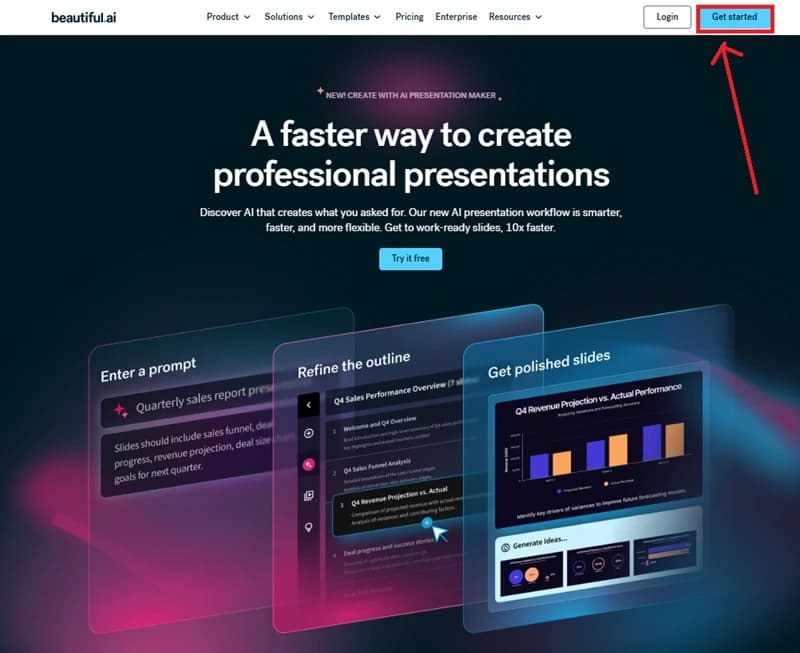
Create a Beautiful.ai Account

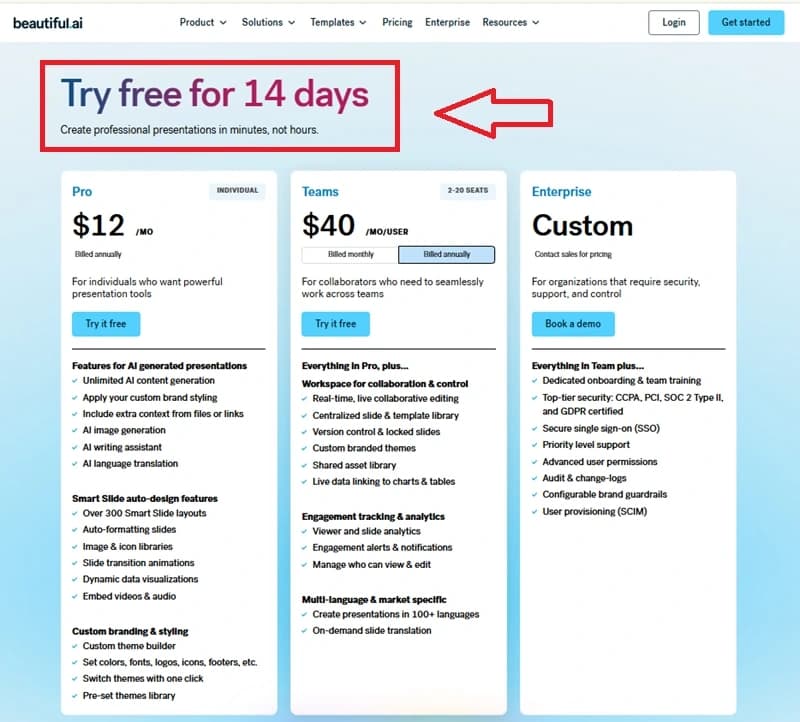
Open the Beautiful.ai website in your browser and click on the “Get Started” button in the top-right corner.

Create a Beautiful.ai Account

Start the Free Trial Plan

After creating the account, start with a 14-day free trial before purchasing any plan.

Start the Free Trial Plan

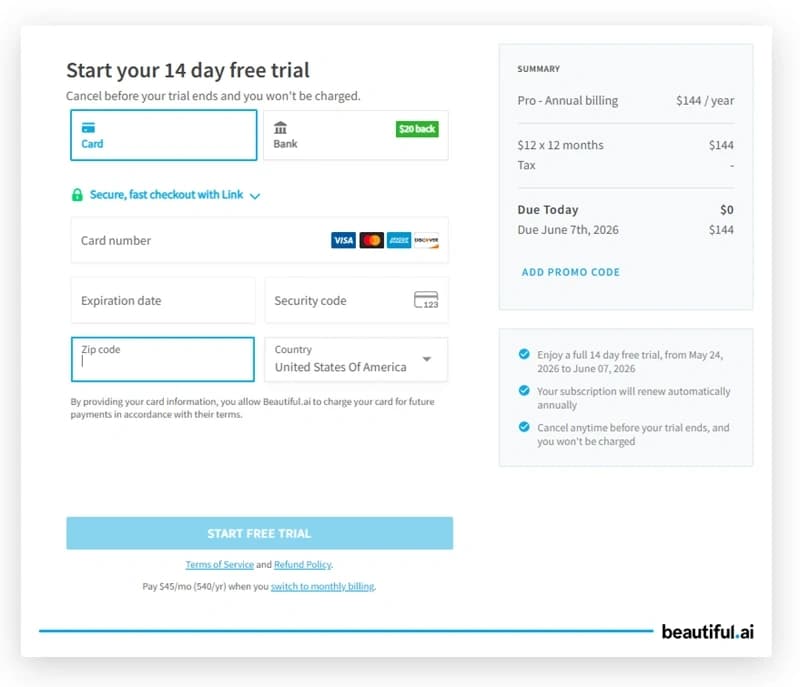
Enter Payment Details to Activate the Trial

After clicking on the “Try it Free” button, a new payment window opens. Here, users need to enter their card details and other information to activate the 14-day free trial plan.

Enter Payment Details to Activate the Trial

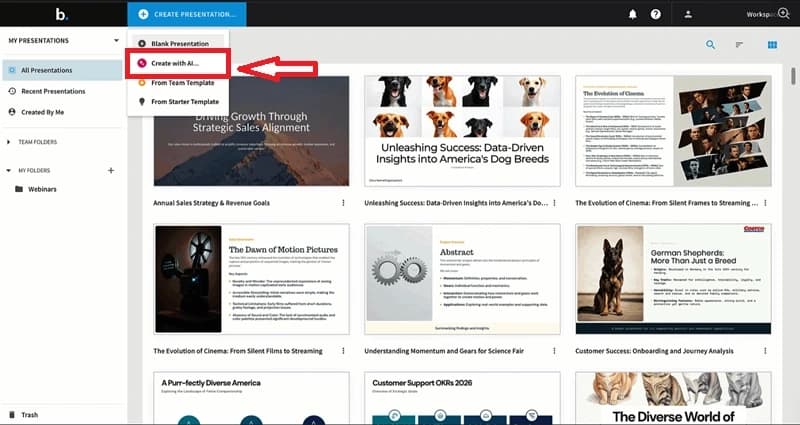
Choose the “Create with AI” Option

After opening the dashboard, click on the “Create Presentation” button and select the “Create with AI” option to start generating a presentation automatically using AI.

Choose the “Create with AI” Option

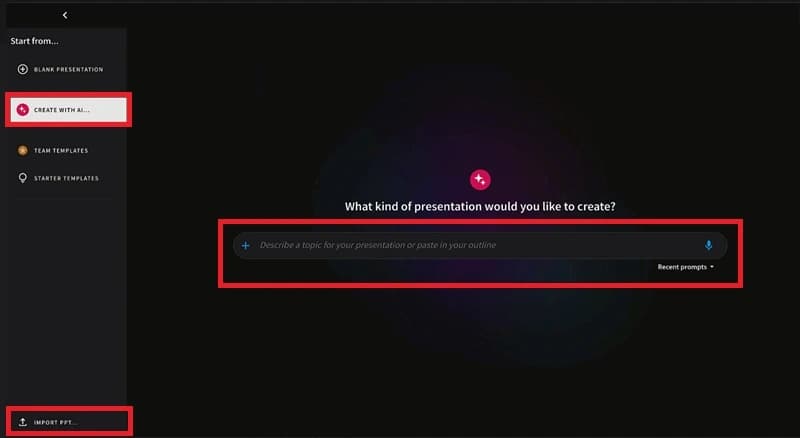
Enter the Presentation Topic or Import an Existing File

Now, enter the presentation topic or idea inside the prompt box to start generating slides automatically. Users can also import an existing PowerPoint presentation using the “Import PPT” option from the left panel.

Enter the Presentation Topic or Import an Existing File

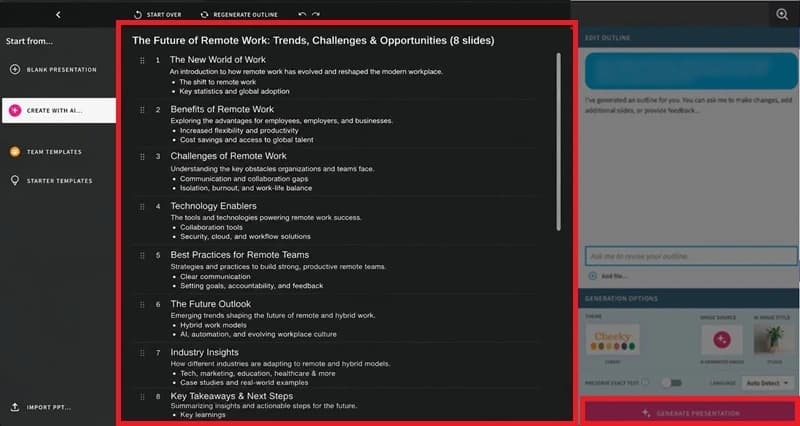
Review and Edit the Presentation Outline

Beautiful.ai automatically creates a presentation outline based on the entered topic. Users can review the slide structure and customize the outline before generating the final presentation. Once everything is ready, click on the “Generate Presentation” button to create the complete slide deck.

Review and Edit the Presentation Outline

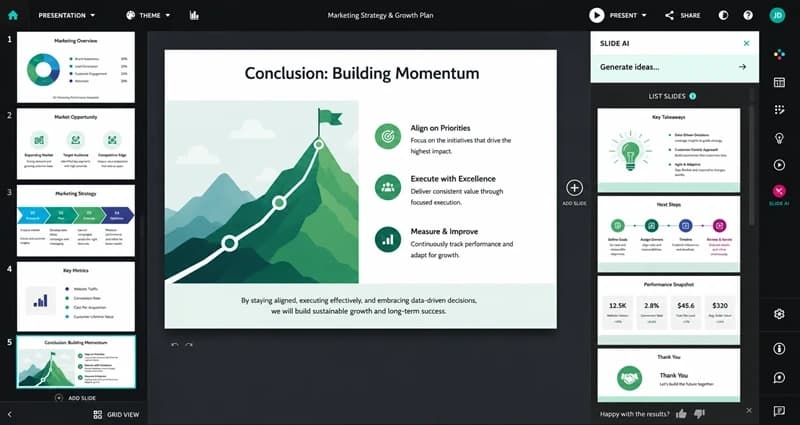
Check Result

After clicking on the generate button, Beautiful.ai creates the complete presentation automatically.

Check Result

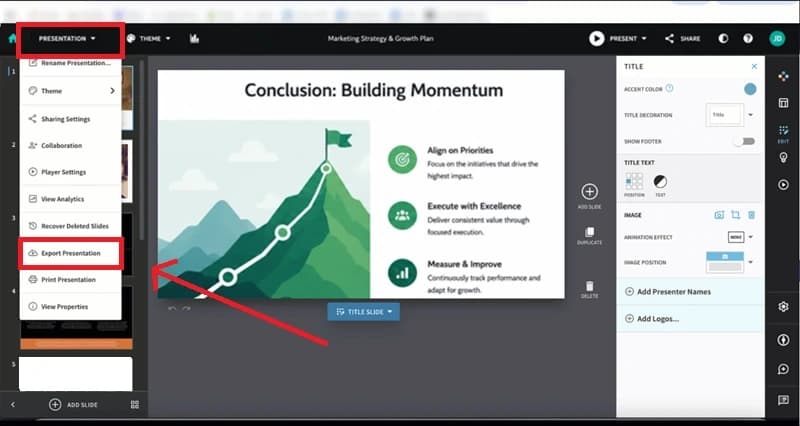
Export or Download the Presentation

After reviewing the presentation, click on the “Presentation” menu from the top-left corner and select the “Export Presentation” option.

Export or Download the Presentation

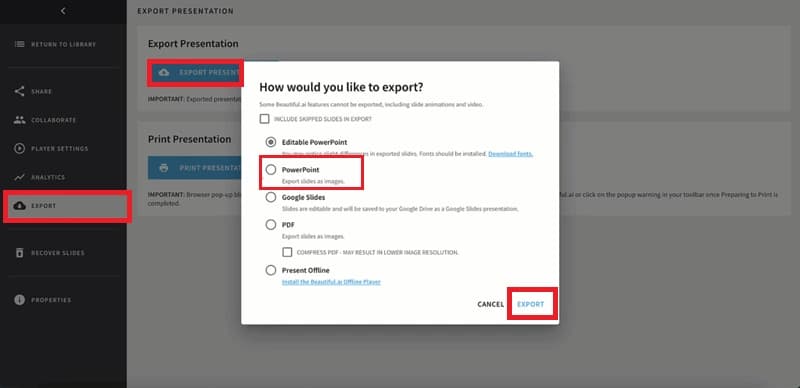
Choose the Export Format and Download the Presentation

After opening the export window, select the preferred export format, such as PowerPoint, PDF, or Google Slides. Then click on the “Export” button to download and save the presentation to your device

Choose the Export Format and Download the Presentation

How MagicSlides Creates Presentations?

Generate presentations from topics, PDFs, documents, URLs, and YouTube videos using a simple step-by-step process:

Create a MagicSlides Account

Open the MagicSlides website in your browser and register using your email address and password for free, without needing credit card information or any other payment.

Create a MagicSlides Account

Add the Presentation Topic

Enter the presentation topic, idea, or instructions in the prompt field so the AI can prepare the slide content automatically.

Add the Presentation Topic

Open the Dashboard

Press the “Dashboard” button from the top-right side to access more presentation tools and options.

Open the Dashboard

Select How You Want to Create Slides

Inside the Dashboard, choose a presentation method such as Start with AI, Start from Scratch, or Import Existing Content.

Select How You Want to Create Slides

Use the “Start with AI” Option

Choose “Start with AI” if you want the platform to create the presentation automatically using AI.

Use the “Start with AI” Option

Add Your Source Files or Content

Upload or drag & drop files like YouTube videos, PDFs, images, DOCX files, URLs, or PPTX presentations for AI-based slide generation.

Add Your Source Files or Content

Generate the Presentation Automatically

Once the topic or files are added, click the arrow ( > ) button to begin creating the presentation.

Generate the Presentation Automatically

Pick a Presentation Design

Select a template and slide style for the presentation. Additional template options are available under “View More.”

Pick a Presentation Design

Build the Full Presentation

Click on “Generate Outline” to create the presentation structure first. Then click “Generate Presentation” to prepare the final slide deck automatically.

Build the Full Presentation

Save or Export the Presentation

After the presentation is ready, use the “Export” button to download it as PPTX, PDF, or send it directly to Google Slides.

Save or Export the Presentation
Demo

Watch MagicSlides Create Presentations Automatically

MagicSlides
Our pick
Feature matrix

MagicSlides vs Beautiful.ai: Feature Comparison

Compare Presentation Creation and Other Important Features of Both Tools Side by Side

Feature
Beautiful.ai
MagicSlides
AI deck generation from prompt
DesignerBot
Generate from URL / YouTube
Generate from PDF / DOCX
PowerPoint (.pptx) export
Paid plans
Google Slides export
Google Slides add-on
Free plan
14-day trial only
Free forever
Real-time slide auto-design
Their core feature
500+ AI templates
Brand kit / fonts
Languages supported
English-first
100+
Output quality

MagicSlides vs Beautiful.ai: Design Quality Comparison

See How Presentations Look After AI Generation and Slide Editing on Both Platforms

Beautiful.ai

During our testing, Beautiful.ai automatically kept slides neat and properly aligned while adding content. The presentations looked good with minimal manual effort. However, we still needed to add most of the presentation content manually compared to MagicSlides.

MagicSlides

In our experience, MagicSlides generated complete presentation slides automatically from the provided topic and content. We needed a little manual editing compared to Beautiful.ai, especially for presentation text and overall slide creation.

Our verdict

Beautiful.ai is better for users who want automatic slide formatting across presentations. MagicSlides is better for users who want faster full-presentation generation with multiple templates, layouts, and export options.

Under the hood

Which Tool Generates Better Presentation Content?

Understand Which Platform Creates More Useful Presentation Slides Automatically

Beautiful.ai

During testing, we found that Beautiful.ai mainly improved how slides looked. Basically, it helps users in structuring the presentation in a visually attractive way for the audience. Additionally, the platform automatically adjusted slide layouts and formatting, but we still had to add most of the presentation content ourselves. So, it is good, but only if you want a structured layout or template for your pre-written content.

MagicSlides

We are impressed with MagicSlides because it automatically does most of the presentation work after adding the topic or source content. This online solution helped us to create a complete slide deck, with AI-written content, related visuals, and a professional template, all automatically, as per our idea. We didn’t write a proper prompt; instead, we wrote an idea, and it structured a complete presentation, without any manual intervention.

Our verdict

Beautiful.ai is better for improving slide design. But when it comes to creating complete presentations automatically, without any manual effort, MagicSlides is better.

Cost

Pricing compared

What you actually pay each month.

Beautiful.ai
Pro
$12/mo
  • Smart slide templates
  • Brand controls
  • PowerPoint export
  • No free tier
Best value
MagicSlides
Pro
$8/mo
  • Unlimited AI generation
  • PPTX + Google Slides
  • All input types
  • AI image generation
The honest scorecard

MagicSlides vs Beautiful.ai: Pros and Cons

See Where MagicSlides and Beautiful.ai Perform Better and Where Both Platforms Have Limitations

MagicSlides Pros

  • Created complete presentations (content + visuals) much faster during our testing
  • Supported presentation generation from topics, PDFs, URLs, YouTube videos, and DOCX files
  • Exported presentations to both PowerPoint and Google Slides
  • Required very little manual editing after generation
  • Free plan available without adding payment details
  • Multiple templates for different presentation styles
  • Resultant files are fully editable

MagicSlides Cons

  • The free plan has limited slide generation per presentation
  • No built-in presentation analytics for tracking viewers
  • Less focused on strict brand styling compared to Beautiful.ai

Beautiful.ai Pros

  • Slides looked clean and visually balanced automatically
  • Helpful for users who already have presentation content ready
  • Strong design consistency across all slides
  • Good template quality for business presentations
  • Useful for teams focused on presentation appearance and branding

Beautiful.ai Cons

  • Required more manual work for writing the presentation content
  • No support for creating presentations from PDF URLs or YouTube videos
  • PowerPoint export available only in paid plans
  • No direct Google Slides export support
The recommendation

MagicSlides vs Beautiful.ai: Which One Should You Choose

Choose The Platform That Matches Your Presentation Creation Style and Daily Workflow

Pick MagicSlides if…

  • Want to complete presentations generated automatically
  • Want to create slides from PDFs, URLs, YouTube videos, or DOCX files
  • Need editable PowerPoint and Google Slides export
  • Want faster presentation creation with less manual work
  • Prefer AI-written slide content and layouts automatically

Pick Beautiful.ai if…

  • Already have presentation content prepared
  • Want help mainly with slide design and formatting
  • Prefer building slides manually one by one
  • Need visual slides across the presentation
  • Focus more on the presentation's appearance than on the generation
In closing

Author’s Verdict

MagicSlides and Beautiful.ai both help users create presentations faster, but they focus on different things:

Beautiful.ai is better for keeping slides clean during editing. However, we still needed to add and manage most of the presentation content manually.

MagicSlides required much less manual work because the platform generated the complete presentation content and layouts automatically. It also offered PowerPoint exports and editable presentation downloads more smoothly during our testing.

Try it yourself

Make your first deck with MagicSlides

Type a topic and Maya turns it into an editable presentation in under a minute — free, no credit card.

Maya

Maya AI · Senior Designer · will design your presentation

13.6k PPTs created in the last 30 days

FAQ

Q/A Related to MagicSlides and Beautiful.ai

Quick Answers to Common Questions Users Search Before Choosing Between MagicSlides and Beautiful.ai

Is MagicSlides Better Than Beautiful.ai for Full Presentation Creation?
Yes. MagicSlides creates complete presentations automatically with much less manual work compared to Beautiful.ai.
Does Beautiful.ai Create the Full Presentation Automatically?
No. Beautiful.ai mainly helps with slide design and formatting. We still needed to add most of the presentation content manually during testing.
Which Tool Creates Presentations Faster?
MagicSlides generated complete presentation drafts in around 1-2 minutes during our testing. However, due to more manual steps, Beautiful.ai required more setup time.
Can MagicSlides Create Presentations From PDFs and URLs?
Yes. MagicSlides supports presentation generation from PDFs, URLs, YouTube videos, DOCX files, and topics.
Does Beautiful.ai Support Google Slides Export?
No. During our testing, Beautiful.ai did not provide direct Google Slides export support.
Which Tool Is Better for Beginners?
MagicSlides is best for both beginners and professionals, because it will create a complete presentation with just a prompt or an idea, without any manual intervention.
Does Beautiful.ai Have a Free Plan?
Yes, for 14 days, but it requires a credit card for auto-payment. However, MagicSlides offers a free plan without any payment or credit card.

Ready to create your presentation?

Join thousands of professionals who save hours every week with AI-powered presentations.

1,511 reviews · Trustpilot & Workspace

Ask AI about MagicSlides
ChatGPT logoClaude logoGemini logoPerplexity logo