Which AI presentation tool wins?

Slidebean Alternative: MagicSlides vs Slidebean Comparison

Searching for a Slidebean alternative? Compare MagicSlides vs Slidebean based on features, pricing, templates, and presentation sharing options.

No credit card required · Free forever plan
Quick verdict

I used both MagicSlides and Slidebean to create presentations and compare their features. After spending time with both tools, I found that MagicSlides gives users more ways to create presentations and supports more content sources. MagicSlides is the better choice for anyone who wants to create presentations quickly with AI without being forced to upgrade just to share or download the slides.

MagicSlides wins at
  • Creating presentations from PDFs, DOCX files, URLs, YouTube videos, and prompts
  • Enabling presentation exports to PowerPoint and Google Slides
  • Allowing presentation sharing and downloading on the free plan
  • Supporting 100+ languages for multilingual slide generation
  • Affordable monthly plans starting at just $8/mo
Slidebean wins at
  • Specialized investor pitch deck layouts
  • Pre-built startup presentation templates
  • Integrated financial modeling tools for founders
The contenders

MagicSlides vs Slidebean: Understanding the Basics

Learn What MagicSlides and Slidebean Are & How They Work

What is MagicSlides?

MagicSlides is an AI-powered presentation creator that turns text prompts, documents, PDFs, YouTube videos, and URLs into professional, editable presentations in seconds. It operates as both a standalone web application and a Google Slides add-on, allowing users to export their slide decks directly to Microsoft PowerPoint and Google Slides. Unlike Slidebean, MagicSlides provides a free forever plan that allows exporting and sharing presentations.


Founded2022
Best forStudents, educators, professionals, and teams looking to quickly generate fully editable presentation decks from any source.
Visit MagicSlides

What is Slidebean?

Slidebean is an AI-powered presentation platform specifically designed for startups, founders, and businesses looking to create professional pitch decks. It helps users generate slide designs using templates or AI by analyzing website content and formatting slides automatically. While it excels in startup pitch deck formatting, its free plan is highly restrictive and does not allow downloading, sharing, or exporting presentations without a paid subscription.

Founded2013
Best forStartups, founders, and businesses looking to create pitch decks and financial models.
Visit Slidebean
Methodology

How We Compared MagicSlides and Slidebean

To Keep this Comparison Fair, We Used Both Tools to Create Similar Presentations and Compared their Features & Overall Performance

We generated 4 presentation decks using both MagicSlides and Slidebean to compare ease of use, export options, sharing flexibility, and overall presentation creation workflows.

Presentations tested
  • 4 presentations created in total
  • 2 created using MagicSlides
  • 2 created using Slidebean
  • Startup pitch decks and business overview topics
  • MagicSlides average generation time: 52 seconds
  • Slidebean average generation time: 3 minutes (due to analyzing time and template selection)
What we checked
  • AI content quality and layouts
  • Input source compatibility (prompts, URLs, files, videos)
  • Free plan restrictions (sharing and downloads)
  • Pricing plans value

Key evaluation areas included:

We compared these features head-to-head to determine which tool is the better choice for AI presentation generation.
4
Presentations created
6
Key areas compared
10-15
Average slides per deck
2
Tools tested head-to-head
Step-by-step

MagicSlides vs Slidebean: Presentation Creation Process

How presentations are created in MagicSlides and Slidebean

How to Create an AI Pitch Deck Using Slidebean

Follow these simple steps to generate a professional pitch deck from your website URL, and understand the sharing limitations of Slidebean's free plan:

Open the Slidebean Website and Click Sign Up

Open the Slidebean website in your web browser and click the Sign Up button.

Open the Slidebean Website and Click Sign Up

Choose a Presentation Creation Method

After signing in, select your preferred option, such as Pitch Deck with AI, Use a Template, or Blank Presentation, to start creating your presentation.

Choose a Presentation Creation Method

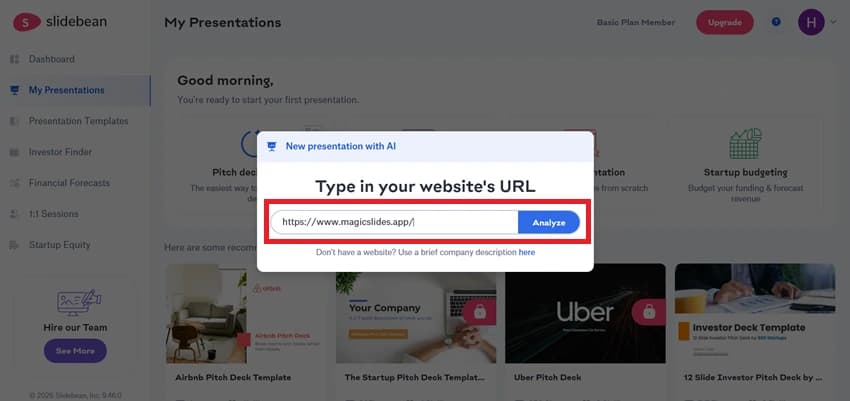
Select Pitch Deck with AI and Enter Your Website URL

Click the Pitch Deck with AI option, paste your website URL into the provided field, and then click the Analyze button.

Select Pitch Deck with AI and Enter Your Website URL

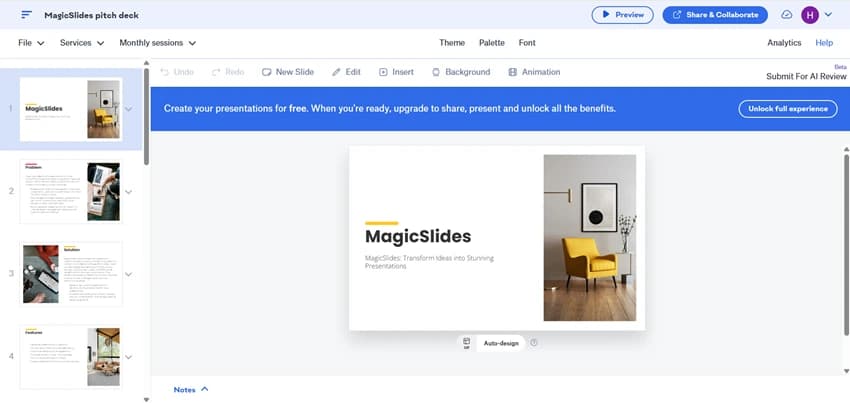
Review and Customize the Generated Presentation

Review the generated slides and make any necessary edits.

Review and Customize the Generated Presentation

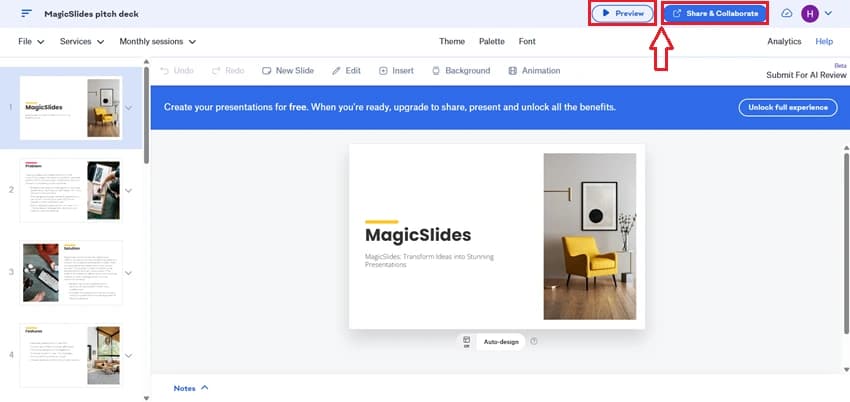
Preview or Share the Presentation

Once you are satisfied with the generated slides, click Preview to review the presentation or select Share & Collaborate to share it with others.

Preview or Share the Presentation

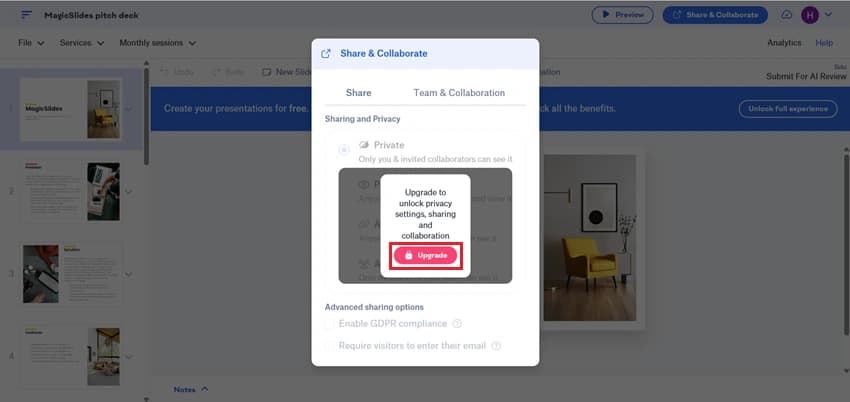
Upgrade Required to Share the Presentation

Slidebean does not allow presentation sharing on the free plan. To use the Share & Collaborate feature, you must upgrade to a paid subscription.

Upgrade Required to Share the Presentation

Choose a Plan and Complete the Subscription

After completing the payment process, you can unlock presentation sharing and other premium features.

Choose a Plan and Complete the Subscription

How Presentations Are Created in MagicSlides

Create professional presentations with MagicSlides by turning your ideas into slides within minutes. Follow these simple steps to get started:

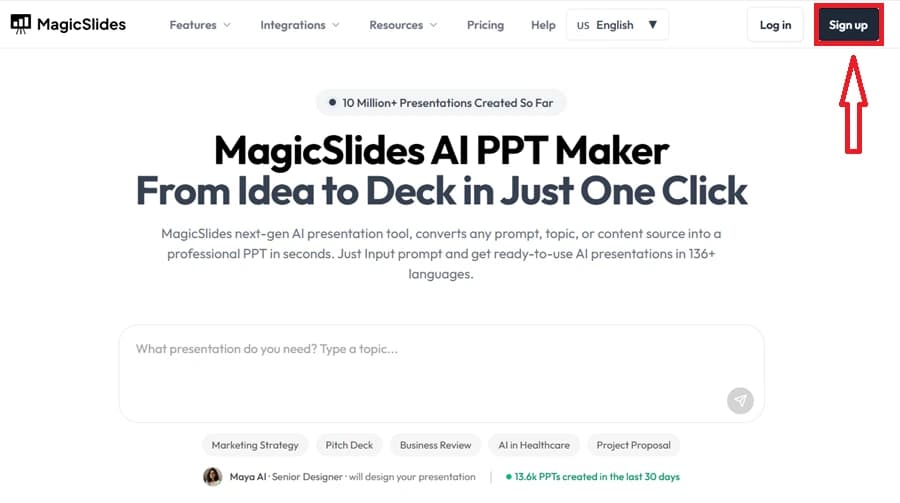
Visit the MagicSlides Website

Open the MagicSlides website and sign up for a new account or log in to an existing one.

Visit the MagicSlides Website

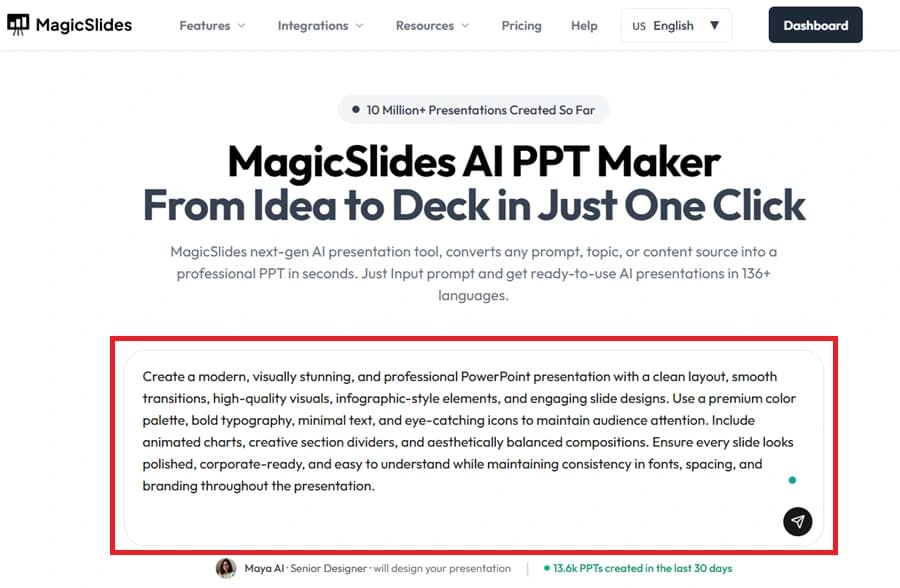
Provide Your Presentation Topic

Enter the topic or subject you want your presentation to be based on.

Provide Your Presentation Topic

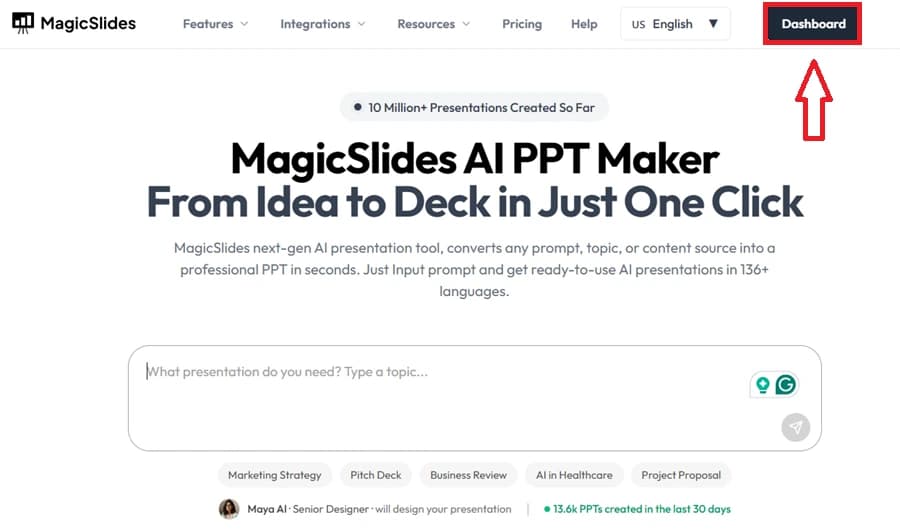
Open the MagicSlides Dashboard

Once logged in, access the dashboard where all presentation creation options are available.

Open the MagicSlides Dashboard

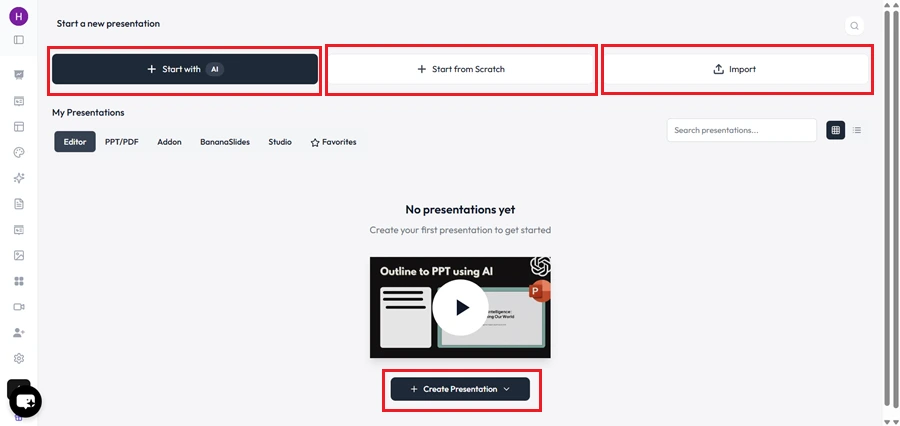
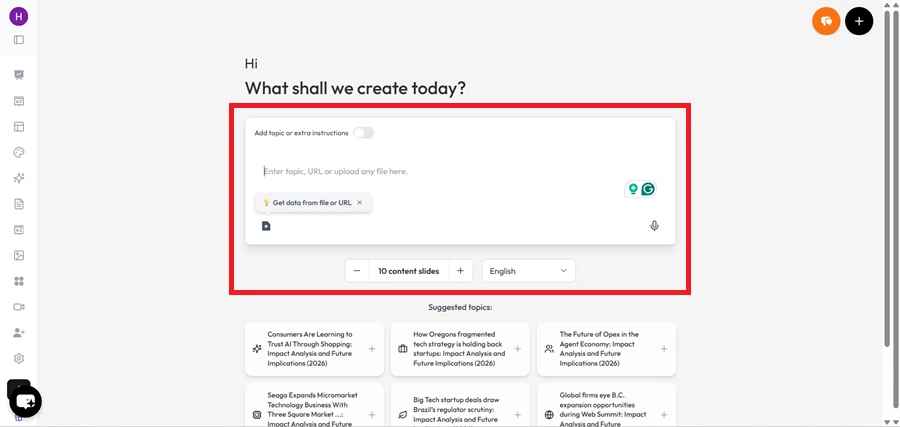
Select a Presentation Creation Method

Choose whether you want to generate slides using AI, start with a blank deck, or create a presentation from existing content.

Select a Presentation Creation Method

Input Your Content

Add the text or information that will be used to build your presentation.

Input Your Content

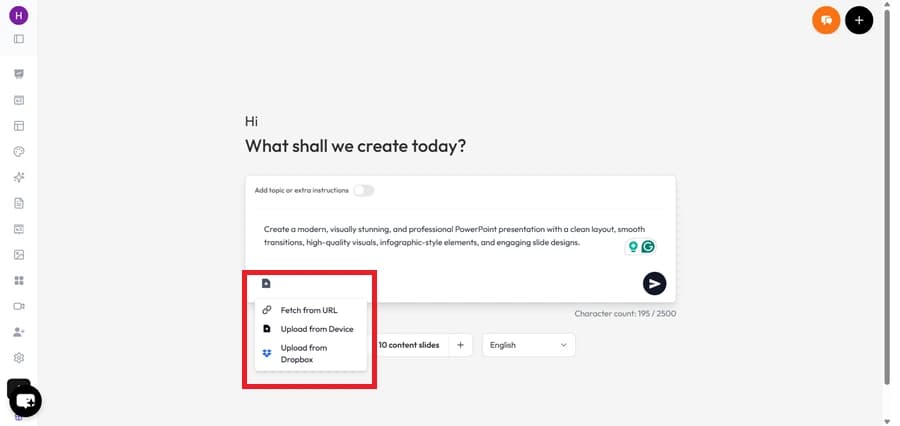
Upload Supporting Files (Optional)

Enhance your presentation by uploading documents, PDFs, images, or other relevant files.

Upload Supporting Files

Generate the Presentation Outline

Proceed to the next step to allow MagicSlides to create an initial slide structure.

Generate the Presentation Outline

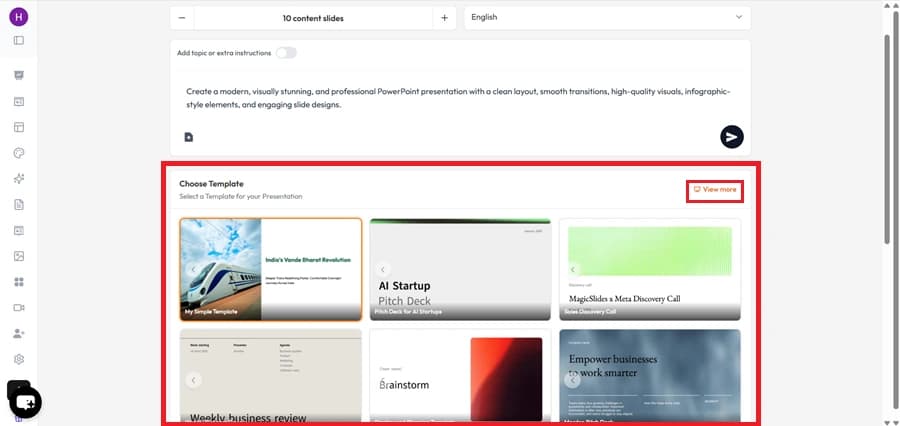
Pick a Presentation Template

Browse and select a template according to your requirements.

Pick a Presentation Template

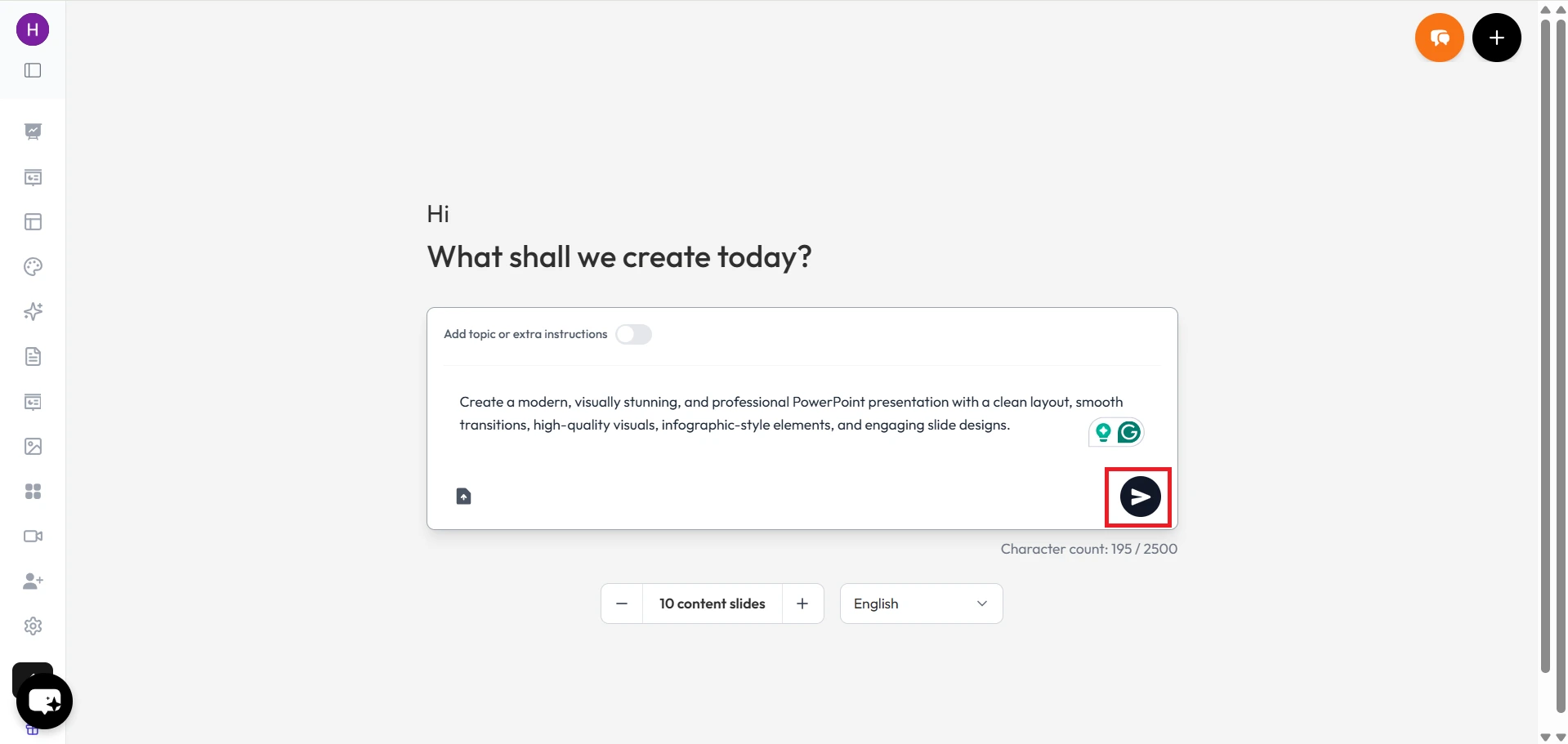
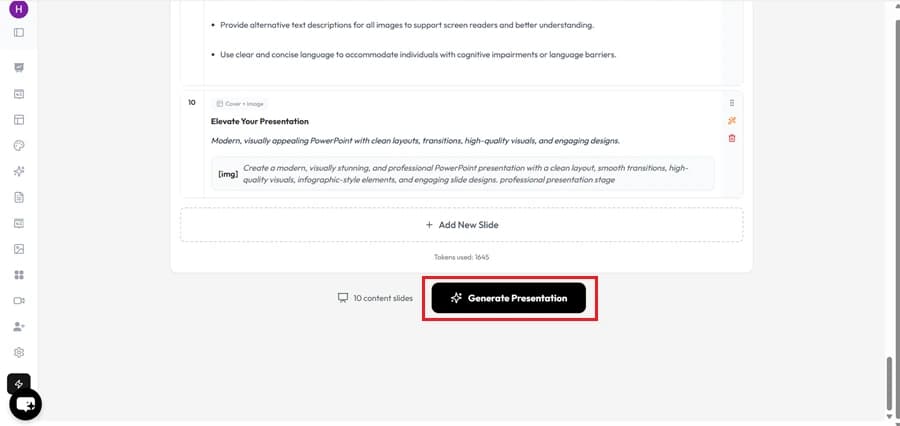
Create the Slides

Click the presentation generation option, and the rest of MagicSlides will handle automatically.

Create the Slides

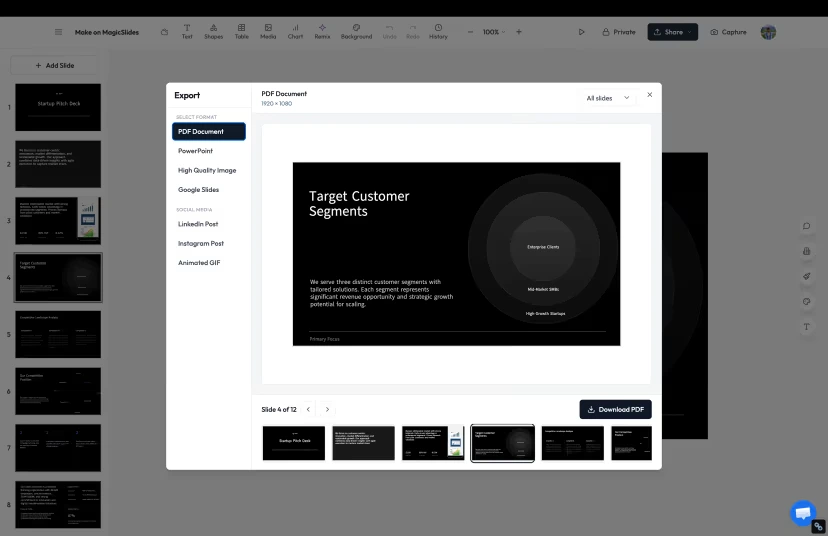
Export or Share Your Presentation

Review the final presentation and either download it in your preferred format or share it directly with your audience.

Export or Share Your Presentation
Demo

Watch MagicSlides Generate a Presentation from Start to Finish

MagicSlides
Our pick
Feature matrix

MagicSlides vs Slidebean: Key Features Compared

Explore the Strengths and Limitations of MagicSlides and Slidebean

Feature
Slidebean
MagicSlides
Free plan
Highly restricted
Free forever
Google Slides add-on
PowerPoint (PPTX) export
Paid plans only
Standalone web app
Generate from URL
From website URL
Generate from YouTube
Generate from PDF / DOCX
Presentation sharing on free plan
Requires paid upgrade
AI image generation
Languages supported
English only
100+
Output quality

Comparing the Quality of Generated Slides

Compare the Final Presentation Output of Both Tools to Understand Which One Creates More Polished and Professional-looking Slides

Slidebean

Slidebean uses an AI design engine that separates content from design, focusing heavily on structured layouts for startup pitch decks. However, customization is locked inside their proprietary editor unless you pay for a subscription to download.

MagicSlides

MagicSlides generates clean, professional presentations with varied slide layouts and embedded AI images, ready to present immediately. All slides are easily downloadable as native PPTX or Google Slides files for further customization.

Our verdict

MagicSlides provides more styling freedom and native PPTX/Google Slides exports, whereas Slidebean has structured layouts optimized mainly for pitching but locks sharing and exports behind paywalls.

Under the hood

Which Tool Has Better AI for Presentations?

See How MagicSlides and Slidebean Use AI to Generate Slide Content and Help Users Create Decks Faster

Slidebean

Slidebean's AI excels at extracting content from websites (such as a company URL) and arranging it into pitch deck templates. However, it lacks support for other inputs like PDFs, YouTube videos, and has less flexibility for educational or general-topic presentations.

MagicSlides

MagicSlides features powerful, versatile AI that can write outlines, summarize PDFs, analyze URLs, convert YouTube videos, and generate custom presentations from simple text prompts. Its AI is fast, flexible, and capable of creating diverse presentations.

Our verdict

MagicSlides is the clear winner for general AI capabilities, handling multiple file types and media sources. Slidebean is more focused on parsing startup websites to pre-fill pitch deck templates.

Cost

MagicSlides vs Slidebean: Pricing and Value Comparison

Compare the Monthly Cost & Overall Value Offered by Each Platform

Slidebean
All-Access
$29/mo
  • Pitch deck templates
  • AI presentation tools
  • Presentation sharing & collaboration
  • PDF export
Best value
MagicSlides
Pro
$8/mo
  • Unlimited AI generation
  • All input types (PDF, URL, YouTube, DOCX)
  • Brand kit + AI images
  • PPTX + Google Slides export
The honest scorecard

The Complete Picture: Pros and Cons Compared

Explore the Key Benefits and Limitations of MagicSlides & Slidebean in One Place

MagicSlides Pros

  • Generates full presentations from PDFs, URLs, YouTube videos, and text prompts
  • Provides Google Slides add-on and standalone web app
  • Enables exporting to PPTX, Google Slides, and PDF
  • Includes free forever plan with sharing and downloading features
  • Supports over 100+ languages

MagicSlides Cons

  • No PowerPoint add-on available
  • Fewer specialized pitch-deck-specific tools than Slidebean

Slidebean Pros

  • Excellent structured templates tailored for investor pitch decks
  • AI-driven design engine to automatically arrange slide content
  • Integrated financial modeling tools for startup business planning

Slidebean Cons

  • Extremely expensive starting price ($29/month)
  • Cannot export or share presentations on the free plan
  • No Google Slides integration or export
  • Supports fewer input sources than MagicSlides
The recommendation

MagicSlides vs Slidebean: Which One Should You Choose?

Based on Our Testing, Here's which Tool is Better for Different Types of Users

Pick MagicSlides if…

  • Want to create presentations from diverse content like YouTube, PDFs, or DOCX files.
  • Need a free plan that actually allows you to share and export your slides.
  • Want to edit and present your slides directly inside Google Slides or export to PowerPoint.
  • Require support for creating presentations in multiple languages (100+ languages supported).
  • Want a full suite of AI generation features at a fraction of the cost ($8 vs $29/mo).

Pick Slidebean if…

  • Are specifically looking for specialized investor pitch deck layouts and business financial tools.
  • Do not need to share, export, or collaborate on your presentations unless you upgrade to their $29/mo plan.
  • Only need to create presentations from website URLs or simple prompts in English.
In closing

Author's Verdict

MagicSlides vs Slidebean — the take after testing both end-to-end.

After spending time with both tools, I found that MagicSlides gives users more ways to create presentations and supports more content sources. MagicSlides is a better choice for anyone who wants to create presentations quickly with AI.

- For versatile creation from files/videos & easy Google Slides export, choose MagicSlides. - For specialized VC-pitching finance spreadsheets and rigid templates, Slidebean is recommended.

Try it yourself

Make your first deck with MagicSlides

Type a topic and Maya turns it into an editable presentation in under a minute — free, no credit card.

Maya

Maya AI · Senior Designer · will design your presentation

13.6k PPTs created in the last 30 days

FAQ

Still Have Questions?

Here are the Answers to Some of the Most Common Questions about Both Platforms

Is MagicSlides a good alternative to Slidebean?
Yes, MagicSlides is a great alternative to Slidebean. While Slidebean is focused on startup pitch decks, it is very expensive ($29/month) and does not allow you to share or export your presentations on its free plan. MagicSlides is cheaper ($8/month), supports more input sources (like YouTube, PDFs, DOCX), works with Google Slides, and lets you share your work for free.
Can I export presentations to Google Slides and PowerPoint in Slidebean?
Slidebean does not have a Google Slides integration. You can export presentations to PDF or HTML on Slidebean, but exporting PPTX or sharing presentations is restricted to paid subscriptions.
Which tool supports more input sources for AI generation?
MagicSlides is the clear winner here. It can generate presentations from simple topics, text documents, PDFs, DOCX files, YouTube videos, and web URLs. Slidebean primarily supports generating presentations from website URLs, templates, or prompts.
Does Slidebean have a free plan?
Slidebean has a free plan where you can create presentations using AI, but you cannot share, collaborate, or export them without upgrading to a paid subscription.
How fast can MagicSlides create a presentation?
MagicSlides can generate a complete, fully customized presentation in under 60 seconds from a single prompt or file input.

Ready to create your presentation?

Join thousands of professionals who save hours every week with AI-powered presentations.

1,511 reviews · Trustpilot & Workspace

Ask AI about MagicSlides
ChatGPT logoClaude logoGemini logoPerplexity logo