Which AI presentation tool wins?

Prezi Alternative: Is MagicSlides Better Than Prezi?

I tried both MagicSlides and Prezi to see which tool makes presentation creation easier. Both can create presentations with AI, but they are completely different. In this comparison, we'll look at MagicSlides vs Prezi, their features, and how each tool creates presentations so you can choose the right one for your needs.

No credit card required · Free forever plan
Quick verdict

In my testing, MagicSlides created a 15-slide presentation in less than 1 minute from a simple topic. It also supports 5 different input methods, including topics, PDFs, DOCX files, URLs, and YouTube videos. The slides were ready to use with only a few small changes. Prezi also creates presentations with AI, but you need to go through several steps, such as creating an outline, selecting designs, and adjusting the final presentation before it is ready. All these stages MagicSlides makes automated, which saves time and manual effort.

MagicSlides wins at
  • Creating presentations in under 60 seconds
  • Turning PDFs, DOCX files, URLs, and YouTube videos into slides
  • Generating ready-to-use content automatically
  • Working directly with Google Slides
Prezi wins at
  • Creating interactive and animated presentations
  • Offering a unique zooming presentation style
  • Making presentations visually engaging
The contenders

Choosing the Right Prezi Alternative for Presentations

See What MagicSlides & Prezi Offer & Who Should Use Them

What is MagicSlides?

MagicSlides is an AI-powered presentation creator that helps you build complete slide decks in minutes. It supports multiple input types — topic, PDF, DOCX, URL, YouTube video — and exports directly to PowerPoint (PPTX) or Google Slides. No design experience required.

Founded2022
Best forFast AI-powered presentations with editable slide output
Visit MagicSlides

What is Prezi?

Prezi creates presentations that look different from regular PowerPoint slides. Instead of moving from slide to slide, the presentation zooms into different parts of the screen. This makes presentations more visually engaging, especially for storytelling. It is best for users who want animated, interactive presentations.

Founded2009
Best forInteractive presentations with zooming effects
Visit Prezi
Methodology

Here's What We Found After Testing MagicSlides vs Prezi

We Created the Same Presentations in Both Tools and Compared the Results Using the Same Testing Criteria

We created 6 presentations using both MagicSlides and Prezi on business, education, and marketing topics. To keep the comparison fair, we tested both tools using their highest available paid plans and evaluated them on 4 key categories.

Presentations tested
  • 6 presentations created in total
  • 3 with MagicSlides
  • 3 with Prezi
  • Business, Education, and Marketing topics
  • Each presentation: 12-15 slides
  • MagicSlides average creation time: 58 seconds
  • Prezi average creation time: 8 minutes 42 seconds
What we checked
  • AI quality
  • Templates
  • Export options
  • Collaboration
  • 7 categories evaluated in total

4 key categories compared:

We evaluated both tools on the same topics and criteria to find out if MagicSlides is the best alternative to Prezi.
6
Presentations created
7
Categories compared
12-15
Average slides per presentation
2
Tools tested head-to-head
Step-by-step

MagicSlides vs Prezi: Presentation Creation Process

Learn How Presentations are Created Using a Powerful Prezi Alternative and Compare the Workflow with Prezi

How to create your first presentation with Prezi

Here are the exact steps to create a presentation using Prezi AI:

Sign Up for Prezi

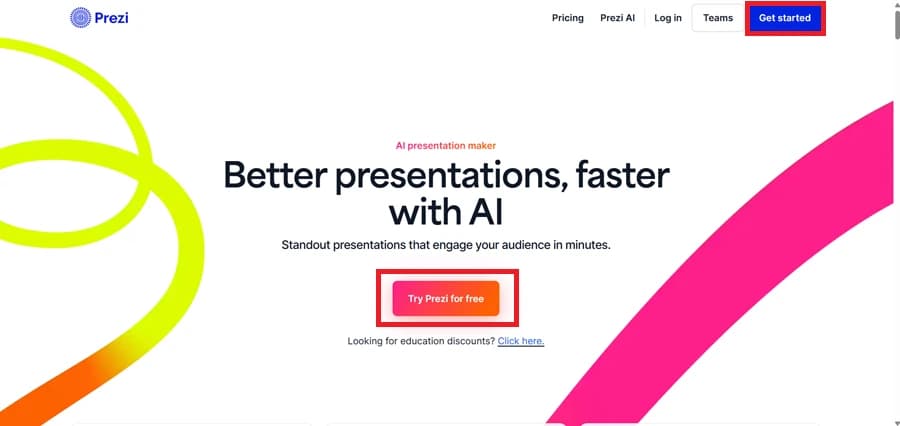
Click on "Try Prezi for Free" and sign up using your Google or Apple account.

Sign Up for Prezi

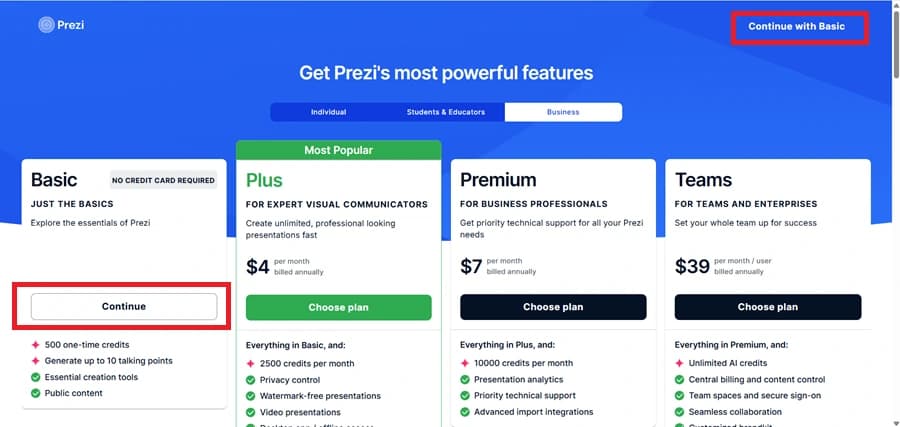
Continue with the Free Basic Plan

On the pricing page, click "Continue" under the Basic plan or select "Continue with Basic" from the top-right corner to access Prezi's free version.

Continue with the Free Basic Plan

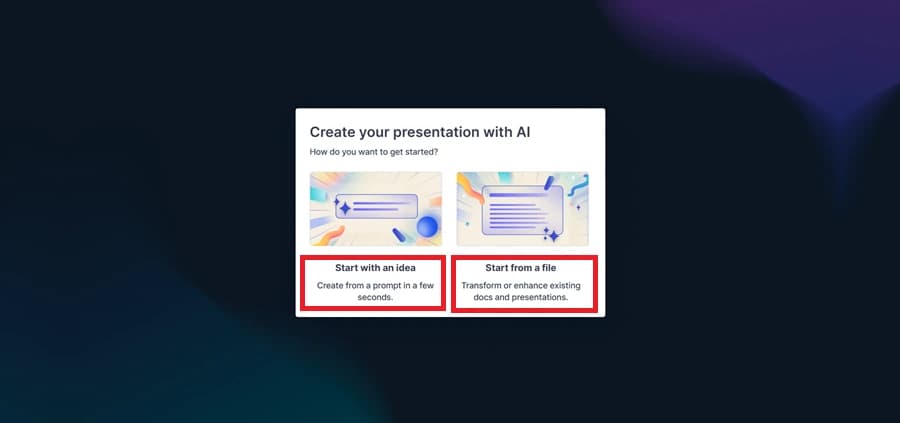
Choose How to Create Your Presentation

Select "Start with an Idea" to generate a presentation using an AI prompt, or choose "Start from a File" to create a presentation from an existing document or presentation file.

Choose How to Create Your Presentation

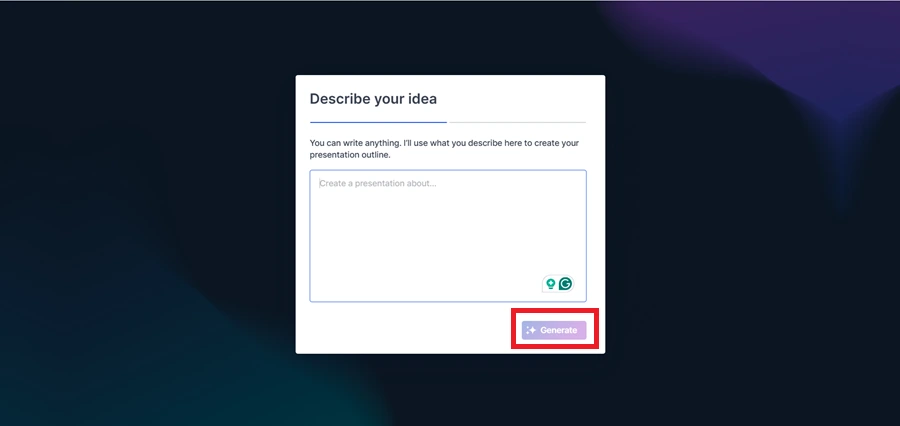
Generate a Presentation with AI

Select "Start with an Idea", then type or paste your presentation topic into the text box and click "Generate" to create the presentation outline automatically.

Generate a Presentation with AI

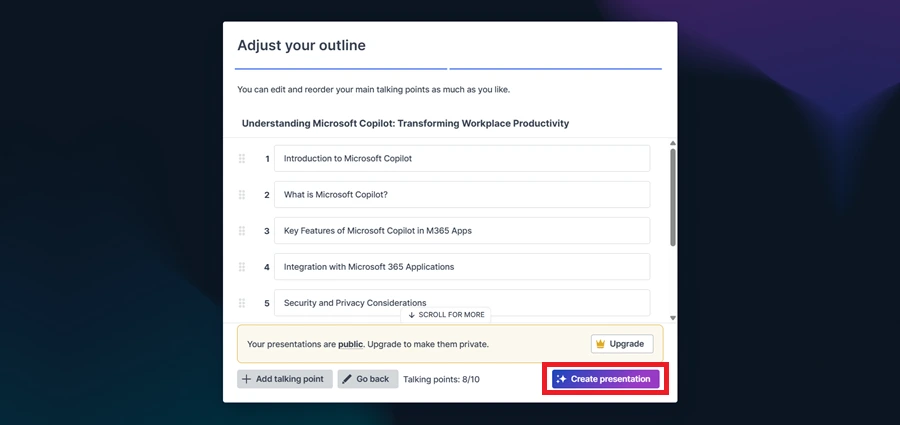
Review the Outline and Create the Presentation

Review the AI-generated outline, and then click "Create Presentation" to generate your Prezi presentation.

Review the Outline and Create the Presentation

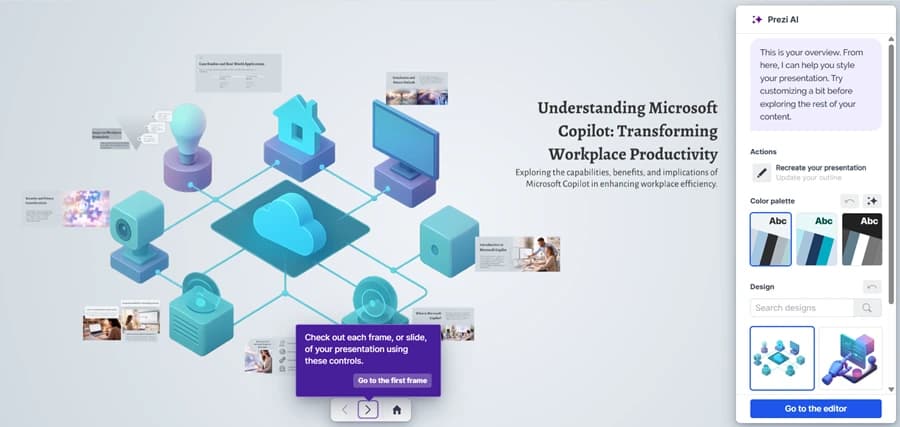
Your AI Presentation Is Ready

Your AI-generated presentation is now ready. Click "Go to the Editor" to make further edits or start presenting.

Your AI Presentation Is Ready

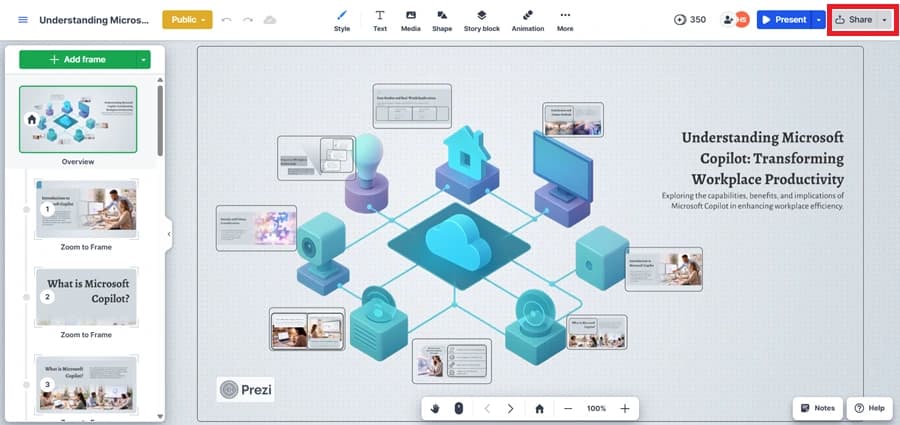
Present or Share Your Presentation

Use the "Present" or "Share" options to export or distribute your presentation.

Present or Share Your Presentation

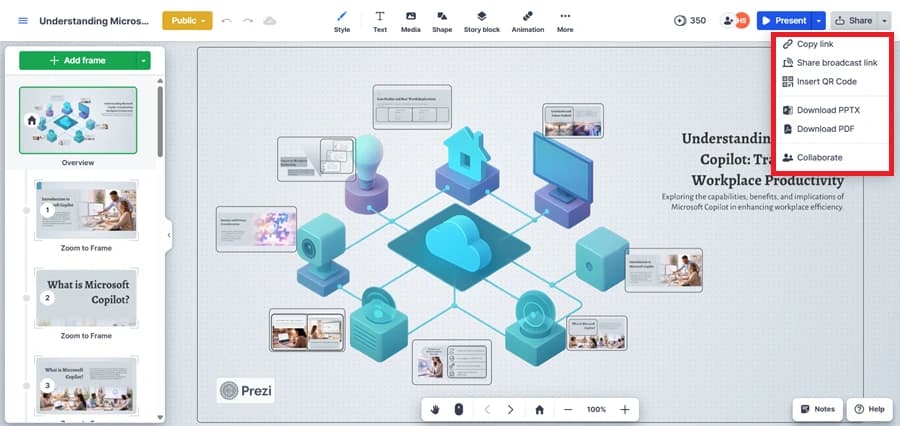
Open the Export Options

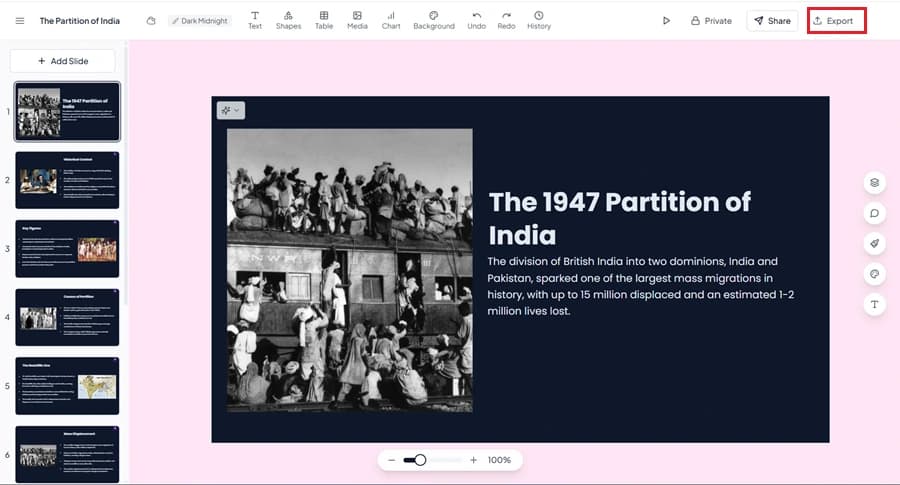
Click the down arrow next to the "Share" button to download your presentation as a PPTX or PDF.

Open the Export Options

How to create your first presentation with MagicSlides

Generate engaging presentations from simple prompts or ideas in just a few easy steps:

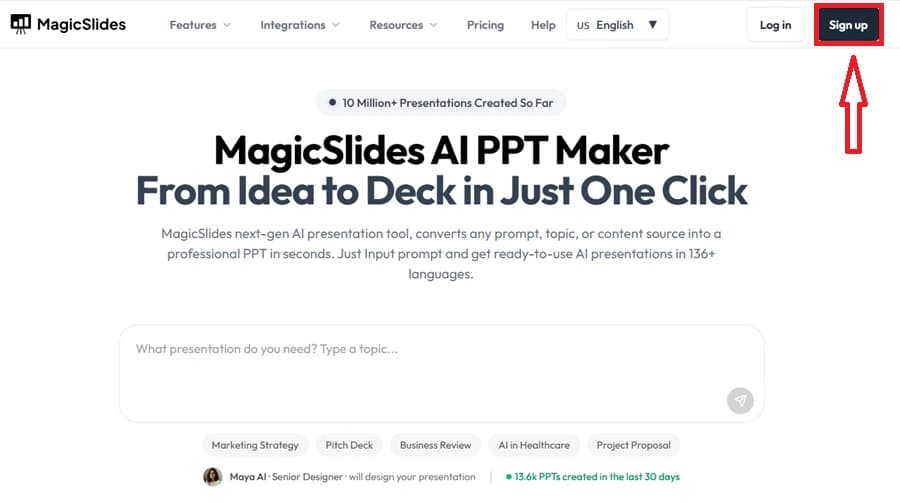
Open the MagicSlides Website

Go to the MagicSlides website and create an account using your email address.

Open the MagicSlides Website

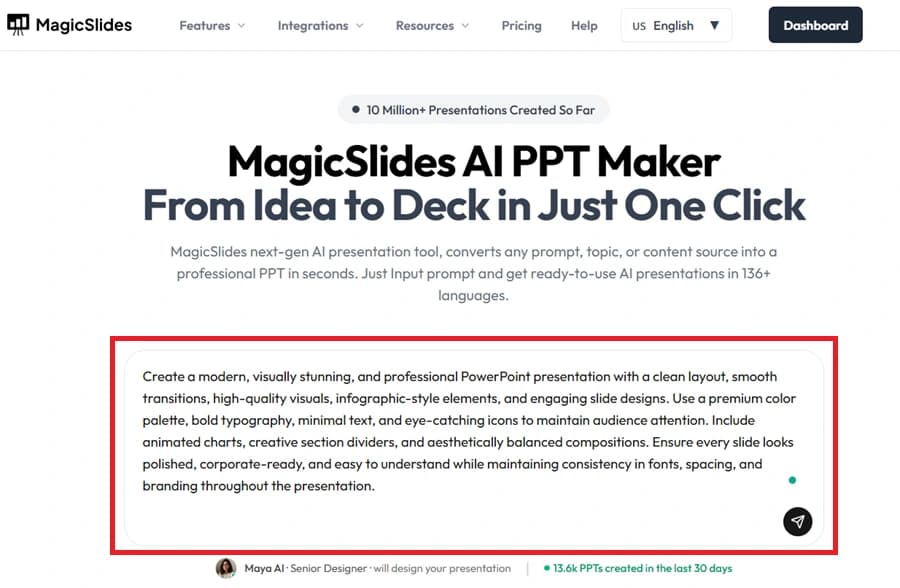
Enter Your Topic

Type your presentation topic or idea into the text box provided.

Enter Your Topic

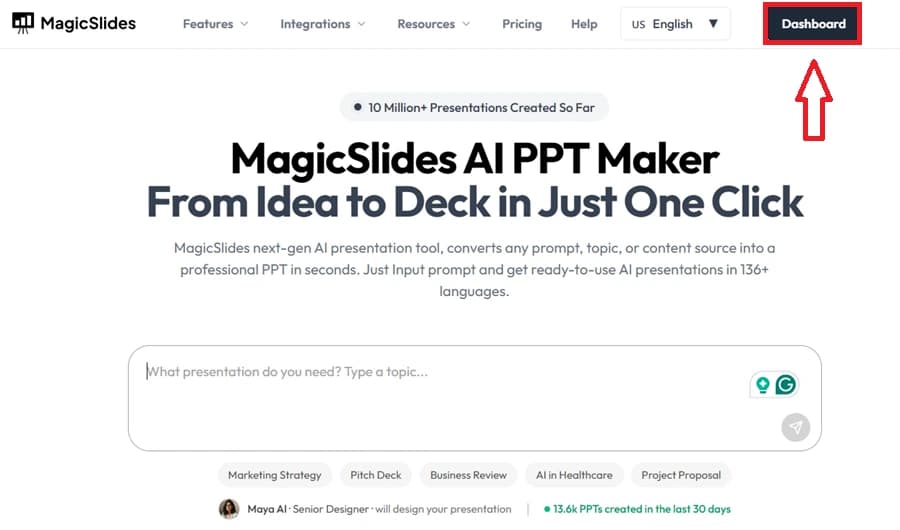
Access the Dashboard

After signing in, open the Dashboard to start creating your presentation.

Access the Dashboard

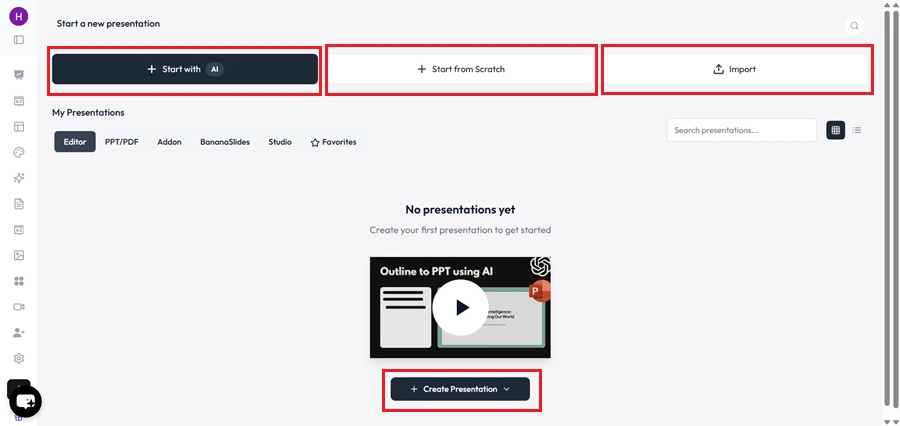
Choose How to Create Your Presentation

Select a creation option such as AI generation, a blank presentation, or importing existing content.

Choose How to Create Your Presentation

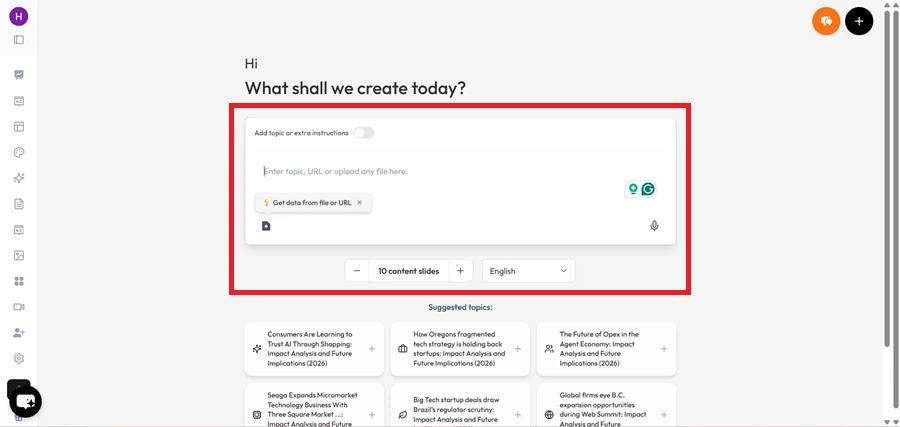
Add Your Content

Enter or paste the information you want MagicSlides to use for creating the presentation.

Add Your Content

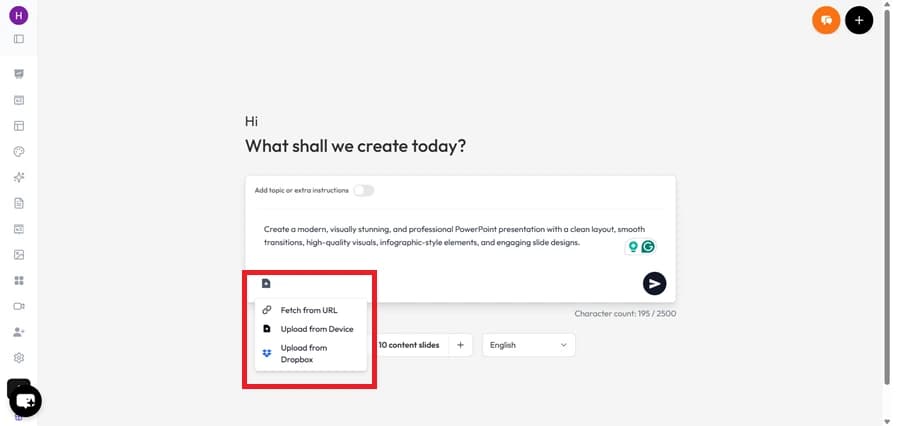
Upload Additional Files (Optional)

You can upload PDFs, Word documents, images, or other files to provide more information.

Upload Additional Files (Optional)

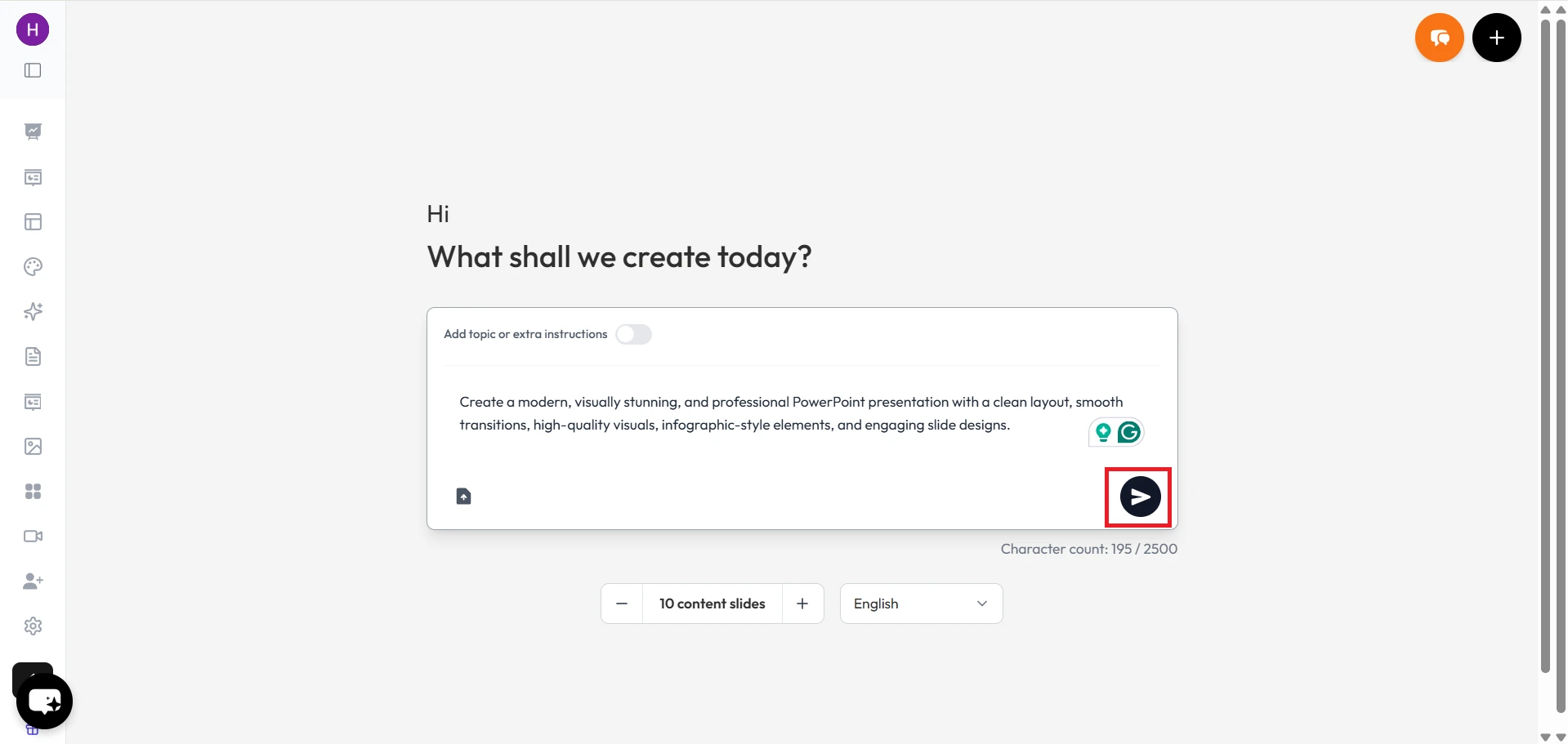
Continue to the Next Step

Click the arrow button to generate the presentation outline.

Continue to the Next Step

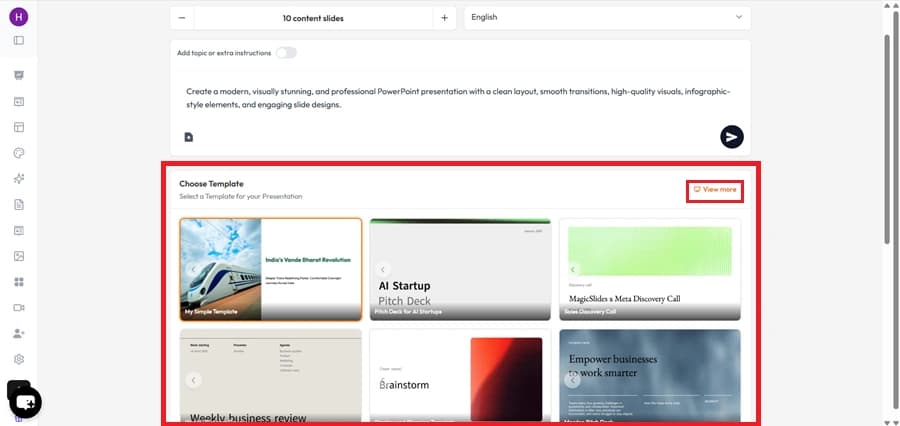
Select a Template

Choose a presentation template that matches your style and requirements.

Select a Template

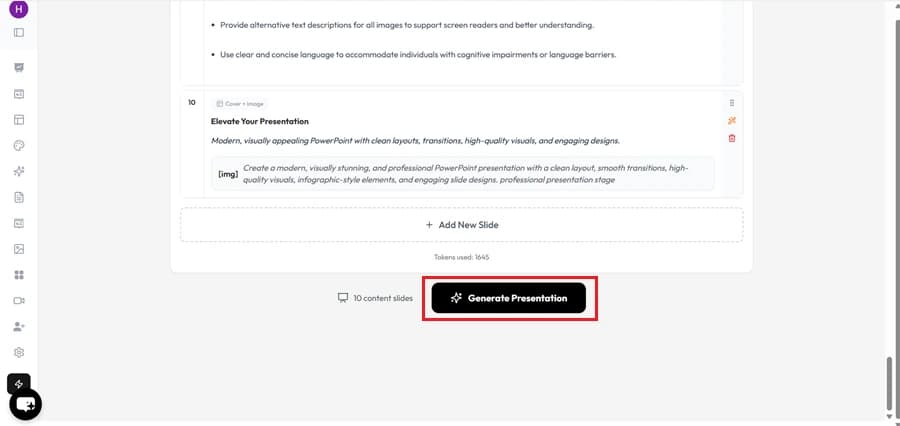
Generate the Presentation

Click Generate Presentation and let MagicSlides create the slides automatically.

Generate the Presentation

Save or Share the Presentation

Download the presentation in your preferred format or share it directly with others.

Save or Share the Presentation
Demo

Prezi Alternative in Action

Watch How MagicSlides Turns a PDF, Topic, URL, or YouTube Video into a Complete Presentation in Just a Few Steps

MagicSlides in action
Our pick
Feature matrix

MagicSlides vs Prezi: Comparing Key Features

Compare the Key Features of MagicSlides & Prezi to See Why Many Users Consider MagicSlides a Strong Prezi Alternative

Feature
Prezi
MagicSlides
AI presentation generation
Requires multiple steps
From any input
Generate from URL / YouTube / PDF
PowerPoint (PPTX) export
Paid plans only
Google Slides export
Google Slides add-on
AI image generation
Ready-to-use slides (no editing needed)
Manual layout setup required
Zooming / animated presentations
Core feature
Free plan available
Limited features
Languages supported
Multiple
100+
Output quality

MagicSlides vs Prezi: Presentation Quality Comparison

Compare the Final Presentation Quality & Overall User Experience of Both Tools

Prezi

Prezi presentations look different from regular PowerPoint slides. Instead of moving from slide to slide, the presentation zooms into different parts of the screen. This can make presentations look more interesting to the audience.

MagicSlides

MagicSlides creates presentations that look like regular PowerPoint or Google Slides presentations. The slides are clean and ready to use for school, office work, meetings, and client presentations.

Our verdict

If you want a presentation that is easy to create and present, MagicSlides is the better option.

Under the hood

How MagicSlides and Prezi Create Presentations with AI

See How MagicSlides & Prezi Turn Your Ideas into Presentations

Prezi

Prezi can create presentation content with AI, with visuals and animations. It is a good option for users who want a presentation that feels more interactive. However, you need to go through several manual steps — creating an outline, selecting designs, and adjusting the final output — before it is ready.

MagicSlides

With MagicSlides, you don't have to start from a blank slide. Give it a topic or content source, and it creates the presentation for you in just a few seconds. All the stages Prezi makes manual, MagicSlides automates — saving significant time and effort.

Our verdict

Choose MagicSlides if you want to create presentations faster. Choose Prezi if presentation zoom effects and animations are more important to you.

Cost

MagicSlides vs Prezi: Plans and Pricing

See which Platform Offers More Features for a Lower Monthly Cost

Prezi
Plus
$12/mo
  • Advanced zoom effects
  • More templates
  • PPTX export
  • Requires manual content setup
Best value
MagicSlides
Pro
$8/mo
  • Unlimited AI generation
  • All input types (PDF, URL, YouTube, DOCX)
  • Brand kit + AI images
  • PPTX + Google Slides export
The honest scorecard

MagicSlides vs Prezi: Pros and Cons Compared

See the Biggest Strengths & Limitations of Both Presentation Tools

MagicSlides Pros

  • Creates a complete presentation without manual effort.
  • Presentations can be edited later if needed.
  • Helps turn ideas into slides quickly.
  • No design experience is needed to get started.

MagicSlides Cons

  • Some slides may need small edits after generation.
  • Advanced features require a paid plan.

Prezi Pros

  • Makes presentations look different from regular slides.
  • Zoom effects can help keep people interested.
  • Useful for presenting ideas in a creative way.
  • Good for visual storytelling.

Prezi Cons

  • Takes longer to create a presentation.
  • Can be harder for beginners to learn.
  • Too many zoom effects can distract viewers.
  • Editing presentations can take more time.
The recommendation

Should You Choose MagicSlides or Prezi?

See which Platform Fits your Presentation Needs Better

Pick MagicSlides if…

  • Want a complete presentation in under 3 minutes.
  • Need editable PowerPoint or Google Slides files.
  • Create presentations from PDFs, URLs, YouTube videos, or documents.
  • Want ready-to-use slides without manual editing.
  • Create presentations regularly for work, school, or business.

Pick Prezi if…

  • Want presentations with zooming and motion effects.
  • Prefer a visual storytelling style.
  • Presentation design is more important than creation speed.
  • Need interactive and animated presentations.
In closing

Author's Verdict

MagicSlides vs Prezi — the take after testing both end-to-end.

After using both tools, I found MagicSlides is the best Prezi alternative. It can create a complete presentation in just a few minutes, and you can edit the slides later in PowerPoint or Google Slides if needed.

Prezi is good if you like zoom effects and a different presentation style. But for school projects, office work, client presentations, investor slide decks, and everyday use, MagicSlides is easier to work with. That's why I would choose MagicSlides as a Prezi alternative.

Try it yourself

Make your first deck with MagicSlides

Type a topic and Maya turns it into an editable presentation in under a minute — free, no credit card.

Maya

Maya AI · Senior Designer · will design your presentation

13.6k PPTs created in the last 30 days

FAQ

MagicSlides vs Prezi: Common Questions Answered

Explore the Most Asked Questions About this Free Prezi Alternative

Is MagicSlides a good alternative to Prezi?
In our testing, MagicSlides created a complete 12-15 slide presentation in about 58 seconds. Prezi required additional time to arrange content and presentation layout. According to us, MagicSlides is better than Prezi.
How much faster is MagicSlides compared to Prezi?
As we tested MagicSlides, it created a complete slide deck in 58 seconds, and Prezi created a presentation in 8 minutes 42 seconds. MagicSlides is a significantly faster alternative to Prezi.
Can MagicSlides create larger presentations?
Yes. In our testing, MagicSlides successfully generated presentations containing 15+ slides from a single prompt without requiring manual intervention.
How many presentation sources does MagicSlides support?
MagicSlides can create presentations from multiple sources, including: - Topic to PPT AI - YouTube to PPT AI - URL to PPT AI - Text to PPT AI - Docx to PPT AI - Image to PPT AI - Audio to PPT AI
Which tool is better for business presentations?
For our business presentation test, MagicSlides produced an editable 14-slide deck in under 3 minutes. The presentation was fully editable in PowerPoint after generation.
Is MagicSlides easier to learn than Prezi?
Most users can create their first presentation in MagicSlides within 2-5 minutes, without needing any design knowledge. Prezi's interface requires additional time to understand presentation paths and zoom effects.

Ready to create your presentation?

Join thousands of professionals who save hours every week with AI-powered presentations.

1,511 reviews · Trustpilot & Workspace

Ask AI about MagicSlides
ChatGPT logoClaude logoGemini logoPerplexity logo