Which AI presentation tool wins?

MagicSlides vs Plus AI: Which Is Best for Students & Professionals

In this complete guide, we'll compare MagicSlides and Plus AI to help you decide which AI presentation tool is right for you. We'll cover the: Key features Pricing Presentation quality Export options

No credit card required · Free forever plan
Quick verdict

As per our experience, the better choice depends on how you create presentations. If you mostly edit slides inside Google Slides or PowerPoint, you can opt for Plus AI. However, if you want to generate presentations from different sources like PDFs, DOCX files, web pages, YouTube videos, or prompts (text), MagicSlides is a complete solution for you. Additionally, you can export your presentations directly from MagicSlides UI to Microsoft PowerPoint or Google Slides.

MAGICSLIDES WINS AT
  • Creating presentations from PDFs, DOCX files, websites, YouTube videos, and prompts
  • No tool installation needed
  • Free plan availability
  • Multilingual presentation creation
PLUS AI WINS AT
  • Editing slides in Google Slides and PowerPoint
  • Rewriting slide text with AI
  • Making slides look better
  • Keeping the same writing style throughout the presentation
The contenders

MagicSlides vs Plus AI: Understanding the Basics

Learn What MagicSlides and Plus AI Are & How They Work

What is MagicSlides?

MagicSlides is an automatic presentation creation solution that turns ideas into ready-to-use slides in minutes. Instead of starting with a blank canvas, users can generate presentations from just writing text or ideas, and MagicSlides will handle the rest (including content and slide layout). It is available as a web app and also integrates with Google Slides. Users can try this for free without needing a credit card.

Founded2022
Best forStudents, educators, teams, marketers, and professionals
Visit MagicSlides

What is Plus AI?

Plus AI works inside Google Slides and PowerPoint. It helps users create, edit, and improve slides without leaving their presentation software. It focuses more on editing and improving existing presentations than creating new ones.

Founded2023
Best forUsers who regularly work in Google Slides or PowerPoint and want automation in creating or improving slides.
Visit Plus AI
Methodology

How We Compared MagicSlides and Plus AI

To Keep this Comparison Fair, We Used Both Tools to Create Similar Presentations and Compared their Features & Overall Performance

We tested both tools using three presentation types:

Presentations tested
  • 10-slide investor pitch
  • 15-slide product launch deck
  • 12-slide training presentation

MagicSlides generated complete first drafts in under a minute on average. Plus AI required 1-2 minutes to generate the same. We compared the results based on presentation quality and overall value.

Verdict: Based on our testing, MagicSlides was the faster option for creating presentations from scratch.
6
Decks generated
5
Metrics scored
12mo
Cost compared
2
Tools head-to-head
Step-by-step

MagicSlides vs Plus AI: Presentation Creation Workflow

See the Exact Steps Required to Create your First Presentation on Each Platform

How to Create a Presentation with Plus AI

Follow these simple steps to create and edit presentations using Plus AI in Google Slides and PowerPoint:

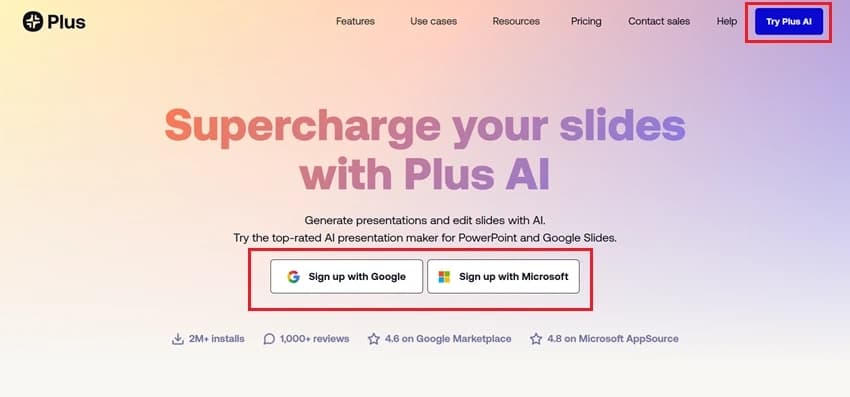
Sign Up for Plus AI

Visit the Plus AI website and click the "Try Plus AI" button in the top-right corner. Or, sign up using your Google or Microsoft account.

Sign Up for Plus AI

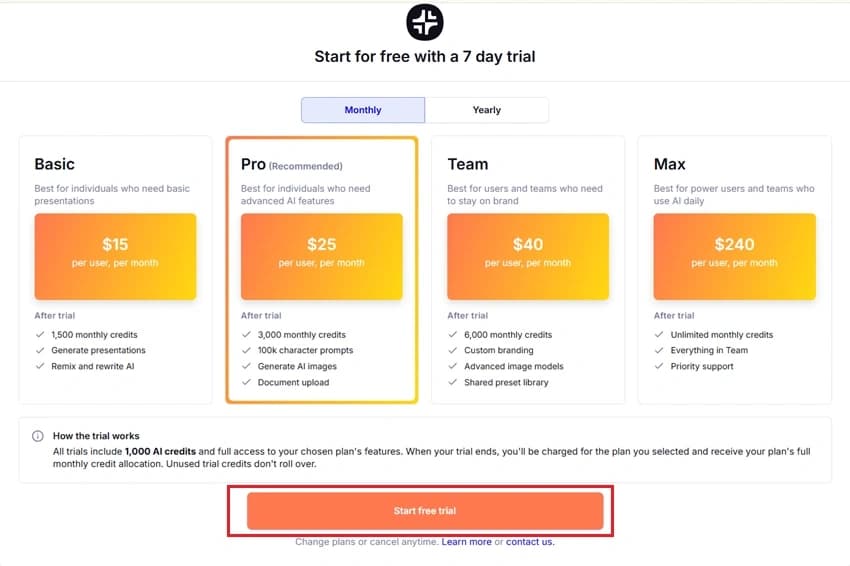
Choose a Plan and Start the Free Trial

After signing up, select the Plus AI plan that best fits your needs. Plus AI offers a 7-day free trial to test its features before purchasing a subscription. For the same, click "Start Free Trial" to continue.

Choose a Plan and Start the Free Trial

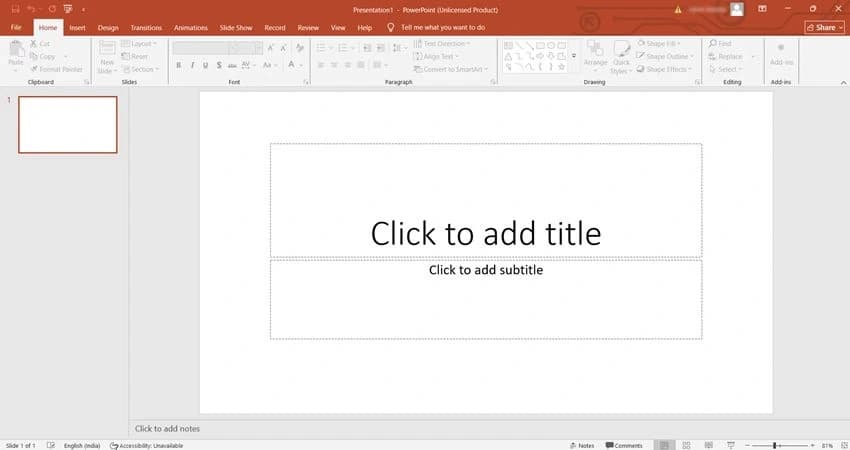
Open PowerPoint

Launch Microsoft PowerPoint on your computer and create a new blank presentation.

Open PowerPoint

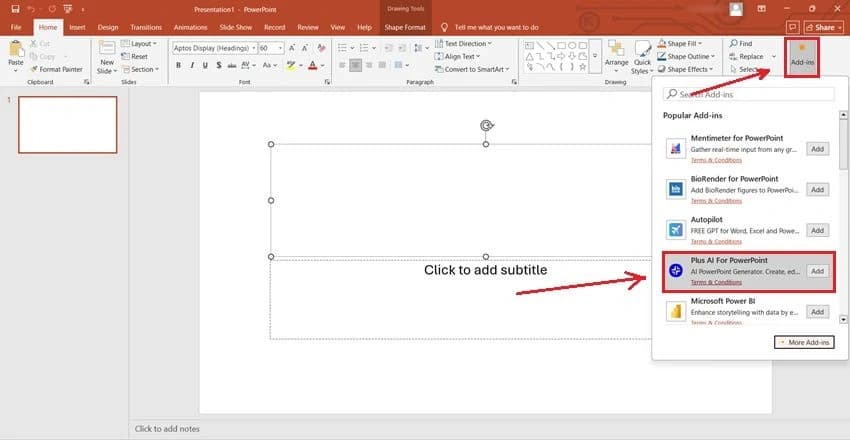
Open the Plus AI Add-in

In PowerPoint, click the Add-ins button from the top menu bar. From the list of available add-ins, select Plus AI for PowerPoint to open the Plus AI panel.

Open the Plus AI Add-in

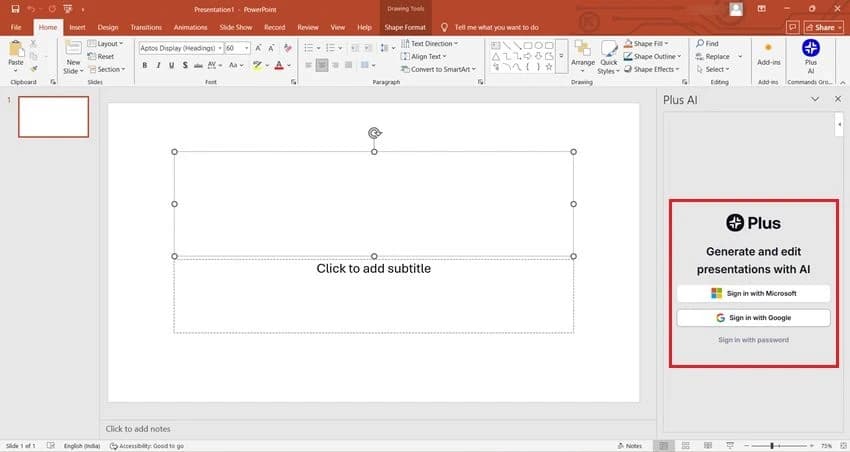
Sign In to Plus AI

After opening the Plus AI add-in, a login panel will appear on the right side of PowerPoint. Sign in using your Google or Microsoft account to connect Plus AI with PowerPoint.

Sign In to Plus AI

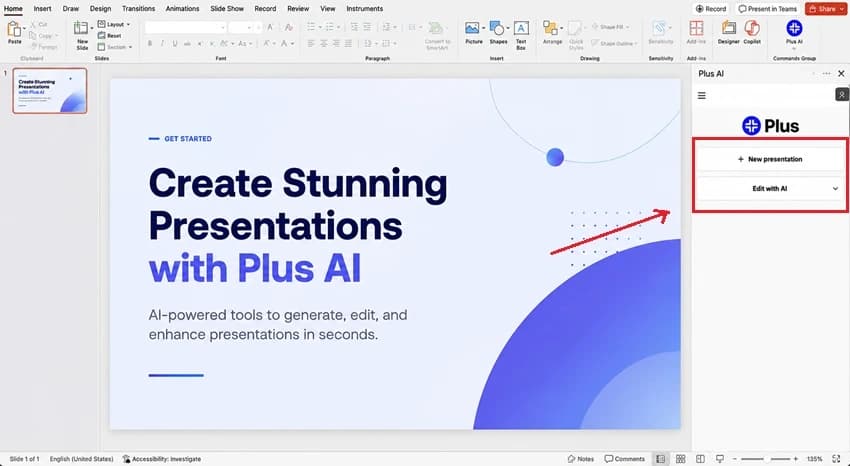
Start a New Presentation

After signing in, the Plus AI panel will appear on the right side of PowerPoint. Click "New Presentation" to begin creating a presentation with AI.

Start a New Presentation

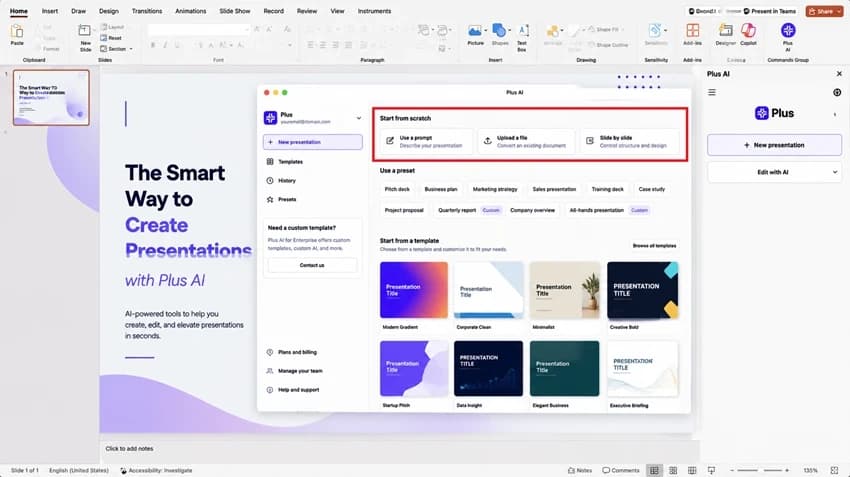
Choose How You Want to Create the Presentation

Select Use a Prompt, Upload a File, or Slide by Slide based on how you want to generate your presentation.

Choose How You Want to Create the Presentation

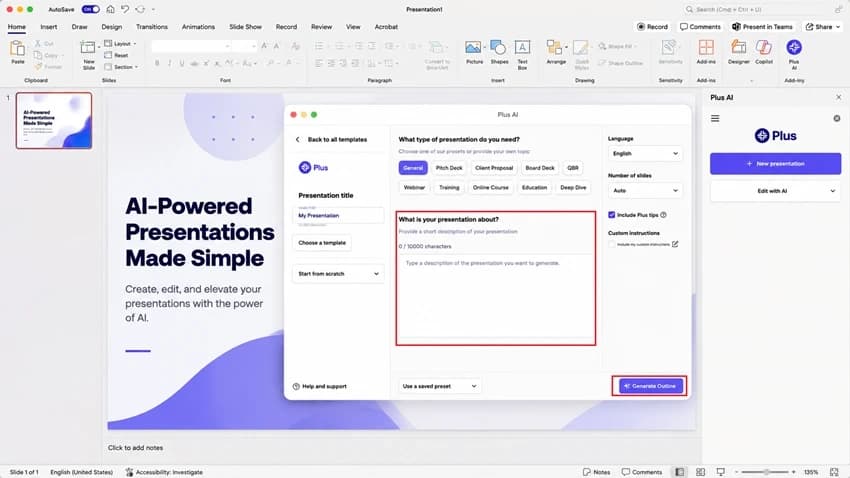
Enter Your Presentation Topic and Generate the Outline

Type a brief description of your presentation in the "What is your presentation about?" box, and click "Generate Outline" to create the presentation structure.

Enter Your Presentation Topic and Generate the Outline

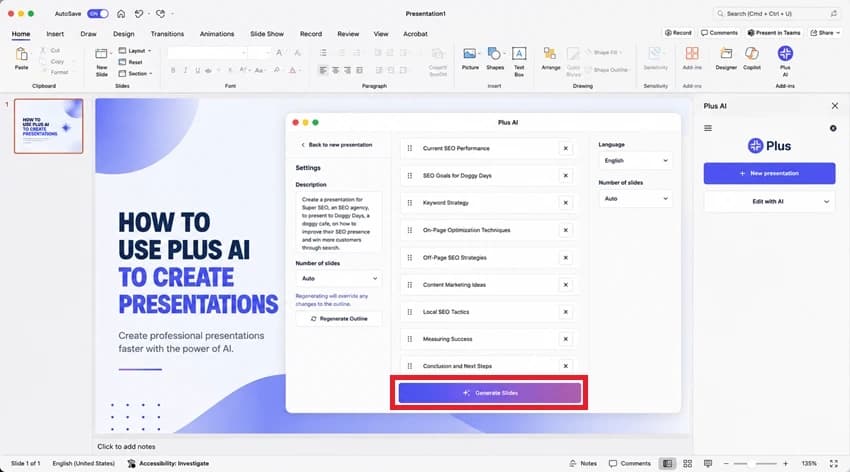
Review the Outline and Generate the Presentation

Review the generated outline, make any necessary changes, and click "Generate Slides."

Review the Outline and Generate the Presentation

Review and Use Your Presentation

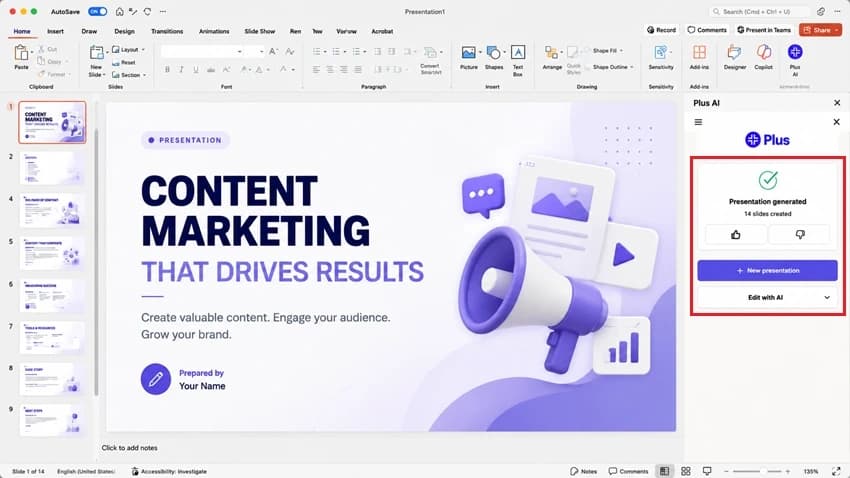
Once the generation process is complete, Plus AI automatically creates the full presentation.

Review and Use Your Presentation

How to Generate a Complete Slide Deck with MagicSlides

MagicSlides allows users to turn ideas, documents, web content, and other sources into professional presentations using AI. Follow the steps below to create your first presentation:

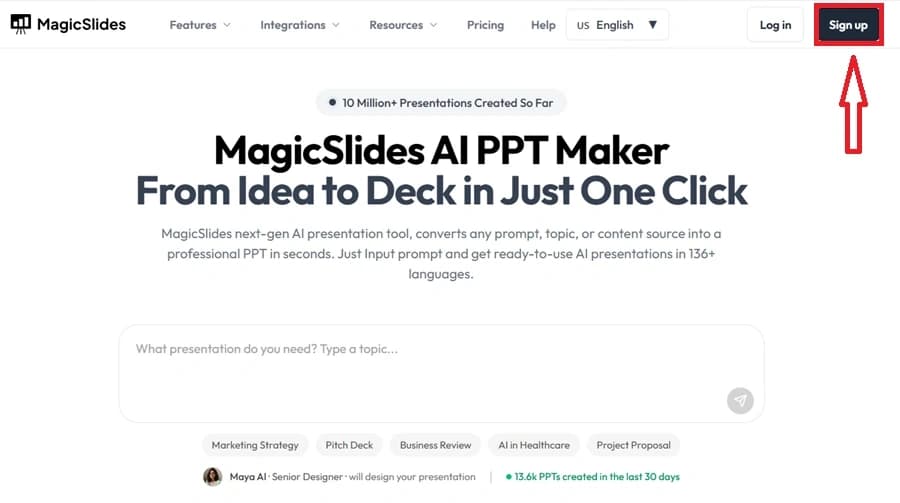
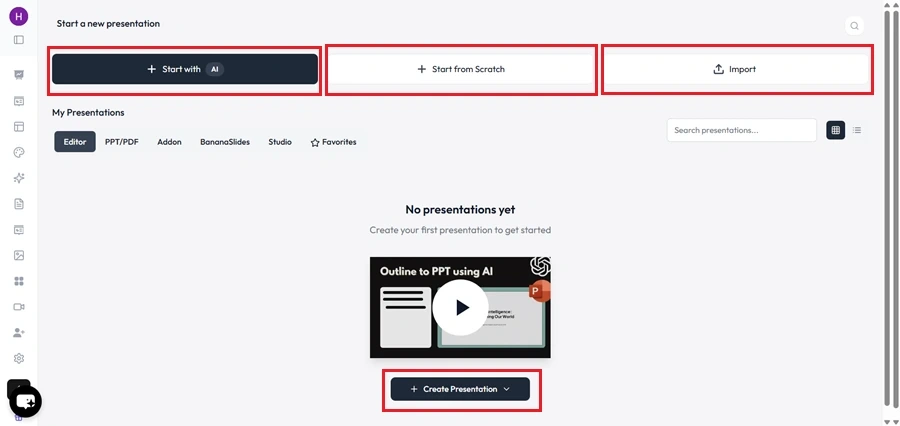
Create Your MagicSlides Account

Go to the MagicSlides website and sign up with your email address. You can get started without providing any payment information.

Create Your MagicSlides Account

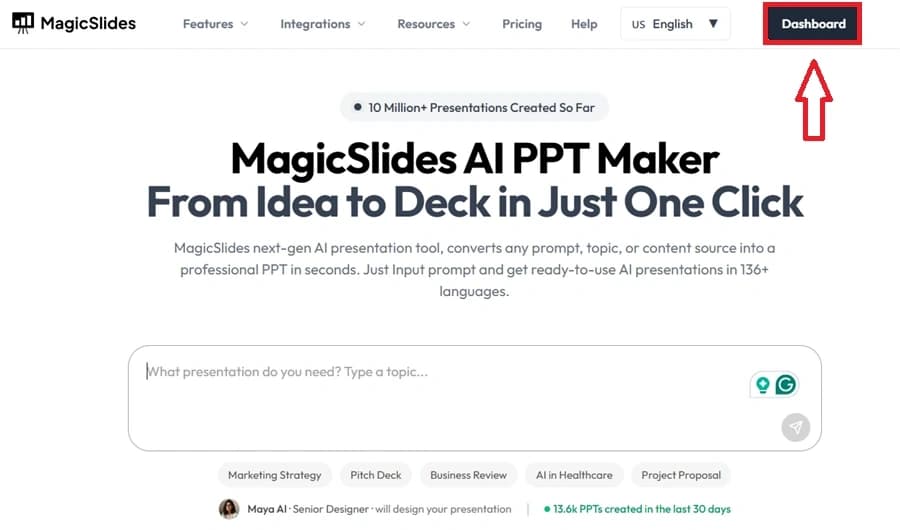
Open the Dashboard

After signing in, access the Dashboard, where all presentation creation and management tools are available.

Open the Dashboard

Choose a Presentation Creation Method

Select how you want to build your presentation. You can start from a topic, use AI, or create slides from existing content.

Choose a Presentation Creation Method

Select “Start with AI”

Choose the AI-powered creation option to let MagicSlides generate slides automatically based on your input.

Select “Start with AI”

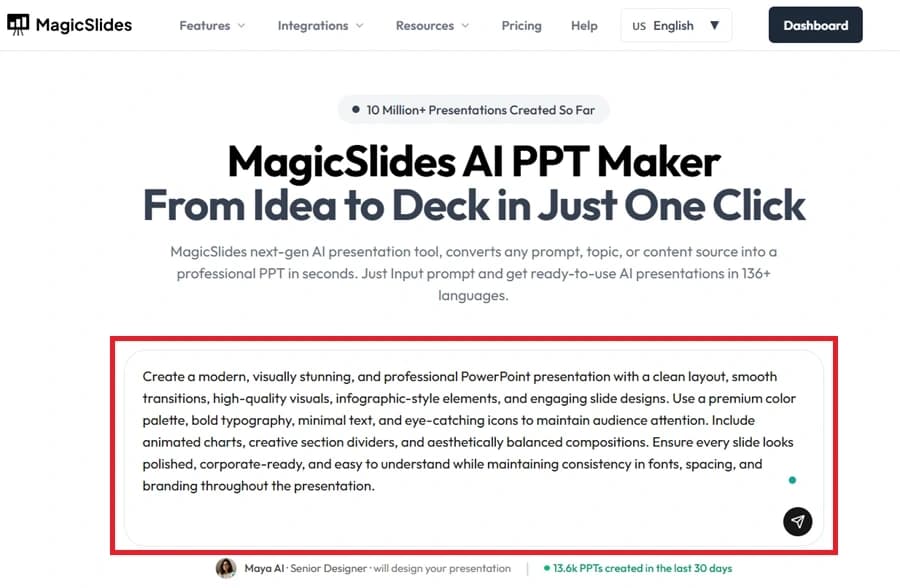
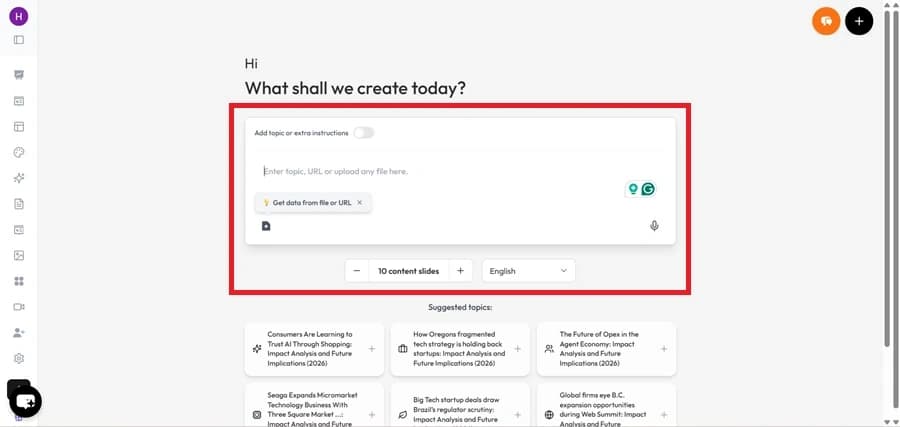
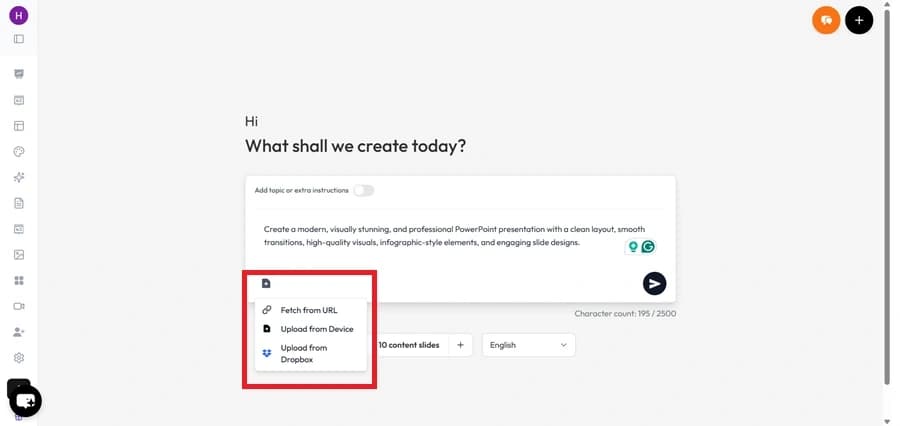
Add Your Content

Provide the information to turn into a presentation. This can be text, articles, or other supported content sources.

Add Your Content

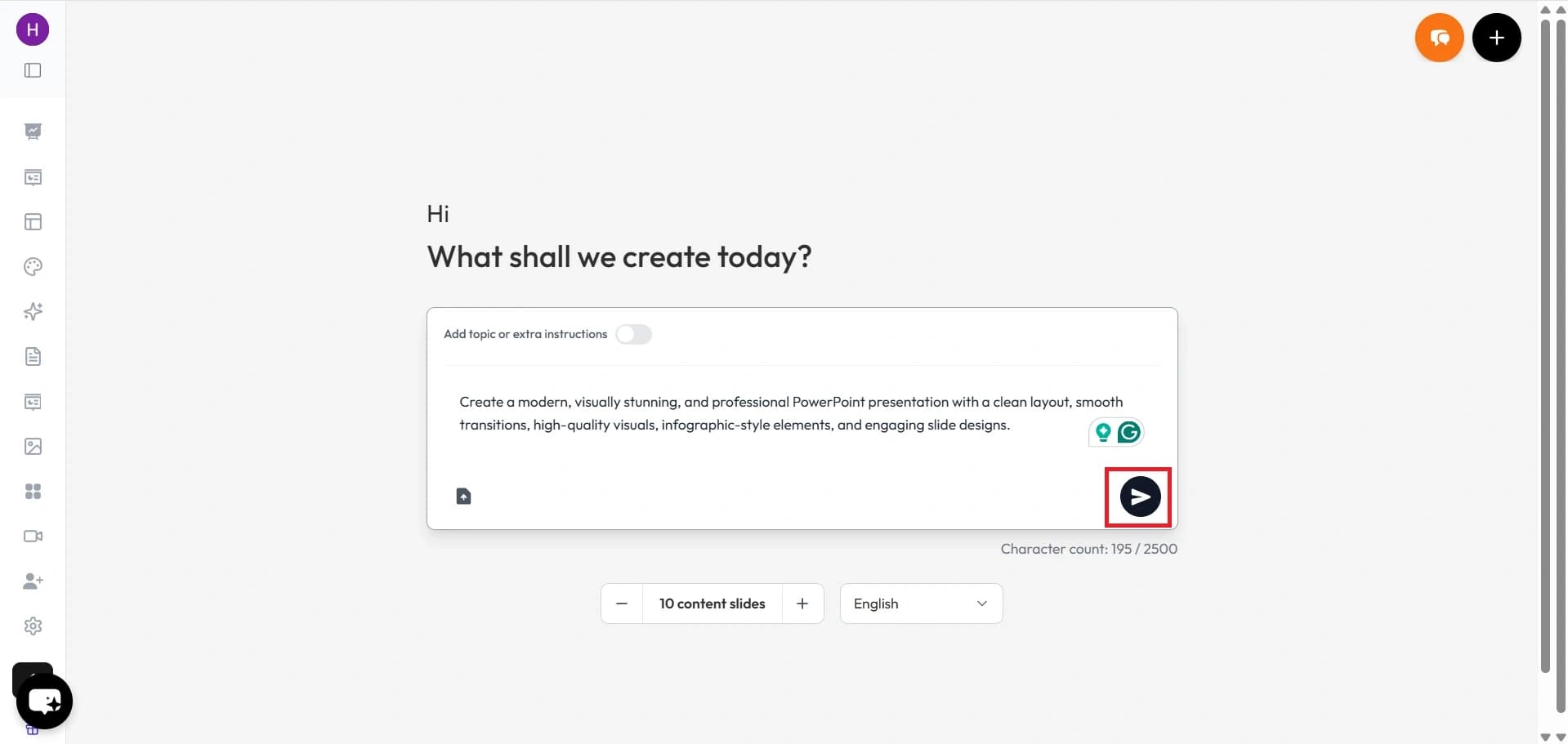
Generate the Presentation

Click the generate button to allow MagicSlides to analyze your content and prepare a presentation outline.

Generate the Presentation

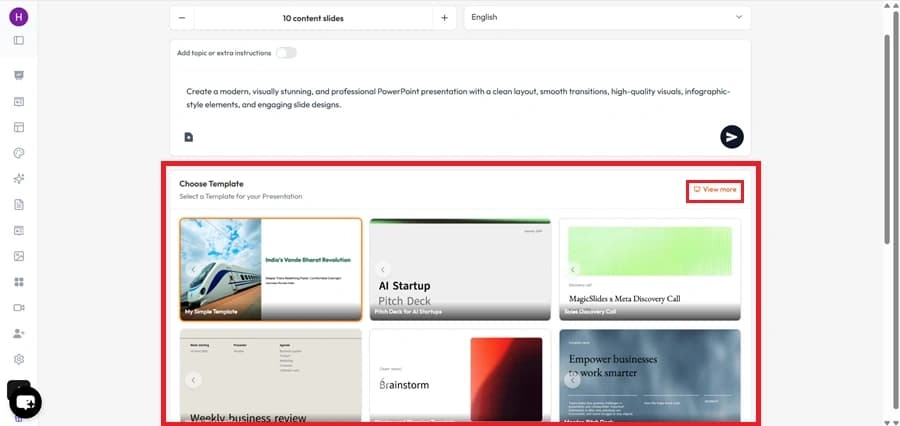
Pick a Template

Choose a design template that matches your presentation requirements.

Pick a Template

Review the Outline

Check the generated slide structure and make any changes before creating the final presentation.

Review the Outline

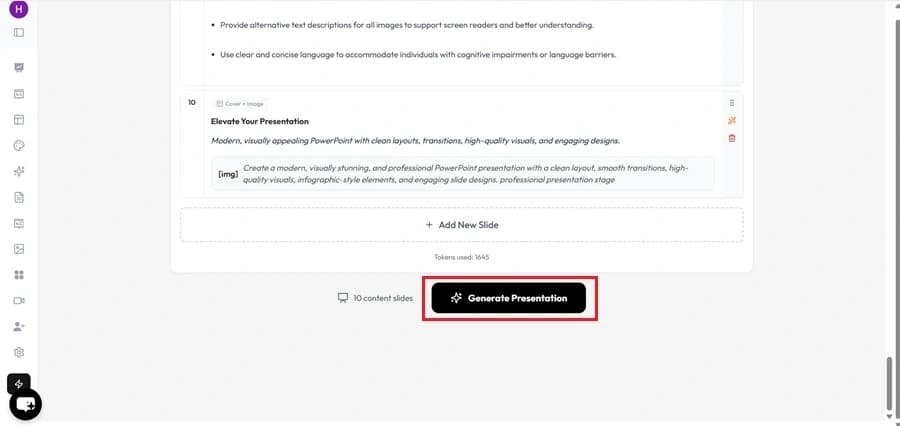
Create the Final Deck

Generate the complete presentation with AI-generated content and layouts.

Create the Final Deck

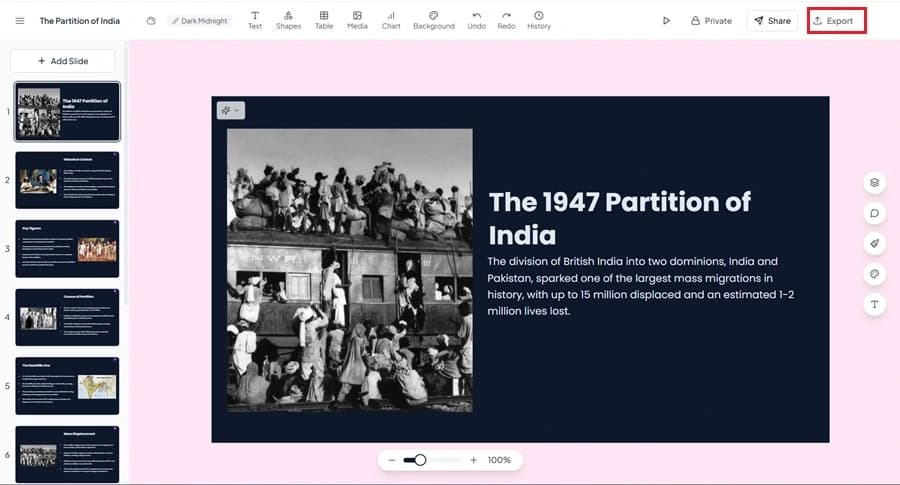
Export the Presentation

Once the presentation is ready, download it in your preferred format, i.e., PPTX (Microsoft PowerPoint), Google Slides, or PDF.

Export the Presentation
Demo

Watch MagicSlides Generate a Presentation from Start to Finish

MagicSlides
Our pick
Feature matrix

MagicSlides vs Plus AI: Key Features Compared

Explore the Strengths and Limitations of MagicSlides and Plus AI

Feature
Plus AI
MagicSlides
Free plan
7-day trial
Free forever
Google Slides add-on
PowerPoint add-on
Standalone web app
Add-on only
Generate from URL
Generate from YouTube
Generate from PDF / DOCX
PDF only
AI image generation
In-slide AI rewrite (snippet edit)
Plus AI's strength
Languages supported
40+
100+
Output quality

Comparing the Quality of Generated Slides

Compare the Final Presentation Output of Both Tools to Understand Which One Creates More Polished and Professional-looking Slides

Plus AI

Plus AI creates presentations that look like standard Google Slides or PowerPoint decks. The slides are easy to edit and work well for users who prefer a familiar presentation style.

MagicSlides

MagicSlides creates presentations that look more polished and ready to use. The slides require less editing, which makes users create professional presentations faster.

Our verdict

Plus AI works well for users who prefer Google Slides and PowerPoint. MagicSlides creates more polished presentations right away, which helps users to edit and design quickly.

Under the hood

Which Tool Has Better AI for Presentations?

See How MagicSlides and Plus AI Use AI to Generate Slide Content and Help Users Create Decks Faster

Plus AI

Plus AI works best when you already have a presentation. It helps rewrite slide content and make changes directly in Google Slides and PowerPoint. During our testing, it was more useful for editing presentations than creating them from scratch.

MagicSlides

MagicSlides helps to create presentations from scratch. Provide your content, and the AI builds a complete presentation for you. During our testing, it handled more content sources and helped create presentations without any manual intervention.

Our verdict

MagicSlides is best for creating new presentations. Plus AI is best for improving presentations you already have.

Cost

MagicSlides vs Plus AI: Pricing and Value Comparison

Compare the Monthly Cost & Overall Value Offered by Each Platform

Plus AI
Pro
$15/mo
  • Slides + PowerPoint add-on
  • Custom GPT-style snippets
  • No standalone web app
  • No URL/YouTube import
Best value
MagicSlides
Pro
$8/mo
  • Unlimited AI generation
  • Web app + Slides add-on
  • All input types
  • AI image generation
The honest scorecard

The Complete Picture: Pros and Cons Compared

Explore the Key Benefits and Limitations of MagicSlides & Plus AI in One Place

MagicSlides Pros

  • Easy-to-use web app and Google Slides add-on
  • Can create presentations from different types of content
  • Export presentations to PowerPoint and Google Slides
  • AI image generation included
  • More affordable pricing
  • Supports 100+ languages

MagicSlides Cons

  • No PowerPoint add-on available
  • Fewer AI editing options for existing slides
  • The free plan has some limits

Plus AI Pros

  • Works directly inside PowerPoint and Google Slides
  • Easy to edit presentations without switching tools
  • Good AI options for rewriting and improving slide content
  • Helps keep the same writing style across slides
  • Uses familiar Google Slides and PowerPoint layouts

Plus AI Cons

  • Higher monthly cost
  • No standalone web app
  • Supports fewer content sources for presentation creation
  • No free forever plan
  • Fewer language options compared to MagicSlides
The recommendation

MagicSlides vs Plus AI: Which One Should You Choose?

Based on Our Testing, Here's which Tool is Better for Different Types of Users

Pick MagicSlides if…

  • Want to create presentations from scratch with AI
  • Need a free plan to get started
  • Create presentations from different types of content
  • Want presentation-ready slides with less editing
  • Prefer a web app instead of working only in Google Slides or PowerPoint
  • Want more features at a lower price

Pick Plus AI if…

  • Already have presentations to edit
  • Mainly use Google Slides or PowerPoint
  • Need help improving slide content
  • Want AI editing tools inside your presentation software
  • Don't need a standalone web app
In closing

Author's Verdict

MagicSlides vs Plus AI — the take after testing both end-to-end.

After testing both tools side by side, MagicSlides is the better choice for most users because it offers more ways to create presentations and better overall value. Plus AI works well for users who mainly edit presentations in Google Slides and PowerPoint. So:

- For creating new presentations, choose MagicSlides. - For improving existing presentations, Plus AI is recommended.

Try it yourself

Make your first deck with MagicSlides

Type a topic and Maya turns it into an editable presentation in under a minute — free, no credit card.

Maya

Maya AI · Senior Designer · will design your presentation

13.6k PPTs created in the last 30 days

FAQ

Still Have Questions?

Here are the Answers to Some of the Most Common Questions about Both Platforms

Is MagicSlides better than Plus AI?
It depends on your needs. MagicSlides is better for creating presentations from scratch and supports more content sources, such as videos, images, PDFs, etc. Plus AI is better for users who mainly edit presentations inside Google Slides and PowerPoint.
Which tool is easier to use for beginners?
MagicSlides is easier for beginners because it can create complete presentations with minimal setup. Just provide your content, and the AI generates the presentation for you.
Does MagicSlides work with PowerPoint?
Yes. MagicSlides allows users to export presentations to PowerPoint format. However, unlike Plus AI, it does not currently offer a native PowerPoint add-on.
Can Plus AI create presentations from YouTube videos and URLs?
No. Plus AI works with text prompts and limited document inputs. MagicSlides supports additional content sources such as URLs, YouTube videos, PDFs, and DOCX files.
Which tool creates presentations faster?
During our testing, MagicSlides generated complete presentation drafts faster because it is designed to create presentations from scratch. Plus AI helps only in editing and improving slides, which requires more manual effort.
Does MagicSlides have a better free plan than Plus AI?
Yes. MagicSlides offers a free forever plan. Plus AI only provides a limited 7-day free trial.
MagicSlides AI PPT Maker — happy team turning documents into presentations

Ready to create your presentation?

Join thousands of professionals who save hours every week with AI-powered presentations.

1,511 reviews · Trustpilot & Workspace

Ask AI about MagicSlides
ChatGPT logoClaude logoGemini logoPerplexity logo