Can PowerPoint Slides be Considered Meeting Minutes


PowerPoint slides can summarize meetings, but are they sufficient as official meeting minutes? Let’s explore
Can PowerPoint Slides Be Considered Meeting Minutes?
Meeting minutes are essential records that summarize key points, discussions, and decisions made during a meeting.
While PowerPoint slides are often used to present information, can they serve as official meeting minutes?
Let’s explore this question and how PowerPoint slides may or may not fulfill the role of formal meeting documentation.
Can PowerPoint Slides Be Used as Meeting Minutes?
Understanding the Purpose of Meeting Minutes
Meeting minutes are an official record of what was discussed, agreed upon, and assigned during a meeting. They typically include:
- The meeting date, time, and participants.
- A summary of discussions and decisions.
- Action items and responsibilities.
- Follow-up steps.
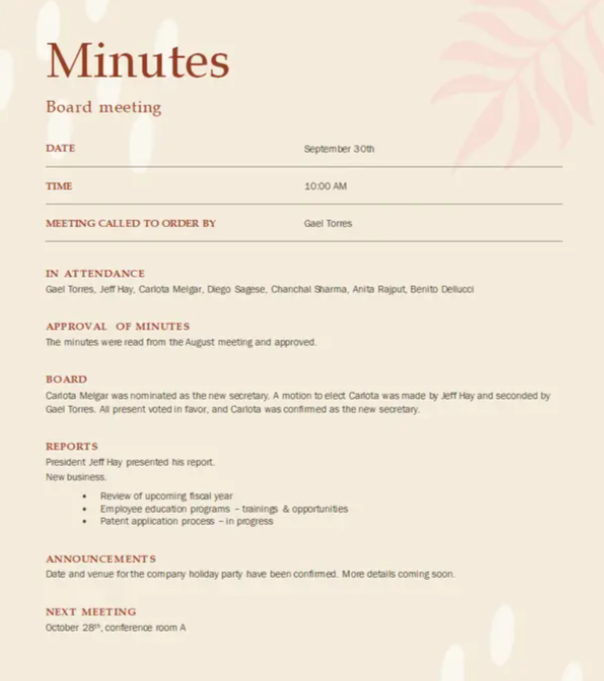
PowerPoint slides, on the other hand, are designed for presentations and may not always capture all these details comprehensively. Below is a Meeting Minutes template for your reference from Microsoft.
When PowerPoint Slides Can Be Used as Meeting Minutes
In certain situations, PowerPoint slides can serve as meeting minutes, especially when they include:
- Key discussion points in text format.
- Action items and next steps.
- Decision summaries and conclusions.
- A structured agenda with timestamps.
If these elements are present, the slides can function as a visual version of meeting minutes.
Limitations of Using PowerPoint as Meeting Minutes
While PowerPoint slides may provide an overview of a meeting, they often lack:
- Detailed discussions and speaker contributions.
- A structured record of who said what.
- Context for decisions made.
- Formal approval and distribution processes.
For formal business records, it’s best to use written minutes alongside PowerPoint slides to ensure accuracy.
How to Make PowerPoint Slides More Suitable as Meeting Minutes
If you plan to use PowerPoint for meeting documentation, consider the following enhancements:
- Add a meeting summary slide covering major points.
- Include a slide listing action items with responsible persons.
- Attach a notes section with additional details for reference.
- Export the slides to PDF format for easy sharing and archival.
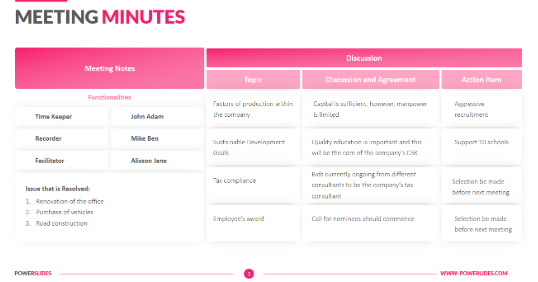
- Checkout a possible PPT Template below if you wish to create Meeting Minutes in PowerPoint.
Best Practice: Combining Slides and Written Minutes
A great approach is to use PowerPoint slides for visual presentation and complement them with written meeting minutes. This ensures all details are covered, making the meeting documentation more comprehensive.
Conclusion
PowerPoint slides alone may not always qualify as official meeting minutes unless they are structured to capture all critical details.
While they are useful for summaries and visual representations, a written record is often required for formal documentation.
The best approach is to use PowerPoint slides alongside traditional meeting minutes for a complete and accurate record.
FAQs on Using PowerPoint Slides as Meeting Minutes
Can I attach PowerPoint slides to meeting minutes?
Yes, PowerPoint slides can be attached to formal minutes as supporting documents, but they shouldn't replace written records.
Is a PowerPoint presentation legally acceptable as meeting minutes?
It depends on the organization’s policies. Most companies require written minutes with formal approval, while slides may serve as supplementary records.
How can I make PowerPoint slides more detailed for meeting minutes?
Use the Notes section in PowerPoint to document discussions, assign tasks, and add timestamps to make slides more informative.
By following these steps, you can determine whether PowerPoint slides can serve as effective meeting minutes in your organization! 🚀


