How to Turn off Slide Numbering in Google Slides


Easily remove slide numbers in Google Slides for a cleaner, more professional presentation layout
How to Turn Off Slide Numbering in Google Slides
Slide numbers help organize presentations, but sometimes you may want to remove them for a cleaner look.
Google Slides allows you to turn off slide numbering in just a few simple steps.
Follow this step-by-step guide to remove slide numbers from your Google Slides presentation.
Steps to Turn Off Slide Numbering in Google Slides
Step 1: Open Your Google Slides Presentation
Go to Google Slides and log in to your account. Open the presentation where you want to remove slide numbers.

Step 2: Access the Slide Numbering Option
Click on Insert in the top menu bar. From the dropdown menu, select Slide numbers.

Step 3: Disable Slide Numbers
A pop-up window will appear with the option to enable or disable slide numbers. Uncheck the box labeled "Show on all slides" to remove slide numbers from the entire presentation.
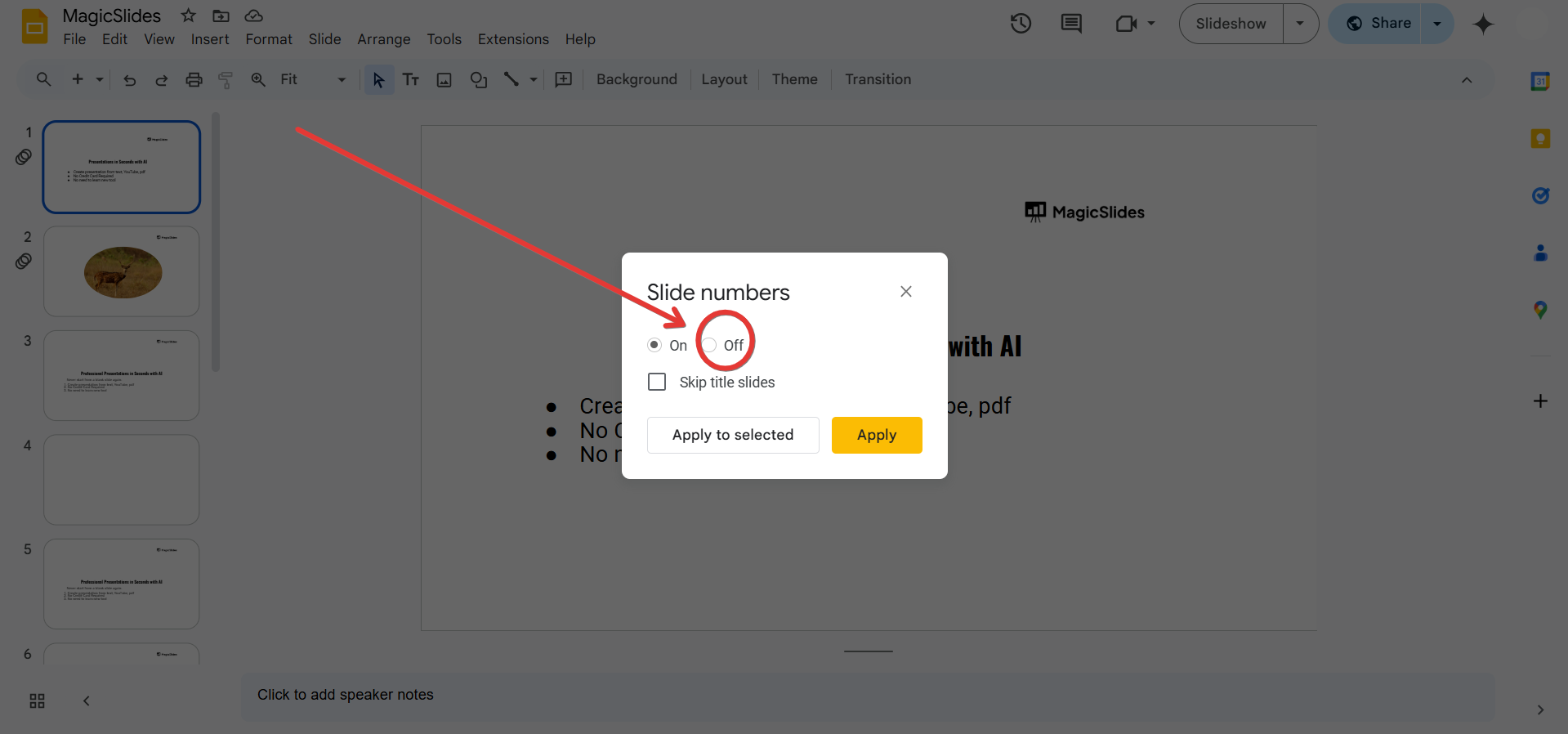
If you only want to remove numbers from specific slides, click "Apply to selected" after selecting those slides.
Step 4: Apply and Save Changes
Click Apply to confirm the changes. Your slide numbers will now be removed.
Step 5: Verify That Slide Numbers Are Removed
Scroll through your slides to ensure that the numbers no longer appear. If needed, repeat the steps to make adjustments.

Conclusion
Turning off slide numbering in Google Slides is a simple process that enhances the visual appeal of your presentation.
Whether you want a cleaner design or prefer custom numbering, these steps help you remove slide numbers effortlessly.
FAQs on Turning Off Slide Numbering in Google Slides
Can I remove slide numbers from only some slides?
Yes, you can select specific slides before disabling slide numbers and apply changes only to them.
Will turning off slide numbers affect the content of my slides?
No, removing slide numbers does not affect any text, images, or content in your presentation.
How do I add slide numbers back after removing them?
Go to Insert > Slide numbers, check the box for "Show on all slides", and click Apply.
Now you know how to manage slide numbering in Google Slides with ease! 🚀


