How to Create Concise Presentations from Lengthy Articles: A Step-by-Step Guide


Transform lengthy articles into impactful presentations with our step-by-step guide. Learn to distill information for concise, engaging presentations effortlessly.
Presenting information in a concise and engaging manner is crucial, especially when dealing with lengthy articles. In this step-by-step guide, we’ll explore how to transform extensive written content into concise and effective presentations using the powerful combination of Google Slides and the MagicSlides GPT extension.
How to Create Concise Presentations from Lengthy Articles: A Step-by-Step Guide
Step 1: Visit Google Slides
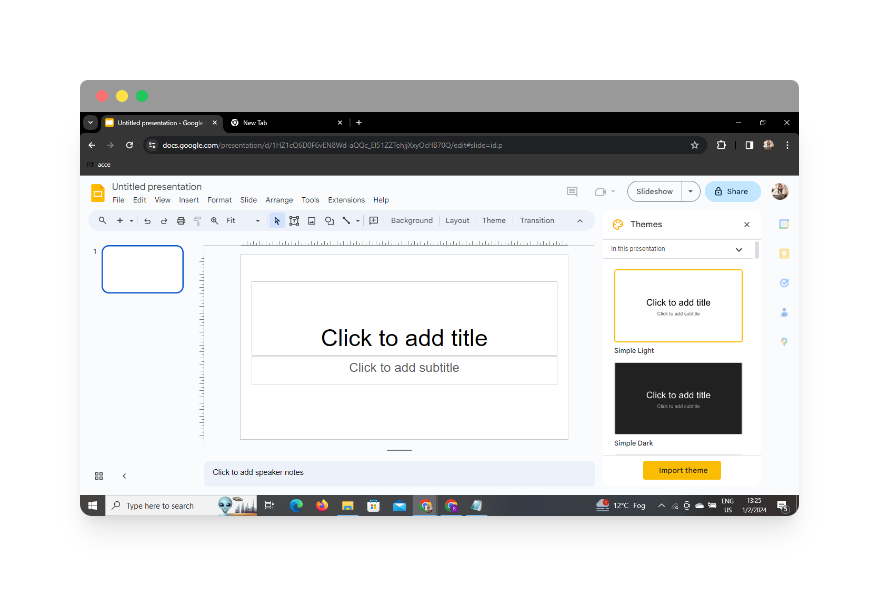
Begin by visiting Google Slides, Google’s user-friendly presentation tool. If you don’t have an account, sign up for one. Once logged in, create a new presentation to kickstart the process.
Step 2: Sign In with Google to Google Slides
Ensure you are signed in with your Google account to access the full range of features in Google Slides seamlessly.
Leveraging MagicSlides GPT Extension
Step 3: Install MagicSlides GPT Extension
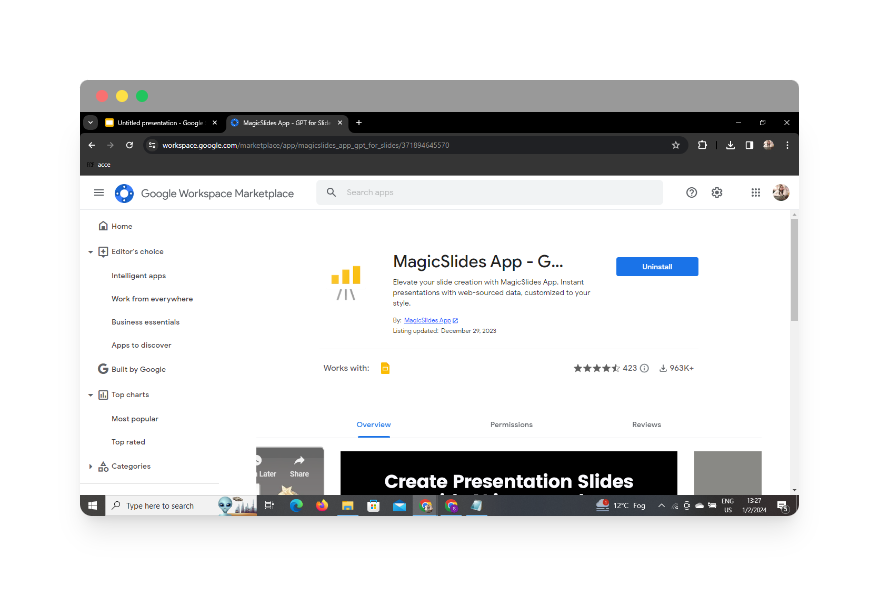
If you haven’t already, navigate to the Chrome Web Store, search for “MagicSlides App,” and install the extension. If already installed, ensure it’s enabled.
Step 4: Open MagicSlides GPT
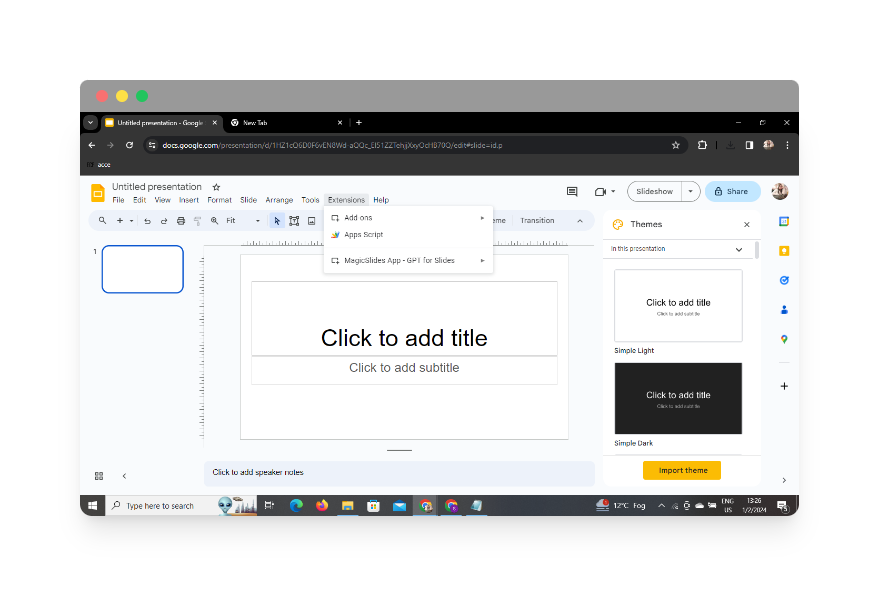
Click on the MagicSlides GPT extension icon in your browser’s toolbar. If you’ve just installed it, refresh your Google Slides tab to activate the extension.
Step 5: Click on ‘Generate PPT’ with MagicSlides GPT
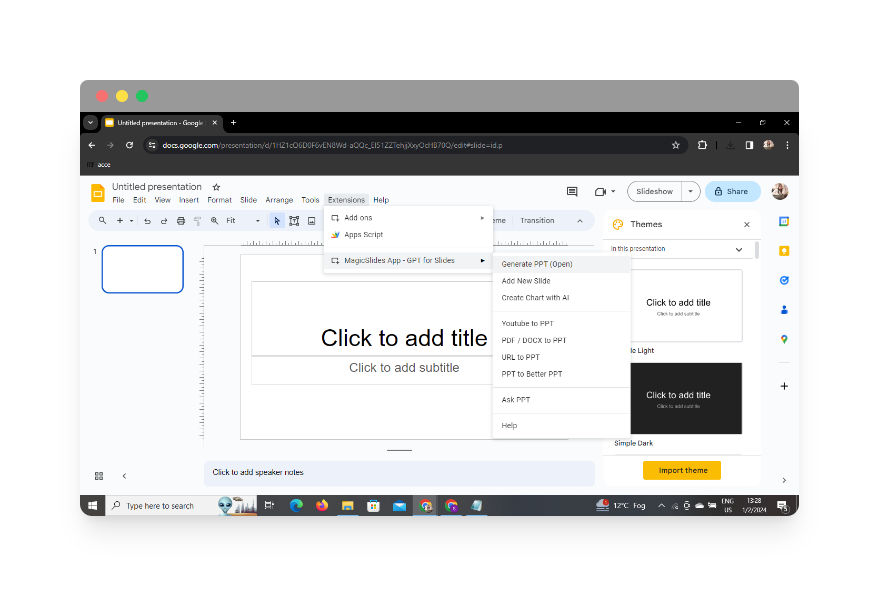
In the MagicSlides GPT extension, click on the “Generate PPT” option. This will open up the MagicSlides GPT interface.
Step 6: Click on ‘Summarize’ Option
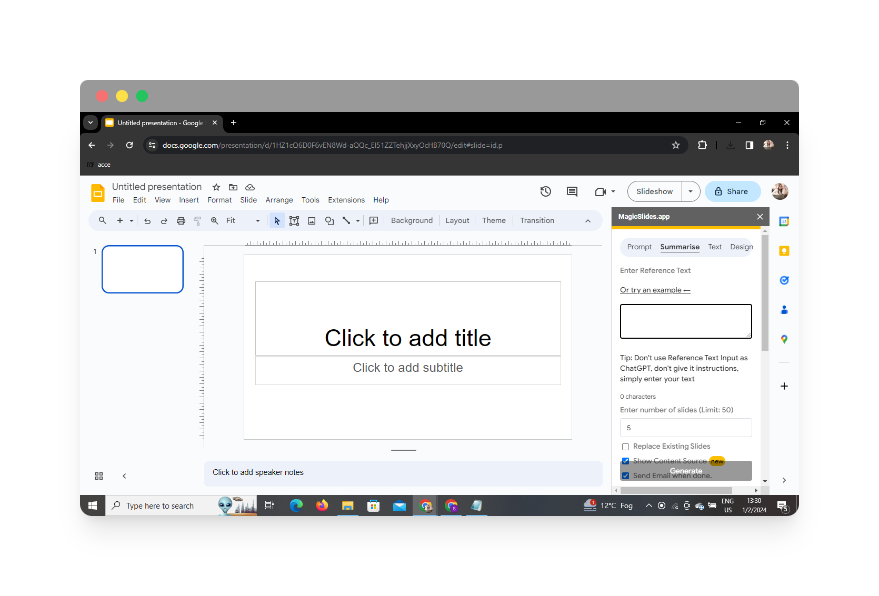
Within the MagicSlides GPT interface, click on the ‘Summarize’ option. This will prepare the tool for condensing the lengthy article into concise presentation slides.
Step 7: Copy & Paste Your Blog Post
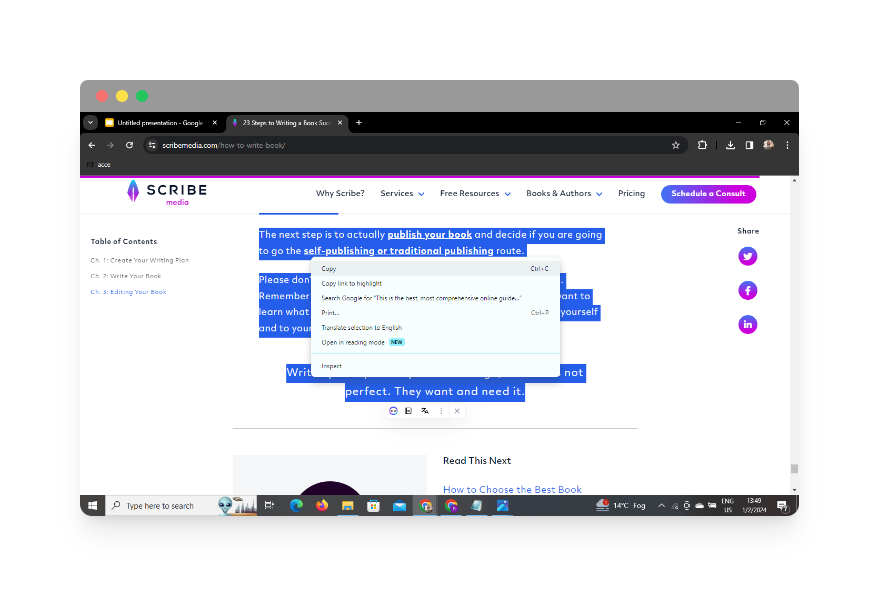
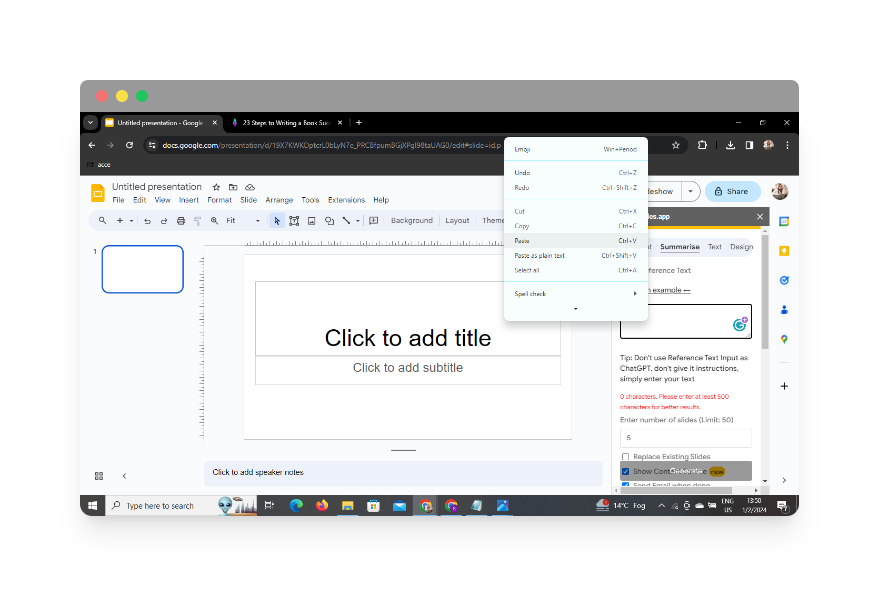
Copy the content of your lengthy article and paste it into the designated area within the MagicSlides GPT interface.
Step 8: Select the Number of Slides
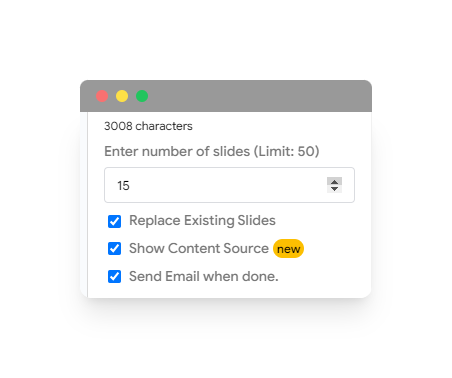
Choose the desired number of slides you want your presentation to have. This step allows you to control the granularity and depth of information on each slide.
Step 9: Click on ‘Generate Presentation’
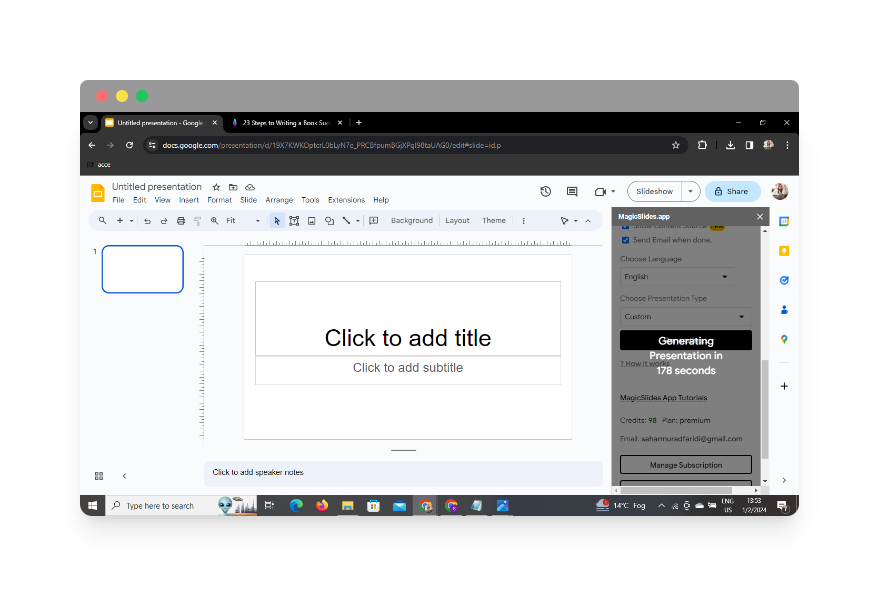
Hit the ‘Generate Presentation’ button within the MagicSlides GPT interface. The tool will now work its magic, summarizing and transforming the article into a coherent presentation.
Step 10: Your Presentation Is Ready
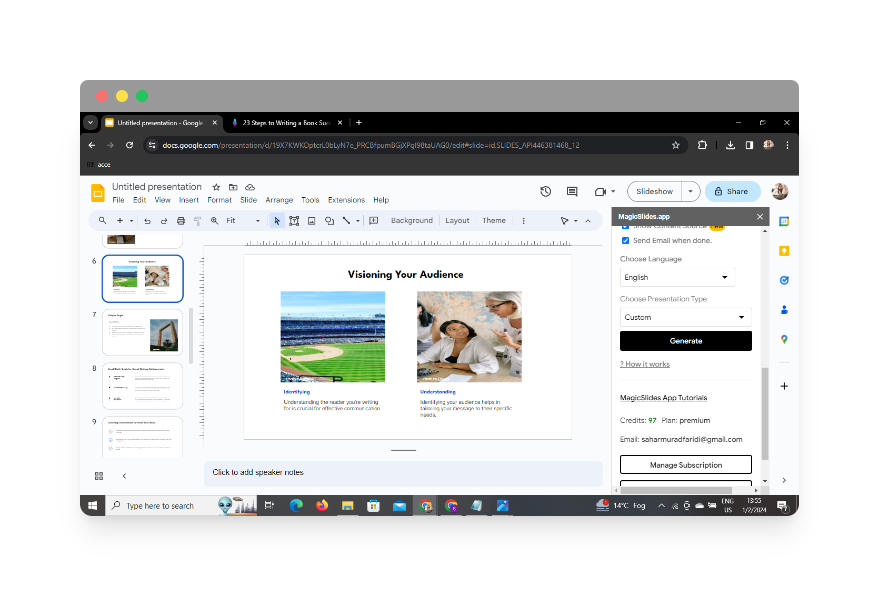
After a brief processing period, MagicSlides GPT will notify you that your presentation is ready. Open it in Google Slides, review the slides, and make any final adjustments.
Conclusion
By following these simple yet effective steps, you can seamlessly create concise and engaging presentations from lengthy articles. The combination of Google Slides and MagicSlides GPT ensures efficiency and professionalism in delivering information.
Frequently Asked Questions
Can I use MagicSlides GPT with other presentation tools?
MagicSlides GPT is currently designed to integrate seamlessly with Google Slides, providing optimal performance and convenience.
Is there a limit to the length of articles MagicSlides GPT can handle?
While MagicSlides GPT is powerful, extremely lengthy articles might need to be condensed manually before pasting them into the tool for better results.
Can I customize the design of the generated slides?
Yes, Google Slides offers extensive customization options, allowing you to personalize the design and layout of the slides generated by MagicSlides GPT.
Is MagicSlides GPT free to use?
MagicSlides GPT may have both free and premium versions. Check the Chrome Web Store for specific details on pricing and features.
Can I collaborate with others on the generated presentation?
Absolutely! Google Slides inherently supports collaborative work. Share your presentation with others and collaborate in real-time for a more dynamic outcome.
Have a look @these informative blogs by us:
- How To Create PPTs For Seminar Topics From Website URL: https://www.magicslides.app/blog/how-to-create-ppts-for-seminar-topics-from-website-url
- How To Convert A Research Paper PDF To PowerPoint Slides?: https://www.magicslides.app/blog/how-to-convert-a-research-paper-pdf-to-powerpoint-slides
- How To Remove An App From Slack: https://www.magicslides.app/blog/how-to-remove-an-app-from-slack
- How To Convert Blog Post To Presentations: https://www.magicslides.app/blog/how-to-convert-blog-post-to-presentations


