Addon google slides iconPPT with AISlide TemplatesPPT TemplatesPricingBlog
    PPT with AISlide TemplatesPPT TemplatesPricingBlog
    VS
    1. Home
    2. Blog
    3. Tome AI Presentation Tool Review (2025) + Best Alternatives

    Tome AI Presentation Tool Review (2025) + Best Alternatives

    Mehjabi From IndianAppGuy

    Published By

    Mehjabi From IndianAppGuy

    Approved By

    Admin

    Published On

    July 14th, 2025

    Reading Time

    5 min read

    In this 2025 review, explore how the Tome AI presentation tool works, its pros and cons, and 5 best alternatives like MagicSlides.app.

    In 2025, AI tools for presentations are changing how people create slides. From students to startup founders, everyone’s looking for faster, smarter ways to turn ideas into polished presentations.
    One of the most talked-about tools this year is the Tome AI presentation tool. Known for its fast, sleek, and web-based slide creation, Tome AI has caught attention across industries.
    But is Tome AI the right fit for your workflow? In this detailed review, we’ll explain what Tome AI is, how it works, what it does well (and where it falls short), and introduce the best alternatives to Tome AI, like MagicSlides.app, for different types of users.

    What is Tome AI?

    If you’re asking, “What is Tome AI?”, you're not alone. Thousands are Googling the same question.
    Tome AI is a web-based presentation maker powered by artificial intelligence. It’s designed for storytelling, not spreadsheets, giving users a new way to build visual slides by simply entering a prompt.
    Here are some of the most searched questions about the Tome AI presentation tool:

    What is Tome AI?

    The Tome AI presentation maker creates decks from text prompts using generative AI. It’s browser-based and requires no installation.

    How does Tome AI work?

    Once you input a prompt, Tome AI uses language and image generation models to produce slides with headlines, descriptions, and visuals. You can tweak the content, rearrange slides, and share the result with a link.

    What is Tome AI used for?

    Tome AI is popular for startup pitches, product showcases, educational content, and any deck that benefits from storytelling and visuals.

    How to use Tome AI?

    Sign up, enter a topic like “marketing strategy 2025,” and Tome AI creates a full presentation in minutes. Everything happens inside your browser.

    What does Tome AI do?

    It automates slide generation using AI, turning short prompts into full-fledged presentations. Think of it as a creative partner for visual storytelling.

    Features of Tome AI

    The Tome AI presentation tool brings a fresh approach to slide design:

    ✅ Smart AI Slide Generation

    Tome AI builds slides from minimal input, helping users go from idea to deck quickly.

    ✅ Web-First Design

    Unlike traditional tools, the Tome AI presentation maker creates content optimized for online sharing, not offline export.

    ✅ AI Text + Image Generation

    It combines generated visuals with structured text for each slide.

    ✅ Easy Link-Based Sharing

    Each Tome AI presentation lives online and can be shared with collaborators or audiences instantly.
    However, some common limitations of Tome AI include:
    • ❌ No .ppt export (a dealbreaker for many)
    • ❌ Not integrated with Google Slides
    • ❌ Lacks support for text, PDF, or URL input
    • ❌ Can’t be used effectively offline
    • ❌ Not ideal for enterprise-grade workflows

    Pros and Cons of Tome AI

    Let’s evaluate what works and what doesn’t with the Tome AI presentation tool:

    ✅ Pros

    • Fast slide generation using Tome AI
    • Clean, minimal user interface
    • Great for personal storytelling and creative decks
    • No software install, just browser access

    ❌ Cons

    • Tome AI doesn’t support PowerPoint (.pptx) export
    • Not ideal for business reports or internal updates
    • Slides are harder to customize beyond what AI generates
    • Limited offline or enterprise functionality
    If you're a traditional PowerPoint user or need more structure, Tome AI might feel limiting.

    Best Alternatives to Tome AI (2025)

    If the Tome AI presentation tool doesn’t match your workflow, here are the best alternatives:

    1. MagicSlides.app – The Best Alternative to Tome AI

    notion image
    If you’re looking for flexibility, MagicSlides.app is the most powerful alternative to Tome AI in 2025.
    With MagicSlides.app, you get:
    • ✅ Full .ppt export
    • ✅ Seamless Google Slides integration
    • ✅ Input from text, PDF, or URL
    • ✅ Templates for onboarding, retrospectives, sales, education
    Compared to the Tome AI presentation tool, MagicSlides.app is better suited for structured workflows, like team updates, client reports, and academic decks.

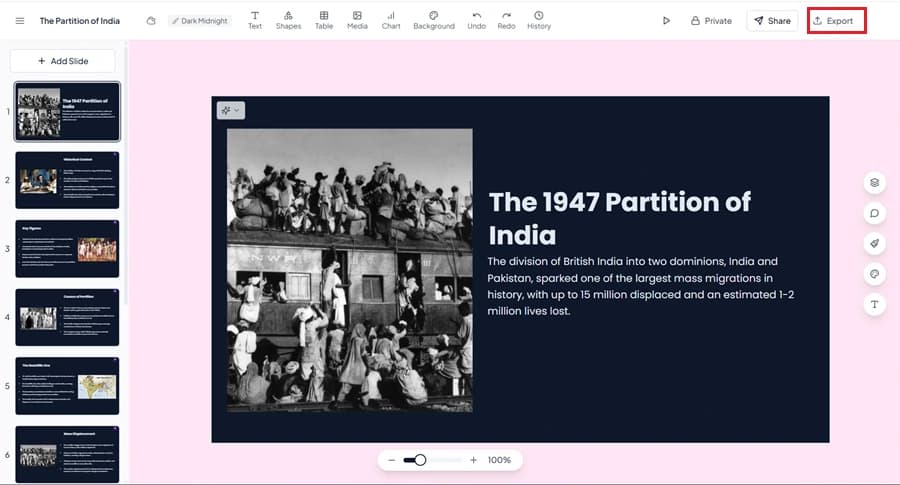
    2. Gamma – Web-First, Like Tome AI

    notion image
    Similar to Tome AI, Gamma is also web-native. It’s more interactive but still lacks export options and structured input support.

    3. Canva Magic Design

    notion image
    Best for visual creators, Canva helps generate decks using templates and stock assets. It's not as "AI-first" as Tome AI, but great for visuals.

    4. SlidesAI

    notion image
    A lightweight plugin that works inside Google Slides. It’s simpler than Tome AI but ideal for quick slide generation in familiar formats.

    Tome AI vs MagicSlides (Quick Comparison Table)

    Feature
    Tome AI
    MagicSlides.app
    PPT Export
    ❌ No
    ✅ Yes
    Google Slides Support
    ❌ No
    ✅ Yes
    Input Flexibility
    ❌ Prompt only
    ✅ Text, PDF, URL
    Use Case Fit
    Best for storytelling
    Best for structured workflows
    Templates
    Limited
    Multiple pro styles
    Offline Use
    ❌ Limited
    ✅ Yes (via export)
    URL / Doc Input
    ❌ Not supported
    ✅ Supported
    If you're comparing Tome AI vs MagicSlides, the choice comes down to:
    • Use Tome AI if you want fast, visual storytelling
    • Choose MagicSlides.app if you need flexibility, compatibility, and structure

    Conclusion

    The Tome AI presentation tool is a strong option for those who prioritize speed and storytelling. If your use case is building pitch decks, educational slides, or simple visuals to present online, Tome AI does the job well.
    However, the lack of .ppt export, limited customization, and no Google Slides support can be frustrating, especially for teams or professionals who need control over their slides.
    That’s where MagicSlides.app stands out. As one of the best alternatives to Tome AI, it bridges the gap between AI creativity and practical usability.
    Whether you’re comparing Tome AI vs MagicSlides or exploring other AI tools for presentations, the right choice depends on how, and where, you present. Try both and see which tool fits your workflow best.

    Share on socials

    About the author

    Ayan Ahmad Fareedi profile photo
    Ayan Ahmad Fareedi— writer at MagicSlides

    Ayan Ahmad is our Senior Writer and brings over two years of experience from working with big companies like Amazon and Okaya. He loves writing stories that grab your attention and speak to a wide audience. When he's not working, you can find him watching movies or planning his next trip. Ayan's work is not just about words; it's about making every article special and interesting.

    More from Ayan

    More from the blog

      50+ Best AI Topics for Presentation

      6 February 2026

      How to Flip an Image in PowerPoint in 2026

      5 February 2026

      How to Make Text to Presentation Using AI in Few Minutes

      4 February 2026

      100+ Best Seminar Topics for Students in 2026

      3 February 2026

      Best Presentation AI Tool of 2026 (with Real Use Cases + Comparisons)

      2 February 2026

      250+ Good Morning Messages for Her (Romantic, Deep, Cute & Sweet)

      30 January 2026

      200+ Heart Touching Birthday Wishes for Sister (Short, Funny and More)

      29 January 2026

      50+ History Presentation Topics For 2026

      28 January 2026

      How to Add Music to Your Canva Presentation: A Step-by-Step Guide

      27 January 2026

    Table of Contents

    Create Presentations in Seconds

    Transform your ideas into professional presentations with AI. No design skills needed.

    Try MagicSlides Free

    Create Stunning Presentations with AI in Seconds ✨

    Transform any topic, text, YouTube video, PDF or URL into beautiful presentations instantly with MagicSlides AI.

    Try MagicSlides AI Presentation Maker
    MagicSlides AI Presentation

    Footer

    Solutions

    • MagicSlides App
    • Google Slides Add-on
    • MagicSlides in Chrome
    • MagicSlides in Figma
    • MagicSlides in ChatGPT
    • MagicSlides in Telegram
    • MagicSlides in Zapier
    • MagicSlides in Figma Slides

    Tools

    • AI PPT Tools
    • QR Code Generator
    • Design Tools
    • PPT Templates
    • Slide Templates
    • PDF Tools

    Examples

    • AI Presentations
    • PPT by MagicSlides
    • Quizzes
    • Charts
    • Coloring Pages

    Resources

    • Changelog
    • Documentation
    • API Docs

    Top Blogs

    • How to Create Presentation Using ChatGPT
    • 100+ Best Seminar Topics for Students in 2025

    Company

    • Help
    • MCP
    • Blog
    • Pricing
    • Affiliate Program
    • Manage Subscription
    • Privacy Policy
    • Contact Us
    • Terms & Conditions
    • Refund & Cancellation Policy

    We also built

    • SheetAI - GPT For Sheets
    • MagicForm - GPT For Google Forms
    • SecondBrain.fyi
    • BlogBee - Free Blogging Platform

    © 2026 IndianAppGuy Tech Pvt Ltd. All rights reserved.