Make a document with Perplexity
Perplexity is built for web research with citations. With MagicSlides added as an MCP connector, it can turn that research into a cited brief and save it as a hosted doc, sources included, that you can share as one link.
Set up MagicSlides in Perplexity (one time)
Custom connectors are on paid Perplexity plans (Pro, Max and Enterprise).
https://www.magicslides.app/api/mcp/mcp- 1.Open Plugins in the sidebar, then Add custom → Connector → Add MCP connector.
- 2.Paste the URL, pick Streamable HTTP and OAuth 2.0, and save.
- 3.Log in with MagicSlides, then turn the connector on in a thread.
Example: what you type in Perplexity
Research how China and Norway became the leading electric car markets. Use recent figures for 2024 and 2025, explain the different routes they took, and save a cited research brief as a MagicSlides doc with a source list.
Source used: Plug-in electric vehicles in Norway (Wikipedia), plus 5 more sources listed in the doc
- Searched the web for 2024 and 2025 electric car sales data for China, Norway and the world
- Read the Wikipedia articles on China and Norway and the IEA figures they cite
- Wrote the brief with each figure tied to a numbered source
- Called create_doc with the brief and a 6-item source list
Your cited brief is saved in MagicSlides. Key points: global electric car sales passed 20 million in 2025, China sold 12.87 million NEVs in 2024 at a 40.9% share, and 88.9% of new cars in Norway in 2024 were fully electric.
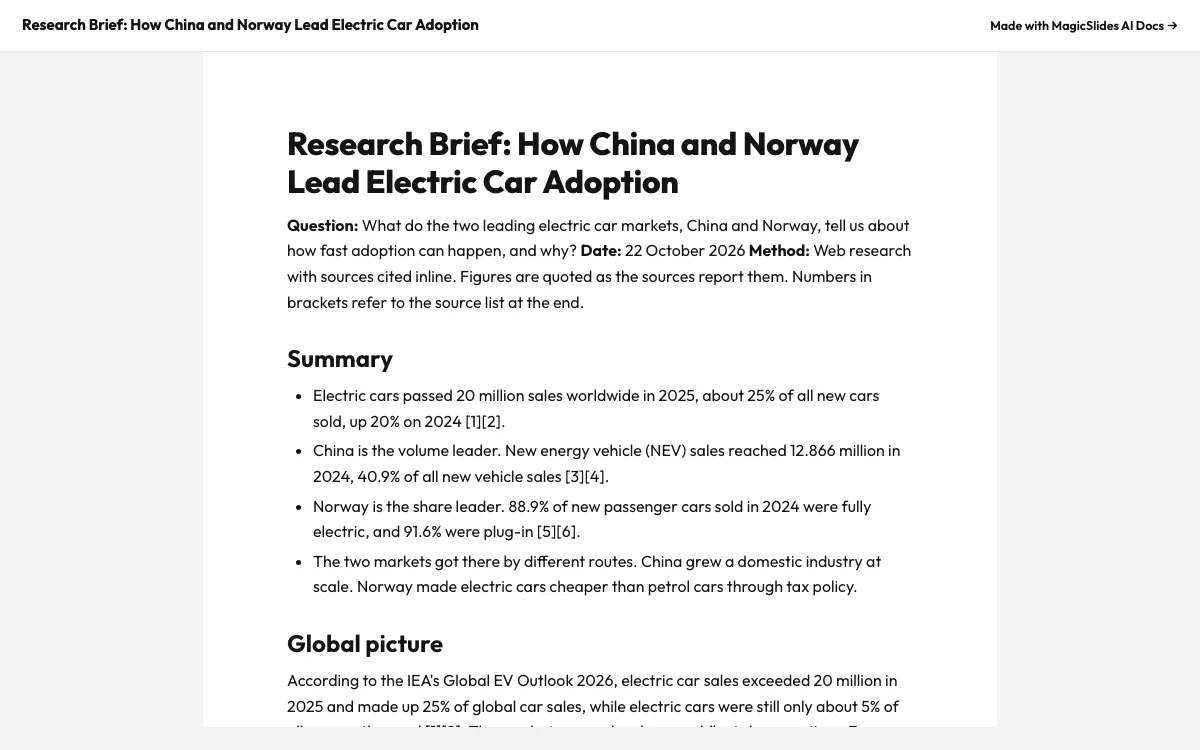
This is the real output from that prompt, made with the MagicSlides MCP. Open it to click through or download it.
How it works
- 1.In Perplexity, go to Plugins, then Add custom, then Connector, then Add MCP connector
- 2.Choose Streamable HTTP and OAuth 2.0, paste https://www.magicslides.app/api/mcp/mcp and log in
- 3.Ask your research question and tell Perplexity to save a cited brief as a MagicSlides doc
- 4.Check the source list in the doc, then share the link
Tool used: create_doc. Prefer a web app? AI document generator does the same without an agent.
FAQ
Which Perplexity plans support MCP connectors?
Custom MCP connectors are available on Pro, Max and Enterprise plans.
Are the citations kept in the doc?
Yes. Perplexity writes the sources into the Markdown it sends to create_doc, so the brief keeps numbered references and full URLs.
Should I still check the sources?
Yes. Open each link in the source list and confirm the figures before you publish or present the brief.
Who can read the brief?
Anyone with the public share link. The editor link lets you change it in MagicSlides.
More with Perplexity
Docs in other agents


Connect MagicSlides to Perplexity
One MCP server for decks, docs, sheets and reels. Log in with your MagicSlides account, no API key. Making a deck from your own copy uses no AI credits.


